Assign1: Soundex Search
Census Day is April 1, 2020. If you live in the US and haven't yet responded, take action to be counted! 🖐🏼🖐🏽🖐🏿🖐🏻🖐
This exercise is all about C++ string processing, with a little bit of file reading and use of the Vector data structure. For this part of the assignment, you will be writing code and making changes in soundex.cpp, as well as answering some short answer questions in short_answer.txt.
Name lookup
One of the more pesky features of the English language is the lack of consistency between phonetics and spelling. Matching surnames is a particularly vexing problem because many common surnames come in a variety of spellings and those variations continue to evolve through time and distance. Cultural differences and input errors can produce to a different spelling than a user's expectations. Traditional string matching focuses on exact matches or partial/overlap match; these algorithms do not adapt well to the messy real-life situation.
Wouldn't it be great if you address an email to your instructor without having to figure out which vowels go where? (Is it "Zelenski" or "Zalinsky" or "Szielinski" … um, how about I just email Chris?) Read on…
Phonetic match
Classifying names by their phonetic structure is the goal of the Soundex system, patented by Margaret O'Dell and Robert C. Russell in 1918. The US Census is a big consumer of Soundex along with genealogical researchers, directory assistance, and background investigators.
Soundex is a coded index based on the way a name sounds rather than the way it is spelled. Surnames that sound the same, but are spelled differently, like "Vaska", "Vasque" and "Vussky", have the same code and are filed together.
The algorithm is designed with English pronunciation in mind and this simple algorithm does a surprisingly good job. There are some counter-examples, even in English, where it gets tripped up, but nonetheless, the US census has extensively used a variation on the Soundex algorithm for almost a century!
A Soundex code
A Soundex code is a four-character string in the form of an initial letter followed by three digits, such as Z452. The initial letter is the first letter of the surname and the three digits are drawn from the sounds within the surname using the following algorithm:
- Discard all non-letter characters from surname: dashes, spaces, apostrophes and so on.
- Save the first letter of surname, convert to uppercase if necessary.
-
Encode each letter as a digit using the table below.
Digit represents the letters 0 A E I O U H W Y 1 B F P V 2 C G J K Q S X Z 3 D T 4 L 5 M N 6 R - Coalesce adjacent duplicate digits from code (e.g.
222025becomes2025). - Replace the first digit of code with the saved uppercase letter.
- Remove all zeros from code.
- Make code exactly length 4 by padding with zeros or truncating the excess.
To ensure you understand the construction, get a piece of scratch paper and manually compute a few names, such as "Zelenski" (Z452) and "Gregg" (G620).
- Q10: What is the Soundex code for "Bowman"? What about for your own surname?
Search program
The program you are to write allows the user to perform a Soundex search on a database of surnames. The operation of the program is to:
- Read a database of surnames from a text file.
- This step is provided for you in the starter code. The "database" is simply a
Vector<string>.
- This step is provided for you in the starter code. The "database" is simply a
- Prompt the user to enter a surname.
- The function
getLinefrom"simpio.h"will be helpful here.
- The function
- Compute the Soundex code of the surname.
- Iterate over the database, compute Soundex of each, and gather a vector of those surnames with a matching code.
- Print the matches in sorted order.
- The Vector has a handy
sort()operation, e.g.vec.sort(), and you can print a vector using the<<operator, e.g.cout << vec << endl;
- The Vector has a handy
- Repeat steps 2-5 until user indicates they are done.
Here is the output from a sample run of the program:
Read file res/surnames.txt, 26409 names found.

Enter a surname (RETURN to quit): Zelenski
Soundex code is Z452
Matches from database: {"Zelenski", "Zelnick", "Zelnik", "Zelnis", "Zielonka"}

Enter a surname (RETURN to quit): troccoli
Soundex code is T624
Matches from database: {"Therkelsen", "Torkelson", "Trakul", "Traxler", "Trisal", "Troccoli", "Trockel", "Troxel", "Troxell", "Trujillo", "Turkel"}

Enter a surname (RETURN to quit):
All done!
Strategies for success
Decompose the problem
Your best strategy for approaching a large undertaking such as a complete program is to decompose the problem into smaller, more manageable tasks and proceed step by step, testing as you go.
- Q11: Before you get started writing code, take some time to brainstorm your decomposition strategy for this problem. Briefly describe your strategy in
short_answer.txt.
To get you started, we're going to walk you through what it might look like to decompose and implement the first step of the Soundex algorithm.
The first thing that you might want to do is to write a function to generate a Soundex code. A single function that attempted the entire computation would be unwieldy but if you instead break it down into smaller string processing tasks, you can develop those small helper functions one at time and write and test each individually.
For example, Step 1 of the Soundex algorithm corresponds to a helper function to remove non-letters from the string. The C++ library has a function isalpha that reports whether a character is alphabetic and the string operation erase can be used to discard characters from the middle of a string. Putting those two together, we have this starting point (provided for you in soundex.cpp):
// WARNIING: Code is buggy! Use unit tests to identify which inputs are mishandled
void removeNonLetters(string& s)
{
    for (int i = 0; i < s.length(); i++) {
        if (!isalpha(s[i])) {
            s.erase(i, 1);
        }
    }
}
Test as you go
With an implementation of removeNonLetters drafted, the next step is to test it. We provided a few unit tests to get you started. if you run these provided tests against the given function, you will see that the tests all pass. From this, you might conclude that the function is good to go. But there is a problem lurking within the code that will reveal itself if you push it harder.
Review our provided test cases to see what sorts of inputs we tested, and, more importantly, what sorts of inputs we didn't test. Brainstorm what those missing cases are and then add them. Think about edge cases that could lurk in the extremes or cases that are uniquely distinguished from the provided tests. As a hint, notice that all of the provided test cases have exactly one non-letter in the input. Add your own tests that target inputs at the extremes or otherwise unusual, such as input that is completely empty or composed of only non-letters. You should add at least 1 new test to expose the bug in the given implementation of removeNonLetters.
Your goal in writing tests is to enumerate a comprehensive set of tests that shine your "flashlight of truth" into the shadows and brings any problems into the light so you can debug and fix them. Good tests are the key to writing robust software. A great developer is not only a great coder, but also a great tester.
Debug a failing test case
Once you have added a failing test case that fails, use the debugger to get more information about how the function has gone wrong. Set a breakpoint within code block for your test case. A good place to stop is on the line with the operation that you want to trace through, like so:
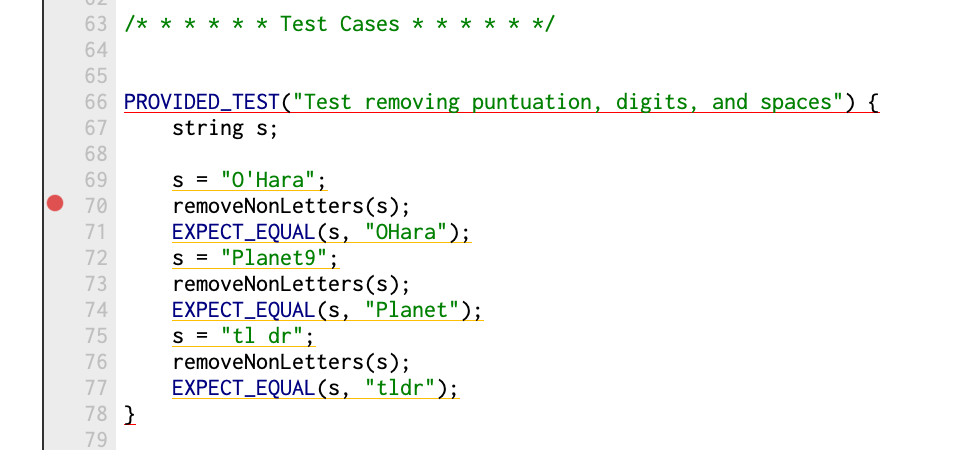
Now run the tests under the debugger. When you hit the breakpoint, you can single step through through the call toremoveNonLetters while watching in the variables pane to observe the changing state of your variables. This "step and watch" approach is the same as you used in the Assignment 0 debugging tutorial.
From this point, you should be able to find the bug and fix it – go ahead and do that!
Continuing on
Once you've fixed the bug from above, you have a working helper function to complete the first step of the Soundex algorithm. You're now set up to follow a similar process to complete the rest of the assignment:
- Pick a small task or part of the algorithm to implement.
- Define a new helper function to accomplish that task.
- Write some tests that define the expected behavior of this new helper function.
- Fill in the code for your helper function, debugging as you go. Continue writing code and debugging until you have passed all the tests from the previous step.
- Rinse and repeat.
Your end goal is to pass all of the top-level Soundex tests that we've provided for you in the starter code. Once you pass all these tests, you've got a working implementation of the Soundex algorithm! Make sure to add a couple additional high-level Soundex tests as well, in addition to the tests that you're writing for your decomposed functions. Finally, the last step is to implement the soundexSearch function described above. Once you can replicate the example program flow correctly, you're done with the assignment!
Useful resources
Testing
- Testing is key here. Make sure that you take advantage of the SimpleTest testing framework!
- If a test is failing, put a breakpoint inside the failing test, and step through the code line by line using the debugger. Keep an eye on the variables pane – that will be your most helpful resource to figure out what is going wrong!
- The starter project includes a text file
res/surnames.txtcontaining the surnames of Stanford students, faculty, and staff for the use of Soundex search. There are some 26,000 unique surnames within the Stanford community, wow! For early testing, you may want to change the program to read names from the fileres/small.txtinstead which contains a tiny set of names that is easier to debug on.
Soundex specification details
- Soundex does not distinguish case in the input; letters can be lower, upper, or mixed case. The first character in the result code is always in upper case.
C++ string/char, library advice
- Make sure to take advantage of the
concat,replace,erase, etc. string functions. Also you may find the functions available in"strlib.h"useful as well. - For case conversions, you can either use the functions in
<cctype>if you are operating on acharvariable or in"strlib.h"if you are operating on thestringdatatype. - Remember that C++ treats individual characters differently than strings. Individual characters have type
char. To talk about a specific single character, you must use single quotes (e.g.'a'rather than"a"). Strings have typestring. To talk about a specific string, you must use double-quotes (e.g."hello"rather than 'hello'). - In a similar vein, the integer 5 is a distinct beast from the digit character '5' or the string "5". Take care to express the type carefully to match you intentions.
References
- https://www.archives.gov/research/census/soundex
- Online calculator http://www.eogn.com/soundex/
Extension ideas
If you get done with the main portion of the assignment and have some extra time, we would encourage you to try working on an extension! There are lots of other phonetic systems out there besides Soundex. Here is a nonextensive list:
- Daitch-Mokotoff
- Beider-Morse
- Metaphone
- New York State Identification and Intelligence System Try implementing one of these other systems and see if you can get better or more intuitive surname matches! We recommend adding new files to the project to implement your extension. When submitting extensions on Paperless, make sure to make a separate submission for your extension code, so that it doesn't interfere with the main functionality of the Soundex system. If you have other creative ides for extensions, run them by the course staff and we'd be happy to give you guidance!