Assign6: Labyrinth Escape
This fun and educational puzzle came from our awesome colleague Keith Schwarz.
Where am I?
You are trapped in a labyrinth, and your only hope of escape is to cast the magic spell that will free you from its walls. To do so, you will need to explore the labyrinth to find three magical items:
- The Spellbook (📕), which contains the script for the escape spell.
- The Potion (🧪), containing the arcane compounds that power the spell.
- The Wand (⚡️), which concentrates your focus to make the spell work. (or is it actually Nick Parlante's legendary wand of dereferencing?)
Once you have all three items, you can cast the spell to escape to safety.
A pointer labyrinth
This is, of course, no ordinary labyrinth. It’s a pointer labyrinth. It is a linked arrangement of locations defined as a MazeCell:
struct MazeCell {
    string contains;   // Either "", "Spellbook", "Potion", or "Wand"
    MazeCell *north;   // The cell to the north, or nullptr if can't go north.
    MazeCell *south;   // The cell to the south, or nullptr if can't go south.
    MazeCell *east;    // The cell to the east, or nullptr if can't go east.
    MazeCell *west;    // The cell to the west, or nullptr if can't go west.
};
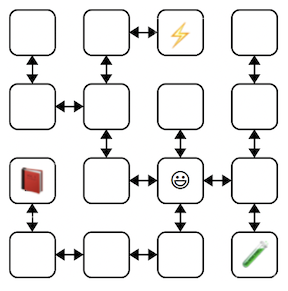 This diagram shows an example 4 × 4 labyrinth. The starting
location is marked with a smiley face and the location of the three items with
similarly cute emojis. The
This diagram shows an example 4 × 4 labyrinth. The starting
location is marked with a smiley face and the location of the three items with
similarly cute emojis. The MazeCell containing the smiley face has
north, south, east, and west pointers pointing to the MazeCell located one step in each of those directions. The MazeCell containing the book has north,
east, and west pointers set to nullptr, and only its south pointer
would point to another MazeCell (specifically, to the cell in the bottom-left
corner).
Each MazeCell has a field named contains that indicates the
item at that location. If the cell contains no item, then its contains field will hold the empty string. A cell that holds the Spellbook, Potion, or Wand item would contain the string "Spellbook", "Potion", or "Wand", respectively.
Once dropped into this labyrinth at the starting location, you can roam around to find the items you need to cast the escape spell. There are many paths you can take; here are three of them:
ESNWWNNEWSSESWWNSWWNSEENWNNEWSSEESWNNEWSSESWWNSEENES
Each path is represented as a sequence of letters (N for north, W
for west, etc.) that, when followed from left to right, trace out the
steps. For example, assuming that we start from the smiley-face in the diagram, the first sequence steps east, then south (getting to the cell with the Potion), then north, then west, etc.
Trace these paths through the labyrinth and confirm that you understand how each is a legal path that gathers all three needed items.
Confirm path to freedom
Your first task is to write a function that, given a starting cell and
a path, checks whether that path is legal and picks up all needed items.
In the file labyrinth.cpp, implement the function
bool isPathToFreedom(MazeCell *start, string path, Set<string> needed)
This function takes as input a pointer to a MazeCell, a string made purely from the characters 'N', 'S', 'E', and 'W', and a Set of items, expressed as strings. If the path trace a valid sequence of steps that gather all of the needed items, the function returns true, false otherwise.
A path successfully escapes if:
- The path is legal. Each step is a valid direction to travel from the current cell.
- Each item of the needed set is picked up by visiting a cell that contains that item. The order in which items are picked up is irrelevant. After picking up all items, any remaining steps in the path are ignored.
You can assume that start is not nullptr. However, if a step attempts to walk through a nullptr link, such as trying move E from the cell containing the wand in the above example, the function should stop and return false. In particular, your function should not crash if the path tries to traverse a link that does not exist. If the input path contains an invalid character (any character other than 'N', 'S', 'E', or 'W'), use the error() function to report an error.
Notes
- You should solve this task using iteration, not recursion.
- Your code should work for a
MazeCellfrom any possible labyrinth, not just the one diagrammed above. - It is allowable for a path to visit the same cell more than once.
- There may be more than one cell that contains a needed item. A path can visit any of those cells to pick up the item.
- You shouldn’t need to allocate any new
MazeCellobjects. You may declare variables of typeMazeCell *, but don’t use thenewkeyword. You are confirming a path through an existing maze, not creating a new maze.
Testing
- There are several provided test cases for
isPathToFreedom. You should review those test cases to understand what they test and how. Each test case generates a labyrinth from our custom string representation and then calls yourisPathToFreedomon various valid and invalid paths. Constructing these test cases is a bit tricky given all the setup needed. Rather than have you get mired in that, we supply a comprehensive suite of provided tests that is sufficient to exercise yourisPathToFreedom. This means that if you pass all the provided tests, you have a bug-free implementation. You are welcome to add student tests of your own, but it is not expected that you do so.
Escape from your personal labyrinth
Your next task is to escape from a labyrinth that’s specifically constructed for you. The starter code provides a function that that build you a personalized labyrinth. By “personalized” we mean that “no one else in the course is going to have the exact same labyrinth as you.” Your job is to figure out a path through your labyrinth that picks up all the three items, allowing you to escape.
At the top of labyrinth.cpp are two constants marked with a "TODO" message. The first one, kYourName, is a spot for your name. Edit this constant so that it contains your name. The second constant kPathOutOfNormalMaze needs to be assigned to a path that escapes your labyrinth. Your job will be to find that escape path.
The last provided test cases tests the escape from your personal labyrinth. This test case generates the custom labyrinth for the kYourName constant and confirms that your kPathOutOfNormalMaze is a valid path to escape it. It is your job to come up with that path.
Debugging linked structures
To find that path, you will use your old friend the debugger! Set a breakpoint on the test case for your personal labyrinth escape. Run the program under the debugger. When stopped at the breakpoint, look to the Variables pane to see the state of the local variables. The variable start is a pointer to the MazeCell where we’ve dropped you into the labyrinth. Clicking the dropdown triangle in the debugger window will let you view the contains field of start (it’ll be empty), as well as the four pointers leading
out of the cell.
Depending on your labyrinth, you may find yourself in a location where you
can move in all four cardinal directions, or you may find that you can
only move in some of them. The pointers in directions you can’t go are
all equal to nullptr, which will show up as 0x0 in the debugger
window. The pointers that indicate directions you can go will all have
dropdown arrows near them. Clicking one of these arrows will show you that
the neighbor cell. You can navigate further by choosing one of its dropdown arrows, or you could back up to the starting cell and explore in other
directions. It’s really up to you!
Draw a lot of pictures. Grab a sheet of paper and map out your labyrinth you’re in. There’s no guarantee where you start – you
could be in the upper-left corner, dead center, etc. The items are
scattered randomly, and you’ll need to seek them out. Once you’ve mapped
it out, work out the steps in your escape path and assign those steps as string to the constant
kPathOutOfNormalMaze, then see if you pass the escape test. If so,
fantastic! You’ve escaped! If not, you have lots of options. You could
step through your isPathToFreedom function to see if one of the
letters you entered isn’t what you intended and accidentally tries to
move in an illegal direction. Or perhaps the issue is that you mis-drew
the map of your personal labyrinth and you’ve ended up somewhere without all the items. You could
alternatively set the breakpoint at the test case again and walk through
things a second time, seeing whether the diagram of the labyrinth you drew
was incorrect.
To summarize, here’s what you need to do:
- Edit the constant
kYourNameto a string containing your full name. Don’t skip this step! If you forget to do this, you’ll be solving the wrong maze! Once you have setkYourName, do not change it, as this would cause a different maze to be generated that the one you have already solved. - Set a breakpoint at the escape test case and run under the debugger.
- Use the debugger to explore the labyrinth links and draw out the labyrinth on a sheet of paper and find where the items are.
- Find a path that picks up all three items and edit the constant
kPathOutOfNormalMazewith that path. Re-run the test case without the debugger to confirm your path is a valid escape.
Advice
- Unlike the perfect mazes we explored in assignment, a labyrinth has can have loops or multiple distinct paths between different cells. Keep this in mind as you’re exploring or you might find yourself going in circles!
- You don’t necessarily need to map out the whole labyrinth. You only need to explore enough of it to find the three items and form a path that picks all of them up.
- In the diagram above, the labyrinth is structured so that if there was a link from one cell to another going north there was a reverse link from the second cell back to the first going south (and the same for east/west links). This may not always be the case for all labyrinth configurations. It is possible for a labyrinth to have one-way links.
Moving on
At this point, you have a good command of how to use the debugger to examine linked structures. You know how to recognize a null pointer, how to manually follow links between objects, and how to reconstruct the shape of a linked data structure. We hope you find these skills useful as you continue to write code that works on linked lists and other linked structures!