SIG-11 Show and Tell Session RESNA 2000
Friday June 30, 10:30 to 11:45 am
Computer Tech Lab
| 1 & 2 | USB device development Michael Hetherington, P.I. Engineering, Inc |
The USB is a useful port but like most things on the consumer computer it was designed for high volume peripherals and not for the experimenter. However if we use the components from these devices we can achieve many new things. The advantage of the eventual cross platform compatibility (Mac OS, PCs and Workstations) will allow more unique products to have a larger market for a single hardware design. We will talk about the various imbedded protocols, mouse, keyboard, and Joystick, how to use these and go beyond them. We will also show some special devices we have developed to use standard devices on the USB in a standard or non-standard format.
| 3 | GUIDE assessment software Don Spaeth, Center of Excellence for Wheelchairs and Related Technologies Pittsburgh VA Healthcare System |
GUIDE is a program that attempts to quantify people‘s motor skills when using a mouse or other pointing device. Guide records the coordinates of the mouse cursor (approximately 30) samples per second) while the subject is engaged in various icon acquisition tasks.
| 4 | An AAC Performance Measurement Tool Katya Hill, CCC-SLP (University of Pittsburgh and Edinboro University of PA) Barry Romich, P.E. (Prentke Romich Company and University of Pittsburgh) |
For over three decades the clinical practice of AAC has been pursued as an art, since the collection of data has been impractical. Recent work has resulted in tools for gathering AAC language sample data that can be analyzed to provide summary measures of performance. The use of these tools allows clinical practice to be pursued as a science. Among these tools is a software language activity monitor for the PC. When this program is running, and the AAC device is connected to the PC serial port during a therapy session, the time and content of language events are recorded. The collected language data can be edited and entered into analysis programs and/or processed manually.
This presentation can include a demonstration of language sample collection if a data projector is available. Also, a portable implementation of the function will be shown. This work may offer a model for other assistive technology outcomes measurement. The PC becomes a tool for collecting quantitative user performance data and establishing clinical databases for evaluating the effectiveness of technological solutions. Support from NIH is acknowledged.
| 5 | External switch for PCs with “Smart Power“ Multiboot software for assessment systems -System Commander Ramon Castillo, ATEC, Goodwill Industries of Orange County |
The majority of new computers have Smart Power buttons that allow the user to shut down directly from Windows. However, to start the computer the power button has to be physically pressed. Theoretically, some BIOS‘s allow you to use the mouse or keyboard to power on, but this doesn‘t always work, in the past, you could just plug the computer into an X-lO module and use a switch to power on the system. With the “Smart“ power supplies, this is not so simple. A solution to this dilemma is to hardwire a switch to the power button. The switch is soldered in parallel with the existing power switch wires or just clipped on with alligator clips. The switch can then be closed via any switch the user can access.
Assistive technology centers often need to have many different software programs and peripherals available for trial but have a limited number of computer systems available. While it is possible to install many different programs on a system, the likelihood of conflicts increases with each installation. Windows 98 is fairly good about being able to recognize newly attached peripherals, but specific drivers may be needed to be installed manually. A solution to this challenge at ATEC is to use a multiple OS boot manager. System Commander allows us to have several instances of Windows 98 on the same physical hard drive. Each instance of Windows has its own programs and hardware drivers installed without affecting software on other partitions. For example, we use System Commander on one of our systems with Dragon Naturally Speaking Professional, various onscreen keyboards, and text to speech programs on one partition. Another partition has L&H VoiceXPress Professional, and several typing tutors. System Commander is a safe and easy way to maximize resources and space in an assistive technology center.
| 6 | Survey of Microphones for Speech Recognition Ray Grott, San Francisco State University |
As most people know, microphones are a critical component in the successful use of speech recognition technology. I will review the results of an informal survey and literature review, discussing the most popular microphones and noting options for specialty applications: desktop, wireless, and those for noisy environments. Samples will be on hand for people to examine afterwards.
If time allows, I will show slides of two applications of the new line of Savant 20 and 50- key programmable keypads. One with a custom key-guard used in conjunction with a BigKeys keyboard to provide supplemental letter and function keys as well as MouseKeys access. The other is for a person with limited range of motion.
| 7 | Multimedia training software Morse Code Kim Adams, Neural Signals Inc. |
A number of computer input systems for Morse Code are available. Morse Code has not been very popular in the disability market because it requires 20-30 hours of training to learn the codes (Anson, 1997). In order to address this obstacle, we are developing a computer based instruction program for training in Morse Code. The program presents Morse Codes with graphical mneumonics, and guides the user through several training sessions and automatically tracks speed and accuracy. The program was implemented by a student group in a senior design course in computer science at Georgia State University.
| 8 | Sip and Puff Saliva Trap Chip Fiske, A Plus Medical |
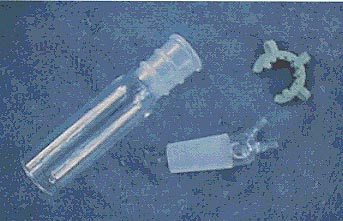
This custom-made glass saliva trap is designed for use with sip and puff actuated systems. The saliva trap is mounted in the air line between the mouth piece and the switch. The 3 ½" by 1" reservoir is easily removable for emptying and cleaning. The dual connection top attaches air tight to the reservoir to ensure a positive switch operation. A lock clip secures the two pieces together. The saliva trap can be mounted to any piece of equipment.