Today: string find/slice practice, file-reading, crazycat example program
Problems today:
> str3 functions
'aabb' → 'bbbbaaaa'
We'll say the midpoint of a string is index len // 2, dividing the string into a left half before the midpoint and a right half starting at the midpoint. Given string s, return a new string made of 2 copies of right followed by 2 copies of left. So 'aabb' returns 'bbbbaaaa'.
Solution
def right_left(s):
    mid = len(s) // 2
    left = s[:mid]
    right = s[mid:]
    return right + right + left + left
    # Style comparison:
    # Without using any variables, the solution
    # is longer and not so readable:
    # return s[len(s) // 2:] + s[len(s) // 2:] + s[:len(s) // 2] + s[:len(s) // 2]
This looks simple, but the details are tricky. Make a drawing.
Given string s. Find the first '@' within s. Return the len-3 substring immediately following the '@'. Except, if there is no '@' or there are not 3 chars after the @, return ''.
Solution
def at_3(s):
    at = s.find('@')
    if at == -1:
        return ''
    # Is at + 3 past end of string?
    # Could "or" combine with above
    if at + 3 >= len(s):
        return ''
    return s[at + 1:at + 4]
    # Working out >= above ... drawing!
This is nice, realistic string problem with a little logic in it.
Recall: s.find(target, start_index) - start search at start_index vs. starting search at index 0.
Given string s.
Look for a '(.....)' within s -
look for the first '(' in s, then the
first ')' after the '(', using the second start_index
parameter of .find(). If both parens are found,
return the chars between them, so
'xxx(abc)xxx' returns 'abc'. If
no such pair of parens is found, return the
empty string. Think about the input
'))(abc)'.
Solution
def parens(s):
    left = s.find('(')
    if left == -1:
        return ''
    # Start search at left + 1:
    right = s.find(')', left + 1)
    if right == -1:
        return ''
    # Use slice to pull out chars between left/right
    return s[left + 1:right]
This code is complete, you can run it to see what it does.
Use backslash \ to include special chars in a string
s = 'isn\'t'

\n  newline char
\\  backlash
\'  single quote
\"  double quote
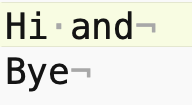
2 lines, each line has a '\n' at the end. The first line has a space, just ' ' in Python.
Hi and
bye
Here is what that file looks like in an editor that shows little gray marks for the space and \n
>>> print('hello', 'there', '!')
hello there !
>>> print('hello', 123, '!')
hello 123 !
>>> print('hello', 123, '!', sep=':')
hello:123:!
>>> print(1, 2, 3)               # end='\n' the default
1 2 3
>>> print(1, 2, 3, end='xxx\n')  # end= what goes at end
1 2 3xxx
>>> print(1, 2, 3, end='')       # suppress the \n
1 2 3>>>
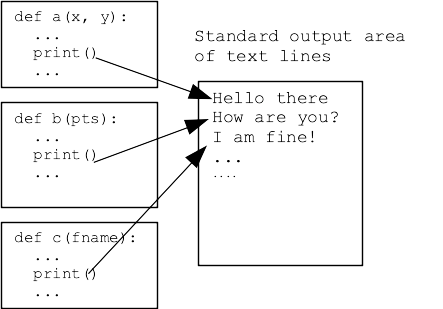
Return and print() are both ways to get data out of a function. We will be careful when specifying a function to say that it should "return" a value (most common), or it should "print" something to standard output. Usually the functions that do computation use return, so they can be tested.
Open a terminal in the crazycat directory (see the Command guide for more information running in the terminal). Terminal commands - work in both Mac and Windows
ls - see list of filenames ("dir" on older Windows)
cat filename - see file contents
$ ls
alice.txt       crazycat.py     hibye.txt       poem.txt        quotes
$ cat poem.txt
Roses Are Red
Violets Are Blue
This Does Not Rhyme
$
$ python3 crazycat.py poem.txt
Roses Are Red
Violets Are Blue
This Does Not Rhyme
$ python3 crazycat.py hibye.txt
Hi and
bye
$
with open(filename, 'r') as f:
    for line in f:
        # use line in here
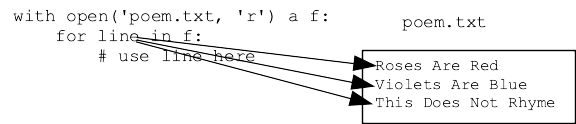
Here is the whole function to print the contents of a file. Why do we need end='' here? The line already has \n at its end, so get double spacing if print() adds its standard \n.
def print_file_plain(filename):
    with open(filename, 'r') as f:
        for line in f:
            # use line in here
            print(line, end='')
def crazy_line(line):
    """
    Given a line of text, returns a "crazy" version of that line,
    where upper/lower case have all been swapped, so 'Hello'
    returns 'hELLO'.
    >>> crazy_line('Hello')
    'hELLO'
    >>> crazy_line('@xYz!')
    '@XyZ!'
    >>> crazy_line('')
    ''
    """
    result = ''
    for i in range(len(line)):
        char = line[i]
        if char.islower():
            result += char.upper()
        else:
            result += char.lower()
    return result
Here is command line to run with -crazy option
$ python3 crazycat.py -crazy poem.txt
rOSES aRE rED
vIOLETS aRE bLUE
tHIS dOES nOT rHYME
Here print_file_crazy(), similar to print_file_plain() but passes each line through the crazy_line() function before printing.
def print_file_crazy(filename):
    """
    Given a filename, read all its lines and print them out
    in crazy form.
    """
    with open(filename, 'r') as f:
        for line in f:
            print(crazy_line(line), end='')