Today: list memory, 3x range() forms, while/break logic
Whoops! Forgot to mention this example in Mon lecture, but here it is. For the homework, just need to understand Form-1 or Form-2 (solutions below). You can download the .zip to run it yourself, or just look at the solution pattern below.
affirm.zip Example of main() command line args
The affirm.py program takes 3 command line forms
def main():
    """
    This program takes 3 command line arg forms:

    1.
    -affirm *name*

    2.
    -hello *name*

    3.
    -n *number* *name*
    """

    # standard - load "args" list with cmd-line-args
    args = sys.argv[1:]

    # args is a list of the command line argument strings that follow
    # the program.py file.
    # So if the command is: python3 affirm.py aaa bbb ccc
    # The args list  will be:
    #   args == ['aaa', 'bbb', 'ccc']
    # The args are all strings, whatever was typed in the terminal.

    # There are 3 command-line-argument patterns below.
    # The code is complete for pattern-1, with the others TBD.

    # 1. This example if-statement recognizes the arg pattern:
    #   python3 affirm.py -affirm Bart
    #   e.g. args[0] is '-affirm' and args[1] is 'Bart'
    # Print out: Looking good Bart
    # 'Looking good' is selected from the random AFFIRMATIONS list
    if len(args) == 2 and args[0] == '-affirm':
        # Select random nice phrase
        affirmation = random.choice(AFIRMATIONS)
        print(affirmation, args[1])

    # 2 - Write an if-statement to recognize this arg pattern:
    #   python3 affirm.py -hello Lisa
    # Print out: Hello Lisa
    # Here 'Hello' is fixed, nothing random.
    pass


    # 3 - Write an if-statement to recognize this arg pattern:
    #   python3 affirm.py -n 100 Maggie
    # Print out 100 copies of 'Maggie' separated by spaces
    # Note: the command line arg is a string, convert to int
    pass
...
    # 2 - Write an if-statement to recognize this arg pattern:
    #   python3 affirm.py -hello Lisa
    # Print out: Hello Lisa
    # Here 'Hello' is fixed, nothing random.
    if len(args) == 2 and args[0] == '-hello':
        print('Hello', args[1])

    # 3 - Write an if-statement to recognize this arg pattern:
    #   python3 affirm.py -n 100 Maggie
    # Print out 100 copies of 'Maggie' separated by spaces
    # Note: the command line arg is a string, convert to int
    if len(args) == 3 and args[0] == '-n':
        # Note: command line values are always strings, so here
        # convert to int form for use in range()
        n = int(args[1])
        for i in range(n):
            # Print each copy of the name with space instead of \n after it.
            print(args[2], end=' ')
        # Print a single \n after the whole thing.
        print()
See: Python Variables
>>> # Build up a list to have 3 string elements
>>> lst = []
>>> lst.append('yo')
>>> lst.append('yo')
>>> lst.append('ma')
>>> lst
['yo', 'yo', 'ma']
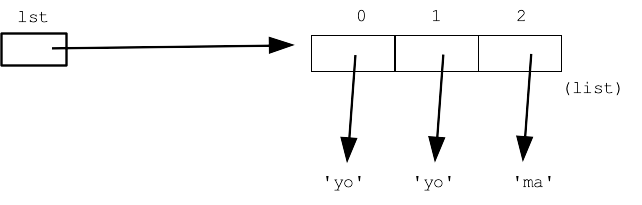
Here is the memory picture for this state. Each element in the list can hold anything. Here they each hold a pointer to a string. In this way, each is like a variable, and = can work on each one.
= is ShallowWhat does the following line do?
>>> lst2 = lst
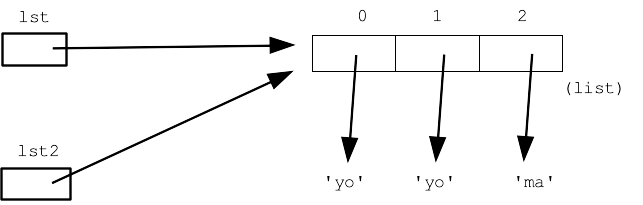
The assignment = does not duplicate or makes a copy of a data structure. Instead the = works in a shallow way, just setting the pointer in the left variable to point to the same thing as the right variable.
Here is a picture after the assignment
>>> lst[2]
'ma'
>>> lst2[2]
'ma'
>>> lst[2] = 'Donut'
Here is the memory picture after that change:
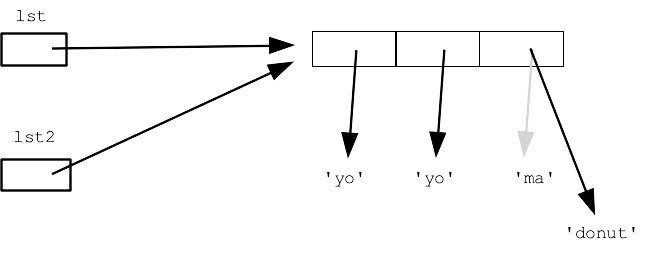
Now if we look at the value of lst or lst2 .. they both show the changed list, since in fact there is just the one list and they are both pointing to it.
>>> lst
['yo', 'yo', 'donut']
>>> lst2
['yo', 'yo', 'donut']
This code sets up 2 lists of numbers
>>> evens = [2, 4]
>>> odds = [1, 3, 5]
![alt: evens is [2, 4], odds is list [1, 3, 5]](python-list-evens.png)
A list can be stored inside of an "outer" list. This code sets up the list outer: its first element is the "evens" list, its second element is the "odds" list.
>>> evens = [2, 4]
>>> odds = [1, 3, 5]
>>> outer = []
>>> outer.append(evens)
>>> outer.append(odds)
>>>
>>> outer
[[2, 4], [1, 3, 5]]
>>>
>>> outer[0]
[2, 4]
>>> outer[1]
[1, 3, 5]
Here is a memory picture of how outer is built.
![alt: outer is list len 2, outer[0] points to evens list, outer[1] points to odds](python-list-outer.png)
A classic way to "iterate" over numbers. All languages have some way to do this, and the Python range() functions are an easy and flexible way to do it.
# standard for/i/range structure
for i in range(20):
    print(i)
range(5, 10) → [5, 6, 7, 8, 9]
range(5, 6) → [5]
range(5, 5) → []  # i.e. nothing
range(5, 4) → []  # i.e. nothing
range(0, 10, 2) → [0, 2, 4, 6, 8]
range(200, 800, 100) → [200, 300, 400, 500, 600, 700]
range(5, 0, -1) -> [5, 4, 3, 2, 1]
range(10, 5, -2) -> [10, 8, 6]
range(10, 10, -2) -> []
In interpreter, try these with list(range(xxx)) form which makes a [ ... ] list of the numbers, making the exact range of numbers very clear:
>>> list(range(10, 5, -2))
[10, 8, 6]
Given a non-negative int n, return a list of n multiples of 6 starting with 6 itself, e.g. n=3 returns [6, 12, 18].
return a list of the first n multiples of 6, e.g. n=3 returns [6, 12, 18].Given a non-negative int n. Create and return a list of lists like this: [[1], [1, 2], [1, 2, 3] .... [1, 2, 3, .. n]]. There will be n lists inside the outer list. Use nested range loops. One approach: write outer loop to set a "top" variable which varies the top number for each inner list.
Output for n=3. Use this to think about outer and inner loops:
[
 [1],
 [1, 2],
 [1. 2. 3],
]
Solution
def triangle(n):
    outer = []
    # Outer loop, one iteration per inner list
    for top in range(1, n + 1):
        # Inner loop, create 1 inner list
        # 1..top
        inner = []
        for i in range(1, top + 1):
            inner.append(i)
        outer.append(inner)
    return outer
Extra problem for practice.
Consider the sequence 100, 200, 300, ... n*100. For each 'x00' multiple of 100 in that sequence, make a list of the 10 numbers leading up to that number, e.g. [91, 92, 93, 94, 95, 96, 97, 98, 99, 100]. Return a big list of all these lists as elements, first the list of 100, then 200, and so on. N = 2 yields [[91, 92, 93, 94, 95, 96, 97, 98, 99, 100], [191, 192, 193, 194, 195, 196, 197, 198, 199, 200]]. Use nested range loops.
Censor problem: censored(n, censor): Given a non-negative int n. Return a list of the ints [1, 2, 3, ... n]. Except as soon as a number in the given censor list is seen, end the list without that number, so censored(10, [5, 4]) returns [1, 2, 3]. Use "break"
Solution
def censored(n, censor):
    nums = []
    for i in range(1, n + 1):
        if i in censor:  # Key: if-break
            break
        nums.append(i)
    return nums
def censored(n, censor):
    nums = []
    for i in range(1, n + 1):
        if i  in censor:
            i = n + 1  # let'd be done with this loop
        else:
            result.append(i)
    return nums
i = 0         # 1. init
while i < n:  # 2. test
    # use i
    i += 1    # 3. increment, bottom of loop
double_char() written as a while (using a range() is eaier for this problem, so just demonstrating what while would look like)
def while_double(s):
    result = ''
    i = 0
    while i < len(s):
        result += s[i] + s[i]
        i += 1
    return result
Given string s. Return a list of all the '[' strings in s. Use s.find() within a while loop to find all the '['.
Use search as index variable, marking current position of search within s.
In loop - how to find each '['? How to end the loop when there is no '['? Important at bottom of loop, advance variable for next iteration ("search" in this case)
Solution
def all_lefts(s):
    search = 0
    result = []
    while search < len(s):
        left = s.find('[', search)
        if left == -1:
            break
        result.append(s[left:left + 1])
        # Key: set up var at end of loop
        search = left + 1
    return result
This pulls it all together, solving a realistic problem.
Given string s. Return a list of all the 'abc' strings for each '[abc]' substring within s. For each left bracket, find the right bracket that follows it. End the search if no left or right bracket is found. Use s.find() within a while loop.
Start with the all_brackets() code. Add code to find the right-bracket following each left bracket. As before: how to terminate the loop? Remember to advance search variable at bottom of loop.
Solution
def all_brackets(s):
    search = 0
    result = []
    while search < len(s):
        left = s.find('[', search)
        if left == -1:
            break
        # Your code here
        pass
        right = s.find(']', left + 1)
        if right == -1:
            break
        result.append(s[left + 1:right])
        # Key: set up var at end of loop
        search = right + 1
    return result