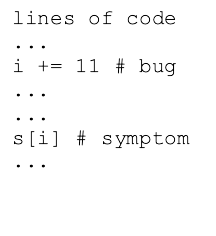
Today: Loose ends, debugging - bug and symptom. String - replace(), split(), join(), unicode. computer = CPU + RAM + Storage, CPU use, RAM use
See Python Debug
See: Python String
>>> s ='this is it'
>>> s.replace('is', 'xxx')
'thxxx xxx it'
>>>
>>> s.replace('is', '')
'th  it'
>>>
>>> s
'this is it'
>>> s = '   this and that\n'
>>> s.strip()
'this and that'
>>> s = '11,45,19.2,N'
>>> s.split(',')
['11', '45', '19.2', 'N']
>>> 'apple:banana:donut'.split(':')
['apple', 'banana', 'donut']
>>>
>>> 'this    is     it  '.split()  # special space form
['this', 'is', 'it']
>>> foods = ['apple', 'banana', 'donut']
>>> ':'.join(foods)
'apple:banana:donut'
>>> 'Alice' + ' got score:' + str(12)  # old: use +
'Alice got score:12'
>>>
>>> '{} got score:{}'.format('Alice', 12) # new: format()
'Alice got score:12'
>>>
(just quoting from Python String) In the early days of computers, the ASCII character encoding was very common, encoding the roman a-z alphabet. ASCII is simple, and requires just 1 byte to store 1 character, but it has no ability to represent characters of other languages.
Each character in a Python string is a unicode character, so characters for all languages are supported. Also, many emoji have been added to unicode as a sort of character.
Every unicode character is defined by a unicode "code point" which is basically a big int value that uniquely identifies that character. Unicode characters can be written using the "hex" version of their code point, e.g. "03A3" is the "Sigma" char Σ, and "2665" is the heart emoji char ♥.
Hexadecimal aside: hexadecimal is a way of writing an int in base-16 using the digits 0-9 plus the letters A-F, like this: 7F9A or 7f9a. Two hex digits together like 9A or FF represent the value stored in one byte, so hex is a traditional easy way to write out the value of a byte. When you look up an emoji on the web, typically you will see the code point written out in hex, like 1F644, the eye-roll emoji 🙄.
You can write a unicode char out in a Python string with a \u followed by the 4 hex digits of its code point. Notice how each unicode char is just one more character in the string:
>>> s = 'hi \u03A3'
>>> s
'hi Σ'
>>> len(s)
4
>>> s[0]
'h'
>>> s[3]
'Σ'
>>>
>>> s = '\u03A9'  # upper case omega
>>> s
'Ω'
>>> s.lower()     # compute lowercase
'ω'
>>> s.isalpha()   # isalpha() knows about unicode
True
>>>
>>> 'I \u2665'
'I ♥'
For a code point with more than 4-hex-digits, use \U (uppercase U) followed by 8 digits with leading 0's as needed, like the fire emoji 1F525, and the inevitable 1F4A9.
>>> 'the place is on \U0001F525'
'the place is on 🔥'
>>> s = 'oh \U0001F4A9'
>>> len(s)
4
You have one on your person all day. You're debugging code for one. You see the output of them constantly. What is it and how does it work?
We'll look starting from the outside...
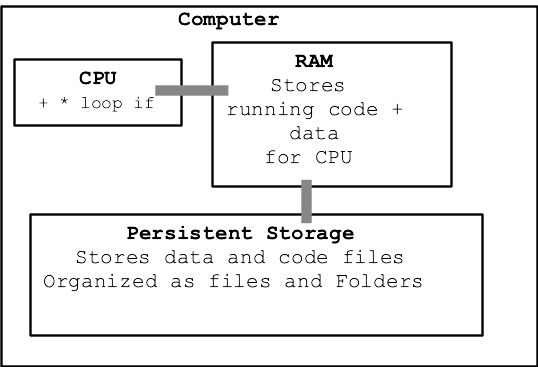
Want to talk about running a computer program...
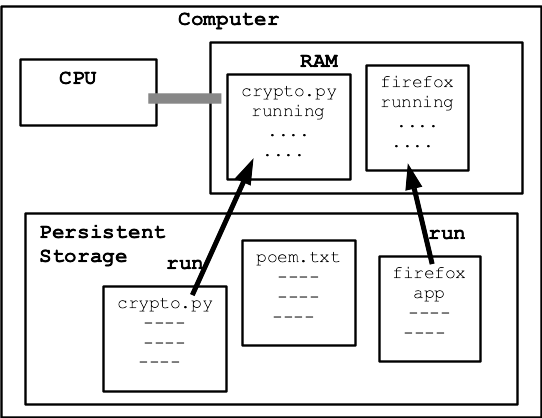
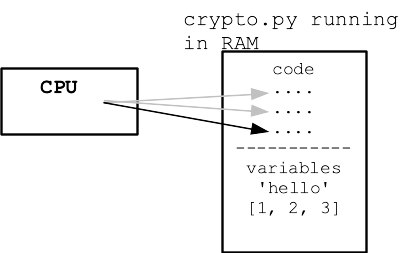
Python shields us from much detail about CPU and RAM, which is great. We're just peeking at the details here to get a little insight about what it means for a program to run, use CPU and RAM.
Nick's Hardware Squandering Program!
Demo: computer is mostly idle to start. Idle CPU is cool. CPU starts running hard, generates heat .. fan spins! This program is an infinite loop - uses 100% of one core. Why is the fan running on my laptop? Use Activity Monitor (Mac), Task Manager (Windows) to see programs that are currently running, see CPU% and MEM%. Run program twice, once in each of 2 terminals - 200%
Core function of -cpu feature:
def use_cpu(n):
    """
    Infinite loop counting a variable 0, 1, 2...
    print a line every n (0 = no printing)
    """
    i = 0
    while True:
        if n != 0 and i % n == 0:
            print(i)
        i = i + 1
Try 1000 first ... woah! Try 1 million instead
$ python3 hardware-demo.py -cpu 1000000 0 1000000 2000000 3000000 4000000 5000000 6000000 7000000 ^CTraceback (most recent call last): File "hardware-demo.py", line 66, inmain() File "hardware-demo.py", line 56, in main use_cpu(n) File "hardware-demo.py", line 24, in use_cpu i = i + 1 KeyboardInterrupt (ctrl-c to exit)
When code reads and writes values, those values are stored in RAM. RAM is a big array of bytes, read and written by the CPU.
Say we have this code
n = 10
s = 'Hello'
lst = [1, 2, 3]
lst2 = lst
Every value in use by the program takes up space in RAM.
Demo using -mem, Look in activity monitor, "mem" area, 100 = 100 MB per second. Watch our program use more and more memory of the machine. Program exits .. not in the list any more!
$ python3 hardware-demo.py -mem 100
Memory MB: 100
Memory MB: 200
Memory MB: 300
Memory MB: 400
Memory MB: 500
Memory MB: 600
Memory MB: 700
^CTraceback (most recent call last):
...
KeyboardInterrupt
(ctrl-c to exit)