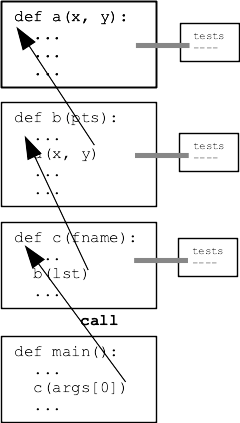
Today: list functions: sorted, min, max, list foreach patterns. File reading. Look at word-count program.
>>> sorted([45, 100, 2, 12])               # numeric
[2, 12, 45, 100]
>>>
>>> sorted([45, 100, 2, 12], reverse=True)
[100, 45, 12, 2]
>>>
>>> sorted(['banana', 'apple', 'donut'])   # alphabetic
['apple', 'banana', 'donut']
>>>
>>> sorted(['45', '100', '2', '12'])       # wrong-looking
['100', '12', '2', '45']
>>>
>>> sorted(['45', '100', '2', '12', 13])
TypeError: '<' not supported between instances of 'int' and 'str'
>>> min(1, 3, 2)
1
>>> max(1, 3, 2)
3
>>> min([1, 3, 2])  # lists work
1
>>> min([1])        # len-1 works
1
>>> min([])         # len-0 is an error
ValueError: min() arg is an empty sequence
>>> min(['banana', 'apple', 'zebra'])  # strs work too
'apple'
>>> max(['banana', 'apple', 'zebra'])
'zebra'
Many times, parts of your program are familiar patterns that you have written in other programs. It's handy to recognize and practice these patterns, you can code that part up quickly and reliably.
Doubled: Given a list of int values, return a new list of their values doubled. Basic mapping pattern example. Solve with a foreach loop.
Solution Code
def doubled(nums):
    result = []
    for num in nums:
        result.append(num * 2)
    return result
filter: Given a list of strings, return a new list of only the strings that start with a digit. Basic filtering example. Solve with a foreach loop + if.
def filter(strs):
    result = []
    for s in strs:
        if len(s) > 0 and s[0].isdigit():
            result.append(s)
    return result
3. shouting: Given a list of strings, return a new list where each original string that ends with a '!' is converted to upper case, and all other strings are omitted. So ['cats!', 'and', 'dogs!'] returns ['CATS!', 'DOGS!']
count_target(): Given a list of ints and a target int, return the int count number of times the target appears in the list. Solve with a foreach + "count" variable.
Solution Code
def count_target(nums, target):
    count = 0
    for num in nums:
        if num == target:
            count += 1
    return count
Style note: we have Python built-in functions like min() max() len() list(). Avoid creating a variable with the same name as an important function, like "min" or "list". This is whey our solution uses "best" as the variable to keep track of the smallest value seen so far instead of "min".
Slice note: one odd thing in this solution is that it use element [0] as the best initially, and then the loop will uselessly < compare best to [0] on its first iteration. Could iterate over nums[1:] to avoid this useless comparison. But that would copy the entire list to avoid a single comparison, a bad tradeoff. Therefore it's better to just write the loop the nice standard way.
Solution
def min(nums):
    # best tracks smallest value seen so far.
    # Compare each element to it.
    best = nums[0]
    for num in nums:  # could slice off [0] here
        if num < best:
            best = num
    return best
count_dups(): Given a list of numbers, count how many "duplicates" there are in the list - a number the same as the value before it in the list. Use a "previous" variable
Solution
def count_dups(nums):
    count = 0
    previous = None      # init
    for num in nums:
        if num == previous:
            count += 1
        previous = num   # set for next loop
    return count
See guide: Python File
A sort or Rosetta stone of coding - it's a working demonstration of many important features of a computer program: strings, dicts, loops, parameters, return, decomposition, testing, sorting, and files.
We'll look at this program to see Python features in action, and the complete source code is included at the end of this doc.
Note how words are cleaned up
$ cat poem.txt
Roses are red
Violets are blue
"RED" BLUE.
$
$ python3 wordcount.py poem.txt
are 2
blue 2
red 2
roses 1
violets 1
Ideal program decomposition picture:
This diagram shows the wordcount.py functions, each as a black box with function call/return as arrows: function parameters = data in, return value = data out.

Now look at the code, start at main() and follow the code chronologically as the code would run, looking at data in/out for each function.
When you are working on clean() do you need the dict-count algorithm in mind? When working on dict-count do you need to think about internals of clean()? No. Programming works more quickly when you can focus on one small problem at a time, not the whole thing.
If the programmer has to think about the whole program, get the n-squared cost. Want to deal with smaller, independent pieces. This is why functions are independent, sealed off from each other. This is the black-box model at work.
Not best style:
    # One style problem: recomputation
    for word in words:
        word = word.lower()
        if clean(word) != '':  # cleaning may leave only ''
            if clean(word) not in counts:
                counts[clean(word)] = 0
            counts[clean(word)] += 1
Better:
    # Better style - compute once, remember in variable
    for word in words:
        word = word.lower()
        cleaned = clean(word)
        if cleaned != '':  # cleaning may leave only ''
            if cleaned not in counts:
                counts[cleaned] = 0
            counts[cleaned] += 1
Style: don't compute the same thing again and again. Compute it once and store it in a var. Reads better, as now we have the benefit of a named variable, identifying that bit of data in the narrative. Also runs faster as the repeated computation really did use CPU each time.
"time" in the command line (Mac, linux) - "real" here is the elapsed seconds. Run the program with it calling clean() needlessly. (In windows "measure-command" works similarly below)
This is the poor style version
$ time python3 wordcount.py alice-book.txt
...
...
yourself 10
youth 6
zealand 1
zigzag 1

real	0m0.135s
user	0m0.112s
sys	0m0.015s
Here "real 0.135s" means regular clock time, 0.135 of a second, aka 135 milliseconds. Now change the code to the good style and time it again. Should be faster
Windows PowerShell equivalent to time the run of a command:
$ Measure-Command { python wordcount.py alice-book.txt }
#!/usr/bin/env python3

"""
CS106A WordCount Example
Nick Parlante

Counting the words in a text file is a sort
of Rosetta-stone of programming - it uses files, dicts, functions,
logic, decomposition, and testing.
Trace the flow of data starting with main()
"""

import sys


def clean(s):
    """
    Given string s, returns a clean version of s where all non-alpha
    chars are removed from beginning and end, so '@@x^^' yields 'x'.
    The resulting string will be empty if there are no alpha chars.
    >>> clean('$abc^')      # basic
    'abc'
    >>> clean('abc$$')
    'abc'
    >>> clean('^x^')        # short (debug)
    'x'
    >>> clean('abc')        # edge cases
    'abc'
    >>> clean('$$$')
    ''
    >>> clean('')
    ''
    """
    # (Meta point: an example of an inline comment: explain
    # the *goal* of the lines, not repeating the line mechanics.
    # Lines of code written for teaching often have more inline
    # comments like this than regular production code.
    # Most often used if the lines are tricky or interesting.

    # Move begin rightwards, past non-alpha punctuation
    begin = 0
    while begin < len(s) and not s[begin].isalpha():
        begin += 1

    # Move end leftwards, past non-alpha
    end = len(s) - 1
    while end >= begin and not s[end].isalpha():
        end -= 1

    # begin/end cross each other -> nothing left
    if end < begin:
        return ''
    return s[begin:end + 1]


def read_counts(filename):
    """
    Given filename, reads its text, splits it into words.
    Returns a "counts" dict where each word
    is the key and its value is the int count
    number of times it appears in the text.
    Converts each word to a "clean", lowercase
    version of that word.
    The Doctests use little files like "test1.txt" in
    this same folder.
    >>> read_counts('test1.txt')
    {'a': 2, 'b': 2}
    >>> read_counts('test2.txt')    # Q: why is b first here?
    {'b': 1, 'a': 2}
    >>> read_counts('test3.txt')
    {'bob': 1}
    """
    with open(filename, 'r') as f:
        text = f.read()   # demo reading whole string vs line/in/f way
    # once done reading - do not need to be indented within open()
    counts = {}
    words = text.split()

    # Two styles of the algorithm here - do speed tests to compare

    # One style problem: re-computation of clean()
    for word in words:
        word = word.lower()
        if clean(word) != '':  # cleaning may leave only ''
            if clean(word) not in counts:
                counts[clean(word)] = 0
            counts[clean(word)] += 1

    # Better style - compute once, remember in variable
    # Better: more readabe, runs faster avoiding re-computation
    # for word in words:
    #     word = word.lower()
    #     cleaned = clean(word)
    #     if cleaned != '':  # cleaning may leave only ''
    #         if cleaned not in counts:
    #             counts[cleaned] = 0
    #         counts[cleaned] += 1

    return counts


def print_counts(counts):
    """
    Given counts dict, print out each word and count
    one per line in alphabetical order, like this
    aardvark 1
    apple 13
    ...
    """
    for word in sorted(counts.keys()):
        print(word, counts[word])


def main():
    args = sys.argv[1:]
    # command line argument form: filename-to-count
    # Can always do the following to see what the args look like
    # print('args list looks like:', args)
    if len(args) == 1:
        # args[0] is filename
        counts = read_counts(args[0])
        print_counts(counts)


if __name__ == '__main__':
    main()