Today: modules, urllib, Jupyter notebooks
Python Niche: Productive Programmers
- Python is "programmer efficient"
- Lets you express your algorithm idea pretty directly
Least work for programmer, more work left for CPU
- Other languages run faster than Python
e.g. C++ (CS106B), C (CS107)
Tradeoff: more work for programmer, less work for CPU
- The low-work-for-programmer niche is always popular
- Python will be a popular default choice for algorithmic work for a long time
Why is Python Coding So Productive?
Or indeed, why are most modern languages so much more productive than 20 years ago?
1. Language Features
- These are just good ideas for expressing your algorithms
- string, list, ..
- foreach loop
- lambda
- sorted
- Doctests
2. Garbage Collection
- Python automatically reclaims memory for re-use
- Some languages make the programmer do this
More work for programmer
Less work for the CPU
- C++ does not have GC exactly
3. Libraries Of Code To Use
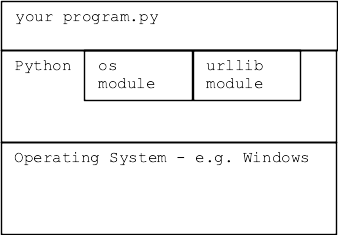
Organized libraries (modules) of code for common problems. Organized, documented, and waiting for your code to use. We say that you build your code "on top of" the libraries.
"Standard" Modules
- Standard = included/maintained as part of Python3 install
- Can rely on this module now and in the future
- No separate install is required
- Standard modules are prefereable
Many Standard Modules
- Many standard modules, installed as part of Python
- Do not: memorize whole list
- Do: check the list for help when starting a project
- Standard Python Modules List
- math module of math functions, e.g. math.cos()
- email module for creating and parsing email messages
- random module for creating pseudo random numbers
- os module for listing directories, creating files
- datetime module of calendar functions
- zipfile module for reading/creating .zip files
- urllib module for making http requests, using data
We ♥ Modules
- Using module code you didn't have to write is very attractive
- (This is kind of a no-brainer case to make!)
- Somebody else wrote it, you can just use it
- It's well tested
- It has real docs
- Your teammates may already be familiar with it
- CS106A we see this "module" theme a little
CS106A needs to cover fundamentals
loops, strs, dicts, files ..
Courses beyond CS106A, more time using modules
Non-Standard "pip" Modules
Other modules are valuable but not a standard part of Python. For code using non-standard module to work, the module must be installed on that computer via the "pip" tool. e.g. "Pillow" we have installed to manipulate images with this command:
$ python3 -m pip install Pillow
..prints stuff...
Successfully installed Pillow-5.4.1
Module Docs
- Every module has formal "documentation" - "docs"
- Explain what functions do
- The "abstraction" of each function
- -what it does
- -how to call it
- Demo web search: python.org math module
How Does The Web Work?
- Browser has url ("client" side)
- Web server is running on some machine ("server" side)
- Browser sends GET request to server
- Server gets request, sends back HTML response data
- HTML is a text code
- Browser "renders" the HTML on screen
- Common request/response data types: HTML JPEG PNG GIF SVG
- Video formats MPEG4 h.265 (crazy patent problems)
- New open format "AV1" .. you heard it here first!
- Demo:
Visit sfgate.com or whatever
Right-click on page, "View Source" to see the HTML text that makes a web page
- Think of all the surfing you have done .. HTML code defines each page
urllib 1
- CS106A theme: look at some modules you can build upon
- Python code to request an HTML page by url
- urllib - making requests to a server, getting back data
- Another example of using a standard module
- docs - urllib.request docs on python.org
- Makes a URL look like a local file mostly
>>> import urllib.request
>>> f = urllib.request.urlopen('http://www.python.org/')
>>> text = f.read().decode('utf-8')
- f.read() works just once, then need to reset f
- decode('utf-8') decode raw bytes -> unicode string
- Does not always work, they may be blocking python on purpose
- f.read() - all the bytes
- r.read(300) - just first 300 bytes
- Can try http: or https: for these
>>> import urllib.request
>>>
>>> f = urllib.request.urlopen('http://www.python.org/')
>>> text = f.read().decode('utf-8')
>>> # text is the HTML
>>> # use text.find('xxx') to look for something, show that slice
>>> # like text[5000:5200]
>>>
>>> f = urllib.request.urlopen('https://sfgate.com/')
>>> text = f.read().decode('utf-8')
Web hello.txt File Example
>>> import urllib.request
>>> f = urllib.request.urlopen('http://web.stanford.edu/class/cs106a/hello.txt')
>>> text = f.read().decode('utf-8')
>>> text
'Hello from CS106A url!\nWhat if there were data here?\n12,34\n25,19\n66,0\n1,2\n'
>>> lines = text.splitlines()
>>> lines
['Hello from CS106AP url!', 'What if there were data here?', '12,34', '25,19', '66,0', '1,2']
>>> lines = lines[2:]  # one way to get rid of first 2 lines
>>> lines
['12,34', '25,19', '66,0', '1,2']
Data From the Web vs. Files
- Very often data is drawn from file, into your program .. parse to list dict ..
- New picture: data is drawn from a URL
- The parsing list/dict is the same as ever
Traffic Example
traffic.zip Jupyter example
Have text data about seconds spent in road traffic across many days and hours. Typical giant data set.
day_of_year,hour_of_day,time_in_secs
01-01-18,0,2549
01-01-18,1,2751
01-01-18,2,2248
01-01-18,3,2440
01-01-18,4,2666
01-01-18,5,2084
01-01-18,6,2302
01-01-18,7,3410
01-01-18,8,3229
01-01-18,9,2367
01-01-18,10,2217
01-01-18,11,2082
01-01-18,12,2055
01-01-18,13,2842
01-01-18,14,2206
01-01-18,15,2178
01-01-18,16,2974
01-01-18,17,2444
01-01-18,18,2965
01-01-18,19,2714
01-01-18,20,2783
01-01-18,21,1951
01-01-18,22,2234
01-01-18,23,2263
01-02-18,0,2311
01-02-18,1,2732
01-02-18,2,2165
01-02-18,3,2377
01-02-18,4,2836
01-02-18,5,2841
01-02-18,6,2719
01-02-18,7,3671
01-02-18,8,3417
01-02-18,9,2578
01-02-18,10,2301
01-02-18,11,2357
01-02-18,12,2165
01-02-18,13,1958
...
traffic.py
- traffic.py - Open in PyCharm to see code
- traffic.py developed normally, tested
- Code to read this data into a dict
- Add all days together, key is hour: 0..23
{0: 922633,
 1: 870481,
 2: 814756,
 3: 850357,
...
 22: 844618,
 23: 902191}
Jupyter Notebook
- Jupyter notebooks jupyter.org
- An extremely popular tech built on Python
- Jupyter is for calling your code, analyzing data
- PyCharm is for building your code
- Much real-world data analysis is done in Jupyter
- Built on top of regular python code
- Support an interactive notebook style
- Produce notebook - shows steps, lets others build
- Like spreadsheets, but with the full power of Python
- Install modules in a terminal "jupyter" and "matplotlib"
- These commands install the modules for jupyter and matplotlib on your machine
- Not a problem if pip install mentions that "pip" could be upgraded, can ignore that
$ python3 -m pip install jupyter
$ python3 -m pip install matplotlib
Start Jupyter
- I'll run through a small Jupyter traffic example here
- We'll do a real example in section
- HW8 will be a small Jupyter project
- List of Jupyter commands below
- Create terminal in the "traffic" folder, then run this command to start
$ jupyter notebook
- This should open a Jupyter tab in your browser - Jupyter works through the browser
- In browser, could use "New" Python3 to create blank notebook
- Here click on the "traffic.ipynb" for our lecture example
Traffic Example Steps
- Hit shift-return in each Jupyter cell
- See its output right there, play with the parameters
- Click on "traffic.ipynb" to in Jupyter list to open the notebook
- OR traffic-output.html is a non-interactive picture of the final notebook state, showing all the steps and output
Why Scientists Love Jupyter
With notebook form, you publish your analysis and output, along with the mechanism to create it - invites iteration and study. Big picture...
Commands in Jupyter
- Jupyter is ..
a. Interactive
b. Produces a notebook you can share, showing your process
- Jupyter steps
- 1. import foo - import foo module, to call its foo.bar() functions, which are typical Python/CS106A functions that get the data organized
Within Jupyter, call the foo.py functions, experiment and graph the resulting data
- 2. Shift-return - runs the code in that cell
If a list or dict as last item, prints out that data. A good way to confirm the step worked
Can say len(lst) or lst[:10] to avoid printing something huge.
Keep hitting shift-return on a cell until it's doing what you want
- 3a. Kernel > Restart Clear - Erase all the outputs, so you can shift-return from the top again
- 3b. Kernel > Restart and Run - Erase all the outputs, then run everything from the top again
- 4. File > Save and Checkpoint - save the notebook to its .ipynb file
- 5. File > Close and Halt - save notebook, close tab and return to file-list
- 6. Quit, button at top of file-list, quit the whole thing (or can ctrl-c in terminal that started it)
Functions in matplotlib
- matplotlib has many, many features
- We'll just use a few
- Here's an outline
# standard import line .. 'plt' is idiomatic here
import matplotlib.pyplot as plt

# 1. plot 1-d list of values. plot() uses lists
plt.plot([5, 13, 2, 7])
plt.show()


# 2. Provide both x-values and y-values lists to plot() - a common pattern
# specify color, titling
plt.title('Some Words Here')
# plot() pattern: plot( [ x-values ], [ y-values] )
plt.plot([1, 2, 3, 4], [5, 13, 2, 7], color='red')
plt.show()