Today: variables, decomposition with functions, parameters
In with Wizard of EarthSea series .. each thing has its true name. A magician calls a thing's true name, invoking the things power. Function calls work the same way!
Like this (Nick demo using Wed functions):
while bit.front_clear():
    bit.left()
    bit.right()
Here's a more subtle bug. What is the problem here?
while bit.front_clear():
    bit.move
A: Easy typo to make - without parenthesis, the move function does not happen! Correct is bit.move()
We've seen def many times - defines a function. Note that
each function has a name and body lines of code, like this "go_west" function:
def go_west(bit):
    bit.left()
    bit.paint('blue')
    ...
To "call" a function means to go run its code. One way to call a function in Python is the "object oriented" form, aka noun.verb. The bit functions look like that, e.g. bit.left(), here "left" is the name of the function.
The other way to call a function is just by using its name with parenthesis. For the above function named "go_west", code to call it looks like:
    ...
    go_west(bit)
    ...
Both of these function-call styles are widely used in Python code.
Say the program is running through some lines, which we'll call the "caller" lines. Then the run gets to the following function call line; what happens?
    # caller lines
    bit = Bit('5x5.world')
    go_west(bit)
    bit.left()
    ...
What this means simply is: (a) go run the lines inside the "go_west" function, suspend running here in the caller. (b) When go_west() is done, return to these caller lines and continue running with the next line. In other words, the program runs one function at a time, and function-call jumps over to run that function.
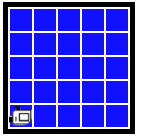
The whole program does this: bit starts at the upper left facing south. We want to fill the whole world with blue, like this
Program Before:
Program After:
> Fill
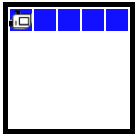
First we'll decompose out a fill_row_blue() function that just does 1 row. Work on that function first.
This is a "helper" function - solves a smaller sub-problem.
fill_row_blue() Before:
fill_row_blue After:
def fill_row_blue(bit):
    bit.left()
    bit.paint('blue')
    while bit.front_clear():
        bit.move()
        bit.paint('blue')
    bit.right()
    bit.right()
    while bit.front_clear():
        bit.move()
    bit.left()
A variable stores a value for the code. Variables are set up with a single equal sign =. Later appearances of that variable retrieve the stored value. Here's a little example:
...
color = 'red'
bit.paint(color)
bit.move()
bit.paint(color)
This paints 2 squares 'red', or whatever value was assigned to color on the first line.
> Stripes
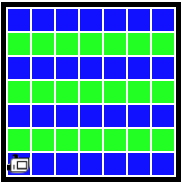
Suppose we want to fill the world with color stripes like this
Old: fill_row_blue()
def fill_row_blue(bit):
    bit.left()
    bit.paint('blue')
    while bit.front_clear():
        bit.move()
        bit.paint('blue')
    bit.right()
    bit.right()
    while bit.front_clear():
        bit.move()
    bit.left()
New with parameter: fill_row_color():
def fill_row_color(bit, color):
    bit.left()
    bit.paint(color)   # key line: use parameter
    while bit.front_clear():
        bit.move()
        bit.paint(color)
    bit.right()
    bit.right()
    while bit.front_clear():
        bit.move()
    bit.left()
Call fill_row_color() with 'green':
   ....
   fill_row_color(bit, 'green')
1. Parameters match up by position, commas between parenthesis 2. Look at the Cases Menu w/ Run button .. shows this in action
Look at the problem statement. We'll work though solving this in lecture.
> Beloved
That's a lot to take in for one day. We'll work more examples Monday.