int mathematics is "precise"
Like formal mathematics
3 + 4 is exactly == 7, as is 4 + 3
float 3.14, 1.2e23
float: has a dot "." when printed
Surprisingly, float is not totally precise (later)
Math Operators: + - * /
Usual math operators + - * /
Precedence: * / go before + -
Otherwise evaluation goes left-right
Try in the interpreter
Up Arrow Power!
>>> 2 + 3
5
>>> 2 + 3 * 4  # precedence
14
Division / → float
Division is tricky
a / b returns a float value, not an int
Even if the division comes out even
What if we want an int?
>>> 7 / 2
3.5
>>> 8 / 2
4.0
Int Division // → int
a // b int division operator
Returns an int value by always rounding down to the next int
>>> 7 // 2
3
>>> 8 // 2
4
Relative Variable Change
Common "relative" pattern for a variable:
x = x + 1
Above increases the value of x by 1
e.g. Suppose x is 6. (1) First evaluate the right hand side, which comes to 7. (2) Then assign the 7 into x. This resolves the circularity with x appearing on both left and right by handling the right side first.
Relative Variable Shortcut: += *= //=
Shortcut operator to update a var: +=. The following is just a shorthand for x = x + 1
x += 1
Here's a shorthand for x = x * 2
x *= 2 # double x
Works for all operators, such as += -= //=
Handy because relative math on a var is so common
This just make the code more compact
>>> x = 10
>>> x += 3
>>> x
13
>>> x //= 2
>>> x
6
Image For Loop Structure
def red_channel(filename):
    image = SimpleImage(filename)
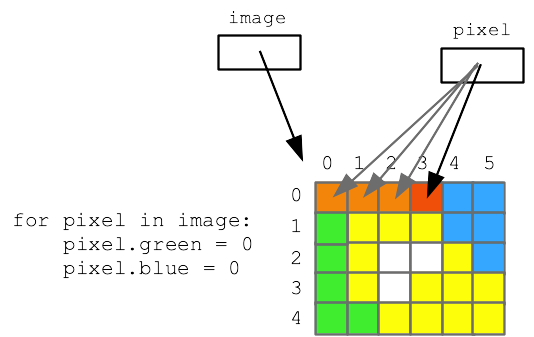
    for pixel in image:
        pixel.green = 0
        pixel.blue = 0
    return image
Filename is like 'flowers.jpg'
image = ... line loads image data into memory
image is a variable, points to image data
for loop - most useful, run loop once per item
aka "foreach" loop
for loop, runs pixel variable over pixels
pixel is a variable, points to next pixel each time
return image - "return" passes information back to our caller
return is the companion to parameters
Parameter = information from caller to called
Return = information sent back from called to caller
Loop over image, write code to change pixels - "foreach" loop
a. recover hidden image
b. 5-10-20 puzzle
5-10-20 puzzle: red, green, and blue values are too small by a factor of 5 10 20. But we do not know which factor goes with which color. Figure it out by experimenting with code to modify the image with various factors.
Swap
A little code pattern everyone should know
Exchange the values in 2 variables
Standard, idiomatic 3-line "temp" sequence
Be able to draw what's going on with memory
Mnemonic: temp=var, then var=... (rest sort of follows)
Trying this in hack-mode
>>> x = 1
>>> y = 2
>>> x
1
>>> y
2
>>> temp = x
>>> x = y
>>> y = temp
>>> x
2
>>> y
1
After the above swap finishes:
Image Coordinates
Load image into memory like this
image = SimpleImage(filename)
image.width, image.height - int number of pixels
e.g. image.width is 200, image.height is 100
(like pixel.red - these are Python "properties")
Origin x=0 y=0 is at upper left
x grows right
y grows down
This coordinate scheme is like typesetting lines of text
Say width is 100, what is range of x values?
0..99 inclusive (max x is 1 less than width)
width 100, height 50 drawing, (x, y) pixels:
(0, 0) pixel at upper left
(99,0) at upper right
(99, 49) at lower right
In all these examples x,y are int There's no pixel at x=2.5 !
for x in range(10):
Today: want to write a loop where x = 0, 1, 2, 3, ....
1-parameter range(n) function
range(10) represents the series:
0, 1, 2, ... 8, 9
Start at 0, go up to but not including the n parameter
range(n) = 0, 1, ... n-1
range(n) works in a foreach loop
Handy for accessing pixels on next examples!
# "list" is required here to display range
# as number series in brackets
>>> list(range(10))
[0, 1, 2, 3, 4, 5, 6, 7, 8, 9]
>>> list(range(5))
[0, 1, 2, 3, 4]
>>> list(range(1))       # just number 0
[0]
>>> list(range(0))       # no numbers!
[]
>>> for x in range(10):  # "foreach" works
...   print(x)
...
0
1
2
3
4
5
6
7
8
9
Mostly your brain is not paying much attention and that's fine
Problem (c) below
Your really need to slow down and work the details
Sometimes computer code requires detail oriented approach
There is no other strategy
4 Image Range Problems
a. and b. are examples, c. is a key example, d. we may get to.
>
Image Range1
Previously we used foreach to access every pixel. Here
we'll use nested-range loops - another form of iteration.
Understanding nested loops is step up in programming power.
a. Darker image-range Example
image.get_pixel(x, y) function - returns pixel for x,y vals
Nested range loops
outer and inner loops
Canonical range-loop code
Loop does top row left-right, then next row, ... like reading text
y = 0 outer loop, inner loop x goes through whole range
then y = 1 outer, inner loop x goes through whole range again
try in loop: print('x:', x, 'y:', y)
only do this with small images like we have here
otherwise its too much output
    image = SimpleImage(filename)
    for y in range(image.height):
        for x in range(image.width):
            pixel = image.get_pixel(x, y)
Note: How to Make 2 Pixels Look The Same?
Have pixel a
Make pixel b look the same as a .. how?
Pixels look the same if they have the same RGB numbers
Make b look the same as a:
b.red = a.red
b.green = a.green
b.blue = a.blue
b. mirror1
Make a new blank image (vs. filename), here width 200, height 100:
out = SimpleImage.blank(image.width * 2, 100)
This problem:
1. Create out twice as wide as original
2. Copy original image to left half
Make a drawing, then think about the code
def mirror1(filename):
    """
    Code is provided - this is an example.
    Read the original image at the given filename.
    Create a new 'out' image twice as wide as the original.
    Copy the original image to the left half of out, leaving
    the right half blank (this is a halfway-point to the image2).
    """
    image = SimpleImage(filename)
    # SimpleImage.blank(width, height) - returns a new
    # image with size given in its 2 parameters.
    # Here, create out image with width * 2 or first image:
    out = SimpleImage.blank(image.width * 2, image.height)
    for y in range(image.height):
        for x in range(image.width):
            pixel = image.get_pixel(x, y)
            # left copy
            pixel_left = out.get_pixel(x, y)
            pixel_left.red = pixel.red
            pixel_left.green = pixel.green
            pixel_left.blue = pixel.blue
            # right copy
            # nothing!
    return out
c. mirror2
This is the key exercise for today
Same as (b) + place mirror image of original on right half
A complex problem with coordinates, make a drawing
Choose concrete numbers to work out an example
e.g. say original width = 100
Make diagram, say 3 ABC "source" points:
What is the dest x,y for each?
A: (0, 0)
B: (1, 0)
C: (2, 0)
D: (99, 0)
Figure out the formula to compute dest x,y from source x,y
(Demo: go through points, figure out formula)
(Demo: put in wrong formula, see bad x,y error message)
Strategy: concrete numbers + drawing .. guide the code
Diff slider draws yellow bars where the output seems wrong to the system
ABC Table Solution
A: (0, 0) dest: (199, 0)
B: (1, 0) dest: (198, 0)
C: (2, 0) dest: (197, 0)
D: (99, 0) dest: (100, 0)
Looking at above, work out that formula is
dest_x = out.width - 1 - x
mirror2 Solution Code
def mirror2(filename):
    """
    Like mirror1, but also copy the original image
    to the right half of "out", but as a horizontally reversed
    mirror image. So the left half is a regular copy,
    and the right half is a mirror image.
    (Starter code does the left half).
    """
    image = SimpleImage(filename)
    out = SimpleImage.blank(image.width * 2, image.height)
    for y in range(image.height):
        for x in range(image.width):
            pixel = image.get_pixel(x, y)
            # left copy
            pixel_left = out.get_pixel(x, y)
            pixel_left.red = pixel.red
            pixel_left.green = pixel.green
            pixel_left.blue = pixel.blue
            # right copy
            # this is the key spot
            # have: pixel at x,y in image
            # want: pixel_right at ??? to write to
            pixel_right = out.get_pixel(out.width - 1 - x, y)
            pixel_right.red = pixel.red
            pixel_right.green = pixel.green
            pixel_right.blue = pixel.blue
    return out
Aside: Parameters
We've talked about parameters - information passed in to a function call
Old simple example - pass 'blue' as parameter value for call of paint() function
bit.paint('blue')
-Now we have complicated examples, like this line:
out.get_pixel(out.width - 1 - x, y)
get_pixel(x, y) - has "x" and "y" parameters
The above uses the expression "out.width - 1 - x"
To provide a value for the "x" parameter
in the call of the get_pixel() function