Today: Canvas drawing, running in PyCharm from command line
Expand the .zip to get a "draw1" folder with .py files in it. Run PyCharm. Use Open... menu to open the ***folder***
Then use the "Terminal" tab at lower left to run by command line as shown below
Command Line is the - "pro" way to control the compouter.
We'll use the CS106A "DrawCanvas" which supports these functions:
    def draw_line(x1, y1, x2, y2):
        """
        Draws a black line between points x1,y1 and x2,y2
        Optional color='red' parameter can specify a color.
        """

    def draw_rect(x, y, width, height):
        """
        Draws a 1 pixel rectangle frame with its upper left at x,y
        and covering width, height pixels.
        Takes optional color='red' parameter.
        """

    def fill_rect( x, y, width, height):
        """
        Draws a solid black rectangle with its upper left at x,y
        and covering width, height pixels.
        Takes optional color='red' parameter.
        """

    def draw_oval(x, y, width, height):
        """
        Draws a 1 pixel oval frame with its upper left bounding rect at x,y
        and covering width, height pixels.
        Takes optional color='red' parameter.
        """

    def fill_oval(x, y, width, height):
        """
        Draws a solid black oval with its upper left bounding rect at x,y
        and covering width, height pixels.
        Takes optional color='red' parameter.
        """

    def draw_string(x, y, text):
        """
        Draws a black text string with its upper left at x,y
        Takes optional color='red' parameter.
        """
These are noun.verb functions on a Canvas like this:
canvas = DrawCanvas(500, 300)   # create with width,height
canvas.draw_line(0, 0, 100, 100, color='red')
...
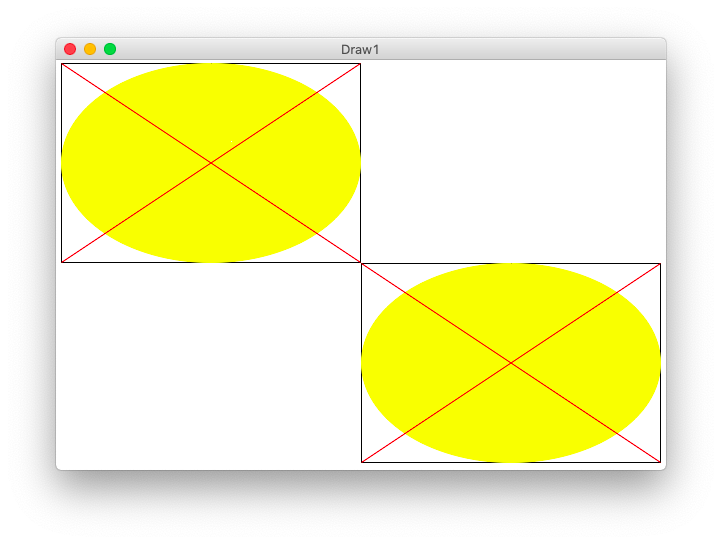
def draw_oval(canvas, x, y, width, height):
    """
    Given a canvas and x,y and width,height
    Draw the "oval" figure inside these bounds.
    (this code is complete)
    """
    canvas.draw_rect(x, y, width, height)
    canvas.fill_oval(x, y, width, height, color='yellow')
    # upper-left to lower-right
    canvas.draw_line(x, y, x + width - 1, y + height - 1, color='red')
    # lower-left to upper-right
    canvas.draw_line(x, y + height - 1, x + width - 1, y, color='red')
The main() in this case calls draw_oval() twice, once upper left and once lower right. This tests that the x,y are handled correctly. Open the "terminal" at the lower left of PyCharm. The "$" below is the prompt, the rest you type (on Windows its "python" instead of "python3".)
$ python3 draw1.py -oval 500 200
In the terminal, hit the up arrow. Edit the old command and run it again easily. This is a very productive and fast way to run and vary your program.
for i in range(n):
    y_add = (i / (n - 1)) * (height - 1)
def draw_lines1(canvas, x, y, width, height, n):
    """
    Draw the lines1 figure within x,y width,height
    """
    canvas.draw_rect(x, y, width, height)
    # Figure y_add for each i in the loop
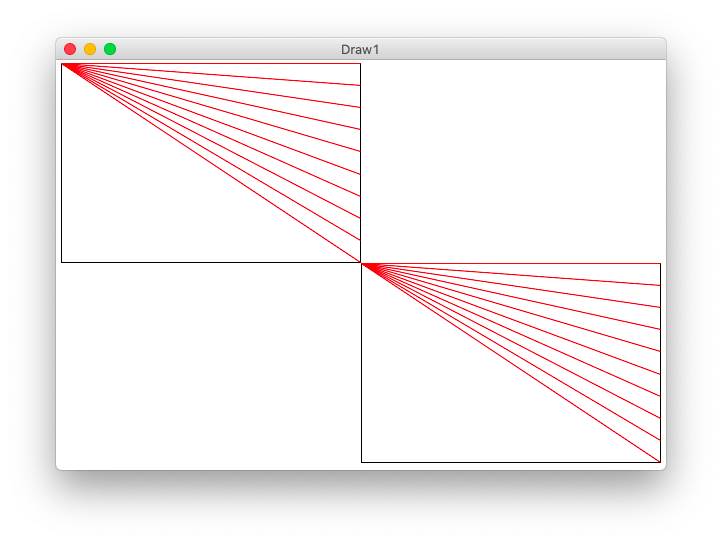
    for i in range(n):
        y_add = (i / (n - 1)) * (height - 1)  # formula: 0..1 fraction * max
        canvas.draw_line(x, y, x + width - 1, y + y_add, color='red')
Run from command line
$ python3 draw1.py -lines1 300 200 12

Run from the command line:
$ python3 draw1.py -lines2 300 200 12
def draw_lines2(canvas, x, y, width, height, n):
    """
    Draw the lines2 figure within x,y width,height
    The code for lines1 is already here
    """
    canvas.draw_rect(x, y, width, height)

    for i in range(n):
        y_add = (i / (n - 1)) * (height - 1)  # formula: 0..1 fraction * max
        canvas.draw_line(x, y, x + width - 1, y + y_add, color='red')

    # loop to draw green "lines2" lines
    for i in range(n):
        pass
        y_add = (i / (n - 1)) * (height - 1)
        x_add = (i / (n - 1)) * (width - 1)
        canvas.draw_line(x, y + y_add, x + x_add, y + height - 1, color='green')
>>> 500 / 11
45.45454545454545    # float division with fraction
>>> 500 // 11        # int division - what we want here
45
Run from command line:
$ python3 draw1.py -grid1 600 400 12
Solution code
def draw_grid1(width, height, n):
    """
    Creates a canvas.
    Draws a grid1 of n-by-n black rectangles
    (this code is complete)
    """
    canvas = DrawCanvas(width, height, fast_draw=True)

    # Figure sizes for all sub rects
    sub_width = width // n
    sub_height = height // n

    # Loop over row/col
    for row in range(n):
        for col in range(n):
            # Figure upper left of this sub rect
            x = col * sub_width
            y = row * sub_height
            canvas.draw_rect(x, y, sub_width, sub_height)
Here is the draw_lines2() def first line:
def draw_lines2(canvas, x, y, width, height, n):
    """
    Draw the lines2 figure within x,y width,height
    The code for lines1 is already here
    """
def draw_grid2(width, height, n):
    """
    Creates a canvas.
    Add code to draw the lines2 figure in each grid sub rect.
    """
    canvas = DrawCanvas(width, height, fast_draw=False)

    sub_width = width // n
    sub_height = height // n

    for row in range(n):
        for col in range(n):
            pass
            # Your code here - draw a lines2 figure in each grid rect
            x = col * sub_width
            y = row * sub_height
            # key line: call the function to draw the figure here
            draw_lines2(canvas, x, y, sub_width, sub_height, n)