CS106A - Lecture 1 - Code and Bit
Today: Bit, code, functions, and the while-loop
CS106A: Computer - Code - You
- Computer is powerful
- But dumb! Just runs code
- You have insight
Think of an algorithm
Express ideas in code
Dumb it down so even a computer can do it
- A great marriage..
- Your insight + the computer
Story #1 - Bit's World - Simple
We have this "bit" robot, lives in a rectangular world divided into squares, like a chessboard. We'll use bit at the start of CS106A to introduce and play with key parts of Python. The nice thing about Bit code is that each action has a tangible result, as bit move around in the world.
Bit can do 4 actions in the world: move, left, right, paint
Here is a more detailed guide of Bit's features: Bit Reference
Bit Example
Suppose Bit starts at the upper left corner facing to the right, and then the following code runs:
    bit = Bit('5x5.world')  # Create "before" picture
    bit.move()
    bit.paint('blue')
    bit.right()
    bit.move()
    bit.paint('green')
Before:
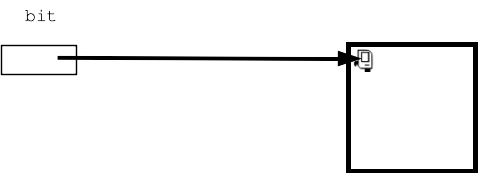
After:

The syntax bit.move() is a Python function call. A function hold some code. To "call" a function runs its code. This is the noun.verb function call form.
Story #2 - Program and Functions
A "program" (or "app") is a collection of code for the computer to run. The code in a program is divided into smaller, logical units of code called "functions", much as the sentences of an essay are divided into logical paragraphs.
Python programs are written as text in files named like "example.py". The program text will be divided into many functions, each marked by the word def:

Story #3 - Example Function Def Syntax
Here is the Python code for one function that moves bit around a little. There is syntax here - not pretty, but easy enough to get used to. Computers need a fixed syntax to understand the code you type in. More about syntax below.
def blue_green(filename):
    bit = Bit(filename)
    bit.move()
    bit.paint('blue')
    bit.right()
    bit.move()
    bit.paint('green')
Next: (1) we can run this code, see what it does. (2) Look at the syntax of a function-def
Let's Run This Function
- Run a function = runs its lines top to bottom (aka "call" that function)
- Each line does something
- In this case, for each line see bit take an action
Here is a "live" on the web version of the above def. Click "Run" on the page and watch what it does. You can use the "steps" slider to run the code forwards and backwards, seeing the details of the run.
> bit1 blue_green function
5 Things About def
So having seen a function run, now look at the details of the syntax. Sorry, it's a bunch of small syntactic points.
The def syntax looks weird, but is basically superficial and you will get used to it quickly.
def blue_green(filename):
    bit = Bit(filename)
    bit.move()
    bit.paint('blue')
    bit.right()
    bit.move()
    bit.paint('green')
The first code line sets up a variable named "bit" to point to the robot-world as pictured above, explained in a later lecture
bit = Bit(filename)
- 1. A function starts with the word "def"
- 2. Followed by a name for the function, e.g. "blue_green".
The name is chosen by the programmer
Multiple words are separated by underbars
We'll talk about function naming more later
- 3. Followed by a parenthesis/colon thing, explained later
- 4. Followed by the lines of code of the function, indented
- 5. Calling a function runs its lines from top to bottom
What Does bit.move() Mean?
- There is a function named "move" that Bit understands
- The syntax
bit.move() "calls" that function
i.e. runs it
- Calling a function runs its lines, then continues to our next line
- This is the "noun.verb" style of function call, which Python uses half the time
- Note the parenthesis at the right side of the call
bit.move()
The call does not work without the parenthesis - syntax!
What Does bit.paint('blue') Mean?
- There is a function named "paint" that bit understands
- The paint function takes a "parameter" - extra information to use
- The parameter value we want to use is written inside the parenthesis of the call
- e.g.
bit.paint('blue')
- Means: run the paint() function, passing in 'blue' as the parameter value
A Little Talk About Syntax Errors
- Syntax - code is structured for the computer
- Very common error - type in code, with slight syntax problem
- e.g. syntax error:
bit.move[)
- Professional programmers make that sort of "error" all the time
- Just type it in, run it, fix the errors
- Not a reflection of some flaw in the programmer
- Do not give in to the following thoughts (imposter syndrome):
"Another syntax error .. maybe I'm not cut out for this!"
"I bet nobody else is getting these"
- Just the nature of typing ideas into the mechanical computer language
- Exercises to desensitize: a bunch of typical syntax errors + fixing them
- Fixing these little errors is a small, normal step
- Computers are powerful for you, but you need to work their way on syntax
Errors - Sport and Fix!
- These all have errors, trying run and fix (lecture demo, or on your own)
- These are on the parlante.org experimental server, uses your Stanford login
- bit1a
- bit1b
- bit1c
- bit1d
- Some common errors
(Can try to put these errors into working blue_green)
Ragged indentation within def
Mess up or omit () on function call
Missing colon : on the def line
Typo the name of a function, e.g. bit.mve()
(optional) You Try One: green2
Bit begins at the upper left corner facing right.
Paint the square below the start square green,
and the square below that green as well, ending like this:

The word pass is a placeholder for your code, remove it. Feel free to make some syntax errors getting this to work!).
> green2
Suppose I Give You This Problem
Bit starts at the upper left. Move bit forward until reaching a wall, painting every moved-to square green. The resulting world looks like:
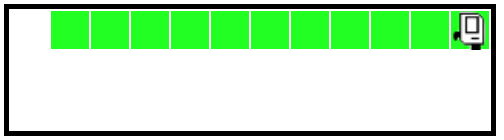
- Looks like a lot of work
- To make all that green, lots of
bit.move()
bit.paint('green')
- Need to stop when reaching far wall
- How to do this? Loops
Statement vs. Expression
- A line of code may be a statement or an expression
- A statement runs code that performns an action
- e.g.
bit.move()
- An expression runs code and returns a value to that spot
- e.g.
bit.front_clear()
bit.front_clear()
- Test if way-forward is clear before a move:
bit.front_clear()
- Calling
bit.front_clear() returns a boolean value, True or False
True and False are Python's "boolean" values
- Today: use as test-expression in while
Run go-green code
First we'll run the code. This code is complete. Study it to see how the loop works.
> go-green
- On this problem the system is checks if the output is correct - green checkmark
(To be clear this is not part of your grade, just checking the output for the exercise.)
- "diff" Feature - red marks on incorrect squares
The system knows what the world is supposed to look like, so marks differing squares
For reference, here is the code:
def go_green(filename):
    bit = Bit(filename)
    while bit.front_clear():
        bit.move()
        bit.paint('green')
While Loop Syntax
Syntax 4 parts: while, test-expression, colon, indented body lines
while test-expression:
  body lines inside the while
  indented
While Loop Operation
- First evaluate test-expression at the top, True or False?
- If True, run all the lines of the body, top to bottom
Then loop back to top, check test again, .. repeat
After every run of the body .. go back and do the test
- When the loop-test is False, loop is done, running continue after the loop body
- If the test is False initially, the body runs zero times (see Case-4)
While Loop Observations
- Lines before and after loop run once, as usual
- Body lines in the loop are different, running many times
- The test is checked, then run all the body lines top to bottom
- It's possible for the body to run zero times
One Code - Many Cases - Generality
- "Generality"
- There is one copy of your code algorithm
- General = it should work for all the different input worlds
- Try Run All option
While Loop - Power!
- Loop - key jump up in power
- "Do these lines again and again"
- Every algorithm has key lines to run thousands or millions of times
- Loops are the way to do that
- Several types of loop - today while