Today - black box examples, boolean logic, string intro, Doctests
Recall: "Black Box" Function Model
Black-box model of a function: function runs with parameters as input, returns a value.
All the complexity of its code is sealed inside. Calling it is relatively simple - provide parameters, get back an answer.

Strategic Story - Why Black Box?
For Divide and Conquer, want to be able to work on each function separately, one at a time. Need to keep the functions sealed off from each other for this to work - black box. We'll see how all this comes together later in the quarter.
"Cases" - Code Handles All Cases
Think of each input as a "case" the function must handle, return the correct output. To be correct, code needs to handle all the possible input cases. Hallmark of putting something on the computer: forces you to think through all the cases.
Boolean Values
For more detail, see guide Python Boolean
- "boolean" value in code -
True or False
- if-test and while-test work with boolean inputs
- e.g.
bit.front_clear() returns a boolean
- So we have
if bit.front_clear():
Ways to Get a Boolean
== operator to compare two things
2 == 1 + 1 returns True
Two equal signs
Since single = is used for var assignment
- Compare greater-than / less-than
< is less-than
<= is less-or-equal to
- These work with ints, floats
Try this in the interpreter..
>>> n = 5   # assign to n to start
>>> n == 6
False
>>> n == 5
True
>>>
>>> n < 10
True
>>> n < 5  # < is strict
False
>>>
>>> n <= 5  # less-or-equal
True
>>>
>>> n > 0
True
Black Box Example Functions
(Trying some new tech here)
>
"logic1" Black Box Functions
1. "Winnings1" Function
- Say we work for the CA lottery
- Writing a function for a game
- Rules: input is an int score 0..10 inclusive
- score 5 or more, winnings = score * 12
- score 4 or less, winnings = score * 10
- We could make a table showing output for each input
- Code needs to work for all cases, i.e. "general"
- Later: we'll see how to put in formal tests that the code is getting the right output for each input
score winnings
0      0
1      10
2      20
3      30
4      40
5      60  # 12x kicks in here
6      72
7      84
8      96
9      108
10     120
Winnings1 code
- This code works
score parameter comes in
- if/logic to check for score >= 5
- return is used twice
- "pick off" of cases
- So past the first if.. what is true of score?
- We know score < 5
Solution
def winnings1(score):
    if score >= 5:
        return score * 12

    # Run gets here: we know score < 5
    return score * 10
if-return Pick-Off Strategy
- The function needs to handle all input cases
- If-logic detects one case .. returns the answer
- The return exits the function immediately with a return value
- Lines below have if-return logic for other cases
- Code is "picking off" the cases one by one
- As we get past if-checks .. input must be a remaining case
- Analogy: coin sorting machine
coin rolls past holes, each a bit larger
dime, penny, nickel, quarter
a dime never makes it to the quarter-hole
The dime is picked-off earlier
- Demo: bug change <= to <
None Is The Default Function Result
- If a function does not run a return,
None is default function result
- Demo: comment out last "return ..." line
See how None is the result for those cases
- Demo: replace all the code with just
pass .. what is the result of calling the function now?
- If you see
None in your output - maybe you forgot the return
- Or your if-logic for some case doesn't return
2. Winnings2 Example
Extra practice example.
Say there are 3 cases, have a series of if-return to get them. Need to think about the order. Need to put the == 10 case early.
Winnings2: The int score number in the range 0..10 inclusive.
Bonus! if score is 10 exactly, winnings is score * 15.
If score is between 4 and 9 inclusive, winnings is score * 12.
if score is 3 or less, winnings is score * 10.
Given int score, compute and return the winnings.
Solution
def winnings2(score):
    if score == 10:
        return score * 15

    if score >= 4:  # score <= 9 is implicit
        return score * 12

    # All score >= 4 cases have been picked off.
    # so score < 4 here.
    return score * 10
Boolean Operators: and or not
- An operator combines values, returning a new value
e.g. + operator, 1 + 2 returns 3
- Boolean operators combine
True False values
- Boolean operators:
and or not
- Suppose here that
xxx and yyy are boolean values
xxx and yyy - if both sides are True, then it is True
xxx or yyy - if either side or both sides are True, it is True
not xxx = inverts True/False
>>> n      # Start n as 5
5
>>> n < 10
True
>>> n > 7
False
>>>
>>> n < 10 and n > 7  # Try and/or
False
>>> n < 10 or n > 7
True
>>>
>>> n = 8   # Change n to 8, try again
>>> n < 10 or n > 7
True
>>> n < 10 and n > 7
True
>>>
>>> n == 8
True
>>> n == 10
False
>>> n != 10  # not-equal
True
and Example
Suppose we have this code
if n > 0 and n < 10:
   # get here if test is True
Values of n where test is True: 1 5 9
Values of n where test is False: 10 12 -1
3. is_teen(n) Example
is_teen(n): Given an int n which is 0 or more. Return True if n is a "teenager", in the range 13..19 inclusive. Otherwise return False. Write a boolean test to pick off the teenager case.
Solution
def is_teen(n):
    # Use and to check
    if n >= 13 and n <= 19:
        return True
    return False
    # Future topic: possible to write this
    # as one-liner: return n >= 13 and n <= 19
4. Lottery Scratcher Example
An extra example for practice.
Lottery scratcher game: We have three icons called a, b, and c. Each is an int in the range 0..10 inclusive.
If all three are the same, winnings is 100.
Otherwise if 2 are the same, winnings is 50.
Otherwise winnings is 0. Given a, b and c inputs, compute and return the winnings. Use and/or/== to make the tests.
Solution:
def scratcher(a, b, c):
    # 1. All 3 the same
    if a == b and b == c:
        return 100

    # 2. Pair the same (3 same picked off above)
    if a == b or b == c or a == c:
        return 50

    # 3. Run gets to here, nothing matched
    return 0
Strings
For more detail, see guide Python Strings
- A very widely used data type
- String is a sequence of "characters" or "chars"
- e.g. urls, paragraphs
- Introduce strings today, more detail later
- In Python code a string "literal" is written on one line within single quote marks ' (prefer)
- Double quote also works "
'hello'
"hello"
len() function
- Returns number of chars in string
- Works on other collections too
- Not noun.verb style
>>> len('Hello')
5
>>> len('x')
1
>>> len('')
0
Empty String ''
- The "empty" string is just the string with 0 chars
- Written like:
'' or ""
- This is a valid string, its len is 0
- A common case to think about with string algorithms
- Does the code need to work on the empty string?
- Probably yes
Zero Based Indexing - Super Common
- Everything in computers uses this zero-based indexing scheme
- Pixels within an image used this, x/y vs. width/height
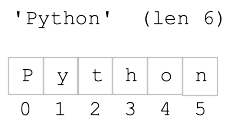
- Characters in strings are "indexed" from 0 vs. length
- Index number addresses each char in the string
- Foreshadow: we'll use index numbers, [ ], and len()...
For many many linear type data arrangements
But for today strings
String Square Bracket Index
- Use square bracket to access a char by index number
- Valid index numbers: 0..len-1
- Get out of bounds error for past-limit index number
>>> s = 'Python'
>>> s[0]
'P'
>>> s[1]
'y'
>>> s[4]
'o'
>>> s[5]
'n'
>>> s[6]
IndexError: string index out of range
String Immutable
- A string in memory is not editable
- "Immutable" is the official term
- e.g. square bracket cannot change a string
>>> s = 'Python'
>>> s[0]        # read ok
'P'
>>> s[0] = 'X'  # write not ok
TypeError: 'str' object does not support item assignment
String +
- Plus operator
+ combines 2 strings to make a new, bigger string
aka "concatenate"
- Uses new memory to hold the result
- Does not change original string
>>> a = 'Hello'
>>> b = 'there'
>>> a + b
'Hellothere'
>>> a
'Hello'
String + Add At End Pattern
- Use + to add at the end of a string, yielding a new bigger string
- Use the following pattern to grow the string s:
s = s + 'xxx'
- The += operator works here too
- The individual strings are still immutable
We are constructing a new, bigger string with each step
>>> a = 'Hi'
>>> a = a + '!'
>>> a
'Hi!'
>>> a = a + '!'
>>> a
'Hi!!'
>>> a = a + '!'
>>> a
'Hi!!!'
for/i/range String Loop
- The canonical loop over index numbers
- For string 'Python' len 6
Want index numbers 0, 1, 2, 3, 4, 5
for i in range(len(s)):
- Use
s[i] to access each char in the loop
- Standard to use the variable name
i for this loop
- This is so common, it's idiomatic
- We'll see another way to do this later
# have string s
for i in range(len(s)):
    # access s[i] in here
String Example Functions
>
"str2" String Functions
1. double_char
- Idiomatic loop look at every char
- Initialize
result = '' variable before loop
- Update in loop:
result = result + xxxx
- Return result at end
- Could use
+= shortcut
- Q: does it work on empty string input?
Solution code
def double_char(s):
    result = ''
    for i in range(len(s)):
        result = result + s[i] + s[i]
    return result
String Boolean Tests - True or False
String Testing == 'a' 'A'
We've used == already. 'a' and 'A' are different characters.
>>> s = 'red'
>>> s == 'red'   # two equal signs
True
>>> s == 'Red'   # must match exactly
False
String Testing - in
- The word in - test if a substring appears in a string
- Mnemonic: same word inside for-loop, like Python wants to introduce very few new words
- Chars must match exactly - upper/lower are considered different
>>> 'c' in 'abcd'
True
>>> 'bc' in 'abcd'
True
>>> 'bx' in 'abcd'
False
>>> 'A' in 'abcd'
False
String Character Class Tests
- String is made of characters
- Categorize characters into major classes:
- 1. Alphabetic -
'a' 'Z' .. used to make words
- 2. Digits -
'0' '2' .. used to make numbers
- 3. Space - space, tab, newline - aka "whitespace"
- There are noun.verb tests for the above 3, returning boolean True or False
- For empty string return False (a weird edge case)
- All the other chars form a miscellaneous class -
'$' '%' ';' ... any char not in the first 3 categories
s.isdigit() - True if all chars in s are digits '0' '1' .. '9'
s.isalpha() - True for alphabetic word char, i.e. a-z A-Z. Each unicode alphabet has its own definition of what's alphabetic, e.g. 'Ω' below is alphabetic.
s.isalnum() - alphanumeric, just combines isalpha() and isdigit()
s.isspace() - True for whitespace char, e.g. space, tab, newline
>>> 'a'.isalpha()
True
>>> 'abc'.isalpha()  # works for multiple chars too
True
>>> 'Z'.isalpha()
True
>>> '@'.isalpha()
False
>>> '9'.isdigit()
True
>>> ' '.isspace()
True
2. digits_only
- Given string s
- Return a string of its chars which are digits
- e.g.
'ab4xx2' returns '42'
- Use the standard range loop
- If logic inside the loop
Solution code
def digits_only(s):
    result = ''
    for i in range(len(s)):
        if s[i].isdigit():
            result += s[i]
    return result
if Variation: if / else
(probably not doing this today)
if test-expr:
  Lines-A
else:
  Lines-B
- See guide: Python-if
- Regular if - do the body lines, or do nothing
- if/else variant:
Choose between 2 actions
Always do one of them
- Run lines-A if test is True
- Run lines-B if test is False
- Style: use if/else to choose 1 of 2 actions
- Avoid using "else" if it is not needed
The regular "if" we've seen is most common
3. str_dx
- Return string where every digit changes to 'd'
And every other char changed to 'x'
- So 'ab42z' returns 'xxddx'
- Use if/else
Solution code
def str_dx(s):
    result = ''
    for i in range(len(s)):
        if s[i].isdigit():
            result += 'd'
        else:
            result += 'x'
    return result
Big Picture - Program, Functions, Testing
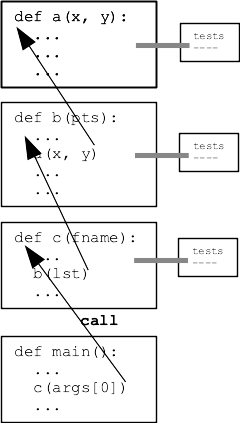
- Big Picture
- Program Made of many functions
- Decomposition
- Best Practice:
Test a function in isolation
Then later functions can call it
- We did this with Bit sometimes
- Fits with Divide and Conquer strategy
- Fits with Black Box model of a function
Inputs and Outputs - test with these
- Today: Python built-in tech for testing a function as you go
str1 project
- Download str1.zip project
- Expand to get "str1" folder
- Open the folder in PyCharm
Python Function - Pydoc
- See digits_only() below
- See triple-quote description at top
- This is known as "Pydoc" of the function
What inputs fn takes
What it promises to return
Black box model
"Contract" idea
def digits_only(s):
    """
    Given a string s.
    Return a string made of all
    the chars in s which are digits,
    so 'Hi4!x3' returns '43'.
    Use a for/i/range loop.
    (this code is complete)
    >>> digits_only('Hi4!x3')
    '43'
    >>> digits_only('123')
    '123'
    >>> digits_only('')
    ''
    """
    result = ''
    for i in range(len(s)):
        if s[i].isdigit():
            result += s[i]
    return result
Python Function - Doctest
See lines like:
    >>> digits_only('Hi4!x3')
    '43'
- That syntax spells a test of 1 case
- Looks like a fn call
- Input between the parens
- Output on the next line
- In PyCharm:
Right click on the test
Select "Run Doctest ..."
- Output:
Process finished with exit code 0
Also look for "Tests passed" and green checkmark on horizontal bar
That means it worked perfectly
This message could be more fun about it!
- Otherwise get error output
- Experiment: try putting in a bug, run Doctest, fix the bug
- Protip:
Green "play" button at left re-runs recent test
See also top of "Run" menu
Avoid having to re-click every time
You will learn and experiment with Doctests in section