Back to CS 106A Homepage
Section 2
Written by Brahm Capoor, Juliette Woodrow and Parth Sarin
January 20, 2020
Image Algorithms Review
Rotate Left
Write the following function:
def rotate_image_left(image)
that takes a SimpleImage parameter called
image and returns a version of that image, rotated 90
degrees to the left.
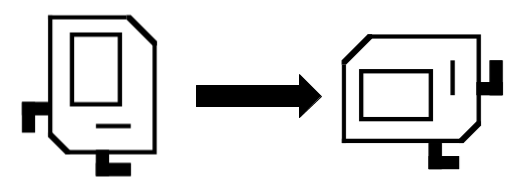
Note that the source image's width may be different from its height, and that the dimensions of the result image reflect the rotation you have performed; the result image is as wide as the source was tall, and as tall as the source was wide.
Flip Vertical
Write the following function:
def flip_vertical(image)
that flips a SimpleImage parameter called
image in the vertical direction.
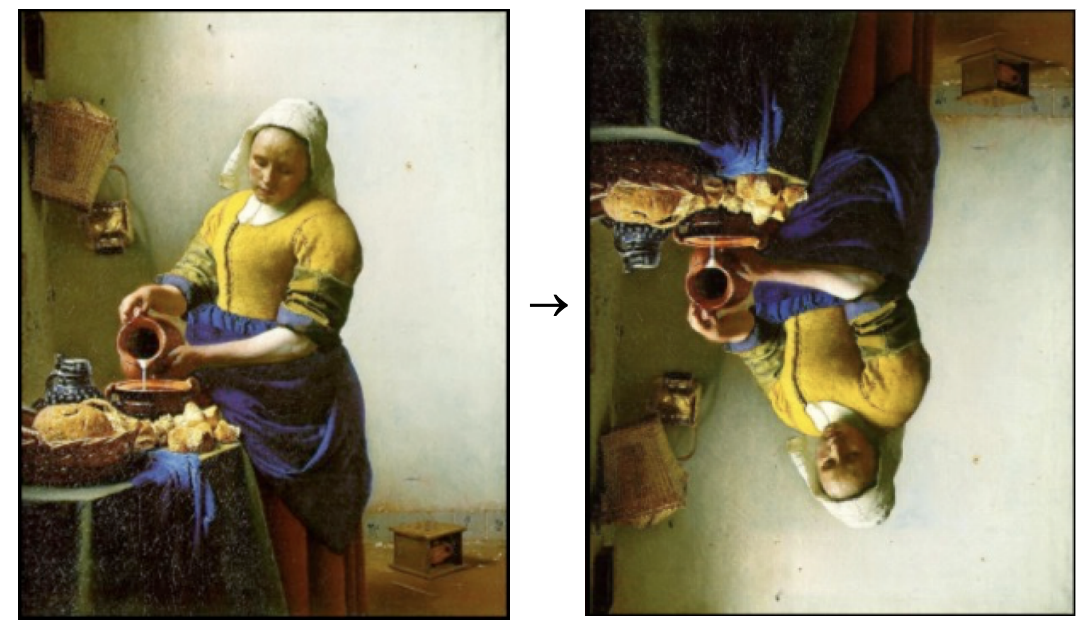
Download the starter project for the canvas drawing problems here if you'd like to try your solutions out.
Concentric Ovals
Implement the following function:
def draw_concentric_ovals(x, y, width, height, n, d)
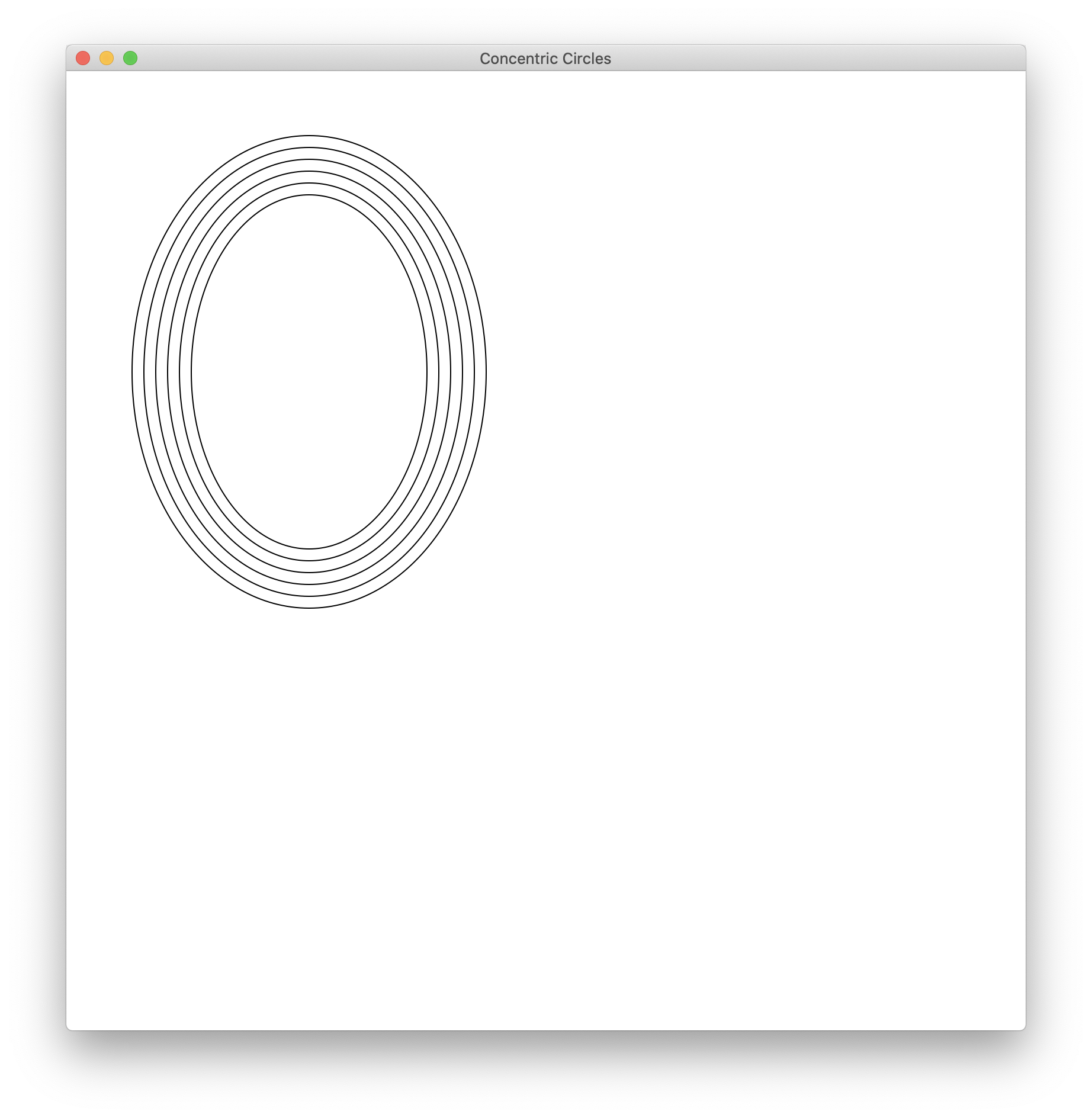
which will draw n concentric ovals separated by a distance of d.
Specifically, the distance from the top of one oval to the top of the next
most inner oval should be exactly d. The other parameters
(namely x, y, width, and height)
should be used to draw the outermost oval. x and y
represent the upper left corner of the rectangle that bounds this oval.
The width and height parameters correspond to the width and height of the
outermost oval.
Concentric ovals are ovals whose centers are in the same position.
Line Drawing
In class, we saw how to draw a nice geomeric pattern using straight lines:
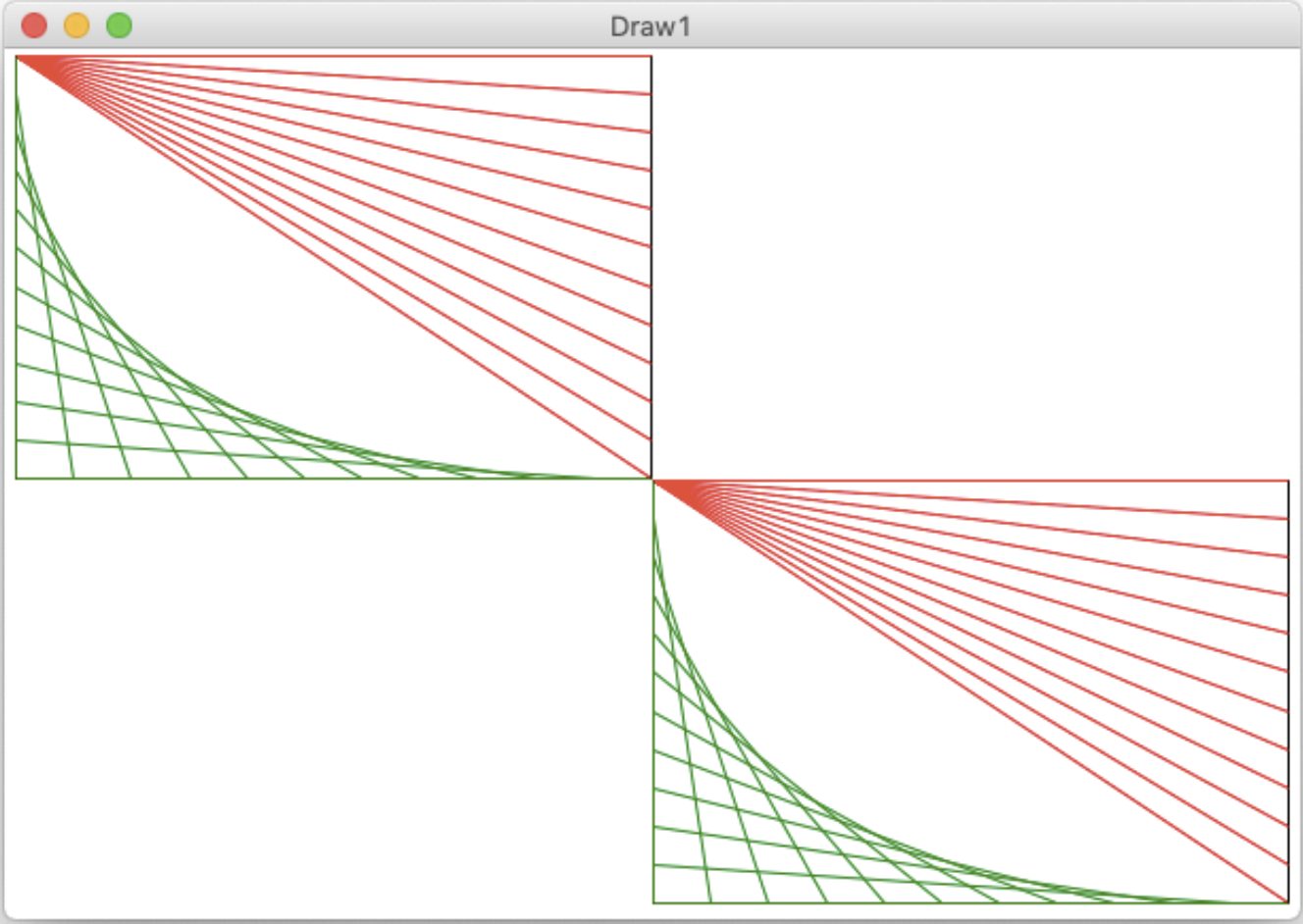
There's a bunch of artwork that uses this same mathematical principle to make really beautiful pictures. The technique is called line designs because it uses straight lines to draw shapes that seem curved (like the edge of the mesh in the picture above).
In this problem, we'll make a more complex line design:
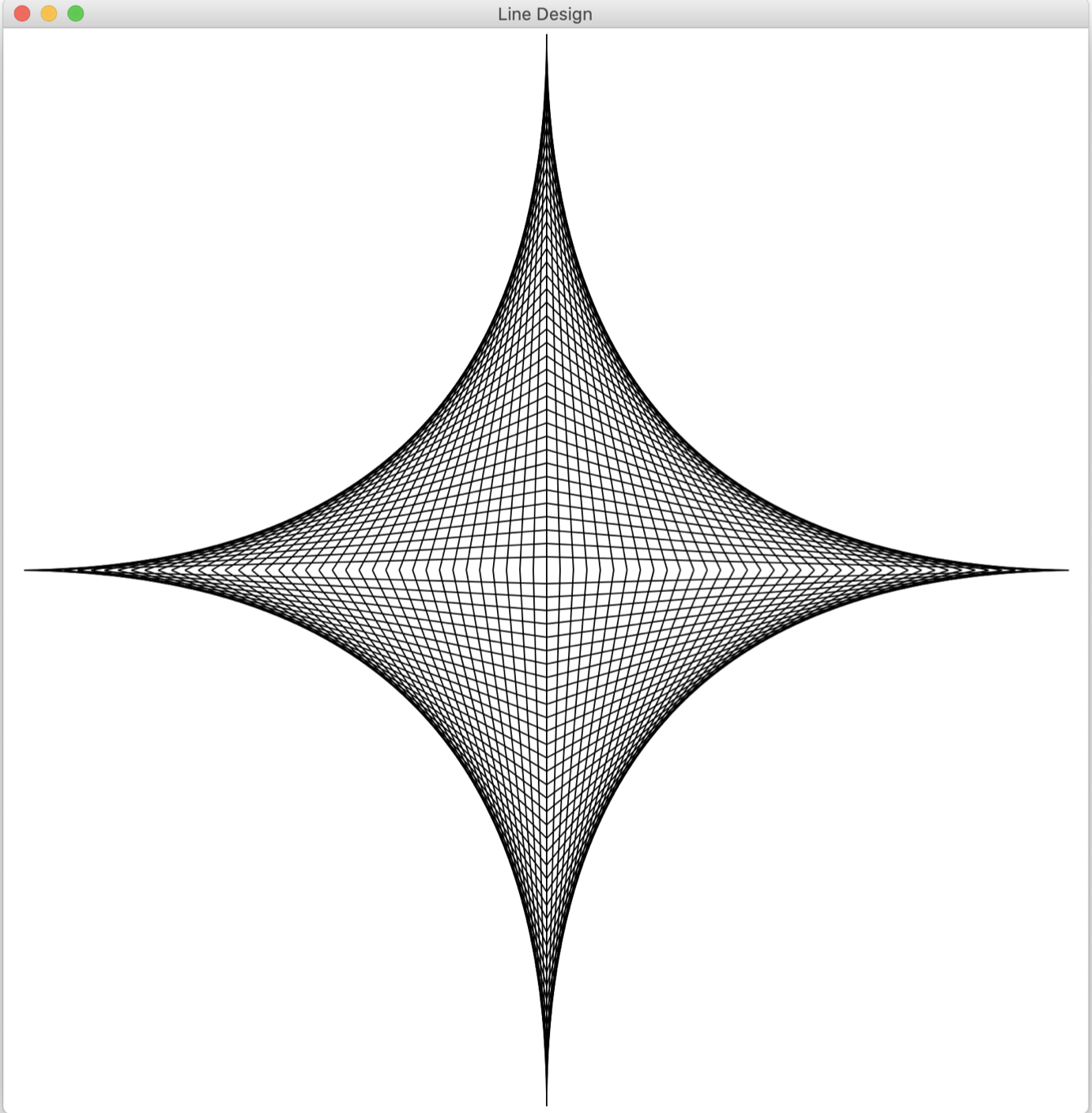
Specifically, your job is to write this function:
def draw_diamond_design(canvas, width, height, n)
that draws this design onto the canvas. height
is the height of the canvas and width is the width of the
canvas.
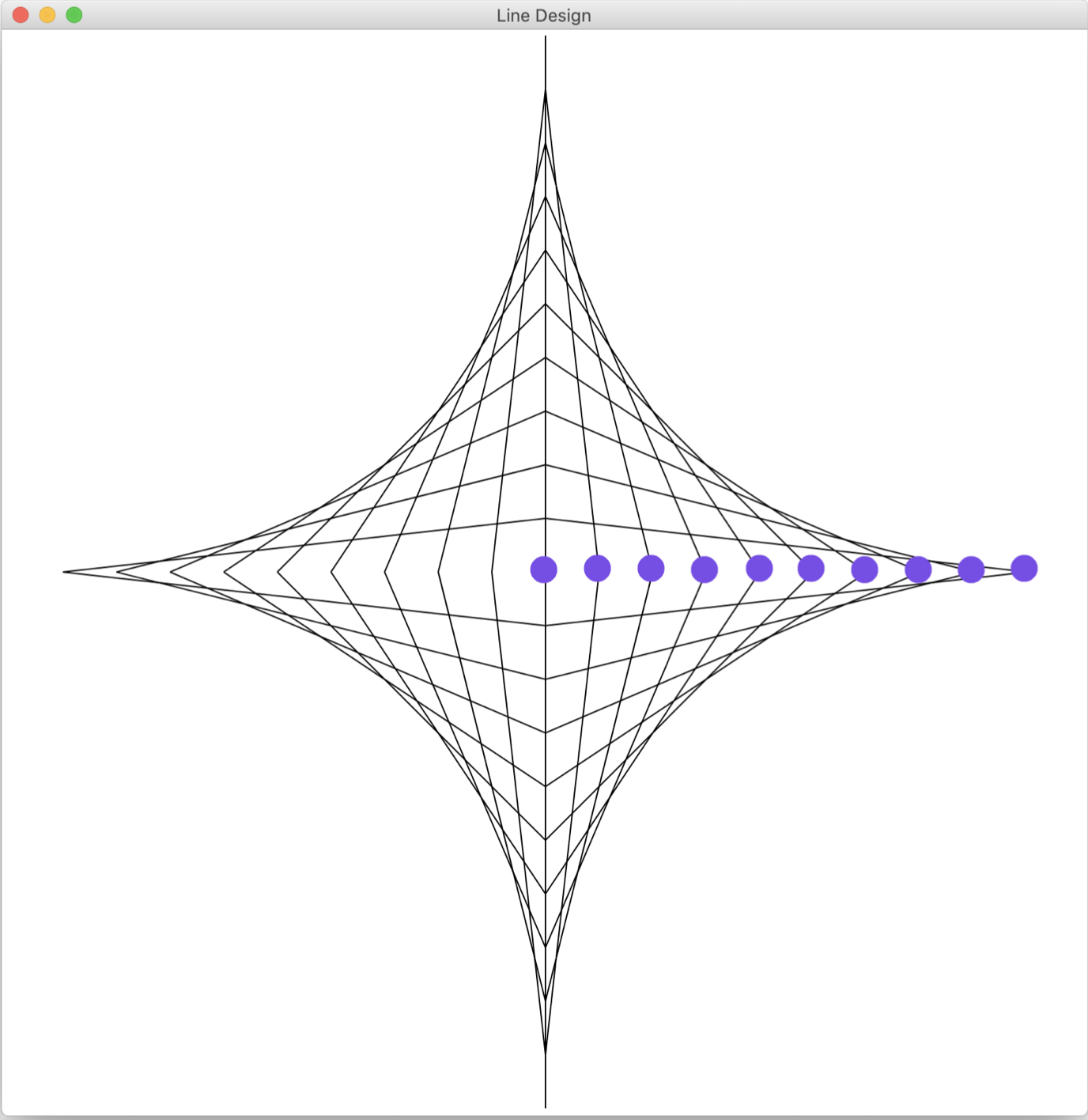
n is the number of points you should connect to on each
axis, divided by 2. Graphically, n is the number of larger
dots in this image:
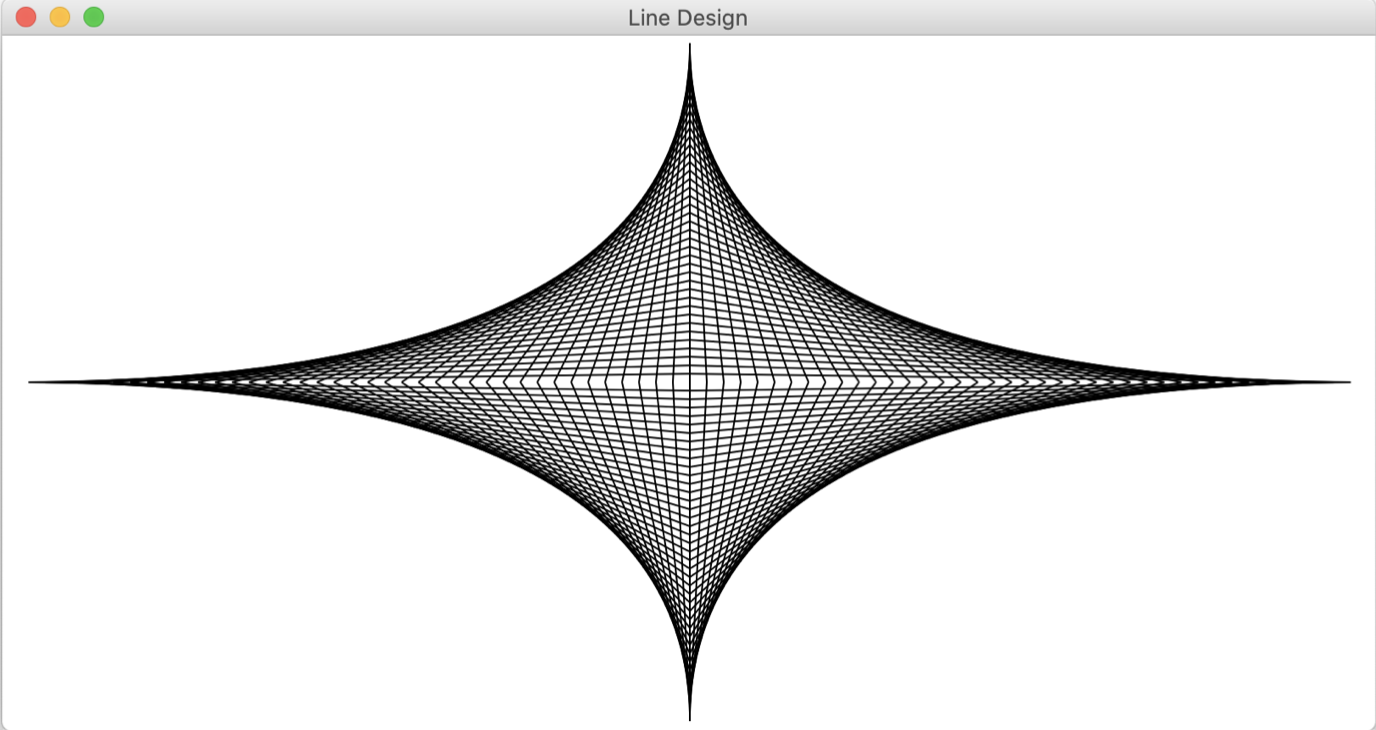
Finally, remember that height might not be equal
to width.
Lego Pyramid
Jeremy is helping his five-year-old nephew make a lego pyramid. Unfortunately, Jeremy is really bad at making pyramids and needs a blueprint. Sketch out a blueprint for Jeremy by writing the following function:
def draw_pyramid(canvas, width, height, num_rows, block_width, block_height)
which draws a pyramid with num_rows many rows and where each lego has width
block_width and height block_height. The bottom row should have
num_rows blocks, and each subsequent row should have one fewer block,
ending with the top row, which only has one block. The leftmost block on the first
row should be at the bottom left corner of the canvas. width and height
are the dimensions of the canvas.
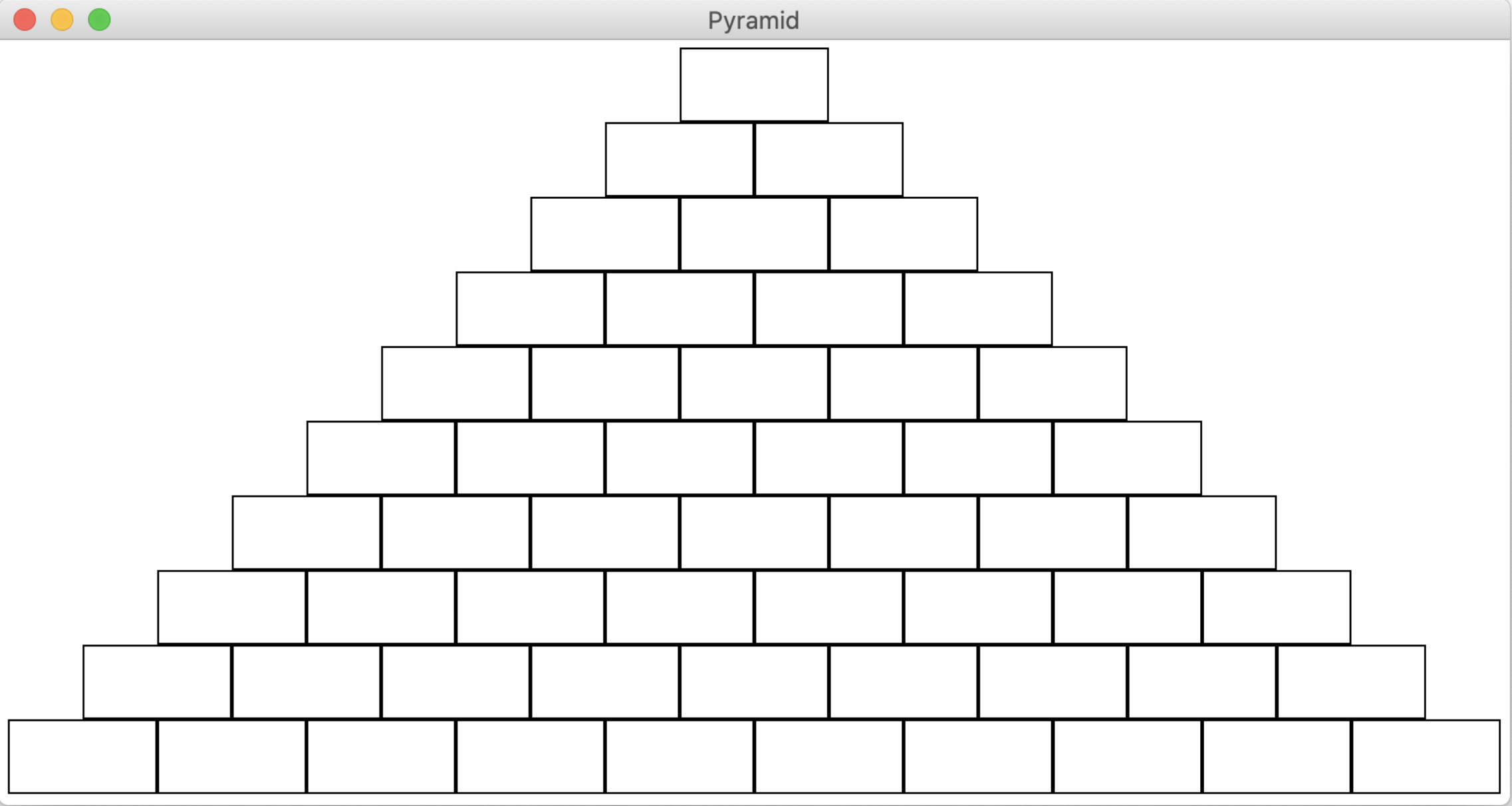
For example, calling draw_pyramid(canvas, width, height, 10, 80, 40) should
draw the following picture:
Opening the Black Box
In this program, you will tackle a series of problems intended to increase your
familiarity with parameters and return statements. Implement the
following functions:
-
def in_range(n, low, high), which takes in three integer parameters and returnsTrueifnis betweenlowandhigh(inclusive of both ends of the range) andFalseotherwise. -
def is_even(n), which takes in an integer parameternand returnsTrueifnis even andFalse. You may wish to use the%operator, which returns the remainder when dividing one number by the other. For instance,7 % 3evaluates to1, since the remainder when dividing 7 by 3 is 1. -
def is_prime(n), which takes in an integer parameternand returnsTrueifnis prime andFalseotherwise. As a reminder, a prime number is a number which has no factors other than 1 and itself. -
def only_one_even(num1, num2), which takes in two integer parameters and returnsTrueif and only if exactly one of them is even. -
(challenge)
def is_power_of_two(n), which takes in an integer parameternand returnsTrueifnis a power of 2 andFalseotherwise. A power of 2 is a number which can be produced by repeatedly multiplying 1 by 2 (and consequently, continuously dividing the number by 2 will lead back to 1).
Playing with Strings
If you'd like to try your solutions in PyCharm, download a starter project to import here. We've included doctests for you to test with, and running the program itself will run a series of tests.
Converting Strings to Integers
Write the following function:
def convert_to_int(s):
which takes in a string parameter s that is the string representation of some positive integer
and converts it to an integer. For example, convert_to_int("42") should return 42
and convert_to_int("0") should return 0.
Remove All Occurrences
Write the following function:
def remove_all_occurrences(s, to_remove)
which removes all occurences of the length-one string
to_remove from the string s. Here are some
sample inputs and outputs for this function:
  >>> remove_all_occurrences('This is a test', 't')
  'This is a es'
  >>> remove_all_occurrence('----O----', '-')
  'O'
Palindrome Checker
Write the following function:
def is_palindrome(s)
which returns True if s is a palindrome
and False otherwise. As a reminder, a palindrome is a
string that reads the same forwards and backwards. Your function
should behave as follows on the following inputs:
  >>> is_palindrome('brahm')
  False
  >>> is_palindrome('maps spam')
  True
  >>> is_palindrome('Maps spam')
  False # uppercase 'M' and lowercase 'm' are not the same character
As an extension, write a function
is_palindrome_without_spaces(s) that returns
True if s is a palindrome when all the
spaces have been removed from the string.
Adding Commas to Numeric Strings
In many parts of the world, when large numbers are written out, it is traditional to use separator characters to split the digits into groups. In the United States, commas are typically used to separate the digits into groups of three. For example, the number one million is usually written in the following form:
1,000,000
As you can imagine, this is probably a task that is frequently done; to allow programmers to easily display numbers in this fashion, implement the method
def add_commas_to_numeric_string(digits)
which takes a string of decimal digits representing a number and returns the string formed by inserting commas after every third position, from right-to-left.
Here are some sample inputs and outputs of the
add_commas_to_numeric_string function:
  >>> add_commas_to_numeric_string('17')
  '17'
  >>> add_commas_to_numeric_string('1001')
  '1,001'
  >>> add_commas_to_numeric_string('12345678')
  '12,345,678'
  >>> add_commas_to_numeric_string('999999999')
  '999,999,999'
Exclaim
Brahm loves to type text messages with tons of punctuation. He's very enthusiastic, so he'll often repeat the exclamation a bunch... Here's one of his recent text conversations:
                Brahm: "Did you see the new Star Wars movie?!?!?!?!?!?!"
                "I didn't. Did you like it?"
                Brahm: "It was wicked cool!!!"
                "Haha that's awesome. I heard it got bad reviews, though?"
                Brahm: "Yeah, but I still liked it......."
Brahm is getting tired of repeating the punctuation so much.
Help him out by writing a Python function that does it for him!
The function should accept a message, msg, the ending
punctuation, end, and the number of times to repeat
the punctuation, n. The function definition looks as follows:
def exclaim(msg, end, n)
The function should print out the resulting message to the terminal,
so Brahm can copy it and paste it into his text messages. For example,
calling exclaim('Did you see the new Star Wars movie', '?!', 6)
would print Did you see the new Star Wars movie?!?!?!?!?!?! and
calling exclaim('106A is awesome', '!', 5) would print
106A is awesome!!!!!.
Questions about Doctests
In class this week, we discussed doctests: ways of specifying the expected output of a function on certain parameters, which provide a convenient way of testing our functions as we write them. Doctests are an incredibly effective tool for programmers, but require careful consideration as we write them. As you go through the quarter, you'll develop a stronger sense of how to test your code, but it's never to early to start thinking about it. If you have time in section, discuss the following questions:
- When writing a function, what sorts of test cases should you put in your doctests?
- How many doctests does a function need?
- Take a look back at some of the functions you implemented in this week's section. What doctests would you write for them?
There aren't any correct answers to questions like this: in the solutions for this week's section, we've put together a few of our best ideas, but we encourage you to continue to restrategize on your own as you move through the quarter and start writing larger and larger programs.