
Today: more string algorithms, decomp-by-var, if/elif, quick-return, str.find(), slices
See chapters in Guide: String - If
>>> 'a'.isalpha()
True
>>> 'cat'.isalpha()
True
>>> '5'.isalpha()
False
>>> '5'.isdigit()
True
>>> '@'.isalpha()
False
>>> 'Kitten123'.upper()  # return with all chars in upper form
'KITTEN123'
>>> 'Kitten123'.lower()
'kitten123'
>>>
>>> 'a'.islower()
True
>>> 'A'.islower()
False
>>> 'A'.isupper()
True
>>> '@'.islower()
False
>>> 'a'.upper()
'A'
>>> 'A'.upper()
'A'
>>> '@'.upper()
'@'
> Experimental server. These examples are on the "String2" section on the experimental server.
'12abc34' -> 'ABC'
Given string s. Return a string made of all the alphabetic chars in s, converted to uppercase form.
Use string functions .isalpha() and .upper()
Solution
def alpha_up(s):
    result = ''
    for i in range(len(s)):
        if s[i].isalpha():
            result += s[i].upper()
    return result
'xCtxxxAax' -> 'CtAa'
Return a string made of the chars from the original string, whenever the chars are one of 'c' 'a' 't', (either lower or upper case). So the string 'xaCxxxTx' returns 'aCT'.
Here is a natural way to think of the code, but it does not work:
def catty(s):
    result = ''
    for i in range(len(s)):
        if s[i] == 'c' or s[i] == 'a' or s[i] == 't':
            result += s[i]
    return result
What is the problem? Upper vs. lower case. We are not getting any uppercase chars 'C' for example.
Solution: convert each char to lowercase form .lower(), then test.
Solution - this works, but that if-test is ugly
def catty(s):
    result = ''
    for i in range(len(s)):
        if s[i].lower() == 'c' or s[i].lower() == 'a' or s[i].lower() == 't':
            result += s[i]
    return result
Create variable to hold the lengthy computation - shorter code and "reads" better.
low = s[i].lower()
The complete solution
def catty(s):
    result = ''
    for i in range(len(s)):
        low = s[i].lower()   # decomp by var
        if low == 'c' or low == 'a' or low == 't':
            result += s[i]
    return result
Style aside: the name of a variable should remind us of the role of that data in the local code. Other than that, the name can be short. The name does not need to repeat every true thing about the value. Just enough to distinguish it from other values in this algorithm.
Good names, short but including essential details: low, low_char
Names with more detail, probably too long: low_char_i, low_char_in_s
The V2 code above is acceptable, but V3 is shorter and nicer. The V3 code also runs faster, as it does not compute the lowercase form three times per char.
if test1:
  action-1
elif test2:
  action-2
else:
  action-3
Solution
def str_adx(s):
    result = ''
    for i in range(len(s)):
        if s[i].isalpha():
            result += 'a'
        elif s[i].isdigit():
            result += 'd'
        else:
            result += 'x'
    return result
'123abc' -> 'a'
'123-456' -> None
Given a string s, return the first alphabetic char in s, or None if there is no alphabetic char. Demonstrates quick-return strategy.
1. Hinges on the fact that return exits the function immediately, so we can bury the return inside a loop or if-statement, structured to return a result immediately if the code finds one.
2. If the code gets to the end of the loop, the condition was never found. Like the Sherlock Holmes - "The Dog that did not bark", the loop never hits a true test. So what can we conclude about the string? In this case, there are no alpha chars in the string.
def first_alpha(s):
    for i in range(len(s)):
        if s[i].isalpha():
            return s[i]
            # 1. Exit immediately if found
    # 2. If we get here,
    # there was no alpha char.
    return None
'abc123' -> True
'abc' -> False
Use quick-return strategy, returning True or False.
Given a string s, return True if there is a digit in the string somewhere, False otherwise.
Solution - same pattern as first_alpha(), but returns boolean instead of a char
    for i in range(len(s)):
        if s[i].isdigit():
            # 1. Exit immediately if found
            return True
    # 2. If we get here,
    # there was no digit.
    return False
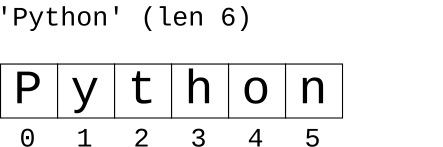
>>> s = 'Python'
>>> s.find('t')
2
>>> s.find('th')
2
>>> s.find('n')
5
>>> s.find('N')
-1
>>> s.find('x')
-1
>>> s = 'Python'
>>> s[1:3]
'yt'
>>> s[1:5]
'ytho'
>>> s[4:5]
'o'
>>> s[4:4]    # "not including" dominates
''
>>> s[:3]     # omit = from/to end
'Pyt'
>>> s[4:]
'on'
>>> s[4:999]  # too big = to end
'on'
>>> s[:4]     # "perfect split" on 4
'Pyth'
>>> s[4:]
'on'
>>> s[:]      # the whole thing
'Python'
(This is in the String3 category on the server.)
A first venture into using index numbers and slices. Many problems work in this domain - e.g. extracting all the hashtags from your text messages.
'cat[dog]bird' -> 'dog'
> brackets

Solution
def brackets(s):
    left = s.find('[')
    if left == -1:
        return ''
    right = s.find(']')
    # Use slice to pull out chars between left/right
    # make a drawing!
    return s[left + 1: right]
Here is a problem similar to brackets for you to try
> at_3

>>> s = 'Python'
>>> s[len(s)-1]
'n'
>>> s[-1]
'n'
>>> s[-2]
'o'
>>> s[-3]
'h'
>>> s[1:-3]
'yt'
>>> s[-3:]
'hon'