Today: variables, digital images, RGB color, for loop
PSA - What is "done" for a homework?
- Tempting: well the output is right, so I'm done!
- You should understand why every line is there
- e.g. select code, delete it all
Re-create the whole thing?
- The exam will look like the HW...
Themes
- Sequence: a goal - an algorithm - code to implement the algorithm
- We often work left to right in that sequence
- Having a rough algorithm idea is one thing
- You need to figure out every detail to write code for it
i.e. to be able to explain it to a computer
"Science is what we understand well enough to explain to a computer. Art is everything else we do." - Donald Knuth
Variables - 2 Things To Know
More details later here: Python Variables section in the guide.
A Python variable has a name and stores a value. We'll start with two rules of variables.
1. Creating a Variable
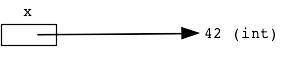
A variable is created in the code by a single equal sign =, like this which creates a variable named x:
x = 42
As a drawing, think of the variable as a little box, labeled with the variable's name, containing a pointer to the value stored.
2. Reading A Variable
After a variable is created, its name can appear in the code, e.g. x, and that use will retrieve whatever value was stored earlier.
Here's a little example. Suppose we set a variable named color to hold the value 'red'. Then subsequent lines can use color (no quotes or anything around it), and that retrieves the stored color.

color = 'red'
# instead of bit.paint('red')...
bit.paint(color)
bit.move()
bit.paint(color)
This paints 2 squares 'red', or whatever value was assigned to color on the first line.
Interpreter / Hack Mode
Try the >>> Hack Interpreter. You type a little expression at the ">>>" prompt and hit the enter key. Python evaluates it, prints the resulting value on the next line. We'll use this more as we get into more Python features.
>>> 1 + 1
2
>>> 1 + 2 * 3
7
In that second example, see that Python follows the order of operations in an expression - evaluate multiplication and division before addition and subtraction.
Interpreter - Variable Demo
Suppose we want to compute the number of hours in a week. Then try defining a days variable using =...
>>> 7 * 24
168
>>> days = 7
>>> days * 24
168
Shows how a variable is set with =, and then using that variable name later retrieves the stored value.
Images - Numbers - Code
- Layers of understanding
- 1. See An image - anyone can do that!
- 2. Understand structure of numbers, red/green/blue etc. making an image
- 3. Write code to change the numbers, changing the image .. CS106A!
- We'll look at all of these today
Digital Images - Pixels
- Originally the internet was made of text
- But perhaps images is where it really shines
- Digital images are made of small square "pixels"
"picture element" - "pixel"
- Pixel = small, square, shows a single color
- The color of a pixel is very often encoded as RGB
- Demo: pebbles.jpg in Mac Preview
Preview feature: new-from-clipboard to open copied image
It can zoom in far to see the pixels
See pebbles-zoomed.png
RGB Color Scheme
- The red-green-blue scheme, RGB
- The color is defined by three numbers: red, green, and blue
- Each number in the range 0..255
- (Why 255? I'll explain later)
- Each number represents a brightness of red/green/blue lights
- 0 = light is off
- 255 = light at maximum
- Can mix these 3 lights to make any color!
- Define any color by 3 numbers, 0..255
- Live RGB explorer: rgb-explorer
- Note: the RGB light-mixing scheme
different from paint-mixing scheme
Image Code - Pixels, Coordinates, RGB
- Image is made of pixels
- Pixels are in a x,y coordinate scheme
- Origin (0, 0) at the upper left
Origin at the upper left feels a little weird at first
Super common system on computers
- x numbers - x=0 is left edge
x values grow going to the right
- y numbers - y=0 is the top row
y values grow going down
- Each pixel:
Small
Square
Shows one color
- Pixel's color is encoded as 3 RGB numbers
# Load an image from the filesystem
# into RAM in variable named "image".
# Now the image can be manipulated by code.

image = SimpleImage('flowers.jpg')

Have Image, How To Change?
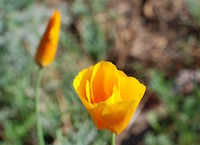
Say we have loaded an image variable as shown above. Now we want to write code to change the image in some way.
For example, let's say we want to set the blue and green values in each pixel of the image to 0. This will leave just the red values. This is called the "red channel" of the image - an image made of just its red lights.
Preamble: pixel.red
If we have a variable referring to just one pixel, then the syntax pixel.red or pixel.blue or pixel.green will refer to the red or blue or green value in that pixel.
So this code will set the red value of a pixel to 0, using the = similarly to above.
pixel.red = 0
Solution - for loop
Here is the code that solves it using a "for loop"
def red_channel(filename):
    image = SimpleImage(filename)
    for pixel in image:
        pixel.green = 0
        pixel.blue = 0
    return image
Here is a link - you can try running it first, then we'll study how it works
> Image1 Examples
How It Works - Big Picture
- The for loop is probably the most useful form of loop
- The loop contains a few body lines
- The for loop runs the body lines, again and again
- Running them once for each pixel in the image
- i.e. That's why this is also known as a "foreach" loop
For Loop Operation
For loop parts:
for x in collection:
    # use x in here
- Loop over any collection of things
- Runs the loop body once for each thing
- The variable name, e.g. x, can be any name the programmer chooses
Image Foreach - a. red_channel()
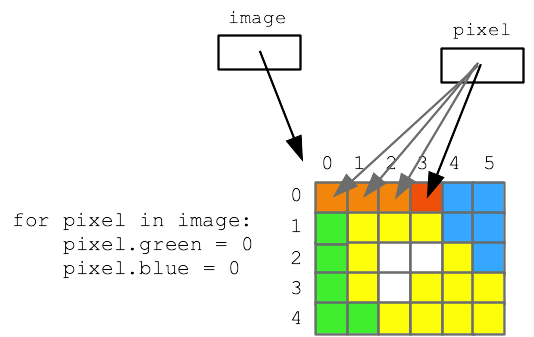
- Filename is like 'flowers.jpg'
image = SimpleImage(filename)
loads image data into memory
image is a variable, points to image data
for pixel in image:
Loop runs lines once for each pixel in image
pixel variable points to each pixel in turn
return image
return xxx returns a value back to our caller
- Parameter = information from caller in to called function
- Return = information sent back from called function to caller
- Q: how many times does first line run? How many times do the lines in the loop?
- A: once, once for each pixel
- Demo red_channel()
- So if there are 50,000 pixels, the loop body is run 50,000 times
- Experiment: green channel, make every pixel black
- See how for loop runs over the image
- See how
pixel.red accesses red/green/blue numbers
Side trip about math
Update Variable: x = x + 1
What does this do:
x = x + 1
- Update the value of a variable
- Variable is on both left and right of =
- This changes the variable in a relative way
- Code rule:
- 1. first "evaluate" right side expression, after the =
- 2. assign that value back into the variable
x = 6
x = x + 1
# what is x now?
image1-b. Make Image Darker
- Relative change of red/green/blue on each pixel
- Try making values smaller, image gets darker
- See below about "shorthand", re-write with *=
    for pixel in image:
        pixel.red = pixel.red / 2
        pixel.green = pixel.green / 2
        pixel.blue = pixel.blue / 2
        # or shorthand form:
        # pixel.red /= 2
Relative Variable Shorthand: += -= *=
Shorthand way to write x = x + 1
x += 1
Shorthand for x = x * 2
x *= 2 # double x
- Works for all operators, such as
+= -= *= /=
- Handy because relative math on a var is so common
- This just make the code more compact, not changing the underlying math
>>> x = 10
>>> x += 3
>>> x
13
>>> x *= 2
>>> x
26
Image2 Puzzles
> Image2 Puzzles
- Loop over image, write code to change pixels - "foreach" loop
- a. recover hidden image
- b. 5-10-20 puzzle
5-10-20 puzzle: red, green, and blue values are too small by a factor of 5 10 20. But we do not know which factor goes with which color. Figure it out by experimenting with code to modify the image with various factors.

