Today: while, break parsing, parse words out of string patterns
Here's some fun looking data...
$GPGGA,005328.000,3726.1389,N,12210.2515,W,2,07,1.3,22.5,M,-25.7,M,2.0,0000*70
$GPGSA,M,3,09,23,07,16,30,03,27,,,,,,2.3,1.3,1.9*38
$GPRMC,005328.000,A,3726.1389,N,12210.2515,W,0.00,256.18,221217,,,D*78
$GPGGA,005329.000,3726.1389,N,12210.2515,W,2,07,1.3,22.5,M,-25.7,M,2.0,0000*71
$GPGSA,M,3,09,23,07,16,30,03,27,,,,,,2.3,1.3,1.9*38
$GPRMC,005329.000,A,3726.1389,N,12210.2515,W,0.00,256.18,221217,,,D*79
$GPGGA,005330.000,3726.1389,N,12210.2515,W,2,07,1.3,22.5,M,-25.7,M,3.0,0000*78
$GPGSA,M,3,09,23,07,16,30,03,27,,,,,,2.3,1.3,1.9*38
...
var += 1'xx @abc @xyz xx'
See the "parse1" examples on the experimental server
Start off with some Notes, use them later on real examples
Censor problem: censored(n, censor): Given a non-negative int n. Return a list of the ints [1, 2, 3, ... n]. Except as soon as a number in the given censor list is seen, end the list without that number, so censored(10, [5, 4]) returns [1, 2, 3]. Use "break"
Solution
def censored(n, censor):
    nums = []
    for i in range(1, n + 1):
        if i in censor:  # Key: if-break
            break
        nums.append(i)
    # "break" jumps to here
    return nums
i Within Range Loop? No!Tempting: inside a loop, control i with = for some case. This does not work at all.
At the top of the loop, for/range uses = to set i to its liking.
Therefore: cannot use for/i/range if we want to adjust i with our own code.
def censored(n, censor):
    nums = []
    for i in range(n):
        ....
        if something:
            i += 10    # NO does not work
        ...
    return nums
continuefor i/range vs. whileThe for/i/range form is great for going through numbers which you know ahead of time - a common pattern in real programs. However, while is more flexible - can test as we go, not needing to know ahead of time. Ultimately you need both forms.
Use for/i/range if have a series of numbers to step through. That is a common case, and for/i/range is perfect for it. We'll use while for situations that require more flexibility.
Here is the while-equivalent to for i in range(n)
i = 0         # 1. init
while i < n:  # 2. test
    # use i
    i += 1    # 3. update, loop-bottom (easy to forget)
double_char() written as a while (using a range() is easier for this problem, so this just demonstrates what while would look like)
def while_double(s):
    result = ''
    i = 0
    while i < len(s):
        result += s[i] + s[i]
        i += 1
    return result
The str.find() function with an added 2 parameter, start index, indicates where to begin scanning for the target. The default start index is 0
>>> s = 'xx[abc[xx'
>>> s.find('[')     # start = 0, the default
2
>>> s.find('[', 2)  # start = 2, no help
2
>>> s.find('[', 3)  # start = 3, find next one
6
Here we have three main code examples for today. Bad news: these are challenging. Good news: these follow a parsing pattern that we'll use again and again so you get used to it. It will also be useful in your future career.
This function is a halfway point, working out half of the difficulties of really solving this.
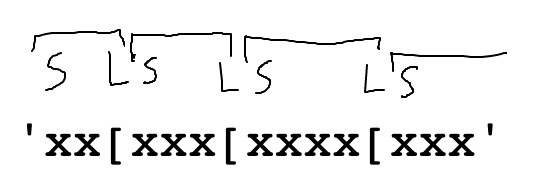
Want - find all the left brackets in s, return a list of them:
'xx[xxx[xxxx[xxx' -> ['[', '[', '[']
Challenges:
'['
Space for a drawing, work out the algorithm:
'xx[xxx[xxxx[xxx'
Given string s. Return a list of all the '[' strings in s. Use s.find() within a while loop to find all the '['.
Use search as index variable, marking current position of search within s - this will be a stereotypical pattern for searching through a string. Starting code - work from here with drawing
def all_lefts(s):
    search = 0
    result = []
    while search < len(s):
        # code in here:
        # -s.find() to find the '['
        # -slice to grab '['
        # -update search = ???
        # -if/break when no more '['
    return result
Solution
def all_lefts(s):
    search = 0
    result = []
    while search < len(s):
        # Find '[', at search index
        left = s.find('[', search)
        # No '[' -> exit loop
        if left == -1:
            break
        result.append(s[left:left + 1])
        # Update search for next iteration
        search = left + 1
    return result
Now use both left and right brackets, so this is more realistic. Find all bracket-pairs in s, return a list of all the contained data
'xx[abc]xxx[hi]xxx[woot]xxx' -> ['abc', 'hi', 'woot']
Given string s. Return a list of all the 'abc' strings for each '[abc]' substring within s. For each left bracket, find the right bracket that follows it. End the search if no left or right bracket is found. Use s.find() within a while loop.
Use the all_brackets() code as a starting point. Challenges:
']' after the '[', slice out data
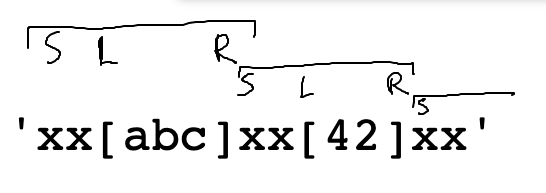
Input case: 'xx[abc]xx[42]xx' -> ['abc', '42']
Draw on top of the input to work out the algorithm:
'xx[abc]xx[42]xx'
Standard CS106A steps - draw an input case, introduce vars left + right on the drawing to work out the details. Run it.
Starter code:
def all_brackets(s):
    search = 0
    result = []
    while search < len(s):
        left = s.find('[', search)
        if left == -1:
            break

        # Your code here


    return result
def all_brackets(s):
    search = 0
    result = []
    while search < len(s):
        left = s.find('[', search)
        if left == -1:
            break
        right = s.find(']', left)  # or left+1
        if right == -1:
            break
        result.append(s[left + 1:right])
        # Update search at loop end
        search = right  # or right+1
    return result
while search < len(s): do?while True:search = right + 1 ?at_words(s): For each '@' in s, parse out the "word" substring of 1 or more alphabetic chars which immediately follow the '@', so '@abc @ @xyz' returns ['abc', 'xyz'].
'xx @abc xx @xyz' -> ['abc', 'xyz']
Say we have a loop structure to find the '@' as we have before
    at = s.find('@', search)
    if at == -1:
        break

    end = at + 1
    # loop, advance end past alpha chars
'xx @abc @xyz xx'
    end = at + 1
    while s[end].isalpha():
        end += 1
    word = s[at + 1:end]
    result.append(word)
    search = end
There is a bug in the end/loop. It has to do with this input case:
'@abc'
 0123
Here is the code again. Think about how the loop works when advancing "end" for '@xyz':
    end = at + 1
    while s[end].isalpha():
        end += 1
Problem: keep advancing "end" .. past the end of the string, eventually end is 4. Then the code s[end].isalpha() throws an error since end (4) is past the end of the string.
The loop above translates to: "advance end so long as the char it refers to is alphabetic"
To fix the bug, we modify the test to: "advance end so long as it refers to a char that exists and that char is alphabetic"
def at_words(s):
    search = 0
    words = []
    while True:
        at = s.find('@', search)
        if at == -1:
            break

        # Pass over alpha chars to find end
        end = at + 1
        while end < len(s) and s[end].isalpha():
            end += 1

        word = s[at + 1:end]
        # Screen out len-0 word
        if len(word) > 0:
            words.append(word)

        # Set up next iteration
        search = end
    return words
exclaim_words(s): For each '!' in s, parse out the "word" substring of one or more alphabetic chars which are immediately to the left of the '!'. Return a list of all such words including the '!', so 'x hey!@ho! returns ['hey!', 'ho!']. (Like at_words, but right-to-left)