Today: dict and dict-count (however far we get today)
Dict - Hash Table - Fast
- Python "dict" type
- A key/value "dictionary"
- In CS generally known as a "hash table"
Sounds like a real hacker thing
CS106B!
- Dict is a bit advanced, compared to basic string/list
- The defining feature of dicts:
Can store and then look up data, and be fast about it
Dict Story Arc
- Have: have some big data set, data is not organized, perhaps random order
- Dict:
Pick out data items we want
Store each item under a key in the dict
- Done: now the data is organized by key
- The dict is fast doing get/set by key, its defining superpower
- Job interview pattern:
Interview question has some messed up data
Best answer inevitably uses a dict to organize the data
Because the dict is powerful and fast...
Interviewers cannot resist using it
Dict Basics
See Python Guide for more detail: Python Dict

- Organize data around a key
- Each key stores one associated value
In drawing with an arrow: key -> value
- 1. Create empty dict:
d = {}
- 2. Set:
d[key] = value
- 3. Get:
d[key]
- Setting a value
Creates that key entry if needed
Overwrites any previous value for that key
- Literal syntax - curly braces, key:value
{'a': 'alpha', 'g': 'gamma', 'b': 'beta'}
Style: one space after colon and comma
Dict Code Example 1
>>> d = {}             # Start with empty dict {}
>>> d['a'] = 'alpha'   # Set key/value
>>> d['g'] = 'gamma'
>>> d['b'] = 'beta'
>>> # Now we have built the picture above
>>>
>>> d['g']             # Get by key
'gamma'
>>> d['b']
'beta'
>>> d['a'] = 'apple'   # Overwrite 'a' key
>>> d['a']
'apple'
>>>
>>> # Dict literal format, curl-braces, key:value
>>> d
{'a': 'apple', 'g': 'gamma', 'b': 'beta'}
>>>
Dict - Errors, in Test
- Get data with key that is not int he dict = Error
- Check if key is present:
key in d
or not present: key not in d
- Guard pattern:
Before getting data out: d[key]
Check first: key in d
- Note: the order of the keys in the dict is kind of random
It is the order they were added
Simplest to think of it as random
- Key type is typically a str or int (immutable)
- Value type can be anything (str, list, ...)
Dict Code Example 2
>>> # Can initialize dict with literal
>>> d = {'a': 'alpha', 'g': 'gamma', 'b': 'beta'}
>>>
>>> d['x']             # Key not present -> Error
Error:KeyError('x',)
>>>
>>> 'a' in d           # "in" key tests
True
>>> 'x' in d
False
>>> 'alpha' in d       # NO in/value does not work
False                  # get/set/in use **key** only
>>>
>>> # Can use += to do a get/set modification
>>> d['a'] += '!!!'
>>> d['a']
'alpha!!!'
>>>
Key and Value - Different Roles
- Note that get/set/in are all by key
- The key is the control, value is just dumb payload
- Could say key/value are asymmetric, having specialized roles
- YES set by key:
d['a'] = 'alpha'
- YES get by key:
d['a'] -> 'alpha'
- YES in check of key:
'a' in d -> True
- NO, in check by value:
'alpha' in d
Does not work
- get/set/in all work with key
Dict = Memory
- At a high level, dict is memory
- Organized by key
- Suppose key is 'a'
- Your code can store at one time:
d['a'] = 12
- Later, code can lookup:
d['a']
- Get back the 12 stored earlier
- Speed: even if d contains 10 million keys, get/set/in by key is instant
Dict vs. List - Keys
- Dict and List both remember things
- What's the difference?
- Keys!
- The "keys" for list are always index numbers
0, 1, 2, 3, ... len-1
- The "keys" for dict, you choose!
Any string or int etc. value is a key
Can set the values in any order
- Can install anything, make that key on the fly...
- e.g.
d['dinner'] = 'radish'
Dict Memory Example - Meals
Use dict to remember that 'breakfast' is 'apple' and 'lunch' is 'donut'. Using 'breakfast' and 'lunch' as keys.
>>> meals = {}
>>> meals['breakfast'] = 'apple'
>>> meals['lunch'] = 'donut'
>>>
>>> # time passes, other lines run
>>>
>>> # what was lunch again?
>>> meals['lunch']
'donut'
>>>
>>> # did I have breakfast or dinner?
>>> 'breakfast' in meals
True
>>> 'dinner' in meals
False
>>>
Basic Dict Code Examples - Meals
Look at the dict1 "meals" exercises on the experimental server
> dict1 meals exercises
With the "meals" examples, the keys are 'breakfast', 'lunch', 'dinner' and the values are like 'hot dot' and 'bagel'. A key like 'breakfast' may or may not be in the dict, so need to "in" check first.
- bad_start() - check for bad breakfast - return True if no breakfast or if it is 'candy'
- candyish() - check for candy lunch or dinner
- enkale() - if
'candy' for dinner, change it to 'kale'
Tricky case: dict[key]
The code can only get the value for a key, if the key is in the dict. Otherwise it's an error. Therefore, need to structure the code with an "in" check or something to make sure the key is in the dict before trying to get its value.
bad_start() Solution Code
Question: is the meals['breakfast'] == 'candy' line safe? Yes. The if-statement above screens out the case that the 'breakfast' key is not in the dict.
def bad_start(meals):
    if 'breakfast' not in meals:
        return True
    if meals['breakfast'] == 'candy':
        return True
    return False
    # Can be written with "or" / short-circuiting avoids key-error
    # if 'breakfast' not in meals or meals['breakfast'] == 'candy':
enkale() Solution Code
Demo: work out the code, see key error
Cannot access meals['dinner'] in the case that dinner is not in the dict, so need logic to avoid that case.
def enkale(meals):
    if 'dinner' in meals and meals['dinner'] == 'candy':
        meals['dinner'] = 'kale'
    return meals
The "in" check guards the meals['dinner'] access, since the short-circuit and only proceeds when the first test is True. Could write it out in this longer form which is ok - works exactly the same as the and/short-circuit form:
def enkale(meals):
    if 'dinner' in meals:
        if meals['dinner'] == 'candy':
            meals['dinner'] = 'kale'
    return meals
"in" Guard Pattern
- Very often see "in" checks just before key access
- Accessing
meals['dinner'] = an error if dinner not in the dict
- Therefore: check
dinner in meals first
- Only access
meals['dinner'] when the key is present
- The
and on the next line does this, only proceeding when in is True:
if 'dinner' in meals and meals['dinner'] == 'candy':
- In effect the in-check is a guard, protecting the access
- Aka "short circuiting" of boolean expressions
We'll just get started with this topic .. pick up on Wed
Dict-Count Algorithm
- Extremely important dict algorithm pattern
- (Read: we'll use it a lot)
- A "counts" dict:
We have some big data set
a key for each distinct value in the data
value for each key is count of occurrences of that key in the data
- e.g. strs:
'a', 'b', 'a', 'c', 'b'
- creates "counts" dict:
{'a': 2, 'b': 2, 'c': 1}
Dict Count Code Examples
> dict2 Count exercises
Note: not using += on the server for these - it's temporarily broken!
Dict-Count Steps
- 1. Start with empty dict
- 2. For each string, test: not seen before?
- 3. Not seen before: store key = str, value = 1
- 4. Seen before: key = str, value = value + 1
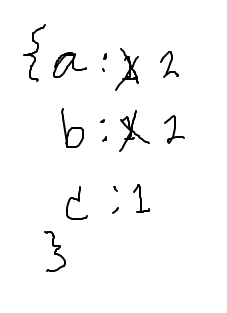
Dict-Count abacb
Go through these data items: a b a c b

Sketch out counts dict here:
Counts dict ends up as {'a': 2 'b': 2, 'c': 1}:
- strs:
'a', 'b', 'a', 'c', 'b'
- Each distinct str is a key in the dict
- The value for each key is the number of times it is seen
- Algorithm: loop through all s, update dict with counts as we go
- Each s: seen this before or not?
1. str-count1() - if/else
str_count1 demo, canonical dict-count algorithm
- Central test of this algorithm: not seen before?
- if/else solution
- Test: not seen before?
not seen before: counts[s] = 1
seen before: counts[s] = count[s] + 1
- This if/else approach is fine, but we'll see another way below
- Not using
+= today .. server limitation
Solution code
def str_count1(strs):
    counts = {}
    for s in strs:
        # s not seen before?
        if s not in counts:
            counts[s] = 1   # first time
        else:
            counts[s] = count[s] + 1  # every later time
    return counts
2. str-count2() - "Invariant" Version, no else
- A slight "invariant" improvement on the above code
- Same central test: not seen s before?
- If not seen before:
counts[s] = 0
- Fix the counts dict - if not in there, make it be in there
- With fix done, following line works for all cases:
-
counts[s] += 1
- "Invariant" - works for all cases
- I have a slight preference this version
It's one fewer lines and does not use else
- All counting goes through that one += 1 line
Standard Dict-Count Code - "invariant" Version
def str_count2(strs):
    counts = {}
    for s in strs:
        if s not in counts:  # fix counts/s if not seen before
            counts[s] = 0
        # Invariant: now s is in counts one way or
        # another, so can do next step unconditionally
        counts[s] = count[s] + 1
    return counts
Int Count - Exercise
Apply the dict-count algorithm to a list of int values, return a counts dict, counting how many times each int value appears in the list.
Char Count - Exercise
Apply the dict-count algorithm to chars in a string. Build a counts dict of how many times each char appears in a string so 'Coffee' returns {'c': 1, 'o': 1, 'f': 2, 'e': 2}.