Today: dict output, wordcount.py example program, list functions, List patterns, state-machine pattern
>>> # Load up dict
>>> d = {}
>>> d['a'] = 'alpha'
>>> d['g'] = 'gamma'
>>> d['b'] = 'beta'
>>>
>>> # d.keys() - list of keys, suitable for foreach etc.
>>> d.keys()
dict_keys(['a', 'g', 'b'])
>>>
>>> # d.values() - list of values, typically don't use this
>>> d.values()
dict_values(['alpha', 'gamma', 'beta'])
Loop over d.keys(), for each key, look up its value. This works fine, the only problem is that the keys are in random order.
>>> for key in d.keys():
...   print(key, '->', d[key])
...
a -> alpha
g -> gamma
b -> beta
>>> sorted(d.keys())
['a', 'b', 'g']
>>>
>>> for key in sorted(d.keys()):
...   print(key, '->', d[key])
...
a -> alpha
b -> beta
g -> gamma
sorted(d)?>>> sorted(d) # CS106A will not write it this way ['a', 'b', 'g']
The word count program is a sort of Rosetta stone of coding - it's a working demonstration of many important features of a computer program: strings, dicts, loops, parameters, return, decomposition, testing, sorting, files, and main(). The complete text of wordcount.py is at the end of this page for reference. Like you need to remember some bit of Python syntax, there's a good chance there's an example in this program. Of if you are learning a new computer language, you could try to figure out how to write wordcount in it to get started.
Note how words are cleaned up
$ cat poem.txt
Roses are red
Violets are blue
"RED" BLUE.
$
$ python3 wordcount.py poem.txt
are 2
blue 2
red 2
roses 1
violets 1
def read_counts(filename):
    """
    Given filename, reads its text, splits it into words.
    Returns a "counts" dict where each word
    is the key and its value is the int count
    number of times it appears in the text.
    Converts each word to a "clean", lowercase
    version of that word.
    The Doctests use little files like "test1.txt" in
    this same folder.
    >>> read_counts('test1.txt')
    {'a': 2, 'b': 2}
    >>> read_counts('test2.txt')    # Q: why is b first here?
    {'b': 1, 'a': 2}
    >>> read_counts('test3.txt')
    {'bob': 1}
    """
    with open(filename) as f:
        text = f.read()   # demo reading whole string vs line/in/f way
    # once done reading - do not need to be indented within open()
    counts = {}
    words = text.split()

    for word in words:
        word = word.lower()
        cleaned = clean(word)   # style: call clean() once, store in var
        if cleaned != '':  # subtle - cleaning may leave only ''
            if cleaned not in counts:
                counts[cleaned] = 0
            counts[cleaned] += 1
    return counts
In the wordcount.py .. the totally standard dict output code is used to print out the words and their counts.
def print_counts(counts):
    """
    Given counts dict, print out each word and count
    one per line in alphabetical order, like this
    aardvark 1
    apple 13
    ...
    """
    for word in sorted(counts.keys()):
        print(word, counts[word])
Try more realistic files. Try the file alice-book.txt - the full text of Alice in Wonderland full text, 27,000 words. tale-of-two-cities.txt` - full text, 133,000 words. Time the run of the program, see if the dic†/hash-table is as fast as they say with the command line "time" command. The second run will be a little faster, as the file is cached by the operating system.
$ time python3 wordcount.py alice-book.txt
...
...
youth 6
zealand 1
zigzag 1

real	0m0.103s
user	0m0.079s
sys	0m0.019s
Here "real 0.103s" means regular clock time, 0.103 of a second, aka 103 milliseconds elapsed to run this command.
Windows PowerShell equivalent to "time" the run of a command:
$ Measure-Command { py wordcount.py alice-book.txt }
There are 33000 words in alice-book.txt. Each word hits the dict 3 times: 1x "in", then at least 1 get and 1 set for the +=. So how long does each dict access take?
>>> 0.103 / (33000 * 3)
1.0404040404040403e-06
So with our back-of-envelope math here, the dict is taking something less than 1 millionth of a second per access. In reality it's faster than that, as we are not separating out the for the file reading and parsing which went in to the 0.103 seconds.
Try it with tale-of-two-cities.txt which is 133000 words. This will better spread out the overhead, so get a lower time per access.
>>> nums = []
>>> nums.append(1)
>>> nums.append(0)
>>> nums.append(6)
>>>
>>> nums
[1, 0, 6]
>>>
>>> 6 in nums
True
>>> 5 in nums
False
>>> 5 not in nums
True
>>>
>>> nums[0]
1
>>>
>>> for num in nums:
...   print(num)
...
1
0
6
>>> lst = ['a', 'b', 'c']
>>> lst2 = lst[1:]   # slice without first elem
>>> lst2
['b', 'c']
>>> lst
['a', 'b', 'c']
>>> lst3 = lst[:]    # copy whole list
>>> lst3
['a', 'b', 'c']
>>> # can prove lst3 is a copy, modify lst
>>> lst[0] = 'xxx'
>>> lst
['xxx', 'b', 'c']
>>> lst3
['a', 'b', 'c']
lst.pop([optional index])>>> lst = ['a', 'b', 'c'] ['a', 'b', 'c'] >>> lst.pop() # opposite of append 'c' >>> lst ['a', 'b'] >>> lst.pop(0) # can specify index 'a' >>> lst ['b'] >>> lst.pop() 'b' >>> lst.pop() IndexError: pop from empty list >>>
Below are lesser features. If a CS106A problem would use one of these, the problem statement will mention it.
Here are some "list2" problems on these if you are curious, but you do not need to do these.
> list2 exercises
>>> a = [1, 2, 3]
>>> b = [4, 5]
>>> a.append(b)
>>> # Q1 What is a now?
>>>
>>>
>>>
>>> a
[1, 2, 3, [4, 5]]
>>>
>>> c = [1, 3, 5]
>>> d = [2, 4]
>>> c.extend(d)
>>> # Q2 What is c now?
>>>
>>>
>>>
>>> c
[1, 3, 5, 2, 4]
>>> a = [1, 2, 3]
>>> b = [9, 10]
>>> a + b
[1, 2, 3, 9, 10]
>>> a   # original is still there
[1, 2, 3]
lst.insert(index, elem)>>> lst = ['a', 'b'] >>> lst.insert(0, 'z') >>> lst ['z', 'a', 'b']
lst.remove(target)
>>> lst = ['a', 'b', 'c', 'b']
>>> lst.remove('b')
>>> lst
['a', 'c', 'b']
Now we'll look some functions we will use.
>>> sorted([45, 100, 2, 12])               # numeric
[2, 12, 45, 100]
>>>
>>> sorted([45, 100, 2, 12], reverse=True)
[100, 45, 12, 2]
>>>
>>> sorted(['banana', 'apple', 'donut'])   # alphabetic
['apple', 'banana', 'donut']
>>>
>>> sorted(['45', '100', '2', '12'])       # wrong-looking, fix later
['100', '12', '2', '45']
>>>
>>> sorted(['45', '100', '2', '12', 13])
TypeError: '<' not supported between instances of 'int' and 'str'
>>> min(1, 3, 2)
1
>>> max(1, 3, 2)
3
>>> min([1, 3, 2])  # lists work
1
>>> min([1])        # len-1 works
1
>>> min([])         # len-0 is an error
ValueError: min() arg is an empty sequence
>>> min(['banana', 'apple', 'zebra'])  # strs work too
'apple'
>>> max(['banana', 'apple', 'zebra'])
'zebra'
Compute the sum of a collection of ints or floats, like +.
>>> nums = [1, 2, 1, 5]
>>> sum(nums)
9
When you're looking at a problem, you never want to think of it as this brand new thing you've never solved before. There's always parts of it that are idiomatic, or following some pattern you've seen before. The familiarity makes them easy to write, easy to read. We put in the pattern code where we can, adding needed custom code around it.
Look at the "listpat" exercises on the experimental server
> listpat exercises
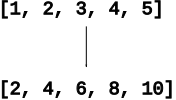
Doubled: Given a list of int values, return a new list of their values doubled. Basic mapping pattern example. Solve with a foreach loop.
Solution Code
def doubled(nums):
    result = []
    for num in nums:
        result.append(num * 2)
    return result
dstart(strs): Given a list of strings, return a new list of only the strings that start with a digit. Basic filtering example. Solve with a foreach loop + if.
['aa', '2b', '3', 'd'] -> ['2b', '3']
Solution Code
def dstart(strs):
    result = []
    for s in strs:
        if len(s) > 0 and s[0].isdigit():
            result.append(s)
    return result
shouting(strs): Given a list of strings, return a new list where each original string that ends with a '!' is converted to upper case, and all other strings are omitted. So ['cats!', 'and', 'dogs!'] returns ['CATS!', 'DOGS!']
count = 0

loop:
   ....
   if xxx:
       count += 1


count-holds-result
count_target(): Given a list of ints and a target int, return the int count number of times the target appears in the list. Solve with a foreach + "count" variable.
Solution Code
def count_target(nums, target):
    count = 0
    for num in nums:
        if num == target:
            count += 1
    return count
Extra: sumpat() - sum up list of ints, same pattern.
Style note: we have Python built-in functions like min() max() len() list(). Avoid creating a variable with the same name as an important function, like "min" or "list". This is whey our solution uses "best" as the variable to keep track of the smallest value seen so far instead of "min".
Slice note: one odd thing in this solution is that it use element [0] as the best initially, and then the loop will uselessly < compare best to [0] on its first iteration. Could iterate over nums[1:] to avoid this useless comparison. But that would copy the entire list to avoid a single comparison, a bad tradeoff. Therefore it's better to just keep it as simple as possible, looping over the whole list in the standard way. Also, we prefer code with the correct answer that is readable, and our solution is good at both of those.
Solution
def min(nums):
    # best tracks smallest value seen so far.
    # Compare each element to it.
    best = nums[0]
    for num in nums:
        if num < best:
            best = num
    return best
count_dups(): Given a list of numbers, count how many "duplicates" there are in the list - a number the same as the value immediately before it in the list. Use a "previous" variable
Solution
def count_dups(nums):
    count = 0
    previous = None      # init
    for num in nums:
        if num == previous:
            count += 1
        previous = num   # set for next loop
    return count
    # Could write as
    # if previous != None and previous == num:
    # but in this case the None comparison is not
    # needed
A neat example of a state-machine approach.
The "hat" code is a simple way to hid some text inside some other text. The string s is mostly made of garbage chars to ignore. However, '^' marks the beginning of actual message chars, and '.' marks their end. Grab the chars between the '^' and the '.', ignoring the others:
'xx^Ya.xx^y!.bb' -> 'Yay!'
Solving using a state-variable "copying" which is True when chars should be copied to the output and False when they should be ignored.
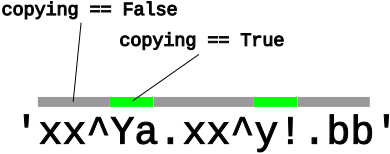
There is a very subtle issue about where the '^' and '.' checks go in the loop. Write the code the first way you can think of, setting copying to True and False when seeing the appropriate chars. Run the code. If it's not right (very common!), look at the got output. Why are extra chars in there?
For reference - source code for wordcount
#!/usr/bin/env python3

"""
Stanford CS106A WordCount Example
Nick Parlante

Counting the words in a text file is a sort
of Rosetta Stone of programming - it uses files, dicts, functions,
loops, logic, decomposition, testing, command line in main().
Trace the flow of data starting with main().
There is a sorted/lambda exercise below.

Code is provided for alphabetical output like:
$ python3 wordcount.py somefile.txt
aardvark 12
anvil 3
boat 4
...

**Exercise**

Implement code in print_top() to print the n most common words,
using sorted/lambda/items.

Then command line -top n feature calls print_top() for output like:
$ python3 wordcount.py -top 10 alice-book.txt
the 1639
and 866
to 725
a 631
she 541
it 530
of 511
said 462
i 410
alice 386
"""

import sys


def clean(s):
    """
    Given string s, returns a clean version of s where all non-alpha
    chars are removed from beginning and end, so '@@x^^' yields 'x'.
    The resulting string will be empty if there are no alpha chars.
    >>> clean('$abc^')      # basic
    'abc'
    >>> clean('abc$$')
    'abc'
    >>> clean('^x^')        # short (debug)
    'x'
    >>> clean('abc')        # edge cases
    'abc'
    >>> clean('$$$')
    ''
    >>> clean('')
    ''
    """
    # Good examples below of inline comments: explain
    # the *goal* of the lines, not repeating the line mechanics.
    # Lines of code written for teaching often have more inline
    # comments like this than regular production code.

    # Move begin rightwards, past non-alpha punctuation
    begin = 0
    while begin < len(s) and not s[begin].isalpha():
        begin += 1

    # Move end leftwards, past non-alpha
    end = len(s) - 1
    while end >= begin and not s[end].isalpha():
        end -= 1

    # begin/end cross each other -> nothing left
    if end < begin:
        return ''
    return s[begin:end + 1]


def read_counts(filename):
    """
    Given filename, reads its text, splits it into words.
    Returns a "counts" dict where each word
    is the key and its value is the int count
    number of times it appears in the text.
    Converts each word to a "clean", lowercase
    version of that word.
    The Doctests use little files like "test1.txt" in
    this same folder.
    >>> read_counts('test1.txt')
    {'a': 2, 'b': 2}
    >>> read_counts('test2.txt')    # Q: why is b first here?
    {'b': 1, 'a': 2}
    >>> read_counts('test3.txt')
    {'bob': 1}
    """
    with open(filename) as f:
        text = f.read()   # demo reading whole string vs line/in/f way
    # once done reading - do not need to be indented within open()
    counts = {}
    words = text.split()

    for word in words:
        word = word.lower()
        cleaned = clean(word)   # style: call clean() once, store in var
        if cleaned != '':  # subtle - cleaning may leave only ''
            if cleaned not in counts:
                counts[cleaned] = 0
            counts[cleaned] += 1
    return counts
    # Style comparison
    # Without "cleaned" var, readability is worse and actually runs slower
    # for word in words:
    #     word = word.lower()
    #     if clean(word) != '':
    #         if clean(word) not in counts:
    #             counts[clean(word)] = 0
    #         counts[clean(word)] += 1


def print_counts(counts):
    """
    Given counts dict, print out each word and count
    one per line in alphabetical order, like this
    aardvark 1
    apple 13
    ...
    """
    for word in sorted(counts.keys()):
        print(word, counts[word])
    # Alternately can use counts.items() to access all key/value pairs
    # in one step.
    # for key, value in sorted(counts.items()):
    #    print(key, value)


def print_top(counts, n):
    """
    (Exercise)
    Given counts dict and int n, print the n most common words
    in decreasing order of count
    the 1639
    and 866
    to 725
    ...
    """
    items = counts.items()
    # To get a start writing the code, could print raw items to
    # get an idea of what we have.
    # print(items)

    # Your code here - our solution is 3 lines long, but it's dense!
    # Hint:
    # Sort the items with a lambda so the most common words are first.
    # Then print just the first n word,count pairs
    pass
    items = sorted(items, key=lambda pair: pair[1], reverse=True)  # 1. Sort largest count first
    for word, count in items[:n]:                                  # 2. Slice to grab first n
        print(word, count)


def main():
    # (provided)
    # Command line forms
    # 1. filename
    # 2. -top n filename   # prints n most common words
    args = sys.argv[1:]

    if len(args) == 1:
        # filename
        counts = read_counts(args[0])
        print_counts(counts)

    if len(args) == 3 and args[0] == '-top':
        # -top n filename
        n = int(args[1])
        counts = read_counts(args[2])
        print_top(counts, n)

if __name__ == '__main__':
    main()