
Today: tuples, dict.items() output pattern, lambda, map, one-liners
Say for our building we have a "temps" dict with a key for each room - 'room1', 'room2', etc. The value for each room is a nested dict of the sensors in the at room 't1', 't2, with the value being the temperature.
>>> d = {'room1': {'t1': 100, 't2': 102}}
Question: Write an expression to compute the average temperature of average temp of t1 and t2 in room1?
The code d['room1'] is a reference to the nested dict. So can add ['t1'] to its right, like this:
>>> # Set values this way
>>> d['room1']['t1'] = 100
>>>
>>> # Compute average
>>> (d['room1']['t1'] + d['room1']['t2']) / 2
101.0
Can store a reference to the nested dict in a var, then use that. We typically do it this way.
>>> # Get a reference to room1 dict, store in var
>>> temps = d['room1']
>>> (temps['t1'] + temps['t2']) / 2
101.0
>>>
For more detail see guide Python Tuples
>>> t = ('a', 13)
>>> t[0]
'a'
>>> t[1]
13
>>> len(t)
2
>>> t[0] = 'b'
TypeError: 'tuple' object does not support item assignment
Unfortunate syntax shortcut: possible to omit the parenthesis. We will not do this in CS106A code, but you can write it if you like and it is allowed under PEP8. We will write our code more spelled-out, showing explicitly where have a tuple.
>>> t = 1, 4     # This works
>>> t
(1, 4)
>>> t = (4, 5)   # We prefer readable/spelled out
>>> t
(4, 5)
Tuple assignment = shortcut. A way to assign multiple variables in one step.
>>> (x, y) = (3, 4)
>>> x
3
>>> y
4
Revisit Dict, now that we have tuples
Say we have a dict loaded up with data
>>> d = {'a': 'alpha', 'g': 'gamma', 'b': 'beta'}
The following pattern we've done many times, it works fine. You can still use it.
>>> for key in sorted(d.keys()):
...     print(key, d[key])
...
a alpha
b beta
g gamma
But there is a more direct way to do it.
>>> d = {'a': 'alpha', 'g': 'gamma', 'b': 'beta'}
>>>
>>> d.keys()
dict_keys(['a', 'g', 'b'])
>>> sorted(d.keys())
['a', 'b', 'g']
>>>
>>> d.values()
dict_values(['alpha', 'gamma', 'beta'])
>>>
>>> d.items()          # still random order
dict_items([('a', 'alpha'), ('g', 'gamma'), ('b', 'beta')])
>>>
>>> sorted(d.items())  # we'll use this form
[('a', 'alpha'), ('b', 'beta'), ('g', 'gamma')]
>>> cities = (('tx', 'houston'), ('ca', 'palo alto'), ('ca', 'san jose'), ('tx', 'austin'), ('ca', 'aardvark'))
>>>
>>> sorted(cities)
[('ca', 'aardvark'), ('ca', 'palo alto'), ('ca', 'san jose'), ('tx', 'austin'), ('tx', 'houston')]
>>>
>>> sorted(cities, reverse=True)
[('tx', 'houston'), ('tx', 'austin'), ('ca', 'san jose'), ('ca', 'palo alto'), ('ca', 'aardvark')]
So with d.items() - sorts by key first, which works perfectly for us. The keys are all unique, so it never looks at the value.
>>> for item in sorted(d.items()):
...     print(item[0], item[1])
...
a alpha
b beta
g gamma
d.items() is a list of tuples len-2. Instead of this:
for item in sorted(d.items()):
    print(item[0], item[1])
Can write it this way, a little nicer:
for key, value in sorted(d.items()):
    print(key, value)
>>> for key, value in sorted(d.items()):
...     print(key, value)
...
a alpha
b beta
g gamma
Map - a short way to transform a list - handy, but not super important
Lambda - an important way to package some code. Use with map() for today.
Lambda code is dense. Another way of saying that it is powerful. Sometimes you feel powerful with computer code because the code you write is long. Sometimes you feel even a little more powerful, because the code you write is short!
There is something satisfying about solving a real problem with 1 line of code. The 1-liner code is so dense, we'll will write it a little more deliberately. See how this works below!
Consider the following "double" def. What does this provide to the rest of the program?
def double n:
    return n * 2
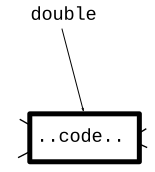
The def sets up the name of the function, and associates it with that body of code. Later line can refer to this function by name. The drawing below shows a form of this - the name "double" now points to this black-box of code that anybody can call.
>>> # Normally don't def a function in the interpreter.
>>> # But it works for little demos like this.
>>>
>>> def double(n):
...   return n * 2
...
>>>
>>> double(10)
20
>>> double(144)
288
>>> # We have a "double" def
>>> def double(n):
...   return n * 2
...
>>>
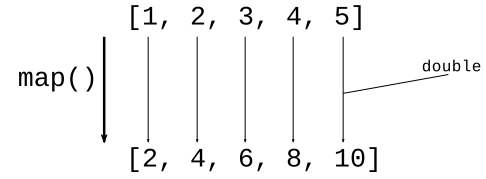
>>> list(map(double, [1, 2, 3, 4, 5]))
[2, 4, 6, 8, 10]
>>>
Other examples
>>> list(map(double, [3, -1, 10]))
[6, -2, 20]
>>>
>>> list(map(double, range(20)))
[0, 2, 4, 6, 8, 10, 12, 14, 16, 18, 20, 22, 24, 26, 28, 30, 32, 34, 36, 38]
>>>
Say we have an exclaim(s) function that takes in a string and returns it uppercase with an exclamation mark at the end. Use map to run exclaim() over a list of strings.
>>> def exclaim(s):
...   return s.upper() + '!'
...
>>>
>>> list(map(exclaim, ['hi', 'woot', 'donut']))
['HI!', 'WOOT!', 'DONUT!']
>>>
>>> list(map(exclaim, ['meh']))
['MEH!']
Here is a lambda that takes in a number, returns double that number
lambda n: 2 * n
It's like the lambda just defines the black box code, not bothering with giving it name.
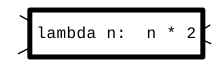
Want to double a bunch of numbers? Instead of a separate def, write the lambda inside the map() like this:
>>> list(map(lambda n: n * 2, [1, 2, 3, 4, 5]))
[2, 4, 6, 8, 10]

Do these in interpreter >>>. Just hit the up-arrow to change the body of the lambda.
>>> nums = [1, 2, 3, 4]
>>>
>>> # n * 10
>>> list(map(lambda n: n * 10, nums))
[10, 20, 30, 40]
>>>
>>> # n * -1
>>> list(map(lambda n: n * -1, nums))
[-1, -2, -3, -4]
>>>
>>> # 100 - n
>>> list(map(lambda n: 100 - n, nums))
[99, 98, 97, 96]
>>>
>>>
Solve these with 1 line of code each. Do not call list(), that was just so the examples print in the interpreter.
Look at the "lambda" exercises on the experimental server
> lambda1 exercises
Have a list of strings. Map a lambda over this list. What is the parameter to the lambda? One string. Whatever the lambda returns, that's what makes up the list of results.
>>> strs = ['Banana', 'apple', 'Zebra', 'coffee', 'Donut']
>>>
>>> list(map(lambda s: s.lower(), strs))
['banana', 'apple', 'zebra', 'coffee', 'donut']
>>>
>>> list(map(lambda s: s[0], strs))
['B', 'a', 'Z', 'c', 'D']
>>>
>>> # Works with strings - change param name to "s"
>>> list(map(lambda s: s.upper() + '!', ['hi', 'ho', 'meh']))
['HI!', 'HO!', 'MEH!']
>>>
Demo: first_2x().