Today: lambda output, lambda/def, custom sorting with lambda, wordcount sorting, introduction to modules
Lambda is powerful feature, letting you express a lot of computation in very little space. As a result, it's weird looking at first, but when it clicks, you should feel like a Power Hacker when you wield it.
Countless times, you have called a function and passed in some data for it to use. The function name is the verb, and the parameters are extra nouns to guide the computation:
# e.g. "range" is the verb, up to 10
range(10)

# e.g. "draw_line" is the verb, with these int coords
canvas.draw_line(0, 0, 100, 50, color='red')
With lambda, we open up a new category, passing in code as the parameter for the function to use, e.g. with map():
map(lambda s: s.upper() + '!', ['pass', 'code']) ->
 ['PASS!', 'CODE!']
Having an easy way to pass code between functions can be very handy.
Look at the "lambda1" section on the experimental server again.
> lambda1
The output list does not need to have the same element type as the input list. The lambda can output any type it likes, and that will make the output list. See examples: super_tuple() and lens()
lens(strs): Given a list of strings. return a list of their int lengths.
Solution
def lens(strs):
    return map(lambda s: len(s), strs)
Lambda and def are similar:
def double(n):
    return n * 2
Equivalent lambda
lambda n: n * 2
In lambda1, see the map_parens() problem.
['xx(hi)xx', 'abc(there)xyz', 'fish'] -> ['hi', 'there', 'fish']
Solution Code
def map_parens(strs):
    return map(parens, strs)


def parens(s):
    left = s.find('(')
    right = s.find(')', left)

    if left == -1 or right == -1:
        return s
    return s[left + 1:right]
> lambda-2 examples
More filled-out uses of lambda, more realistic. Some of these use a list of numbers, some with list of (x, y) tuples.
Given a list of len-2 (x, y) tuples. Return a list of the sums of each tuple. Shows that the result-list does not need to hold the same type as the input list. Solve with a map/lambda.
[(4, 2), (1, 2) (2, 3)] -> [6, 3, 5]
This is a list of points. Q: What type is the param to the lambda? A: one point
Solution
def xy_sum(points):
    return map(lambda pt: pt[0] + pt[1], points)
Given a list of len-2 (x, y) tuples. Return a list of just the x value of each tuple. Solve with a map/lambda.
Solution
def xs(points):
    return map(lambda pt: pt[0], points)
Given a non-empty list of len-2 (x, y) tuples. What is the leftmost x among the tuples? Return the smallest x value among all the tuples, e.g. [(4, 2), (1, 2) (2, 3)] returns the value 1. Solve with a map/lambda and the builtin min(). Recall: min([4, 1, 2]) returns 1
[(4, 2), (1, 2), (2, 3)] -> 1
Solution
def min_x(points):
    return min(map(lambda pt: pt[0], points))
    # Use map/lambda to form a list of
    # just the x coords. Feed that into min()
>>> foods = [('radish', 2, 8), ('donut', 10, 1), ('apple', 7, 9), ('broccoli', 6, 10)]
>>>
>>> # By default, sorts food tuples by [0]
>>> sorted(foods)
[('apple', 7, 9), ('broccoli', 6, 10), ('donut', 10, 1), ('radish', 2, 8)]
>>>

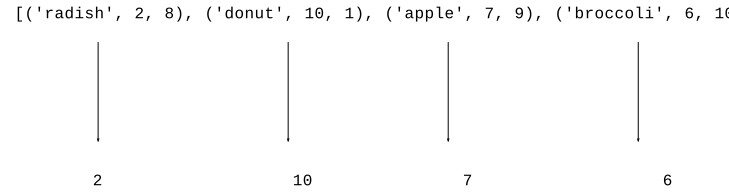
![alt: lambda food: food[1]](python-sort3.svg)
Q: What is the parameter to the lambda?
A: One elem from the list (similar to map() function)
>>> foods = [('radish', 2, 8), ('donut', 10, 1), ('apple', 7, 9), ('broccoli', 6, 10)]
>>>
>>> sorted(foods, key=lambda food: food[1])
[('radish', 2, 8), ('broccoli', 6, 10), ('apple', 7, 9), ('donut', 10, 1)]
>>> sorted(foods, key=lambda food: food[1], reverse=True)  # most tasty
[('donut', 10, 1), ('apple', 7, 9), ('broccoli', 6, 10), ('radish', 2, 8)]
>>> sorted(foods, key=lambda food: food[2], reverse=True)  # most healthy
[('broccoli', 6, 10), ('apple', 7, 9), ('radish', 2, 8), ('donut', 10, 1)]
Not limited to just projecting out existing values. We can project out a computed value. Here we compute tasty * healthy and sort on that. So apple is first, 7 * 9 = 63, broccoli is second with 6 * 10 = 60. Donut is last :(
>>> sorted(foods, key=lambda food: food[1] * food[2], reverse=True)
[('apple', 7, 9), ('broccoli', 6, 10), ('radish', 2, 8), ('donut', 10, 1)]
>>>
>>> foods = [('radish', 2, 8), ('donut', 10, 1), ('apple', 7, 9), ('broccoli', 6, 10)]
>>> max(foods)     # uses [0] by default - tragic!
('radish', 2, 8)
>>>
>>> sorted(foods, key=lambda food: food[1])
[('radish', 2, 8), ('broccoli', 6, 10), ('apple', 7, 9), ('donut', 10, 1)]
>>>
>>> max(foods, key=lambda food: food[1])  # most tasty
('donut', 10, 1)
>>> min(foods, key=lambda food: food[1])  # least tasty
('radish', 2, 8)
Key performance point: computing one max/min element is much faster than sorting all n elements.
>>> # The default sorting is not good with upper/lower case
>>> strs = ['coffee', 'Donut', 'Zebra', 'apple', 'Banana']
>>> sorted(strs)
['Banana', 'Donut', 'Zebra', 'apple', 'coffee']
>>> strs = ['coffee', 'Donut', 'Zebra', 'apple', 'Banana']
>>>
>>> sorted(strs, key=lambda s: s.lower())    # not case sensitive
['apple', 'Banana', 'coffee', 'Donut', 'Zebra']
>>>
>>> sorted(strs, key=lambda s: s[len(s)-1])  # by last char
['Zebra', 'Banana', 'coffee', 'apple', 'Donut']
>>>
Look at wordcount project, apply custom sorting to the output stage.
>>> items = [('z', 1), ('a', 3), ('e', 11), ('b', 3), ('c', 2)]
>>> items = [('z', 1), ('a', 3), ('e', 11), ('b', 3), ('c', 2)]
>>>
>>> # sort by [0]=word is the default
>>> sorted(items)
[('a', 3), ('b', 3), ('c', 2), ('e', 11), ('z', 1)]
>>>
>>> sorted(items, key=lambda pair: pair[1])   # sort by count
[('z', 1), ('c', 2), ('a', 3), ('b', 3), ('e', 11)]
>>>
>>> sorted(items, key=lambda pair: pair[1], reverse=True)
[('e', 11), ('a', 3), ('b', 3), ('c', 2), ('z', 1)]
>>>
>>> max(pairs, key=lambda pair: pair[1])      # largest count
('e', 11)
Here is the WordCount project we had before. This time look at the print_counts() and print_top() functions.
Here is the output of the regular print_counts() function, which prints out in alphabetic order. Output looks like:
$ python3 wordcount.py poem.txt
are 2
blue 2
red 2
roses 1
violets 1
$
This is the standard dict-output sorted loop.
def print_counts(counts):
    """
    Given counts dict, print out each word and count
    one per line in alphabetical order, like this
    aardvark 1
    apple 13
    ...
    """
    for word in sorted(counts.keys()):
        print(word, counts[word])
    # Alternately use .items() to access all the key/value data
    # for key, value in sorted(counts.items()):
    #    print(key, value)
The print_top(counts, n) function - print the n most common words in decreasing order by count.
$ python3 wordcount-solution.py -top 10 alice-book.txt
the 1639
and 866
to 725
a 631
she 541
it 530
of 511
said 462
i 410
alice 386
def print_top(counts, n):
    """
    Given counts dict and int N, print the N most common words
    in decreasing order of count
    the 1045
    a 672
    ...
    """
    items = counts.items()
    # Could print the items in raw form, just to see what we have
    # print(items)
    pass
    # Your code - my solution is 3 lines long, but it's dense!
    # Sort the items with a lambda so the most common words are first.
    # Then print just the first N word,count pairs with a slice
    items = sorted(items, key=lambda pair: pair[1], reverse=True) # 1. Sort largest count first
    for word, count in items[:n]:                                 # 2. Slice to grab first N
        print(word, count)
>>> import math >>> math.sqrt(2) # call sqrt() fn 1.4142135623730951 >>> math.sqrt>>> >>> math.log(10) 2.302585092994046 >>> math.pi # constants in module too 3.141592653589793
Quit and restart the interpreter without the import, see common error:
>>> # quit and restart interpreter
>>> math.sqrt(2)  # OOPS forgot the import
Traceback (most recent call last):
NameError: name 'math' is not defined
>>>
>>> import math
>>> math.sqrt(2)  # now it works
1.4142135623730951
>>> import math
>>> dir(math)
['__doc__', '__file__', '__loader__', '__name__', '__package__', '__spec__', 'acos', 'acosh', 'asin', 'asinh', 'atan', 'atan2', 'atanh', 'ceil', 'copysign', 'cos', 'cosh', 'degrees', 'e', 'erf', 'erfc', 'exp', 'expm1', 'fabs', 'factorial', 'floor', 'fmod', 'frexp', 'fsum', 'gamma', 'gcd', 'hypot', 'inf', 'isclose', 'isfinite', 'isinf', 'isnan', 'ldexp', 'lgamma', 'log', 'log10', 'log1p', 'log2', 'modf', 'nan', 'pi', 'pow', 'radians', 'remainder', 'sin', 'sinh', 'sqrt', 'tan', 'tanh', 'tau', 'trunc']
>>>
>>> help(math.sqrt)
Help on built-in function sqrt in module math:

sqrt(x, /)
    Return the square root of x.
>>>
>>> help(math.cos)
Help on built-in function cos in module math:

cos(x, /)
    Return the cosine of x (measured in radians).
The file wordcount.py
Forms a module named wordcount
>>> # Run interpreter in wordcount directory
>>> import wordcount
>>>
>>> wordcount.read_counts('test1.txt')
{'a': 2, 'b': 2}
>>> dir(wordcount)
['__builtins__', '__cached__', '__doc__', '__file__', '__loader__', '__name__', '__package__', '__spec__', 'clean', 'main', 'print_counts', 'print_top', 'read_counts', 'sys']
>>>
>>> help(wordcount.read_counts)

Help on function read_counts in module wordcount:

read_counts(filename)
    Given filename, reads its text, splits it into words.
    Returns a "counts" dict where each word
    ...
You have written many foo.py files with defs in the. Now we see, another program can import foo, and then call foo.bar() in your module to access your functions (in the same directory). It helps that your functions have well defined input/output, so they can be used and re-mixed by other programs.
Typical last 2 lines of .py file:
if __name__ == '__main__':
    main()
Experiment: Put these lines at end of wordcount.py. Then try running wordcount from command line, and loading it in interpreter.
if __name__ == '__main__':
    print("I feel like running main()")
    main()
else:
    print("Not running main()")
Design idea: doing the ordinary thing should be easy, not require thought. Doing something hard should be possible, but may require work.
This __name__ business seems a weak point in Python's design. It is not great that every vanilla python program has to carry around these 2 obscure looking lines. There should be a less obscure way of getting the default behavior that 99% of python programs want.