Today - style, black box examples, boolean logic, string introduction, string loop, [Doctests]
Coding Style
Let's add a little more to our Py style rules. This is the same document referenced in week 1, but we'll look in more detail today.
Python Guide - look at the Style1 section.
Data Flow Picture
We want to divide our big program into a bunch of functions.
You have some files with data int them. You write code to lode the data into Python in one form. Then compute a transform into another form. Then a further computation produces an "answer" form. You can think of this as a sort of "data flow", from the original data to the final output.
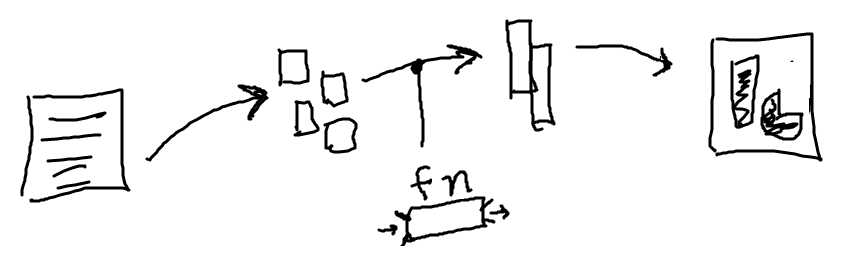
- We have seen functions thus far, mainly we call them to run their code
- Today we will start using functions as data flow
- Each function is like a little box of some computation, with data-in and data-out
- One stage in the picture above might be one function
"Black Box" Function Model
Black-box model of a function: function runs with parameters as input, returns a value.
All the complexity of its code is sealed inside. Calling it is relatively simple - provide parameters, get back an answer.

Strategic Story - Why Black Box?
Key goal: be able to work on one function at a time
For Divide and Conquer, want to be able to work on each function separately, one at a time. Need to keep the functions sealed off from each other for this to work - black box. You'll see how this all comes together as we work with functions, parameters, and return.
1. winnings1() Example
>
winnings1()
- This is a first, simple example
- Writing a function for a lottery game
- Rules: input is an int score 0..10 inclusive
score 5 or more, winnings is score * 12
score 4 or less, winnings is score * 10
- We could make a table showing output for each input
- Code needs to work for all cases, i.e. "general"
- Later: we'll see how to put in formal tests that the code is getting the right output for each input
score winnings
0      0
1      10
2      20
3      30
4      40
5      60  # 12x kicks in here
6      72
7      84
8      96
9      108
10     120
1. Input - Parameter score
def winnings1(score):
    ...
- The parameters to a function are its inputs
Left side of black-box picture
- Each is like a variable with a value in it
- Who put the value in the parameter?
The code that called this function.
Mostly the value is there, we just use it
2. Output - return score * 10
def winnings1(score):
    return score * 10
- The
return directive does two things
- 1. It exits the run of the function immediately
- 2. It specifies the return value that will go back to the caller
- So the return statement determines the output of the function
Experiment 1 - winnings1()
You can type these in and hit the Run button as we go. The results are pretty easy to follow.
def winnings1(score):
    return score * 10
- Try 1 line for the function:
return score * 10
- Look at the table of output
- See the basic role of parameter/return
- But this output is wrong half the time
Output Format
- With the experimental server
- It calls the function many times, shows the results one per row
- First "call" column is the input
- Second "got" column is what the function returned
- Easy to see the function's behavior this way
- Function in/out is, in a way, more compact and simple than, say, the 2-d image input/output
if-return Pick-Off Strategy
- The function needs to handle all input cases
- If-logic detects one case
Returns the answer for that case
Exiting the function
- Lines below have if-return logic for other cases
- Code is "picking off" the cases one by one
- As we get past if-checks .. input must be a remaining case
- Analogy: coin sorting machine
Coin rolls past holes, smallest to largest
1st dime, 2nd penny, 3rd nickel, 4th quarter
A dime never makes it to the quarter-hole
The dime is picked-off earlier
Experiment 2
def winnings1(score):
    if score >= 5:
        return score * 12
Add if-logic to pick off the >= 5 case. It's only right half the time.
None Result
None is the default return value
- Returned if there is not explicit return value
- Possibly by "falling off the end" of the function
All its lines have run and it is finished
- Above example, we see
None if score < 5
- If you see
None like this
Your code is not returning a value somehow
Experiment 3 - Almost
def winnings1(score):
    if score >= 5:
        return score * 12

    if score < 5:
        return score * 10
Add pick-off code for the other case. This is close to fully correct. It does return the right result in all cases, but the code is a little off.
Experiment 4 - Perfect
def winnings1(score):
    if score >= 5:
        return score * 12

    # If we get to this line, score < 5
    return score * 10
- Each pick-off recognizes a case and exits the function
- Therefore for lines below, the picked-off case is excluded
- e.g. the
score < 5 test is unnecessary
- Also, this helps a one-at-a-time use of your attention
Work on code for case-1
When that's done, put it out of mind
Work on case-2, knowing case-1 is out of the picture
Observations
- Thinking about cases, if-logic to pick them off one at a time
- Try changing <= to <
- A form of Off By One bug - be careful right at the boundary
- What about this form...
def winnings1(score):
    if score >= 5:
        return score * 12
        return score * 10
That does not work. The second return is under the control of the if. It never runs because the line above exits the function. In Python code, where a line is indented is very significant.
2. Winnings2 Example
Extra practice example.
>
winnings2()
Say there are 3 cases, have a series of if-return to get them. Need to think about the order. Need to put the == 10 case early.
Winnings2: The int score number in the range 0..10 inclusive.
Bonus! if score is 10 exactly, winnings is score * 15.
If score is between 4 and 9 inclusive, winnings is score * 12.
if score is 3 or less, winnings is score * 10.
Given int score, compute and return the winnings.
Solution
def winnings2(score):
    if score == 10:
        return score * 15

    if score >= 4:  # score <= 9 is implicit
        return score * 12

    # All score >= 4 cases have been picked off.
    # so score < 4 here.
    return score * 10
Boolean Values
For more detail, see guide Python Boolean
- "boolean" value in code -
True or False
- if-test and while-test work with boolean inputs
- e.g.
bit.front_clear() returns a boolean
- So we have
if bit.front_clear():
Ways to Get a Boolean
== operator to compare two things
2 == 1 + 1 returns True
Two equal signs
Since single = is used for var assignment
!= - not-equal test
2 != 10 returns True
- Compare greater-than / less-than
< is less-than
<= is less-or-equal to
- These all work with ints, floats, other types of data
Try this in the interpreter (or Hack Mode button at bottom experimental server)
>>> n = 5   # assign to n to start
>>> n == 6
False
>>> n == 5
True
>>> n != 6
True
>>>
>>> n < 10
True
>>> n < 5  # < is strict
False
>>>
>>> n <= 5  # less-or-equal
True
>>>
>>> n > 0
True
Boolean Operators: and or not
- An operator combines values, returning a new value
e.g. + operator, 1 + 2 returns 3
- Boolean operators combine
True False values
- Boolean operators:
and or not
- Suppose here that
xxx and yyy are boolean values
xxx and yyy - if both sides are True, then it is True
aka all the inputs must be True
xxx or yyy - if either side or both sides are True, it is True
aka some input must be Triue
not xxx = inverts True/False
Why does not go to the left? It's like negative numbers..
e.g. -6
Weather Examples - and or not
Say we have temp variable is a temperature, and is_raining is a Boolean indicating if it's raining or not. Here are some examples to demonstrate and or not:
# OR: either or both are true
# Say we don't want to go outside if
# if it's cold or raining.
if temp < 50 or is_raining:
    print('not going outside!')


# AND
# We want to go outside if it's snowing.
if temp < 32 and is_raining:
    print('yay snow!')


# AND + NOT
# Sunny and nice case:
if temp > 70 and not is_raining:
    print('Sunny and nice!')


# Style note: don't use == False or == True
# to form a test. See above how "is_raining"
# is used directly in the test, or with a "not"
# in front of it.
Numeric and Example
Suppose we have this code, and n holds an int value.
if n > 0 and n < 10:
   # get here if test is True
What must n be inside the if-statement? Try values like 0 1 2 3 . 8 9 10
You can work out that n must be a an int value in the range 1..9 inclusive.
3. is_teen(n) Example
>
is_teen()
is_teen(n): Given an int n which is 0 or more. Return True if n is a "teenager", in the range 13..19 inclusive. Otherwise return False. Write a boolean test to pick off the teenager case.
Solution
def is_teen(n):
    # Use and to check
    if n >= 13 and n <= 19:
        return True

    return False

    # Future topic: possible to write this
    # as one-liner: return n >= 13 and n <= 19
4. Lottery Scratcher Example
>
scratcher()
An extra example for practice.
Lottery scratcher game: We have three icons called a, b, and c. Each is an int in the range 0..10 inclusive.
If all three are the same, winnings is 100.
Otherwise if 2 are the same, winnings is 50.
Otherwise winnings is 0. Given a, b and c inputs, compute and return the winnings. Use and/or/== to make the tests.
Solution:
def scratcher(a, b, c):
    # 1. All 3 the same
    if a == b and b == c:
        return 100

    # 2. Pair the same (3 same picked off above)
    if a == b or b == c or a == c:
        return 50

    # 3. Run gets to here, nothing matched
    return 0
Strings
For more detail, see guide Python Strings
- A very widely used data type
- e.g. a string:
'Hello'
- String is a sequence of "characters" or "chars"
- e.g. urls, paragraphs
- In Python code a string "literal" is written on one line within single quote marks ' (prefer)
- Double quote also works "
'Hello'
"Hello"
len() function
- Returns number of chars in string
- Works on other collections too
- Not noun.verb style
>>> len('Hello')
5
>>> s = 'Hello'   # Equivalently
>>> len(s)
5
>>> len('x')
1
>>> len('')
0
Empty String ''
- The "empty" string is just the string with 0 chars
- Written like:
'' or ""
- This is a valid string, its len is 0
- A common case to think about with string algorithms
- Does the code need to work on the empty string?
- Probably yes
Zero Based Indexing - Super Common
- Everything in computers uses this zero-based indexing scheme
- Pixels within an image used this, x/y vs. width/height
- Characters in strings are "indexed" from 0 vs. length
- Index number addresses each char in the string
- Foreshadow: we'll use index numbers, [ ], and len()...
For many many linear type data arrangements
But for today strings

String Square Bracket Index
- Use square bracket to access a char by index number
- Valid index numbers: 0..len-1
- Get out of bounds error for past-limit index number
>>> s = 'Python'
>>> s[0]
'P'
>>> s[1]
'y'
>>> s[4]
'o'
>>> s[5]
'n'
>>> s[6]
IndexError: string index out of range
String Immutable
- A string in memory is not editable
- "Immutable" is the official term
- e.g. square bracket cannot change a string
>>> s = 'Python'
>>> s[0]        # read ok
'P'
>>> s[0] = 'X'  # write not ok
TypeError: 'str' object does not support item assignment
String +
- Plus operator
+ combines 2 strings to make a new, bigger string
aka "concatenate"
- Uses new memory to hold the result
- Does not change original string
>>> a = 'Hello'
>>> b = 'there'
>>> a + b
'Hellothere'
>>> a
'Hello'
String + Add At End Pattern
- Use + to add at the end of a string, yielding a new bigger string
- Use the following pattern to grow the string s:
s = s + 'xxx'
- The += operator works here too
- The individual strings are still immutable
We are constructing a new, bigger string with each step
>>> a = 'Hi'
>>> a = a + '!'  # aka a += '!'
>>> a
'Hi!'
>>> a = a + '!'
>>> a
'Hi!!'
>>> a = a + '!'
>>> a
'Hi!!!'
for/i/range String Loop
- The canonical loop over index numbers
- For string
'Python' len 6
Want index numbers 0, 1, 2, 3, 4, 5
for i in range(len(s)):
- Use
s[i] to access each char in the loop
- Standard to use the variable name
i for this loop
- This is so common, it's idiomatic
- We'll see another way to do this later
# have string s
for i in range(len(s)):
    # access s[i] in here
String2 Example Functions
1. double_char
>
double_char
- Idiomatic code to look at every char
- Initialize
result = '' variable before loop
- Update in loop:
result = result + xxxx
- Use
s[i] to access each char in loop
- Return result at end
- Could use
+= shortcut
- Q: does it work on empty string input?
Solution code
def double_char(s):
    result = ''
    for i in range(len(s)):
        result = result + s[i] + s[i]
    return result
String Boolean Tests - True or False
String Testing: 'a' vs. 'A'
We've used == already. 'a' and 'A' are different characters.
>>> 'a' == 'A'
False
>>> s = 'red'
>>> s == 'red'   # two equal signs
True
>>> s == 'Red'   # must match exactly
False
String Testing - in
- The word in - test if a substring appears in a string
- Mnemonic: same word inside for-loop, like Python wants to introduce very few new words
- Chars must match exactly - upper/lower are considered different
>>> 'c' in 'abcd'
True
>>> 'bc' in 'abcd'
True
>>> 'bx' in 'abcd'
False
>>> 'A' in 'abcd'
False
String Character Class Tests
- String is made of characters
- Categorize characters into major classes:
- 1. Alphabetic -
'a' 'Z' .. used to make words
- 2. Digits -
'0' '2' .. used to make numbers
- 3. Space - space, tab, newline - aka "whitespace"
- There are noun.verb tests for the above 3, returning boolean True or False
- For empty string return False (a weird edge case)
- All the other chars form a miscellaneous class -
'$' '%' ';' ... any char not in the first 3 categories
s.isdigit() - True if all chars in s are digits '0' '1' .. '9'
s.isalpha() - True for alphabetic word char, i.e. a-z A-Z. Each unicode alphabet has its own definition of what's alphabetic, e.g. 'Ω' below is alphabetic.
s.isalnum() - alphanumeric, just combines isalpha() and isdigit()
s.isspace() - True for whitespace char, e.g. space, tab, newline
>>> 'a'.isalpha()
True
>>> 'abc'.isalpha()  # works for multiple chars too
True
>>> 'Z'.isalpha()
True
>>> '@'.isalpha()
False
>>> '9'.isdigit()
True
>>> ' '.isspace()
True
2. digits_only
>
digits_only
- Given string s
- Return a string of its chars which are digits
- e.g.
'ab4xx2' returns '42'
- Use the standard range loop
- If logic inside the loop
Control if a char is grabbed or not
Solution code
def digits_only(s):
    result = ''
    for i in range(len(s)):
        if s[i].isdigit():
            result += s[i]
    return result
if Variation: if / else
if test-expr:
  Lines-A
else:
  Lines-B
- See guide: Python-if
- Regular if - do the body lines, or do nothing
- if/else variant:
Choose between 2 actions
Always do one of them
- Run lines-A if test is True
- Run lines-B if test is False
- Style: use if/else to choose 1 of 2 actions
- Avoid using "else" if it is not needed
The regular "if" we've seen is most common
else vs. not
Sometimes people sort of back into using else to do something if the test is False, like this:
if some_test:
     pass
     (do nothing here)
else:
     line I want to do
The correct way to do that is with not:
if not some_test:
    line I want to do
3. str_dx
>
str_dx
- Return string where every digit changes to 'd'
And every other char changed to 'x'
- So 'ab42z' returns 'xxddx'
- Use if/else
Solution code
def str_dx(s):
    result = ''
    for i in range(len(s)):
        if s[i].isdigit():
            result += 'd'
        else:
            result += 'x'
    return result
Big Picture - Program, Functions, Testing
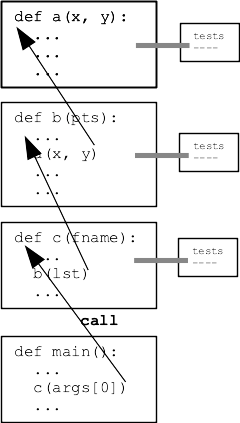
- Big Picture
- Program Made of many functions
- Decomposition
- Best Practice:
Test a function in isolation
Then later functions can call it
- We did this with Bit sometimes
- Fits with Divide and Conquer strategy
- Fits with Black Box model of a function
Inputs and Outputs - test with these
- Today: Python built-in tech for testing a function as you go
str1 project
- Download str1.zip project
- Expand to get "str1" folder
- Open the folder in PyCharm
Python Function - Pydoc
- See digits_only() or str_dx() below
- See triple-quote description at top
- Inside each ">>>" thing within triple quote is a test
- This is known as "Doctest" of the function
What inputs fn takes
What it promises to return
Black box model
"Contract" idea
def digits_only(s):
    """
    Given a string s.
    Return a string made of all
    the chars in s which are digits,
    so 'Hi4!x3' returns '43'.
    Use a for/i/range loop.
    (this code is complete)
    >>> digits_only('Hi4!x3')
    '43'
    >>> digits_only('123')
    '123'
    >>> digits_only('')
    ''
    """
    result = ''
    for i in range(len(s)):
        if s[i].isdigit():
            result += s[i]
    return result
Python Function - Doctest
See lines like:
    >>> digits_only('Hi4!x3')
    '43'
- That syntax spells a test of 1 case
- Looks like a fn call
- Input between the parens
- Output on the next line
- In PyCharm:
Right click on the test
Select "Run Doctest ..."
- Output:
Process finished with exit code 0
Also look for "Tests passed" and green checkmark on horizontal bar
That means it worked perfectly
This message could be more fun about it!
- Otherwise get error output
- Experiment: try putting in a bug, run Doctest, fix the bug
- Protip:
Green "play" button at left re-runs recent test
See also top of "Run" menu
Avoid having to re-click every time
Doctest - Important for Strategy
Divide and conquer - want to be able to divide your program up into separate functions, say A, B, and C. Want to work on one function at a time, including testing. Doctests make this really easy - just author the tests right next to where you write the code.
We'll use Doctests to drive the examples on wed and in section.