
Today: is this course going to get harder and harder each week?, idiomatic range index loop, reversed, resume the movie example, grid, grid testing, work on one function at a time, demo HW3
How are the things numbered individually? It's always the zero based scheme: 0, 1, 2, .. 9
The idiomatic way to loop over them by their index numbers is with the for/i/range loop.
for i in range(10):
   # i in here: 0 1 2 .. 9
   # e.g. use s[i]
"Idiomatic" here meaning a phrase that is used frequently, becomes familiar and easy to use correctly.
The reversed() function: reverses a sequence such as from range(). Splices into the regular for/i/range idiom to go through the same numbers in reverse order:
for i in reversed(range(10)):
    # i in here: 9 8 7 .. 0
For more detail, see the guide Python range()
The reversed() function appears in part of homework-3.
Here is the movie example, continuing from last time: movie.zip
Implement set_edges()
def set_edges(grid):
    """
    Set all the squares along the left edge (x=0) to 'a'.
    Do the same for the right edge.
    Return the changed grid.
    """
    pass
Solution code:
def set_edges(grid):
    """
    Set all the squares along the left edge (x=0) to 'a'.
    Do the same for the right edge.
    Return the changed grid.
    """
    for y in range(grid.height):
        grid.set(0, y, 'a')
        grid.set(grid.width - 1, y, 'a')
    return grid
Q: How can we tell if that code works? With our image examples, at least you could look at the output, although that was not a perfect solution either. Really we want to be able to write test for a small case with visible data.
There's a syntax to write a grid out in Python code. It's a little funny looking, but it's fine for small grids. Suppose we have this 3 by 2 grid
Here is the nested-list "literal" representation of that grid:
[[None, None, 'a'], [None, None, 'b']]
The grid is shown as a series of rows, row-0, row-1, .... Each row within square brackets. The special value None is in the empty squares. So the first thing you see is the top row, Then the next row and so on.
The Grid code understands how to build a grid from a literal. This lets us create a grid in a particular state in one line. This will be handy for testing!
grid = Grid.build([[None, None, 'a'], [None, None, 'b']])
Here's a visualization - before and after - of grid and how set_edges() modifies it.
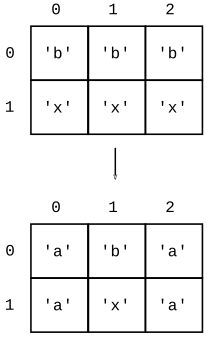
Here are the key 3 lines added to set_edges() that make the Doctest: (1) build a "before" grid, (2) call fn with it, (3) write out the expected result of the function call
    ...
    >>> grid = Grid.build([['b', 'b', 'b'], ['x', 'x', 'x']])
    >>> set_edges(grid)
    [['a', 'b', 'a'], ['a', 'x', 'a']]
    ...
"Anyone who attempts to generate random numbers by deterministic means is, of course, living in a state of sin." John von Neumann
A computer program is "deterministic" - each time you run the lines with the same input, they do exactly the same thing. Creating random numbers is a challenge, so we settle for "pseudo-random" which are statistically random looking, but in fact are generated by an algorithm that selects the series of numbers.
Try the "Python Console" tab at the lower-left of your PyCharm window to get an interpreter. It may have a prompt like "In[2]:", but it's basically the same as the old >>> interpreter.
>>> import random   # starter code has this already
>>>
>>> random.randrange(10)
1
>>> random.randrange(10)
3
>>> random.randrange(10)
9
>>> random.randrange(10)
1
>>> random.randrange(10)
8
>>> random.choice('doofus')
'o'
>>> random.choice('doofus')
'u'
>>> random.choice('doofus')
'o'
>>> random.choice('doofus')
'o'
>>> random.choice('doofus')
's'
>>> random.choice('doofus')
's'
>>> random.choice('doofus')
'o'
>>> random.choice('doofus')
's'
The code for this one is provided to fill in letters at the right edge. We're not testing this one - testing random behavior is a pain, although it is possible.
def random_right(grid):
    """
    Set the right edge of the grid to some
    random letters from 'doofus'.
    (provided)
    """
    for y in range(grid.height):
        if random.randrange(10) == 0:
            char = random.choice('doofus')
            grid.set(grid.width - 1, y, char)
    return grid
Think about scroll_left()
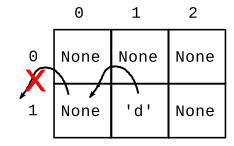
Before:
NNN
NdN
After:
NNN
dNN
def scroll_left(grid):
    """
    Implement scroll_left as in lecture notes.
    """
    # v1 - has bugs
    for y in range(grid.height):
        for x in range(grid.width):
            # Move letter at x,y leftwards
            val = grid.get(x, y)
            if x > 0 and val != None:
                grid.set(x - 1, y, val)
    return grid
We'll use this as the "before" case:
[['a', 'b', 'c'], ['d', None, None]]
What should the after/result look like for that case? If you are writing the code for something, a good first step is writing out an example "after" case for it. Thinking through before/after pair clearly is a good first step, getting your coding ideas organized.
After:
[['b', 'c', None], [None, None, None]]
Strategy aside: if you need to write an algorithm and are staring at a blank screen. Write out a couple before/after cases to get your thoughts started.
Use this to iterate on the code, get it perfect.
def scroll_left(grid):
    """
    Implement scroll_left as in lecture notes.
    >>> grid = Grid.build([['a', 'b', 'c'], ['d', None, None]])
    >>> scroll_left(grid)
    [['b', 'c', None], [None, None, None]]
    """
How do you debug a function? Run its (small, isolated) Doctests, look at the "got"
Here is the code with bugs fixed.
def scroll_left(grid):
    """
    Implement scroll_left as in lecture notes.
    >>> grid = Grid.build([['a', 'b', 'c'], ['d', None, None]])
    >>> scroll_left(grid)
    [['b', 'c', None], [None, None, None]]
    """
    for y in range(grid.height):
        for x in range(grid.width):
            # Move letter at x,y leftwards
            val = grid.get(x, y)
            if x > 0 and val != None:
                grid.set(x - 1, y, val)
            grid.set(x, y, None)
    return grid
$ python3 movie.py
$
$ python3 movie.py 80 40  # bigger window