
Today: black box, string loops, Start movie example, grid, grid testing.
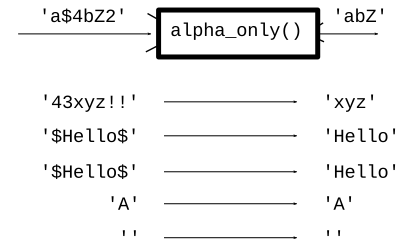
Suppose there were a function named alpha_only(s), and we tried to describe it, talking about its code. Code has a lot of detail and complexity to it, so it's not a good way to characterize a function.
Instead, we wall off the code, not looking inside the function. Instead, characterize the function by talking only about its input and output data - parameters and return value.
Continue with strings. For more details, see the Python guide chapter on strings
s = s + something>>> s = 'hello' >>> s = s + '!' >>> # Q: What is s now?
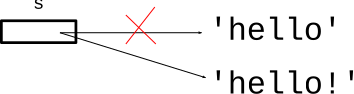
Answer: s is 'hello!' after the two lines. So s = s + xxx is a way of adding something to the right side of a string. The following form does the exactly the same thing using += as a shorthand:
>>> s = 'hello'
>>> s += '!'
Here is our string, using zero-based index numbers to refer to the individual chars..
>>> s = 'Python'
>>> s[0]
'P'
>>> s[1]
'y'
>>>
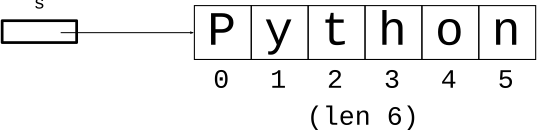
The length of the string is 6. The index numbers are 0, 1, 2, 3, 4, 5. How to write a loop that generates those numbers? It's the same loop we used to, say, loop over the x values of an image. If the image width was 100, we wanted the index numbers 0, 1, 2.. 99. Strings are exactly the same, feeding len(s) into the range() function.
for i in range(len(s)):This is the standard, idiomatic loop to go through all the index numbers.
It's traditional to use a loop variable with the simple name i with this loop. Inside the loop, use s[i] to access each char of the string.
# have string s
for i in range(len(s)):
    # access s[i] in here
double_char(s): Given string s. Return a new string that has 2 chars for every char in s. So 'Hello' returns 'HHeelllloo'. Use a for/i/range loop.
Also, see the experimental server section string2 for many problems like double_char()
Solution code
def double_char(s):
    result = ''
    for i in range(len(s)):
        result = result + s[i] + s[i]
    return result
not_ab(s): Given string s. Return a new string made of all the chars in s which are not lowercase 'a' or 'b'. Use a for/i/range loop.
Try to solve using for/i/range loop with the += pattern like double_char(). Test each char to see if it is 'a' or 'b' using !=.
> not_ab
We've used == already. 'a' and 'A' are different characters.
>>> 'a' == 'A'
False
>>> s = 'red'
>>> s == 'red'   # two equal signs
True
>>> s == 'Red'   # must match exactly
False
>>> 'c' in 'abcd'
True
>>> 'bc' in 'abcd'
True
>>> 'bx' in 'abcd'
False
>>> 'A' in 'abcd'
False
s.isdigit() - True if all chars in s are digits '0' '1' .. '9'
s.isalpha() - True for alphabetic word char, i.e. 'a-z' and 'A-Z'. Each unicode alphabet has its own definition of what's alphabetic, e.g. 'Ω' below is alphabetic.
s.isalnum() - alphanumeric, just combines isalpha() and isdigit()
s.isspace() - True for whitespace char, e.g. space, tab, newline
>>> 'a'.isalpha()
True
>>> 'abc'.isalpha()  # works for multiple chars too
True
>>> 'Z'.isalpha()
True
>>> '$'.isalpha()
False
>>> '@'.isalpha()
False
>>> '9'.isdigit()
True
>>> ' '.isspace()
True
Solution code
def alpha_only(s):
    result = ''

    # Loop over all index numbers
    for i in range(len(s)):
        # Access each s[i]
        if s[i].isalpha():
            result += s[i]

    return result
See guide for more if/else details: Python-if
if test-expr:
  Lines-A
else:
  Lines-B
> str_dx
Solution code
def str_dx(s):
    result = ''
    for i in range(len(s)):
        if s[i].isdigit():
            result += 'd'
        else:
            result += 'x'
    return result
Sometimes beginners sort of back into using else to do something if the test is False, like this:
if some_test:
     pass  # do nothing here
else:
     do_something
The correct way to do that is with not:
if not some_test:
    do_something
def digits_only(s):
    """
    Given a string s.
    Return a string made of all
    the chars in s which are digits,
    so 'Hi4!x3' returns '43'.
    Use a for/i/range loop.
    (this code is complete)
    >>> digits_only('Hi4!x3')
    '43'
    >>> digits_only('123')
    '123'
    >>> digits_only('')
    ''
    """
    result = ''
    for i in range(len(s)):
        if s[i].isdigit():
            result += s[i]
    return result
Here are the key lines that make one Doctest:
    >>> digits_only('Hi4!x3')
    '43'
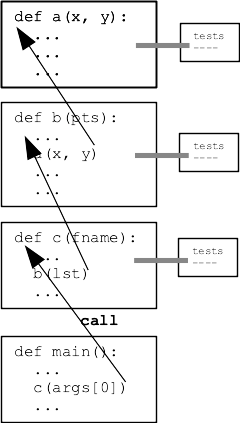
Divide and conquer - want to be able to divide your program up into separate functions, say A, B, and C. Want to work on one function at a time, including testing. Doctests make this really easy - just author the tests right next to where you write the code.
We'll use Doctests to drive the examples in section and on homework-3. (Not on the quiz though)
Today's grid example peeps.zip
grid = Grid(3, 2)
grid.width # returns 3
grid.set(2, 0, 'a')
grid.set(2, 1, 'b')
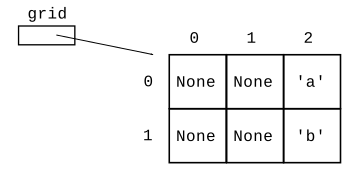
Suppose we have a 2-d grid of peeps candy bunnies. A square in the grid is either 'p' if it contains a peep, or is None if empty. We'll say that a peep is "happy" if it has another peep immediately to its left or right.
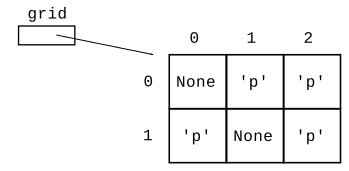
Look at the grid squares above. For each x,y .. is that a happy peep x,y?
x, y happy?
(top row)
0, 0 -> False (no peep there)
1, 0 -> True
2, 0 -> True

(2nd row, nobody happy)
0, 1 -> False
1, 1 -> False
2, 1 -> False
Here is the syntax for the above grid. The first [ .. ] is the first row, the second [ .. ] is the second row. This is fine for writing the data of a small grid, which is good enough for writing a test.
grid = Grid.build([[None, 'p', 'p'], ['p', None, 'p']])
def is_happy(grid, x, y):
    """
    Given a grid of peeps and in bounds x,y.
    Return True if there is a peep at that x,y
    and it is happy.
    A peep is happy if there is another peep
    immediately to its left or right.
    >>> grid = Grid.build([[None, 'p', 'p'], ['p', None, 'p']])
    >>> is_happy(grid, 0, 0)
    False
    >>> is_happy(grid, 1, 0)
    True
    >>> is_happy(grid, 2, 0)
    True
    >>> is_happy(grid, 0, 1)
    False
    >>> is_happy(grid, 2, 1)
    False
    """
    pass
This code is fine. Using the "pick-off strategy, looking for cases to return True. Then return False as the bottom if none of the cases found another peep.
def is_happy(grid, x, y):
    """
    Given a grid of peeps and in bounds x,y.
    Return True if there is a peep at that x,y
    and it is happy.
    A peep is happy if there is another peep
    immediately to its left or right.
    >>> grid = Grid.build([[None, 'p', 'p'], ['p', None, 'p']])
    >>> is_happy(grid, 0, 0)
    False
    >>> is_happy(grid, 1, 0)
    True
    >>> is_happy(grid, 2, 0)
    True
    >>> is_happy(grid, 0, 1)
    False
    >>> is_happy(grid, 2, 1)
    False
    """
    # 1. Check if there's a peep at x,y
    # If not we can return False immediately.
    if grid.get(x, y) != 'p':
        return False

    # 2. Happy because of peep to left?
    # Must check that x-1 is in bounds before calling get()
    if grid.in_bounds(x - 1, y):
        if grid.get(x - 1, y) == 'p':
            return True

    # 3. Similarly, is there a peep to the right?
    if grid.in_bounds(x + 1, y):
        if grid.get(x + 1, y) == 'p':
            return True

    # 4. If we get to here, not a happy peep,
    # so return False
    return False
andThe in_bounds() checks can be done with and instead nesting 2 ifs. This works because the "and" works through the tests left-to-right, and stops as soon as it gets a False. This code is a little shorter, but both approaches are fine.
    # 2. Happy because of peep to left?
    # here using "and" instead of 2 ifs
    if grid.in_bounds(x - 1, y) and grid.get(x - 1, y) == 'p':
        return True
We're just starting down this path Doctests. Doctests enable writing little tests for each black-box function as you go, which turns out to be big productivity booster. We will play with this in section and on homework-3.