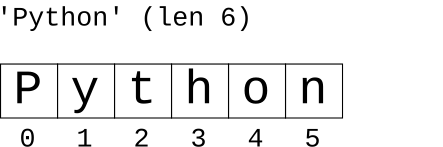
Today: string in, if/elif, string .find(), slices
See chapters in Guide: String - If
in Test>>> 'Dog' in 'CatDogBird' True >>> 'dog' in 'CatDogBird' # upper vs. lower case False >>> 'd' in 'CatDogBird' # finds d at the end True >>> >>> 'i' in 'CatDogBird' True >>> >>> 'x' in 'CatDogBird' False
Python has many built-in functions, and we will see all the important ones in CS106A. You want to know the common built-in functions, since using a built-in is far preferable to writing code for it yourself - "in" is a nice example. The "in" operators works for several data structure to see if a value is in there, and its use with strings is our first example of it.
has_pi(s): Given a string s, return True if it contains the substrings '3' and '14' somewhere within it, but not necessarily together. Use "in".
> has_pi()
Note these functions are in the string-3 section on the Experimental server
This form works in English but not in Python:
if '3' and '14' in s:   # NO does not work
    ...
The and should connect two fully formed boolean tests, such as you would write with "in" or "==", so this works
if '3' in s and '14' in s:
    ...
> catty()
'xCtxxxAax' -> 'CtAa'
Return a string made of the chars from the original string, whenever the chars are one of 'c' 'a' 't', (either lower or upper case). So the string 'xaCxxxTx' returns 'aCT'.
Here is a natural way to think of the code, but it does not work:
def catty(s):
    result = ''
    for i in range(len(s)):
        if s[i] == 'c' or s[i] == 'a' or s[i] == 't':
            result += s[i]
    return result
What is the problem? Upper vs. lower case. We are not getting any uppercase chars 'C' for example.
Solution: convert each char to lowercase form .lower(), then test.
Solution - this works, but that if-test is quite long, can we do better?
def catty(s):
    result = ''
    for i in range(len(s)):
        if s[i].lower() == 'c' or s[i].lower() == 'a' or s[i].lower() == 't':
            result += s[i]
    return result
Start with the v2 code. Create variable to hold the repeated computation - shorten the code and it "reads" better with the new variable.
low = s[i].lower()
The complete solution
def catty(s):
    result = ''
    for i in range(len(s)):
        low = s[i].lower()   # decomp by var
        if low == 'c' or low == 'a' or low == 't':
            result += s[i]
    return result
We will often do this with 106a code. If the solution is getting a little lengthy, introduce a variable for some part of the data like this.
The name of a variable should label that value in the code, helping the programmer to keep their ideas straight. Other than that, the name can be short. The name does not need to repeat every true thing about the value. Just enough to distinguish it from other values in this algorithm.
1. Good names for this example, short but including essential details: low, low_char
2. Names with more detail, probably too long: low_char_i, low_char_in_s
3. Avoid this name: lower - name is ok, but avoid using a name which is the same as the name of a function, just to avoid confusion.
The V2 code above is acceptable, but V3 is shorter and nicer. The V3 code also runs faster, as it does not needlessly re-compute the lowercase form three times per char.
The if/return "pick off" strategy is good strategy for a function. An if statement detects a case and returns the answer for that case. Later lines deal with other cases, and we have a sort of "none of the above" return at the bottom. Each return represents 1 of the n cases the function can handle. In this case, handling a case is also synonymous with leaving the function.
def foo():
    if case-1
        return case-1 result

    if case-2
        return case-2 result

    return none-of-above result
The if/elif structure below has the same 1-of-n-cases structure, but does not leave the function.
if test1:
  action-1
elif test2:
  action-2
else:
  action-3
str_adx(s): Given string s. Return a string of the same length. For every alphabetic char in s, the result has an 'a', for every digit a 'd', and for every other type of char the result has an 'x'. So 'Hi4!x3' returns 'aadxad'. Use an if/elif structure.
Solution
def str_adx(s):
    result = ''
    for i in range(len(s)):
        if s[i].isalpha():
            result += 'a'
        elif s[i].isdigit():
            result += 'd'
        else:
            result += 'x'
    return result
>>> s = 'Python'
>>>
>>> s.find('th')
2
>>> s.find('o')
4
>>> s.find('y')
1
>>> s.find('x')
-1
>>> s.find('N')
-1
>>> s.find('P')
0
>>> s = 'Python'
>>> s[1:3]    # 1 .. UBNI
'yt'
>>> s[1:5]
'ytho'
>>> s[4:5]
'o'
>>> s[4:4]    # "not including" dominates
''
>>> s[:3]     # omit = from/to end
'Pyt'
>>> s[4:]
'on'
>>> s[4:999]  # too big = through the end
'on'
>>> s[:4]     # "perfect split" on 4
'Pyth'
>>> s[4:]
'on'
>>> s[:]      # the whole thing
'Python'
A first venture into using index numbers and slices. Many problems work in this domain - e.g. extracting all the hashtags from your text messages.
'cat[dog]bird' -> 'dog'
> brackets
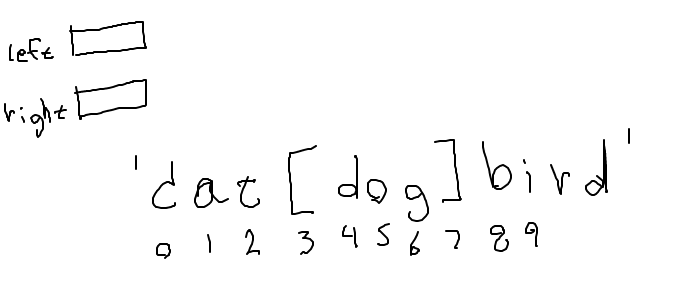
def brackets(s):
    left = s.find('[')
    if left == -1:
        return ''
    right = s.find(']')
    return s[left + 1:right]
The variables left and right are a very natural example of decomp-by-var. In the code, the variables name an intermediate value that runs through the computation.
Below is what the code looks like without the variable. It works fine, and it's one line shorter, but the readability is clearly worse. It also likely runs a little slower, as it computes the left-bracket index twice.
def brackets(s):
    if s.find('[') == -1:
        return ''
    return s[s.find('[') + 1: s.find(']')]
The first solution with its variables looks better and is more readable.
We have seen many examples of int indexing to access a part of a structure. So of course doing it slightly wrong is very common as well. So common, there is a phrase for it - "off by one error" or OBO — it even has its own wikipedia page. You can feel some kinship with other programmers each time you stumble on one of these.
"My code is perfect! Why is this not working? Why is this not work ... oh, off by one error. We meet again!"
Here is a problem similar to brackets for you to try. If we have enough time in lecture, we'll do it in lecture. A drawing really helps the OBO on this one.
> at_3
> parens()
'x)x(abc)xxx' -> 'abc'
This is nice, realistic string problem with a little logic in it.
s.find() variant with 2 params: s.find(target, start_index) - start search at start_index vs. starting search at index 0. Returns -1 if not found, as usual.
Suppose we have the string '[xyz['. How to find the second '['?
>>> s = '[xyz['
>>> s.find('[')      # find first [
0
>>> s.find('[', 1)   # start search at 1
4
Thinking about this input: '))(abc)'. Starting hint code, something like this, to find the right paren after the left paren:
    left = s.find('(')
    ...
    right = s.find(')', left + 1)
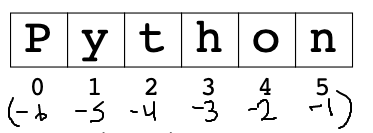
>>> s = 'Python'
>>> s[len(s) - 1]
'n'
>>> s[-1]  # -1 is the last char
'n'
>>> s[-2]
'o'
>>> s[-3]
'h'
>>> s[1:-3]  # works in slices too
'yt'
>>> s[-3:]
'hon'