Today: program style: readability and decomposition, bits and bytes, computer hardware CPU, RAM, storage
Program Design and Style
Why is code written the way it is? Today we tell the outside, strategic story, driving what forms of code work best.
We'll look over to the Python guide chapters on style readability and decomposition.
Python Guide: Readable Code
Python Guide: Decomposition
Bits and Bytes
At the smallest scale in the computer, information is stored as bits and bytes. In this section, we'll look at how that works.
Bit
- a "bit", like an atom, the smallest unit of storage
- A bit stores just a 0 or 1
- "In the computer it's all 0's and 1's" ... bits
- Anything with two separate states can store 1 bit
Nick's tennis racket example
- In a chip: electric charge = 0/1
- In a hard drive: spots of North/South magnetism = 0/1
- A bit is too small to be much use
- Group 8 bits together to make 1 byte
Byte
- One byte = grouping of 8 bits
- e.g. 0 1 0 1 1 0 1 0
- One byte can store one roman character, e.g. 'A' or 'x' or '$'
How Many Patterns With N Bits?
How many different patterns can be made with 1, 2, or 3 bits?
| Number of bits | Different Patterns |
|---|
| 1 | 0 1 |
| 2 | 00 01 10 11 |
| 3 | 000 001 010 011
100 101 110 111 |
- Combare 3 bits vs. 2 bits
- Consider just the leftmost bit
- It can only be 0 or 1
- Leftmost bit is 0, then append 2-bit patterns
- Leftmost bit is 1, then append 2-bit patterns again
- Result ... 3-bits has twice as many patterns as 2-bits
- Every row - double the number of patterns of previous row
| Number of bits | Different Patterns |
|---|
| 1 | 0 1 |
| 2 | 00 01 10 11 |
| 3 | 000 001 010 011
100 101 110 111 |
- In general: add 1 bit, double the number of patterns
- 1 bit - 2 patterns
- 2 bits - 4
- n bits - 2n - 2 to the nth power
- number of patterns is exponential of number of bits
- Few things in life are exponential!
Compound interest
Spread of novel pathogen in population
- Exponential growth is so fast, it is unintuitive
| Number of bits | Number of Patterns |
|---|
| 1 | 2 |
| 2 | 4 |
| 3 | 8 |
| 4 | 16 |
| 5 | 32 |
| 6 | 64 |
| 7 | 128 |
| 8 | 256 |
One Byte - 256 Patterns
- 1 byte is group of 8 bits
- 8 bits can make 256 different patterns
- How to store an int number in 1 byte?
- Each number gets its own pattern, e.g. 0010
- pat1 = number 0
- pat2 = number 1
- pat3 = number 2
- ...
- pat255 = number 254
- pat256 = number 255
- 255 is the max int stored in one byte
- pixel.red takes in a number 0..255. Why?
- The red/green/blue numbers of a pixel are each stored in one byte
- That's why it's 0..255
"HDR" Image
- HDR High Dynamic Range - more than 256 values
- HDR uses 10 bits per color
- How many more colors is that than 8 bits? 258 colors?
- No it's exponential, doubling with each bit
- 8 bits = 256 colors
- 9 bits = 512 colors
- 10 bits = 1024 colors - HDR
- Uses a little more space, looks better
- Some added software complexity, as 1/byte color is so simple
We'll do this if we have time.
What is a Computer?
You have one on your person all day. You're debugging code for one.
You see the output of them constantly. What is it and how does it work?
Step 1 - Why is it called Silicon Valley?
- Silicon valley may be here because of Stanford
- Stanford Prof Fred Terman -> Hewlett and Packard (1939) -> Silicon valley
- Orchards and cheap real estate at that time!
- Think silicon chip
- silicon chip
- Tiny transistors are "etched" onto the chip
- PSA: Silicon (chips) and Silicone (rubbery stuff) easily confused
Moore's Law
- Moore's Law: transistors per chip doubles every 2 years
- (Moore's law appears to be slowing from the 2 year cadence at this time)
- i.e. smaller transistors, fit more per chip ... cheaper!
- Since 1965, an incredible run of improvement
- Think about phone 6 years ago (junior high)
6 years = 3 doublings = 8x
- Was 32GB storage .. now 256 GB is the minimum, 8x more
- Moore's law!
We'll look starting from the outside...
Computer - CPU, RAM, Storage
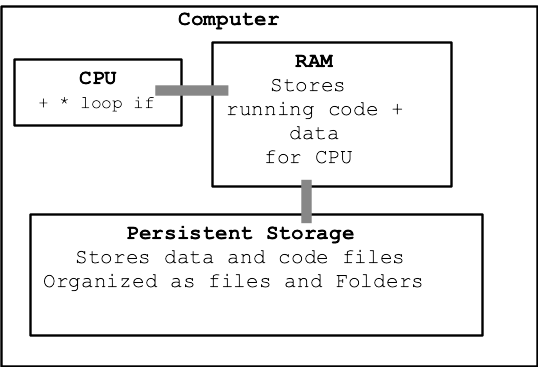
- 3 parts of the computer (or phone)
- 1. CPU
The brains, 2 GHz, simple instructions
CPU does work (RAM stores the work)
e.g. run a line: a = b + c
(Central Processing Unit)
- 2. RAM
Temporary store of bytes for CPU
Stores code and its variables
Not persistent (power-off = erased)
(Random Access Memory)
- 3. Persistent Storage
"storage" in laptop / phone / USB key
Storage in the form of files, folders
Measured in bytes, like RAM, but much cheaper.
Your phone might have 4GB of RAM, but 64GB of storage
"Persistent", keeps state even if powered-off
Extra: GPU
- Modern computers also have a GPU
- GPU Graphics Processing Unit
- Optimized for pixel processing, games
- Ordinary code runs on the CPU, not the GPU
- The GPU has its own distinct computer language
Used by, say, game developers
Most programmers never write GPU code, it's a specialty
There is a "graphics" specialization in CS if interested
Want to talk about running a computer program...
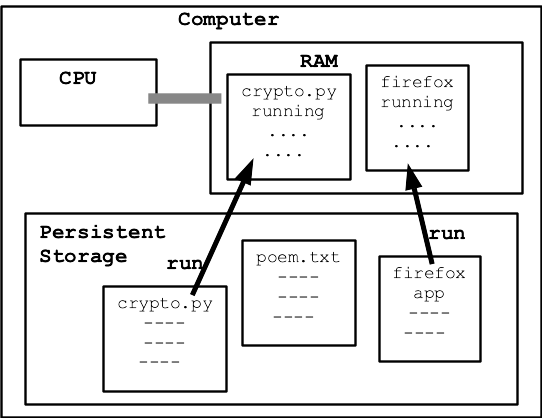
Running Program Gets its own RAM Area
"Process"
- Running program gets its own area in RAM
- Running program = "process"
- The areas are kept separate from each other
- Multiple programs can run at one time
- When a program exits, its RAM space is reclaimed
Operating System
- "Operating System" (OS) manages CPU, RAM etc.
- e.g. Windows, iOS, Android, Mac OS, Linux
Starts and stops programs
Manages memory between programs
Manages files
- OS starts programs, knows about files
- When you bring up the "terminal"
You are typing commands to the operating system
Run a program: python3 crazycat.py alice.txt
List files: ls
Show the contents of files: cat poem.txt
Run Code: CPU + RAM + Code
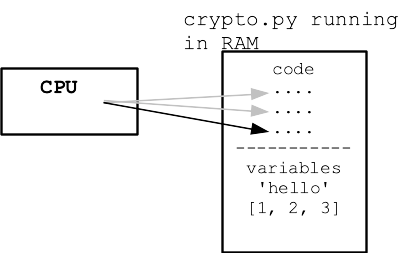
- RAM holds Code of program for CPU
- RAM holds values like
'Hello' and [1, 2, 3]
- CPU runs the code, manipulates the values
CPU
- CPU is the brains
- When your code is "running"
- The CPU is running the code
RAM just stores it
- CPU "Fetch/Execute" cycle
Fetch a code instruction
Execute that instruction
- 1 line of Python code expands to about 10 CPU instructions
- Often a core is "idle" waiting for something to do
- Cores use more power when running, less when idle
This why the fans spin up to cool the CPU when it is active
CPU "Cores"
- CPU has 2 or 4 or more "cores"
- Each core can run code independently
- So a 4-core CPU can run 4 things simultaneously
- Think of crypto.py
One core is running its code
Code runs in order, one thing at a time
main() .. encrypt_char() .. print()
- Another core might be running Chrome at the same time
Process Manager
- "Process" = CS term for a running program
- A core can switch from one process to another in, say, 1 millisecond
Suspending the first process and starting the second
Run process1 a bit
Switch to run process2 a bit
- In this way, your computer "runs" 100 programs simultaneously
- Look at Process Manager (on the Mac Utilities > Activity Monitor)
- See dozens of processes, mostly idle
- CPU cores switching around, running each when needed
- Note: 16 core machine is not 16x more useful than a 1 core machine
Diminishing returns for a consumer computer, most benefit around 2 cores
Some computations can utilize many cores
- "%CPU" = the percentage of one core used
Browser Tab = Process
- Each process in RAM is isolated from the other processes
- Each tab in your browser is supposed to be isolated from the other tabs
- Modern web browsers implement tabs by running each tab in your browser as its own process
- Most tabs don't do much computation, but advertising / animation heavy tabs can use a lot of CPU
- Look at the processes on your computer, you will likely see processes with names like "Chrome Helper" or "Firefox Web Content". Each of these holds the data and runs the code of one tab
- This shows how a web page in your browser is using your local CPU and RAM
Python Shields us from Hardware Details - Great!
Python shields us from much detail about CPU and RAM, which is great. We're just peeking at the details here to get a little insight about what it means for a program to run, use CPU and RAM.
Hardware Demo Program
Nick's Hardware Squandering Program!
> hardware-demo.zip
Demo: computer is mostly idle to start. Idle CPU is cool. CPU starts running hard, generates heat .. fan spins! This program is an infinite loop, see the code below. It uses 100% of one core. Why is the fan running on my laptop? Use Activity Monitor (Mac), Task Manager (Windows) to see programs that are currently running, see CPU% and MEM%. Run program twice, once in each of 2 terminals - 200%
Core function of -cpu feature:
def use_cpu(n):
    """
    Infinite loop counting a variable 0, 1, 2...
    print a line every n (0 = no printing)
    """
    i = 0
    while True:
        if n != 0 and i % n == 0:
            print(i)
        i = i + 1
Try 1000 first ... yikes! Try 1 million instead
$ python3 hardware-demo.py -cpu 1000000
0
1000000
2000000
3000000
4000000
5000000
6000000
7000000
^CTraceback (most recent call last):
  File "hardware-demo.py", line 66, in
    main()
  File "hardware-demo.py", line 56, in main
    use_cpu(n)
  File "hardware-demo.py", line 24, in use_cpu
    i = i + 1
KeyboardInterrupt

(ctrl-c to exit)
Let's Talk About RAM
When code reads and writes values, those values are stored in RAM. RAM is a big array of bytes, read and written by the CPU.
Say we have this code
n = 10
s = 'Hello'
lst = [1, 2, 3]
lst2 = lst
Every value in use by the program takes up space in RAM.
RAM
- RAM - Random Access Memory
"random access" = can access any byte at will
- Each Python value is stored using bytes in RAM
- Every value gets its own area
- Every value is tagged with its type - int, str, ...
Python Values in RAM
- Each Python value has, say, 16 bytes of fixed overhead
- Here's how it works out
- The int value 10 is 8 bytes + 16 overhead = 24 bytes
- The string
'hello' - is 2 bytes per char + 16 = 26 bytes
- If the string were 100 chars long, that would 200 + 16 = 216 bytes
Demo using -mem, Look in activity monitor, "mem" area, 100 = 100 MB per second. Watch our program use more and more memory of the machine. Program exits .. not in the list any more!
$ python3 hardware-demo.py -mem 100
Memory MB: 100
Memory MB: 200
Memory MB: 300
Memory MB: 400
Memory MB: 500
Memory MB: 600
Memory MB: 700
^CTraceback (most recent call last):
...
KeyboardInterrupt
(ctrl-c to exit)