Today: advanced double-while parsing, flex-arrow drawing example
We've done them like this:
  at    end
   v----v
xx @word xx
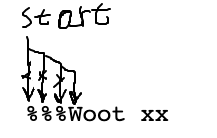
I will work this one in lecture with the double-while technique. Then we'll have you try to solve a similar one. (HW5)
find_alpha(s): We'll say a word is made of 1 or more alphabetic chars. Find and return the first word in s, or None if there is none. So '%%%abc xx' returns 'abc'. Use two while loops.
1. Skip over the '%' to find the 'W'
2. Then find the end of the series of alpha
%%%Woot xx
%%%Woot xx
    # Advance start to first alpha
    start = 0
    while start < len(s) and not s[start].isalpha():
        start += 1
%%%Woot xx
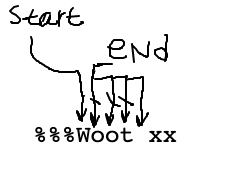
%%%Woot xx
nnn♥♥♥♥nn
Q: Suppose there is no alpha. What will start be after loop 1? What is the if-check for that case?
Reminder: here is the loop-1 code:
while start < len(s) and not s[start].isalpha():
   start += 1
Sketch out what start does for the no-alpha case:
  '%%%'
   0123
    if start == len(s):
        return None
def find_alpha(s):
    # Advance start to first alpha
    start = 0
    while start < len(s) and not s[start].isalpha():
        start += 1

    # There was no word
    if start == len(s):
        return None

    # Advance end past alpha chars
    end = start + 1
    while end < len(s) and s[end].isalpha():
        end += 1

    return s[start:end]
The find_num() - like the lecture example, see if you can do it.
find_num(s): We'll say that a number is a series of one or more digit chars. Find and return the substring of the first num in s, or None if there is none.
def find_num(s):
    # Advance start to first digit
    start = 0
    while start < len(s) and not s[start].isdigit():
        start += 1

    # There was no num
    if start == len(s):
        return None

    # Advance end past digits
    end = start + 1
    while end < len(s) and s[end].isdigit():
        end += 1

    return s[start:end]
This is a little more difficult than then find_alpha() example. Try it later if you get stuck on the homework.
find_abba(s): We'll say an "abba" word is just made of 'a' and 'b' chars. Find and return the first abba word in s, or the empty string if there is not one. Use two while loops.
Notice that we don't have some unrealistic constraint that there's always an '@' to start the word - the word is just sitting in s and we need to find it.
To get you started, think about the first loop for find_abba() - advancing start to the start of the abba word. This is the not ♥ loop.
Code
start = 0
while start < len(s) and ???:
    start += 1
Some drawings to think about it:
 start
   v
  'xx$aba'
or this
 start
   v
  'xx$bab'
The second loop is the same as the find/while problems, advancing end past the ♥ chars.
Code
while end < len(s) and ???:
    end += 1
Some drawings to think about it:
     end
      v
  'xx$aba x'
The first loop, advance start while char is not 'a' and char is not 'b'. The "or" is tempting here, but try it on both the cases above to see why it's "and".
# Advance start to first abba char
start = 0
while start < len(s) and s[start] != 'a' and s[start] != 'b':
    start += 1
Then the loop to find the end of the abba uses "or" and parenthesis, since we have a combination of and/or:
# Advance end past abba chars
end = start + 1
while end < len(s) and (s[end] == 'a' or s[end] == 'b'):
    end += 1
The whole solution
def find_abba(s):
    # Advance start to first abba char
    start = 0
    while start < len(s) and s[start] != 'a' and s[start] != 'b':
        start += 1

    # There was no abba
    if start == len(s):
        return ''

    # Advance end past abba chars
    end = start + 1
    while end < len(s) and (s[end] == 'a' or s[end] == 'b'):
        end += 1

    return s[start:end]
Download the flex-arrow.zip to work this fun little drawing example.
Ultimately we want to produce this output:
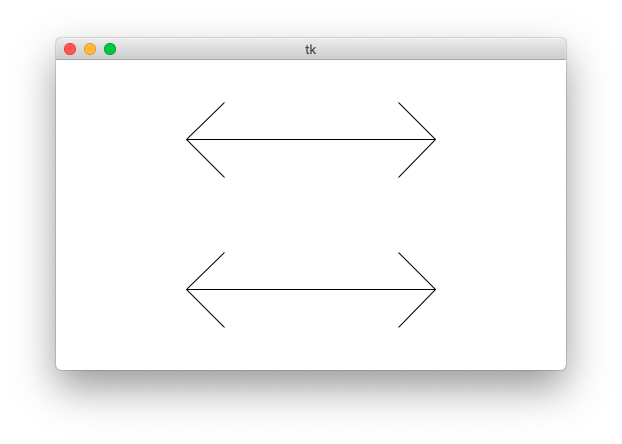
The "flex" parameter is 0..1.0: the fraction of the arrow's length used for the arrow heads. The arms of the arrow will go at a 45-degree angle away from the horizontal.
Specify flex on the command line so you can see how it works. Close the window to exit the program. You can also specify larger canvas sizes.
$ python3 flex-arrow.py -arrows 0.25
$ python3 flex-arrow.py -arrows 0.15
$ python3 flex-arrow.py -arrows 0.1 1200 600
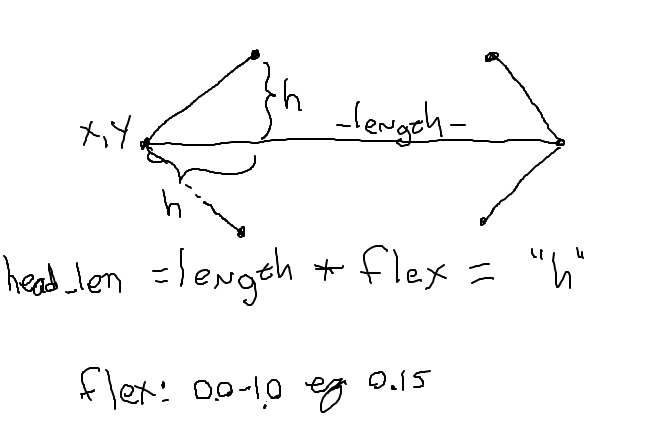
Look at the draw_arrow() function. It is given x,y of the left endpoint of the arrow and the horizontal length of the arrow in pixels. The "flex" number is between 0 .. 1.0, giving the head_len - the horizontal extent of the arrow head - called "h" in the diagram. Main() calls draw_arrow() twice, drawing two arrows in the window.
The code here draws the left arrow head.
def draw_arrow(canvas, x, y, length, flex):
    """
    Draw a horizontal line with arrow heads at both ends.
    It's left endpoint at x,y, extending for length pixels.
    "flex" is 0.0 .. 1.0, the fraction of length that the arrow
    heads should extend horizontally.
    """
    # Compute where the line ends, draw it
    x_right = x + length - 1
    canvas.draw_line(x, y, x_right, y)

    # Draw 2 arrowhead lines, up and down from left endpoint
    head_len = flex * length
    canvas.draw_line(x, y, x + head_len, y - head_len)  # up
    canvas.draw_line(x, y, x + head_len, y + head_len)  # down

    # Draw 2 arrowhead lines from the right endpoint
    # your code here
    pass
Look at the diagram below. Add the code to draw the head on the right endpoint of the arrow. The head_len variable "h" in the drawing. This is a solid, CS106A applied-math exercise. Note that x_right is computed to be x value of right endpoint.
    # Draw 2 arrowhead lines from the right endpoint
    # your code here
    pass
    canvas.draw_line(x_right, y, x_right - head_len, y - head_len)  # up
    canvas.draw_line(x_right, y, x_right - head_len, y + head_len)  # down
Now we're going to show you something a little beyond the regular CS106A level, and it's a teeny bit mind warping.
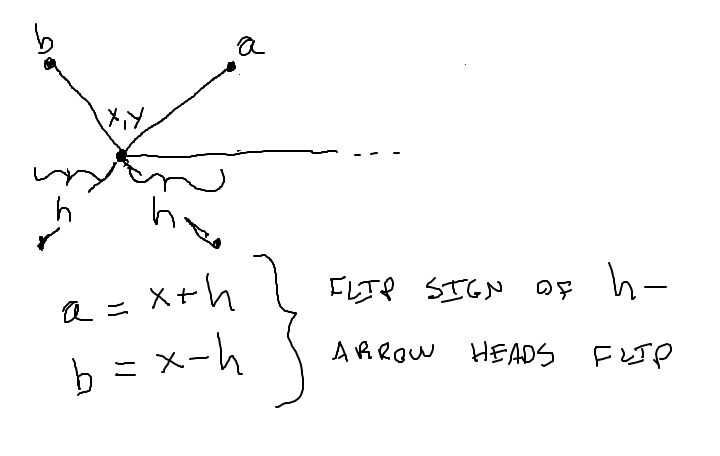
Run the code with -trick like this, see what you get.
$ python3 flex-arrow.py -trick 0.1 1200 600
Note: one more thing today