Today: code for dict-count algorithm, when does python make a copy? More sophisticated nested-dict example, other ways to read a file
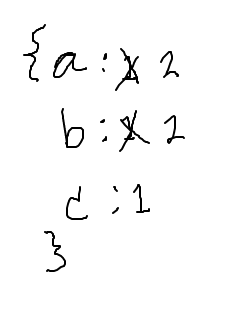
Say we are building a counts dict, counting how many times each string appears in the strs list
strs = ['a', 'b', 'a', 'c', 'b']
Want to build this dict ultimately
counts == {'a': 2, 'b': 2, 'c': 1}
Standard dict-count code:
counts = {}
for s in strs:
    # 1. not in -> init
    if s not in counts:
        counts[s] = 0

    # 2. increment
    counts[s] = counts[s] + 1
not in Form%Recall that modulo % is the remainder after int division.
57 % 10 -> 7
123 % 10 -> 3
19 % 10 -> 9
10 % 10 -> 0
98 % 10 -> 8
99 % 10 -> 9
100 % 10 -> 0
The % 10 of a non-negative int is just its last digit.
Mathematics angle: All the digits to the left of the rightmost one includes 10 as a factor. Computing % 10 is just what's left after all the multiples of 10 are taken away.
Apply the dict-count algorithm to count how many numbers end with each digit.
digit_count(nums): Give a list of non-negative ints. The last digit of each num can be found by computing num % 10. For example 57 % 10 is 7, and 7 is the last digit of 57. Build a counts dictionary where each key is an int digit, and its value is the count of one or more numbers in the list ending with that digit.
def digit_count(nums):
    counts = {}
    for num in nums:
        digit = num % 10
        if digit not in counts:
            counts[digit] = 0
        counts[digit] += 1
    return counts
For more detail see guide: Python Not Copying
When Python uses an assignment = with a data structure like a list or a dict, Python does not make a copy of the structure. Instead, there is just the one list or dict, and multiple pointers pointing to it.
>>> lst = [1, 2, 3]
>>> b = lst
>>>
>>> # lst and b appear to have the same value
>>> # in fact, they both point to the same list
>>> lst
[1, 2, 3]
>>> b
[1, 2, 3]
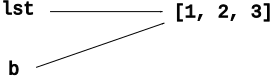
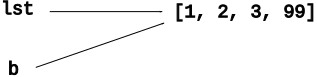
Key: there is one list, two vars pointing to it. We can call .append() using either variable, and they both do the same thing, changing the one underlying list.
>>> b.append(99)  # b.append()
>>> b
[1, 2, 3, 99]     # b's list is changed
>>> lst
[1, 2, 3, 99]     # so is lst - it's the same list
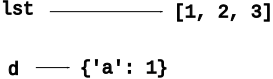
Here is code that creates one list and one dict, each with a variable pointing to it.
>>> lst = [1, 2, 3]
>>> d = {}
>>> d['a'] = 1
Memory looks like:
>>> d['b'] = lst
What does this do? Key: the = does not make a copy of the list. Instead, it stores an additional reference to the one list inside the dict.
Memory looks like:
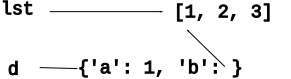
There is just one list, and there are two references to it. This is fine. What does the following code do?
>>> d['b'].append(4)
What does memory look like now? First, what does the list look like? Who is pointing to it?
Memory looks like:
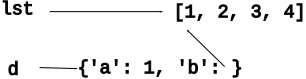
What do these lines of code print now?
>>> lst
???
>>> d['b']
???
Answer
Both lst and d['b'] are both references to the list, which is now [1, 2, 3, 4]
Use = to store another reference to list in a "nums" variable. Does this make a copy of the list? No. It's just another reference to the one list. What happens when we do nums.append(99)?
>>> nums = d['b']
>>> nums.append(99)
>>> nums
[1, 2, 3, 4, 99]
>>> d['b']
[1, 2, 3, 4, 99]
>>>
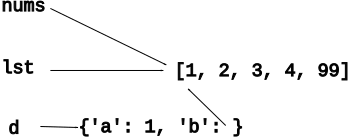
Python does not copy a list or dict when used with, say, =. Instead, Python just spreads around more pointers to the one list. This is a normal way for Python programs to work - a few important lists or dicts, and pointers to those structures spread around in the code. This does not require any action on your part, just realize that that there are no copies.
Suppose "x" holds the key we're counting...
    if x not in counts:   # Fix so x is in there
       counts[x] = 0      # -Init
    counts[x] += 1        # -Increment
# Have email strings
-'abby@foo.com'
-'bob@bar.com'

# One @
-"user" is left of @ -> 'abby'
-"host" is right of @ -> 'foo.com'
This is a tricky problem. We'll go step by step in lecture, you can follow along. Then we'll work a similar problem in section.
High level: we have a big list of email addresses. We want to organize the data by host. For each host, build up a list of all the users for that host.
Given a list of email address strings. Each email address has one '@' in it, e.g. 'abby@foo.com', where 'abby' is the user, and 'foo.com' is the host.
Create a nested dict with a key for each host, and the value for that key is a list of all the users for that host, in the order they appear in the original list (repetition allowed).
emails:
  ['abby@foo.com', 'bob@bar.com', 'abe@foo.com']

returns hosts dict:
  {
   'foo.com': ['abby', 'abe'],
   'bar.com': ['bob']
  }
When working a nested dict problem, it's good to keep in mind the type of each key and its value. This info guides code that reads or writes in the dict - when do you do += and when do you do .append(). What we have for this problem - will refer to this when writing a key line of code.
Here are the two types we have for the hosts dict. Write these on the board, for reference later when we get to the code. A commitment.
'foo.com'Each key in the hosts dict is a host string, e.g. 'foo.com'
The value for each key is an inner list of users for that host, e.g. ['abby', 'abe']
> email_hosts() - nested dict problem
Here is the code to start with. The "not in" structure still applies.
def email_hosts(emails):
    hosts = {}
    for email in emails:
        at = email.find('@')
        user = email[:at]
        host = email[at + 1:]
        # your code here
        pass
    return hosts
Need to init for the case where the host is not in dict already. For counting the init value was 0. Now the init value is [].
        # init ([])
        if host not in hosts:
            hosts[host] = []
Think about the "increment" line - want to append this user to the inner list of users. What is the reference to the inner list of users? Look above at the definition for each key and value. The inner list is hosts[host] - not so readable though.
        # increment (.append)
        hosts[host].append(user)
hosts[host]What is hosts[host]? It is hard to read.
Recall that the hosts dict looks like this:
  {
   'foo.com': ['abby', 'abe'],
   'bar.com': ['bob']
  }
In hosts dict, each key is a host, and each value is a list of user names. Therefore, hosts[host] is accessing one of the lists of users.
Instead of using hosts[host] as is, put its value into a variable with a good name, spelling out what sort of data it holds. This helps go step by step and is how our solution is written. Note how the names in this line of code confirm that the logic is correct: users.append(user) This depends on the "shallow" feature of Python data (above), e.g. hosts[host] returns a reference to the embedded list to us.
Store the inner list in a var, then append() on the var:
        users = hosts[host]
        users.append(user)
Or if you cannot think of a word for the inner list, you could at least use "inner" as the var name. Not fancy, but better than v1:
        inner = hosts[host]
        inner.append(user)
def email_hosts(emails):
    hosts = {}
    for email in emails:
        at = email.find('@')
        user = email[:at]
        host = email[at + 1:]

        # key algorithm: init/increment
        if host not in hosts:
            hosts[host] = []
        users = hosts[host]  # decomp by var
        users.append(user)
    return hosts
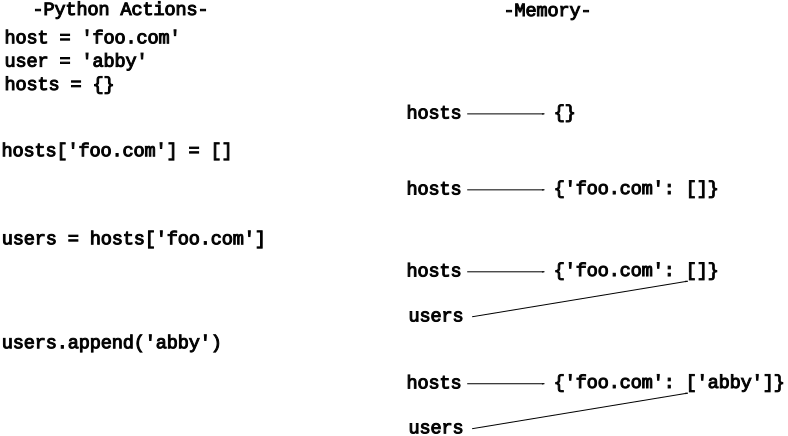
Say we have a bunch of ratings about foods, and we want to organize them per food.
> food_ratings() - nested dict problem
food_ratings(ratings): Given a list of food survey rating strings like this 'donut:10'. Create and return a "foods" dict that has a key for each food, and its value is a list of all its rating numbers in int form. Use split() to divide each food rating into its parts. There's a lot of Python packed into this question!
Build dict with structure:
Key = one food string
Value = list of rating ints
split(':')Nice technique, say we have rating = 'donut:10'
Use split():
rating = 'donut:10'
parts = rating.split(':')
# parts is now ['donut', '10']`
See guide for more details: File Reading and Writing
Standard "with" to open a text file for reading:
with open(filename) as f:
    # use f in here
You can specify a particular encoding (default depends on your machine / locale). The encoding 'utf-8' is what many files use. Try this if you get a UnciodeDecodeError. Or you may have a file which has a different encoding, so you will need to try others such as 'utf-16'.
with open(filename, encoding='utf-8') as f:
    # use f
Older way to open() a file (use in interpreter)
f = open(filename)
# use f
# f.close() when done
# "with" does the .close() automatically
Most common way to look at the text of a file, process 1 line at a time. Uses the least memory.
for line in f:
    # process each line
f.readlines() - return list of line strings, can do slices etc. to access lines in a custom order. Each line has the '\n' at its end. Use str.strip() to strip off whitespace from the ends of a line.
>>> f = open('poem.txt')  # use open() in interpreter
>>> lines = f.readlines()
>>> lines
['Roses are red\n', 'Violets are blue\n', 'This Does Not Rhyme\n']
>>>
>>> line = lines[0]    # first line
>>> line
'Roses are red\n'
>>> line.strip()       # strip() - remove whitespace from ends
'Roses are red'
>>>
>>> # What if we want to skip the first line?
>>>
>>> lines[1:]   # slice to skip first line
['Violets are blue\n', 'This Does Not Rhyme\n']
read() - whole file into one string. Handy if you can process the whole thing at once, not needing to go line by line. Reading from a file "consumes" the data. Doing a second read returns the empty string.
>>> f = open('poem.txt')
>>> s = f.read()          # whole file in string
>>> s
'Roses are red\nViolets are blue\nThis Does Not Rhyme\n'
>>>
>>> f.read()          # reading again gets nothing
''
Social Security Administration's (SSA) baby names data set of babies born in the US going back more than 100 years. This part of the project will load and organize the data. Part-b of the project will build out interactive code that displays the data.
New York Times: Where Have All The Lisas Gone. This is the article that gave Nick the idea to create this assignment way back when.
This is an endlessly interesting data set to look through: john and mary, ethel and emily.