Today: lambda output, lambda/def, custom sorting with lambda, wordcount sorting, introduction to modules
Lambda is powerful feature, letting you express a lot of computation in very little space. As a result, it's weird looking at first, but when it clicks, you should feel like a Power Hacker when you wield it. Kind of a superpower.
These are well suited to little in-class exercises .. just one line long. Not easy, but they are short!
1. The word "lambda"
2. What type of element? - choose a good name for the parameter: n:, s:, ...
3. Write expression to produce, no "return"
> lambda-2 section
The first of these work on a list of (x, y) tuples. These are a little more complicated but packing even more power into the one line.
Given list of ints nums. Return a list of strings, where each int has parenthesis added, so 3 becomes the string '(3)'. Note that str(n) converts an int to a str.
[13, 42, 0] -> ['(-13)', '(42)', '(0)']
Solution
def int_to_str(nums):
    return map(lambda n: '(' + str(n) + ')', nums)
> min_x()
Given a non-empty list of len-2 (x, y) tuples. What is the leftmost x among the tuples? Return the smallest x value among all the tuples, e.g. [(4, 2), (1, 2) (2, 3)] returns the value 1. Solve with a map/lambda and the builtin min(). Recall: min([4, 1, 2]) returns 1
[(4, 2), (1, 2), (2, 3)] -> 1
Solution
def min_x(points):
    return min(map(lambda point: point[0], points))
    # Use map/lambda to form a list of
    # just the x coords. Feed that into min()
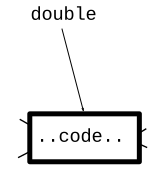
Previously, here is def
def double n:
    return 2 * n
The def sets up the name of the function, and associates it with that body of code. Like this drawing:
Lambda is code, just like what the def creates, but without the name pointing to it. Can kind of see this in the interpreter.
>>> def double(n):
...   return 2 * n
...
>>> double
<function double at 0x7fb944ab6ee0>
>>>
>>> lambda n: 2 * n
<function <lambda> at 0x7fb944ad03a0>
Thus far we've let map() call the lambda code for us. Is there another way to call the lambda code?
Just to show how Python works, you can actually make your own def using lambda and an equal sign. A def has code and a name. Here we use = to make the name fn point to the lambda code. Then we can call it like any other function.
>>> fn = lambda n: 2 * n
>>>
>>> fn       # fn points to code
<function <lambda> at 0x7fb944ad0700>
>>>
>>>
>>>
>>> fn(10)   # function call works
20
>>> fn(12)
24
>>>
That is not something you need to do to get work done. That's a peak behind the curtain, showing what def is doing under the hood. Python is in a way very simple. A variable means that name has a pointer to that value. We see here that functions work the same way - a name pointing to a value which happens to be code.
Lambda and def are similar:
def double(n):
    return 2 * n
Equivalent lambda
lambda n: 2 * n
Should you just use lambda for everything? Not at all! Lambda is good for cases where the code is really short. Your program will have situations like that sometimes, and lambda is great for that. But def can do many things lambda cannot.
In lambda1, see the map_parens() problem.
['xx(hi)xx', 'abc(there)xyz', 'fish'] ->
  ['hi', 'there', 'fish']
Solution Code. map() works fine with "parens" by name
def parens(s):
    left = s.find('(')
    right = s.find(')', left)

    if left == -1 or right == -1:
        return s
    return s[left + 1:right]


def map_parens(strs):
    return map(parens, strs)
We'll try these food examples in the interpreter.
By default sorted() works on list of tuples, compares [0] first, then [1], and so on
>>> foods = [('radish', 2, 8), ('donut', 10, 1), ('apple', 7, 9), ('broccoli', 6, 10)]
>>>
>>> # By default, sorts food tuples by [0]
>>> sorted(foods)
[('apple', 7, 9), ('broccoli', 6, 10), ('donut', 10, 1), ('radish', 2, 8)]
>>>

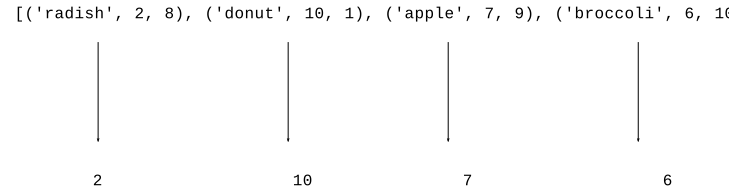
![alt: lambda food: food[1]](python-sort3.svg)
Q: What is the parameter to the lambda?
A: One elem from the list (similar to map() function)
>>> foods = [('radish', 2, 8), ('donut', 10, 1), ('apple', 7, 9), ('broccoli', 6, 10)]
>>>
>>> sorted(foods, key=lambda food: food[1])
[('radish', 2, 8), ('broccoli', 6, 10), ('apple', 7, 9), ('donut', 10, 1)]
>>> sorted(foods, key=lambda food: food[1], reverse=True)  # most tasty
[('donut', 10, 1), ('apple', 7, 9), ('broccoli', 6, 10), ('radish', 2, 8)]
>>> sorted(foods, key=lambda food: food[2], reverse=True)  # most healthy
[('broccoli', 6, 10), ('apple', 7, 9), ('radish', 2, 8), ('donut', 10, 1)]
Not limited to just projecting out existing values. We can project out a computed value. Here we compute tasty * healthy and sort on that. So apple is first, 7 * 9 = 63, broccoli is second with 6 * 10 = 60. Donut is last :(
>>> sorted(foods, key=lambda food: food[1] * food[2], reverse=True)
[('apple', 7, 9), ('broccoli', 6, 10), ('radish', 2, 8), ('donut', 10, 1)]
>>>
>>> foods = [('radish', 2, 8), ('donut', 10, 1), ('apple', 7, 9), ('broccoli', 6, 10)]
>>> max(foods)     # uses [0] by default - tragic!
('radish', 2, 8)
>>>
>>> sorted(foods, key=lambda food: food[1])
[('radish', 2, 8), ('broccoli', 6, 10), ('apple', 7, 9), ('donut', 10, 1)]
>>>
>>> max(foods, key=lambda food: food[1])  # most tasty
('donut', 10, 1)
>>> min(foods, key=lambda food: food[1])  # least tasty
('radish', 2, 8)
Key performance point: computing one max/min element is much faster than sorting all n elements.
>>> # The default sorting is not good with upper/lower case
>>> strs = ['coffee', 'Donut', 'Zebra', 'apple', 'Banana']
>>> sorted(strs)
['Banana', 'Donut', 'Zebra', 'apple', 'coffee']
>>> strs = ['coffee', 'Donut', 'Zebra', 'apple', 'Banana']
>>>
>>> sorted(strs, key=lambda s: s.lower())    # not case sensitive
['apple', 'Banana', 'coffee', 'Donut', 'Zebra']
>>>
>>> sorted(strs, key=lambda s: s[len(s)-1])  # by last char
['Zebra', 'Banana', 'coffee', 'apple', 'Donut']
>>>
Given a list of movie tuples, (name, score, date-score), e.g.
[('alien', 8, 1), ('titanic', 6, 9), ('parasite', 10, 6), ('caddyshack', 4, 5)]
Given a list of movie tuples, (name, score, date-score), where score is a rating 1-10, and date 1-10 is a rating as a "date" movie. Return a list sorted in increasing order by score.
Given a list of movie tuples, (name, score, date-score), where score is a rating 1-10, and date-score 1-10 is a rating as a "date" movie. Return the list sorted in decreasing by date score.
Look at wordcount project, apply custom sorting to the output stage.
>>> items = [('z', 1), ('a', 3), ('e', 11), ('b', 3), ('c', 2)]
>>> items = [('z', 1), ('a', 3), ('e', 11), ('b', 3), ('c', 2)]
>>>
>>> # sort by [0]=word is the default
>>> sorted(items)
[('a', 3), ('b', 3), ('c', 2), ('e', 11), ('z', 1)]
>>>
>>> sorted(items, key=lambda pair: pair[1])   # sort by count
[('z', 1), ('c', 2), ('a', 3), ('b', 3), ('e', 11)]
>>>
>>> sorted(items, key=lambda pair: pair[1], reverse=True)
[('e', 11), ('a', 3), ('b', 3), ('c', 2), ('z', 1)]
>>>
>>> max(pairs, key=lambda pair: pair[1])      # largest count
('e', 11)
Here is the WordCount project we had before. This time look at the print_counts() and print_top() functions.
Here is the output of the regular print_counts() function, which prints out in alphabetic order. Output looks like:
$ python3 wordcount.py poem.txt
are 2
blue 2
red 2
roses 1
violets 1
$
This is the standard dict-output sorted loop.
def print_counts(counts):
    """
    Given counts dict, print out each word and count
    one per line in alphabetical order, like this
    aardvark 1
    apple 13
    ...
    """
    for word in sorted(counts.keys()):
        print(word, counts[word])
    # Alternately use .items() to access all the key/value data
    # for key, value in sorted(counts.items()):
    #    print(key, value)
The print_top(counts, n) function - print the n most common words in decreasing order by count.
$ python3 wordcount-solution.py -top 10 alice-book.txt
the 1639
and 866
to 725
a 631
she 541
it 530
of 511
said 462
i 410
alice 386
def print_top(counts, n):
    """
    Given counts dict and int N, print the N most common words
    in decreasing order of count
    the 1045
    a 672
    ...
    """
    items = counts.items()
    # Could print the items in raw form, just to see what we have
    # print(items)
    pass
    # Your code - my solution is 3 lines long, but it's dense!
    # Sort the items with a lambda so the most common words are first.
    # Then print just the first N word,count pairs with a slice
Here's the lines - sort by count decreasing order. Then slice to take the top n.
    # 1. Sort largest count first
    items = sorted(items, key=lambda pair: pair[1], reverse=True)
    # 2. Slice to grab first N
    for word, count in items[:n]:
        print(word, count)