Today: loose ends: comprehension-if, truthy logic, format strings, is None, tech and society
>>> nums = [1, 2, 3, 4, 5, 6]
>>> [n for n in nums if n > 3]
[4, 5, 6]
>>> [n * n for n in nums if n > 3]
[16, 25, 36]
Can get into Comprehension Fever - trying to write your whole program as nested comprehensions. Probably 1-line is the sweet spot.
Using regular functions, loops etc. for longer phrases is fine.
These are all 1-liner solutions with comprehensions. We'll just do 1 or 2 of these.
Syntax reminder - e.g. make a list of nums doubled where n > 3
[2 * n for n in nums if n > 3]> Comprehensions
Try these in class
> squared
> even_ten
For more detail see "truthy" section in the if-chapter Python If - Truthy
s = 'hello'
if s:
    print('truthy')
Truthy logic says that "empty" values count as False. These all count as False - zero, emtpy-string, empty-list,...
# Count as False:
0
0.0
None
''
[]
{}
Any other value counts as True
# Count as True
6
3.14
'Hello'
[1, 2]
{1: 'b'}
The bool() function takes
any value and returns a formal bool False/True value, so it's a way for us to see how truthy logic works in the interpreter:
>>> bool(0)
False
>>> bool(0.0)
False
>>> bool('')   # empty string - False
False
>>> bool([])   # empty list - False
False
>>> bool(None)
False
>>> bool(6)       # non-zero int - True
True
>>> bool('hi')    # non-empty string - True
True
>>> bool([1, 2])  # list of something - True
True
>>> bool('False')  # ??? - what's this one?
???
>>> bool([0, 0])   # ???
???
>>>
Why does the truthy system exist? It makes it easy to test, for example, for an empty string like the following. Testing for "empty" data is such a common case, it's nice to have a shorthand for it. For CS106A, you don't ever need to use this shorthand, but it's there if you want to use it. Also, many other computer languages also use this truthy system.
# long form screen out empty string
if len(s) > 0:
    print(s)


# shorter way, handy!
if s:
    print(s)
__name__ Thing?
if __name__ == '__main__':
    main()
There are two ways wordcount.py is loaded into Python. (1) is the obvious way (2) is less common but does happen.
# 1. From the command line:
$ python3 wordcount.py poem.txt


# 2. Loaded as an import into
# some other python file
...
import wordcount
Which of those two forms should run main()? The answer is .. just the (1) form, running wordcount.py from the command line. The other form .. don't run main()
The symbol __name__ will be '__main__' for the (1) case. This if-statement checks for that symbol, and if so, calls the main() function.
if __name__ == '__main__':
    main()
That's a lot of detail for a kind of rare case. Just remember this: have that if-statement at the bottom of your file. It calls the main() function when this file is run on the command line.
== vs. is ComparisonsTo compare things, use the == operator. That is the main one and it is quite reliable.
However, there is another comparison called is. This checks if two variables refer to the exact same object in memory.
You can go an entire lifetime and never need to use is operator in code - it just does not compute something that code typically needs to know. You should default to using == to compare values.
That said, here is a demo of is
>>> a = [1, 2, 3]
>>> b = a
>>> a is b          # "is" True case
True
>>> c = [1, 2, 3]   # c looks like a
>>> a is c          # "is" False case
False
>>> a is not c      # "is not" variant
True
>>>
>>> a == c          # == returns True
True
>>>
is None RuleThe one time you need to use is is for PEP8 conformance. PEP8 says to use is for the values None, True, False, but really None is the one that comes up all the time.
So for PEP8, it's preferable to use is instead of ==, like this. The reasons for this are a bit obscure, but it's simplest to just follow PEP8.
if x == None:          # NO not this way
    print('nothing')


if x is None:          # YES this way
    print('nothing')
We will never mark off CS106A code that uses == here (which in fact will work perfectly), but for PEP8 you can write it with is.
s = f'A format string'
Try in the interpreter:
>>> name = 'Sally'
>>> scores = [19, 34, 22]
>>>
>>> s = f'Name:{name} count:{len(scores)}'
>>> s
'Name:Sally count:3'
>>> s = f'Name:{name} count:{len(scores)} max score:{max(scores)}'
>>> s
'Name:Sally count:3 max score:34'
Amazingly, within the curly braces, just write any old expression like {name} referring to a variable, or even max(scores) which calls a function, pasting in what it returns.
To include a literal { or } in the string, double them up - so {{ to make one {
>>> f'A curly brace: {{'
'A curly brace: {'
Quick tech and society points, just for fun.
Mostly, technology getting better has made life better. But not this story!
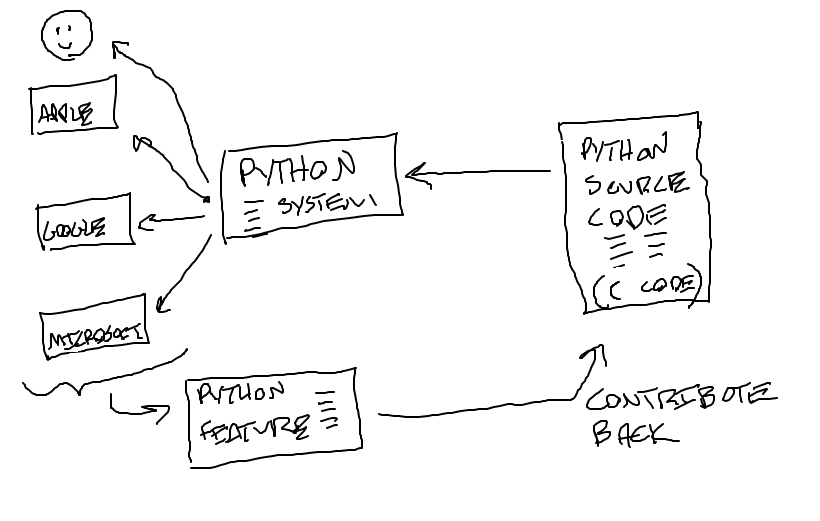
You have noticed that Python works well on your machine, and yet it's free. How does that work? Python is a great example of "open source" software.
Much of the internet is based on open standards - TCP/IP, HTML, JPEG - and open source software: Python (language), Linux (operating system), R (statistics system).
Let's look at Python