Today - interpreter, math int/float, style, black box examples, boolean logic, string introduction, string +=, string for/i/range loop
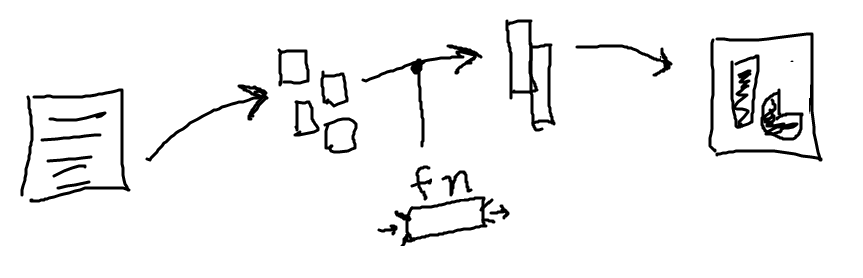
Here is a way of looking at a program.
You have some files with data in them. You write code to lode the data into Python in one form. Then compute a transform into another form. Then a further computation produces an "answer" form. You publish the answer and get tweets of praise - the coding lifecycle! You can think of this as a sort of "data flow", from the original data to the final output.

Black-box model of a function: function runs with parameters as input, returns a value. All the complexity of its code is sealed inside.
The black box model makes it easy to call the function - provide data you have as the input, call the function, get back an answer.
For Divide and Conquer, want to be able to work on each function separately, one at a time. We need to keep the functions sealed off from each other as much as possible. The black box model works well for this, narrowing the interactions to just the input and output data for each function.
Here we'll work through the code for first black-box examples. There are in the logic 1 section on the experimental server.
We'll think about the various cases for the input, since ultimately the code needs to handle all possible input cases. Thinking about the various cases is an easy way to get started with the code for a function.
score   winnings
0       0
1       10
2       20
3       30
4       40
5       60  # 12x kicks in here
6       72
7       84
8       96
9       108
10      120
def winnings1(score):
    ...
return result
def winnings1(score):
    return score * 10
You can type these in and hit the Run button as we go or just watch as we go. The results are pretty easy to follow.
def winnings1(score):
    return score * 10
def winnings1(score):
    if score < 5:
        return score * 10
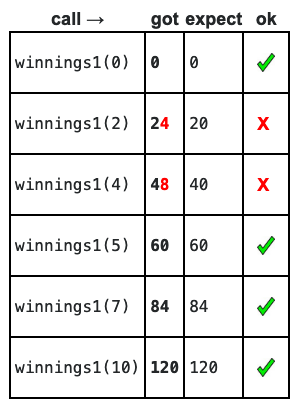
Add if-logic to pick off the < 5 case. Run it. We can see that it's right for half the cases.
None Result
def winnings1(score):
    if score < 5:
        return score * 10

    if score >= 5:
        return score * 12
Add pick-off code for the score >= 5 case. This code returns the right result in all cases. There is just at tiny logical flaw.
def winnings1(score):
    if score < 5:
        return score * 10

    # Run gets here: we know score >= 5
    return score * 12
What about this solution...
def winnings1(score):
    if score < 5:
        return score * 10
        return score * 12
That does not work. The second return is in the control of the if because of the indentation. It never runs because the line above exits the function. Obviously indentation is very significant for what code means in Python.
Extra practice example.
Say there are 3 cases. Use a series of if-return to pick them off. Need to think about the order. Need to put the == 10 case early.
Winnings2: The int score number is in the range 0..10 inclusive. Bonus! if score is 10 exactly, winnings is score * 15. If score is between 4 and 9 inclusive, winnings is score * 12. if score is 3 or less, winnings is score * 10. Given int score, compute and return the winnings.
Solution
def winnings2(score):
    if score == 10:
        return score * 15

    if score >= 4:  # score <= 9 is implicit
        return score * 12

    # All score >= 4 cases have been picked off.
    # so score < 4 here.
    return score * 10

    # Here the cases are handled from 10 to 0.
    # The opposite order would be fine too.
For more detail, see guide Python Boolean
Try this in the interpreter (or Hack Mode button at bottom experimental server)
>>> n = 5   # assign to n to start
>>> n == 6
False
>>> n == 5
True
>>> n != 6
True
>>>
>>> n < 10
True
>>> n < 5  # < is strict
False
>>>
>>> n <= 5  # less-or-equal
True
>>>
>>> n > 0
True
and or notand or notSay we have temp variable is a temperature, and is_raining is a Boolean indicating if it's raining or not. Here are some examples to demonstrate and or not:
# OR: either or both are true
# Say we don't want to go outside if
# if it's cold or raining.
if temp < 50 or is_raining:
    print('not going outside!')


# AND
# We want to go outside if it's snowing.
if temp < 32 and is_raining:
    print('yay snow!')
What is the code to detect if the temp is over 70 and it's not raining?
if -what goes here?-:
    print('Sunny and nice!')
# Style note: don't use == False or == True
# to form a test. See above how "is_raining"
# is used directly in the test, or with a "not"
# in front of it.
and ExampleSuppose we have this code, and n holds an int value.
if n > 0 and n < 10:
   # get here if test is True
What must n be inside the if-statement? Try values like 0 1 2 3 . 8 9 10
You can work out that n must be a an int value in the range 1..9 inclusive.
is_teen(n): Given an int n which is 0 or more. Return True if n is a "teenager", in the range 13..19 inclusive. Otherwise return False. Write a boolean test to pick off the teenager case.
Solution
def is_teen(n):
    # Use and to check
    if n >= 13 and n <= 19:
        return True

    return False

    # Future topic: possible to write this
    # as one-liner: return n >= 13 and n <= 19
An extra example for practice.
Lottery scratcher game: We have three icons called a, b, and c. Each is an int in the range 0..10 inclusive. If all three are the same, winnings is 100. Otherwise if 2 are the same, winnings is 50. Otherwise winnings is 0. Given a, b and c inputs, compute and return the winnings. Use and/or/== to make the tests.
Solution:
def scratcher(a, b, c):
    # 1. All 3 the same
    if a == b and b == c:
        return 100

    # 2. Pair the same (3 same picked off above)
    if a == b or b == c or a == c:
        return 50

    # 3. Run gets to here, nothing matched
    return 0
For more detail, see guide Python Strings
>>> len('Hello')
5
>>> s = 'Hello'   # Equivalently
>>> len(s)
5
>>> len('x')
1
>>> len('')
0
''
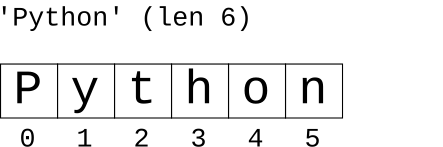
>>> s = 'Python'
>>> s[0]
'P'
>>> s[1]
'y'
>>> s[4]
'o'
>>> s[5]
'n'
>>> s[6]
IndexError: string index out of range
>>> s = 'Python'
>>> s[0]        # read ok
'P'
>>> s[0] = 'X'  # write not ok
TypeError: 'str' object does not support item assignment
>>> a = 'Hello'
>>> b = 'there'
>>> a + b
'Hellothere'
>>> a
'Hello'
We've already used = to set a variable to point to a value. The code below sets s to point to the string 'hello'.
s = 'hello'

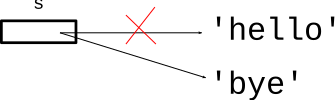
What if we use = to set an existing variable to point to a new value? This just changes the variable to point to the latest value, forgetting the previous value. The assignment = could be translated to English as "now points to".
s = 'hello'
# change s to point to 'bye'
s = 'bye'
s = s + something>>> s = 'hello' >>> s = s + '!' >>> # Q: What is s now?
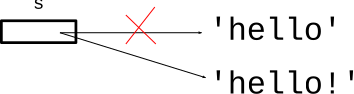
Answer: s is 'hello!' after the two lines. So s = s + xxx is a way of adding something to the right side of a string. The following form does the exactly the same thing using += as a shorthand:
>>> s = 'hello'
>>> s += '!'
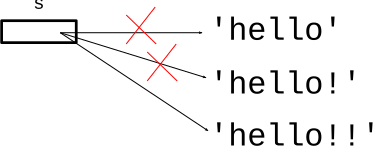
Use a series of += to add on the end.
>>> s = 'hello'
>>> s = s + '!'
>>> s = s + '!'
>>> s
'hello!!'
Here is our string, using zero-based index numbers to refer to the individual chars..
>>> s = 'Python'
>>> s[0]
'P'
>>> s[1]
'y'
>>>
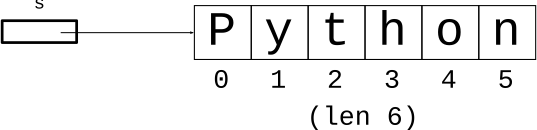
The length of the string is 6. The index numbers are 0, 1, 2, 3, 4, 5. How to write a loop that generates those numbers? It's the same loop we used to, say, loop over the x values of an image. If the image width was 100, we wanted the index numbers 0, 1, 2.. 99. Strings work the same way, use range(len(s)) to generate the index numbers.
for i in range(len(s)):This is the standard, idiomatic loop to go through all the index numbers.
It's traditional to use a loop variable with the simple name i with this loop. Inside the loop, use s[i] to access each char of the string.
# have string s, loop over its chars
for i in range(len(s)):
    # access s[i] in here
double_char(s): Given string s. Return a new string that has 2 chars for every char in s. So 'Hello' returns 'HHeelllloo'. Use a for/i/range loop.
Also, see the experimental server section string2 for many problems like double_char()
Solution code
def double_char(s):
    result = ''
    for i in range(len(s)):
        result = result + s[i] + s[i]
    return result
not_ab(s): Given string s. Return a new string made of all the chars in s which are not lowercase 'a' or 'b'. Use a for/i/range loop.
Try to solve using for/i/range loop with the += pattern like double_char(). Test each char to see if it is 'a' or 'b' using !=.
> not_ab