
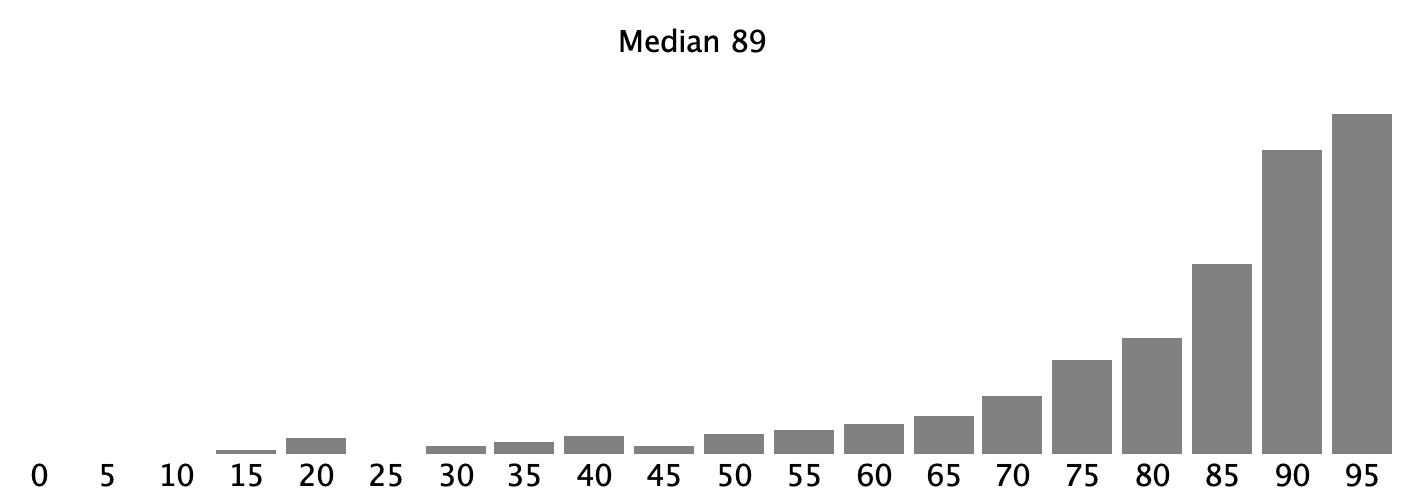
Median: 89/100
We try to grade as consistently as possible, but we are human and we might make mistakes. If you feel like one of your problems was misgraded, please file a regrade request on Gradescope. The regrade requests are open now and must be submitted before Friday, February 18th at 3pm PT. Note that this is the only way to have your regrade request considered; in particular, asking your section leader to take a quick look to see whether a problem was misgraded isn't a way of short circuiting this process. We want you to have the credit you deserve, but filing a formal request helps us make sure that your request goes to the right person. If you submit a regrade regrade request, we do reserve the right to regrade the entire problem and make any necessary corrections.
# CS106A Exam Reference Reminder
# [square brackets] denote functions listed here that we have not used yet
# Exam questions will not depend on functions we have not used yet
Bit:
  bit = Bit(filename)
  bit.front_clear() bit.left_clear() bit.right_clear()
  bit.move() bit.left() bit.right()
  bit.paint('red') [bit.erase()]

General functions:
  len() int() str() range() [list() sorted()]
String functions:
  isalpha() isdigit() isspace() isupper() islower()
  find() upper() lower() [strip()]
List functions:
  append() index() [extend() pop()  insert()]

SimpleImage:
  # read filename
  image = SimpleImage(filename)
  # create blank image
  image = SimpleImage.blank(width, height)

  # foreach loop
  for pixel in image:

  # range/y/x loop
  for y in range(image.height):
      for x in range(image.width):
          pixel = image.get_pixel(x, y)

Grid 2D:
  grid = Grid.build([['row', '0'], ['row', '1']])
  grid.width, grid.height - properties
  grid.in_bounds(x, y) - True if in bounds
  grid.get(x, y) - returns contents at that x,y, or None if empty
  grid.set(x, y, value) - sets new value into grid at x,y


Read lines out of a text fie:
  with open(filename) as f:
      for line in f:
a. Write what value comes from the Python expression below.
>>> s = 'SpiderMan'
>>> s[3:]
??
b. What 3 numbers print when the caller() function runs? This code runs without error.
def foo(x, y)
    a = x + y
    return a


def caller():
    a = 1
    b = 5
    c = foo(b, a)
    print(a, b, c)
# starter code
a.
>>> s = 'SpiderMan'
>>> s[3:]
??

b.
# Write 3 numbers here

# solution code
a.
>>> s = 'SpiderMan'
>>> s[3:]
'derMan'

b.
# Write 3 numbers here
1 5 6
Bit is on the ground, facing the right side of the world. Move bit forward until a hole appears below. Move bit down the hole until blocked. Paint the topmost square inside the hole blue, the square below that green, the square below that blue, and so on. Leave bit at the bottom of the hole facing down.
Bit before and after:
# starter code
def cave_color(filename):
    bit = Bit(filename)


# solution code
def cave_color(filename):
    bit = Bit(filename)
    # Find the hole to our right
    while not bit.right_clear():
        bit.move()
    # Move down the hole
    bit.right()
    while bit.front_clear():
        bit.move()
        bit.paint('blue')
        if bit.front_clear():
            bit.move()
            bit.paint('green')
Given an image filename and ints a and b which are 1 or more. Create a new out image with a copy of the original image at the top left and with a vertical yellow stripe a-pixels-wide running down the right right side of the image. Also add a horizontal purple stripe b-pixels-high running along the bottom of the image. The yellow and purple stripes should not extend past the height and width of the image, respectively. The code for the copy of the image is provided - you write the code to create the output image and fill the two stripes. You may use a pair of loops for each stripe. The starter code includes an a-b-c outline, but any solution which gets the right output is fine. Reminder: create yellow by setting blue to 0 and purple by setting green to 0.

# starter code
def two_stripes(filename, a, b):
    image = SimpleImage(filename)
    # a. Create out image
    out = SimpleImage.blank(   ??????   )

    # Write copy of original image (provided)
    for y in range(image.height):
        for x in range(image.width):
            pixel = image.get_pixel(x, y)
            pixel_out = out.get_pixel(x, y)
            pixel_out.red = pixel.red
            pixel_out.green = pixel.green
            pixel_out.blue = pixel.blue

    # b. yellow stripe a pixels wide
    pass

    # c. purple stripe b pixels high
    pass

    return out

# solution code
def two_stripes(filename, a, b):
    image = SimpleImage(filename)
    # a. Create out image
    out = SimpleImage.blank(image.width + a, image.height + b)

    # Write copy of original image (provided)
    for y in range(image.height):
        for x in range(image.width):
            pixel = image.get_pixel(x, y)
            pixel_out = out.get_pixel(x, y)
            pixel_out.red = pixel.red
            pixel_out.green = pixel.green
            pixel_out.blue = pixel.blue

    # b. yellow stripe a pixels wide
    for y in range(image.height):
        for x in range(a):
            pixel_out = out.get_pixel(image.width + x, y)
            pixel_out.blue = 0

    # c. purple stripe b pixels high
    for x in range(image.width):
        for y in range(b):
            pixel_out = out.get_pixel(x, image.height + y)
            pixel_out.green = 0

    return out
Write code for the two functions:
digit_list(s): Given string s. Return a list of the int values of the digit chars in s, so 'ab31xx41' returns [3, 1, 4, 1]
atly(s): The string s will contain either zero or two or more '@' chars. If there are two or more '@', return a string made of the chars after the second '@' followed by the chars before the first '@'. So 'aa@bbb@cccc' returns 'ccccaa'. If there are no '@' return None. Use str.find().
'aa@bbb@cccc' -> 'ccccaa'
'abc@donut@hello' -> 'helloabc'
'abcxyz' -> None
# starter code
def digit_list(s):
    pass


def atly(s):
    pass


# solution code
def digit_list(s):
    result = []
    for ch in s:
        if ch.isdigit():
            result.append(int(ch))
    return result


def atly(s):
    at1 = s.find('@')
    if at1 == -1:
        return None
    at2 = s.find('@', at1 + 1)  # need the +1!
    return s[at2 + 1:] + s[:at1]
We have a Grid representing Yellowstone national park,
and every square is either a bear 'b',
rock 'r', or empty None.
There are several different moves that can happen in this game, and for this problem you are writing the boolean function bear_pile_ok(grid, x_to, y_to) to check if a particular bear-pile move is ok. Here are the rules for a bear-pile move. Assume there is a bear at an in-bounds "from" square, and the function checks the "to" square with these rules:
1. The "to" square must be in-bounds
2. The to square must be empty
3. The square immediately below the to square must contain a bear.
If all three of those conditions are met, the bear-pile move is ok. The function is passed a prospective x_to, y_to to check - return True if the move is ok and False otherwise. Do not change the grid. Assume that that there is a bear at the "from" square. The "from" numbers are not needed for this computation, so they are not provided. The "to" square will always be one of 3 possible moves, as shown by the three arrows in the example below: down-left, straight-down, down-right.

In the example above, the down-left move is ok. The straight-down move is not ok, because there is no bear below. The down-right move is not ok because there is a rock in the way.
# starter code
def bear_pile_ok(grid, x_to, y_to):
    pass


# solution code
def bear_pile_ok(grid, x_to, y_to):

    if not grid.in_bounds(x_to, y_to):   # in bounds
        return False

    if grid.get(x_to, y_to) != None:    # empty
        return False

    if grid.in_bounds(x_to, y_to + 1) and grid.get(x_to, y_to + 1) == 'b':
        return True   # the one true in this approach

    return False

# alternative solution code
def bear_pile_ok(grid, x_to, y_to):

    if not grid.in_bounds(x_to, y_to):   # in bounds
        return False

    if grid.get(x_to, y_to) != None:    # empty
        return False

    if not grid.in_bounds(x_to, y_to + 1) or grid.get(x_to, y_to + 1) != 'b':
        return False
    return True
Suppose we have an encryption function similar to the homework but with two slug lists - one for lowercase inputs and one for uppercase inputs.
def encrypt(source, slug_lower, slug_upper, ch):
The source parameter is a list of chars that can be encrypted, all in lowercase form. The slug_lower and slug_upper lists hold encrypted chars, the same length as the source list, like this:
    source = ['a', 'b', 'c', 'd']
slug_lower = ['t', 'Q', 'p', 'Z']
slug_upper = ['r', 'i', 'Y', 'M']
To encrypt the parameter ch, if its lowercase form is found in the source list, its encrypted form is at the same index in one of the two slug lists. If the original char is lowercase, its encrypted form is in slug_lower. Otherwise, its encrypted form is in slug_upper. If the char is not found in the source list, e.g. '$', then it is returned unchanged.
# Examples using above source/slugs
Encrypt of 'a' is 't'
Encrypt of 'A' is 'r'
Encrypt of 'b' is 'Q'
Encrypt of 'B' is 'i'
Encrypt of '$' is '$'
On the homework project, lowercase chars were always encrypted as lowercase, and uppercase chars encrypted as uppercase. On this problem, the encrypted chars are a mixture of lowercase and uppercase.
Each input char that has a match in the source list will be either lowercase or uppercase, e.g. 'a' or 'A'.
# starter code
def encrypt(source, slug_lower, slug_upper, ch):
    pass


# solution code
def encrypt(source, slug_lower, slug_upper, ch):
    low = ch.lower()
    if low in source:
        idx = source.index(low)
        if ch.islower():
            return slug_lower[idx]
        return slug_upper[idx]
        # could use "else" or "isupper",
        # but works fine just like this
    return ch