Today: string accumulate patterns, int for indexing, int div, int mod, text files, standard output, print(), file-reading, crazycat example program
"Patterns" are a powerful idea for building your code more quickly. With patterns, we understand there are group functions with common, "pattern" code they have in common, plus some code that is unique to each function. A common first thought when writing a function is: what can I borrow from functions I've written before that look like this one?
Create an empty result at the start. In the loop, some kind of += to add to the result. After the loop, the result holds the answer.
result = empty

loop:
    if some-test:
        result += something

return result
The double_char() function fits this pattern, adding a string onto the result each time the loop to build it up:
def double_char(s):
    result = ''
    for i in range(len(s)):
        result += s[i] + s[i]
    return result
A common problem in computer code is counting the number of times something happens within a data set. This is within the pattern, using count += 1 in the loop to count something. Recall that the line count += 1 will increase the int stored in the variable by 1.
count = 0

loop:
    if thing-to-count:
        count += 1

return count
This string problem shows how to use += 1 to count the occurrences of something, in this case the number of 'e' in a string.
def count_e(s):
    count = 0
    for i in range(len(s)):
        if s[i] == 'e':
            count += 1
    return count
A related code problem is - how sum up a series of numbers? It's really the same pattern again. Initialize the sum to 0 before the loop. Inside the loop, use += to add each number.
sum = 0

loop:
    sum += one_number

return sum
Say we want to rate an email about how long and how much shouting it has in it before we read it as follows:
shout_score(s): Given a string s, we'll say the "shout" score is defined this way: each exclamation mark '!' is 10 points, each lowercase char is 1 point, and each uppercase char is 2 points. Return the total of all the points for the chars in s.
In the loop, use the sum pattern to compute the score for the string.
def shout_score(s):
    score = 0
    for i in range(len(s)):
        if s[i] == '!':
            score += 10
        elif s[i].islower():
            score += 1
        elif s[i].isupper():
            score += 2
    return score
Here using if/elif structure, since our intention is to pick out 1 of N tests. As a practical matter, it also works as a series of plain if. Since '!' and lowercase and uppercase chars are all exclusive from each other, only one if test will be true for each char.
Most often, what Python code will do follows your intuition. Here we'll look at the mechanism underlying how it works, and sometimes that will be important so you can understand how to make the code work.
int and strQ: What is the difference between these two?
123 vs. '123'
These two values are different types. The type of a value is its official category, and all data in Python has a type. The formal type of integers is int and type of strings is str
A: 123 is an int number, and '123' is a string length 3, made of 3 digit chars
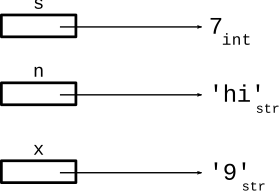
int str VariablesSuppose we set up these three variables
>>> s = 7
>>> n = 'hi'
>>> x = '9'
Here is what memory looks like. In Python, each value in memory is tagged with its type - here int or str.
Normally we follow the convention that a variable named s to points to a string. This is a good convention, allowing people reading the code get the right impression of what the variable stores.
But Python does not have any rule that a certain variable name must point to a certain type. To Python, the variable name is just a label of that variable used to identify it within the code. Python's attitude to the variable name is like: this is the name my human uses for this variable.
Therefore, we were contrary for this example, picking names that go against the conventions to show that Python does not care.
Python uses the type of a value to guide operations on that value. We can see this by watching the behavior of the + operators. Think about what the result will be for the expressions like s + s.
For each variable, Python follows the arrow to get the value to use, and each value is tagged with its type. For s + s the result is 14. Since the value is int, the + does arithmetic addition. What about n + n?
>>> s = 7
>>> n = 'hi'
>>> x = '9'
>>>
>>> s + s
14
>>> n + n
???
>>> x + x
???
What are the ??? above?
int() str()>>> # e.g. text out of a file - a string >>> # convert str form to int >>> text = '123' >>> int(text) 123 >>> >>> # works the other way too >>> str(123) '123' >>> >>> # append int to str - error like this >>> 'score:' + 13 TypeError: can only concatenate str (not "int") to str >>> >>> # use str() to append int to str >>> 'score:' + str(13) 'score:13' >>>
'12abc3' -> 6
This example combines the accumulate pattern and str/int conversion.
sum_digits(s): Given a string s. Consider the digit chars in s. Return the arithmetic sum of all those digits, so for example, '12abc3' returns 6. Return 0 if s does not contain any digits.
def sum_digits(s):
    sum = 0
    for i in range(len(s)):
        if s[i].isdigit():
            # str '7' -> int 7
            num = int(s[i])
            sum += num
    return sum
'aabb' -> 'bbbbaaaa'
right_left(s): We'll say the midpoint of a string is the len divided by 2, dividing the string into a left half before the midpoint and a right half starting at the midpoint. Given string s, return a new string made of 2 copies of right followed by 2 copies of left. So 'aabb' returns 'bbbbaaaa'.
Where do you cut the string Python?
The back half begins at index 3. The length is 6, so an obvious approach is to divide the length by 2. This actually does not work, and leads to a whole story.
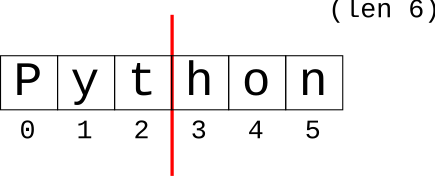
Dividing length by 2 leads to an error...
>>> s = 'Python'
>>> mid = len(s) / 3
>>> mid
3.0
>>> s[mid:]
TypeError: slice indices must be integers ...
>>>
There are two number systems in the computer int for whole-number integers, and float for floating point numbers. The math operators + - * / ** work for both number types, so for many day-to-day computations the int/float distinction is not important. However, in this case, we are running into the issue that float does not work for indexing:
1. Use int for indexing, float does not work (e.g. 3.0 above)
2. The division operator / produces a float, even if the math comes out even
>>> 7 / 2
3.5
>>> 6 / 2
3.0
Python has a separate "int division" operator. It does division and discards any remainder, rounding the result down to the next integer.
>>> 7 // 2
3
>>> 6 // 2
3
>>> 9 // 2
4
>>> 8 // 2
4
>>> 94 // 10
9
>>> 102 // 4
25
This will work for right_left() - computing the int index where the right half begins, rounding down if the length is odd.
'aabb' -> 'bbbbaaaa'
Now solve right_left(). Use // to compute int "mid", rounding down in the case of a string of odd width. Our solution uses a decomp-by-var strategy, storing intermediate values in variables.
With the decomp-by-var strategy: solve a sub-part of the problem, storing the partial result in a variable with a reasonable name. Use the var on later lines. This is decomposition at a small scale - breaking a long line into pieces. Also the variable names make it nicely readable.
def right_left(s):
    midpoint = len(s) // 2
    left = s[:midpoint]
    right = s[midpoint:]
    return right + right + left + left
Here is the solution without the variables - yikes!
def right_left(s):
    return s[len(s) // 2:] + s[len(s) // 2:] + s[:len(s) // 2] + s[:len(s) // 2]
The solution is shorter - just one line long, but the decomp-var version is more readable. Readability is not to help some other person, it's to help yourself. Bugs are when the code does something unexpected, and readability is at the core of that.
% OperatorThe "mod" operator % is essentially the remainder after int division. So for example (23 % 10) yields 3 — divide 23 by 10 and 3 is the leftover remainder. The formal word for this us "modulo", but the word is often shortened to just "mod". The mod operator makes the most sense with positive numbers, so avoid negative numbers in modulo arithmetic.
>>> 23 % 10
3
>>> 36 % 10
6
>>> 45 % 10
5
>>> 45 % 0
ZeroDivisionError: integer division or modulo by zero
>>>
>>> 40 % 10  # mod result 0 means it divides evenly
0
>>> 17 % 5
2
>>> 45 % 5
0
A simple use of mod is checking if a number is even or odd - n % 2 is 0 if even, 1 if odd.
>>> 8 % 2
0
>>> 9 % 2
1
>>> 10 % 2
0
>>> 11 % 2
1
crazy_str(s): Given a string s, return a crazy looking version where the first char is lowercase, the second is uppercase, the third is lowercase, and so on. So 'Hello' returns 'hElLo'. Use the mod % operator to detect even/odd index numbers.
'Hello' -> 'hElLo'

index:   0      1      2      3      4
       lower, upper, lower, upper, lower ...

even index: lower
odd index: upper
def crazy_str(s):
    result = ''
    for i in range(len(s)):
        if i % 2 == 0:  # even
            result += s[i].lower()
        else:
            result += s[i].upper()
    return result
We'll use the crazycat example to demonstrate files, file-processing, printing, standard output, and functions.
The file named "hibye.txt" is in the crazycat folder. What is a file? A file on the computer has a name and stores a series of bytes. The file data does not depend on the computer being switched on. The file is said to be "non-volatile". More details later.
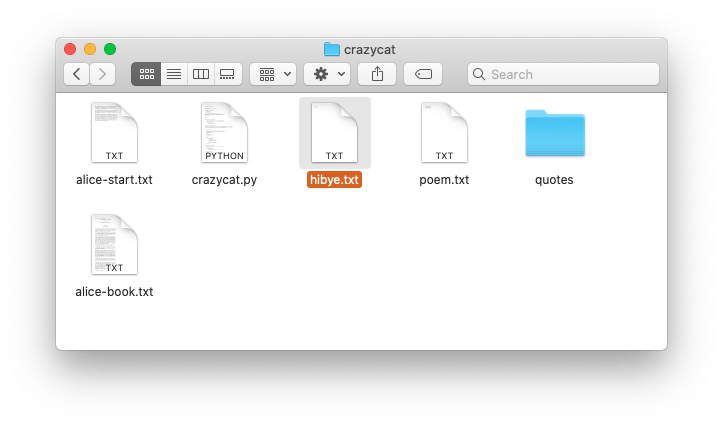
Text file: series of lines, each line a series of chars, each line marked by '\n' at end
The hibye.txt file has 2 lines, each line has a '\n' at the end.
The first line has a space, aka ' ', between the two words. Here is the complete contents:
Hi and
bye
Here is what that file looks like in an editor that shows little
gray marks for the space and \n (like show-invisibles mode in word processor):
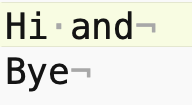
In Fact the contents of that file can be expressed as a Python string - see how the newline chars end each line:
'Hi and\nbye\n'
Use backslash \ to include special chars within a string literal. Note: different from the regular slash / on the ? key.
\n  newline char
\'  single quote

s = 'isn\'t'
# or use double quotes
s = "isn't"

\\  backlash char
\"  double quote
How many chars are in that file (each \n is one char)?
There are 11 chars. The latin alphabet A-Z chars like this take up 1 byte per char. Characters in other languages take 2 or 4 bytes per char. Use your operating system to get the information about the hibye.txt file. What size in bytes does your operating system report for this file?
So when you send a 50 char text message .. that's about 50 bytes sent on the network + some overhead. Text data like this uses very few bytes compared to sound or images or video.
In the old days, there were two chars to end a line. The \r "carriage return", would move the typing head back to the left edge. The \n "new line" would advance to the next line. So in old systems, e.g. DOS, the end of a line is marked by two chars next to each other \r\n. On Windows, you will see text files with this convention to this this day. Python code largely insulates your code from this detail - the for line in f form shown below will go through the lines, regardless of what line-ending they are encoded with.
Q: How does data flow between the functions in your program?
A: Parameters and Return value
Parameters carry data from the caller code into a function when it is called. The return value of a function carries data back to the caller.
This is the key data flow in your program. It is 100% the basis of the Doctests. It is also the basis of the old black-box picture of a function

BUT .. there is an additional, parallel output area for a program, shared by all its functions.
There is a Standard Output area associated with every run of a program. It is by default a text area made of lines of text. A function can append a line of text to standard out, and conveniently that text will appear in the terminal window hosting that run of python code. Standard out is associated with the print() function below.
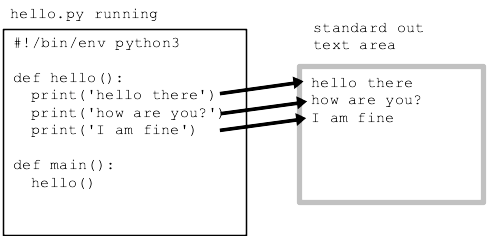
Return and print() are both ways to get data out of a function, so they can be confused with each other. We will be careful when specifying a function to say that it should "return" a value (very common), or it should "print" something to standard output (rare). Return is the most common way to communicate data out of a function, but below are some print examples.
See guide: print()
>>> print('hello', 'there', '!')
hello there !
>>> print('hello', 123, '!')
hello 123 !
>>> print(1, 2, 3)
1 2 3
>>> print('hello', 123, '!', sep=':')  # sep= between items
hello:123:!
>>> print(1, 2, 3, end='xxx\n')  # end= what goes at end
1 2 3xxx
>>> print(1, 2, 3, end='')       # suppress the \n
1 2 3>>>
This example program is complete, showing some functions, Doctests, and file-reading.
See guide: Command line
See guide: File Read/Write
Open a terminal in the crazycat directory (see the Command Line guide for more information running in the terminal). Terminal commands - work in both Mac and Windows. When you type command in the terminal, you are typing command directly to the operating system that runs your computer - Mac OS, or Windows, or Linux.
pwd - print out what directory we are in
ls - see list of filenames ("dir" on older Windows)
cat filename - see file contents ("type" on older Windows)
$ ls
alice-book.txt	crazycat.py	poem.txt
alice-start.txt	hibye.txt	quotes
$ cat poem.txt
Roses Are Red
Violets Are Blue
This Does Not Rhyme
$
$ python3 crazycat.py poem.txt
Roses Are Red
Violets Are Blue
This Does Not Rhyme
$ python3 crazycat.py hibye.txt
Hi and
bye
$
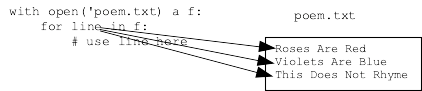
Say filename holds the name of a file as a string, like 'poem.txt'
Here is the canonical file-reading code:
with open(filename) as f:
    for line in f:
        # use line in here
Visualization of how the variable "line" behaves for each iteration of the loop:
This command line runs print_file_plain() below, passing in the string 'poem.txt' as the filename.
$ python3 crazycat.py poem.txt
Roses Are Red
Violets Are Blue
This Does Not Rhyme
Here is the complete code for the "cat" feature - printing out the contents of a file. Why do we need end='' here? The line already has \n at its end, so we get double spacing if print() adds its standard \n. Run the program with end='' removed and see what it does.
def print_file_plain(filename):
    with open(filename) as f:
        for line in f:
            # use line in here
            print(line, end='')
The main() function looks for '-crazy' option on the command line. We'll learn how to code that up soon. For now, just know that main() calls the print_file_crazy() function which calls the crazy_line() helper.
Here is command line to run with -crazy option
$ python3 crazycat.py -crazy poem.txt
rOsEs aRe rEd
vIoLeTs aRe bLuE
tHiS DoEs nOt rHyMe
def crazy_str(s):
    """
    Given a string s, return a crazy looking version where the first
    char is lowercase, the second is uppercase, the third is lowercase,
    and so on. So 'Hello' returns 'hElLo'.
    >>> crazy_str('Hello')
    'hElLo'
    >>> crazy_str('@xYz!')
    '@XyZ!'
    >>> crazy_str('')
    ''
    """
    result = ''
    for i in range(len(s)):
        if i % 2 == 0:
            result += s[i].lower()
        else:
            result += s[i].upper()
    return result
Important technique: see how how the line string is passed into the crazy_str() helper. The result of the helper is sent to print(). Very compact using parameter/result data flow here.
Key Line: print(crazy_str(line), end='')
The code is similar to print_file_plain() but passes each line through the crazy_str() function before printing. Think about the flow of data in the code below.
def print_file_crazy(filename):
    """
    Given a filename, read all its lines and
    print them out in crazy form.
    """
    with open(filename) as f:
        for line in f:
            print(crazy_str(line), end='')
            # think about black box of crazy_str()
Add temporary print() to show before/after string, then run -crazy. The print() debug output will be mixed in with the regular output.
Code with debug print()
def crazy_str(s):
    result = ''
    print('crazy input:', s, end='')
    for i in range(len(s)):
        if i % 2 == 0:
            result += s[i].lower()
        else:
            result += s[i].upper()
    print('crazy output:', result, end='')
    return result
Output
$ python3 crazycat.py -crazy poem.txt
crazy input: Roses Are Red
crazy output: rOsEs aRe rEd
rOsEs aRe rEd
crazy input: Violets Are Blue
crazy output: vIoLeTs aRe bLuE
vIoLeTs aRe bLuE
crazy input: This Does Not Rhyme
crazy output: tHiS DoEs nOt rHyMe
tHiS DoEs nOt rHyMe
Try running the code with alice-start.txt is the first few paragraphs of Alice in Wonderland, and alice-book is the entire text of the book. Try the entire text.
1. Note how fast it is. Your computer is operating at, say, 2Ghz, 2 billion operations per second. Even if each Python line of code takes, say, 10 operations, that's still a speed that is hard for the mind to grasp.
2. Try running this way, works on all operating systems:
$ python3 crazycat.py -crazy alice-start.txt > capture.txt
What does this do? Instead of printing to the terminal, it captures standard output to a file "capture.txt". Use "ls" and "cat" to look at the new file. This is a super handy way to use your programs. You run the program, experimenting and seeing the output directly. When you have a form you, like use > once to capture the output. Like the pros do it!