Today: foreach loop instead of for/i/range, start lists, how to write main()
int() str() Conversions
'123' is type str
123 is type int

int('123') -> 123
str(123) -> '123'
The two words not in work as an operator, simply the opposite of the in operator — True if the substring is not in the larger string.
>>> 'x' not in 'abcd'
True
>>> 'bc' not in 'abcd'
False
for/i/range - We've Had a Good Run!for/i/range FormsSo many memories! Looping over string index numbers.
for i in range(len(s)):
Looping over x values in an image
for x in range(image.width):
Looping over y values in an grid:
for y in range(grid.height):
Looping over index numbers like this is an important code pattern and we'll continue to use it.
BUT now we're going to see another way to do it!
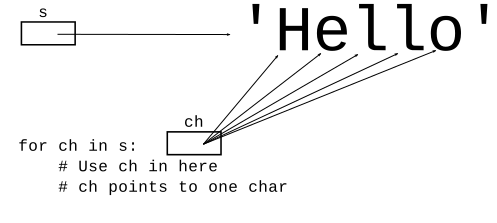
for ch in s:A "foreach" loop can loop over a string and access each char directly, not bothering with index numbers. This is easier than the for/i/range form above. In the loop, the ch variable points to each char, one per iteration:
'H' 'e' 'l' 'l' 'o'
s = 'Hello'
for ch in s:
    # Use ch in here
Here are examples we might have solved with for/i/range before, but here we solve with the simpler for/ch/s. Look at a couple examples, then students do one.
Like earlier double_char() - shows the for/ch/s loop. The variable ch points to one char for each iteration.
Note: no index numbers, no []
def double_char2(s):
    result = ''
    for ch in s:
        result = result + ch + ch
    return result
has_digit2(s): Given a string s, return True if there is a digit in the string somewhere, False otherwise. Use foreach for/ch/s.
'abc123' -> True
'abc' -> False
Solved this before with early-return strategy. Now the code is simplified with for/ch/s.
def has_digit2(s):
    for ch in s:
        if ch.isdigit():
            return True
    # If we get here .. no digit
    return False
sum_digits2(s): Given a string s. Consider the digit chars in s. Return the arithmetic sum of all those digits, so for example, '12abc3' returns 6. Return 0 if s does not contain any digits. Use a foreach for/ch/s loop.
'12ab3' -> 6
'777' -> 21
'abcd' -> 0
Note: think about str/int conversion.
def sum_digits2(s):
    sum = 0
    for ch in s:
        if ch.isdigit():
            num = int(ch)  # '7' -> int 7
            sum += num
    return sum
Demonstrates both foreach and in
difference(a, b): Given two strings, a and b. Return a version of a, including only those chars which are not in b. Use case-sensitive comparisons. Use a for/ch/s loop.
def difference(a, b):
    result = ''
    # Look at all chars in a.
    # Check each against b.
    for ch in a:
        if ch not in b:
            result += ch
    return result
Use the for ch in s: form if you do not need access to index numbers - it's simpler, so we are happy to use it where it's good enough.
Use the for i in range(len(s)): form if you need to know the index numbers in the loop
See the guide: Python List for more details about lists
See the "list1" for examples below on the experimental server
[1, 2, 3]Use square brackets [..] to write a list in code (a "literal" list value), separating elements with commas. Python will print out a list value using this same square bracket format.
>>> lst = ['a', 'b', 'c', 'd']
>>> lst
['a', 'b', 'c', 'd']
>>>

"empty list" is just 2 square brackets with nothing within: []
len(lst)Use len() function, just like string. As a nice point of consistency, many things that work on strings work the same on lists - they are, after all, both linear collections using zero-based indexing.
>>> len(lst)
4
Use square brackets to access an element in a list. Valid index numbers are 0..len-1. Unlike string, you can assign = to change an element within the list.
>>> lst = ['a', 'b', 'c', 'd']
>>> lst[0]
'a'
>>> lst[2]
'c'
>>>
>>> lst[0] = 'aaaa'   # Change an elem
>>> lst
['aaaa', 'b', 'c', 'd']
>>>
>>>
>>> lst[9]
Error:list index out of range
>>>
The big difference from strings is that lists are mutable - lists can be changed. Elements can be added, removed, changed over time. We'll look at four list features.
# 1. make empty list, then call .append() on it
>>> lst = []
>>> lst.append(1)
>>> lst.append(2)
>>> lst.append(3)
>>>
>>> lst
[1, 2, 3]
>>> len(lst)
3
>>> lst[0]
1
>>> lst[2]
3
>>>
>>> # 2. Say we want a list of 0, 10, 20 .. 90
>>> # Write for/i/range loop, use append() inside
>>> nums = []
>>> for i in range(10):
...   nums.append(i * 10)
...
>>> nums
[0, 10, 20, 30, 40, 50, 60, 70, 80, 90]
>>> len(nums)
10
>>> nums[5]
50
The list.append() function modifies the existing list. It returns None. Therefore the following code pattern will not work, setting lst to None:
# NO does not work
lst = []
lst = lst.append(1)
lst = lst.append(2)

# Correct form
lst = []
lst.append(1)
lst.append(2)
# lst points to changed list
Why do programmers write the incorrect form? Because the immutable string does use that pattern, and so you are kind of used to it:
# This works for string
# x = change(x) pattern
s = 'Hello'
s = s.upper()
s = s + '!'
# s is now 'HELLO!'
> list_n()
list_n(n): Given non-negative int n, return a list of the form [0, 1, 2, ... n-1]. e.g. n=4 returns [0, 1, 2, 3] For n=0 return the empty list. Use for/i/range and append().
def list_n(n):
    nums = []
    for i in range(n):
        nums.append(i)
    return nums
>>> lst = ['a', 'b', 'c', 'd']
>>> 'c' in lst
True
>>> 'x' in lst
False
>>> 'x' not in lst  # preferred form to check not-in
True
>>> not 'x' in lst  # equivalent form
True
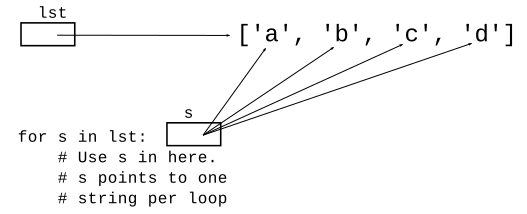
>>> lst = ['a', 'b', 'c', 'd']
>>> for s in lst:
...   # use s in here
...   print(s)
...
a
b
c
d
intersect(a, b): Given two lists of numbers, a and b. Construct and return a new list made of all the elements in a which are also in b.
This code is similar to string algorithms, but use list features like [] and .append().
Minor point: since it's a list of numbers, we'll use num as the variable name in the foreach over this list.
>>> lst = ['a', 'b', 'c', 'd']
>>> lst.index('c')
2
>>> lst.index('x')
ValueError: 'x' is not in list
>>> 'x' in lst
False
>>> 'c' in lst
True
donut_index(foods): Given "foods" list of food name strings. If 'donut' appears in the list return its int index. Otherwise return -1. No loops, use .index(). The solution is quite short.
def donut_index(foods):
    if 'donut' in foods:
        return foods.index('donut')
    return -1
list_censor(n, censor): Given non-negative int n, and a list of "censored" int values, return a list of the form [1, 2, 3, .. n], except omit any numbers which are in the censor list. e.g. n=5 and censor=[1, 3] return [2, 4, 5]. For n=0 return the empty list.
Solution
def list_censor(n, censor):
    nums = []
    for i in range(n):
        # Introduce "num" var since we use it twice
        # Use "in" to check censor
        num = i + 1
        if num not in censor:
            nums.append(num)
    return nums
As your algorithms grow more complicated, with three or four variables running through your code, it can become difficult to keep straight in your mind which variable, say, is the number and which variable is the list of numbers. Many little bugs have the form of wrong-variable mixups like that.
Therefore, an excellent practice is to name your list variables ending with the letter "s", like "nums" above, or "urls" or "weights".
urls = []   # name for list of urls


url = ''    # name for one url
Then when you have an append, or a loop, you can see the singular and plural variables next to each other, reinforcing that you have it right.
    url = (some crazy computation)
    urls.append(url)
Or like this
for url in urls:
...
STATES = ['CA, 'NY', 'NV', 'KY', 'OK']
...
...

def some_fn():
    # can use STATES in here
    for state in STATES:
        ...
# provided ALPHABET constant - list of the regular alphabet
# in lowercase. Refer to this simply as ALPHABET in your code.
# This list should not be modified.
ALPHABET = ['a', 'b', 'c', 'd', 'e', 'f', 'g', 'h', 'i', 'j', 'k', 'l', 'm', 'n', 'o', 'p', 'q', 'r', 's', 't', 'u', 'v', 'w', 'x', 'y', 'z']

...

def foo():
    for ch in ALPHABET:  # this works
        print(ch)
You have called your code from the command line many times. The special function main() is typically the first function to run in a python program, and its job is looking at the command line arguments and figuring out how to start up the program. With HW4, it's time for you to write your own main(). You might think it requires some advanced CS trickery, but it's easier than you might think.
For details see guide: Python main() (uses affirm example too)
affirm.zip Example/exercise of main() command line args. You can do it yourself here, or just watch the examples below to see the ideas.
First run affirm.py, see what the command line arguments (aka "args") it takes:
-affirm and -hello options (aka "flags")
$ python3 affirm.py -affirm Lisa
Everything is coming up Lisa
$ python3 affirm.py -affirm Bart
Looking good Bart
$ python3 affirm.py -affirm Maggie
Today is the day for Maggie
$ python3 affirm.py -hello Bob
Hello Bob
$
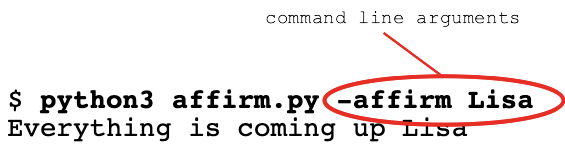
-affirmThe command line arguments, or "args", are the extra words you type on the command line to tell the program what to do. The system is deceptively simple - the command line arguments are just the words after the program.py on the command line, separated from each other by spaces. So in this command line:
$ python3 affirm.py -affirm Lisa
The words -affirm and Lisa are the 2 command line args. They are separated from each other by spaces when typed on the command line.
main() has args Python ListWhen a Python program starts running, typically the run begins in a special function named main(). This function can look at the command line arguments, and figure out what other functions to call.
In our main() code the variable args is set up as a Python list containing the command line args. Each arg is a string - just what was typed on the command line.
$ python3 affirm.py -affirm Lisa
   ....
   e.g. args == ['-affirm', 'Lisa']


$ python3 affirm.py -affirm Bart
    ....
    e.g. args == ['-affirm', 'Bart']
Edit the file affirm-exercise.py. In the main() function, find the args = .. line which sets up the args list. Add the following print() - this just prints out the args list so we can see it. We can remove this print() later.
    args = sys.argv[1:]

    print('args:', args)   # add this
Now run the program, trying a few different args, so you see what the args list is depending on what is typed.
$ python3 affirm-exercise.py -affirm Bart
args: ['-affirm', 'Bart']
$ python3 affirm-exercise.py -affirm Lisa
args: ['-affirm', 'Lisa']
$ python3 affirm-exercise.py -hello Hermione
args: ['-hello', 'Hermione']
Solution code
For this example, say we have functions already defined that do the various printouts:
print_affirm(name) - prints affirmation for name
print_hello(name) - print hello to name
print_n_copies(n, name) - given int n,
                          print n copies of name
Here is the source code for these three. They are not too complex. Also see that AFFIRMATIONS is defined as a constant - the random affirmation strings to use.
AFFIRMATIONS = [
    'Looking good',
    'All hail',
    'Horray for',
    'Today is the day for',
    'I have a good feeling about',
    'A big round of applause for',
    'Everything is coming up',
]

def print_affirm(name):
    """
    Given name, print a random affirmation for that name.
    """
    affirmation = random.choice(AFFIRMATIONS)
    print(affirmation, name)


def print_hello(name):
    """
    Given name, print 'Hello' with that name.
    """
    print('Hello', name)


def print_n_copies(n, name):
    """
    Given int n and name, print n copies of that name.
    """
    for i in range(n):
        # Print each copy of the name with space instead of \n after it.
        print(name, end=' ')
    # Print a single \n after the whole thing.
    print()
Make this command line work, editing the file affirm-exercise.py:
$ python3 affirm-exercise.py -affirm Lisa
Solution code
def main():
    args = sys.argv[1:]
    ....
    ....
    # 1. Check for the -affirm arg pattern:
    #   python3 affirm.py -affirm Bart
    #   e.g. args[0] is '-affirm' and args[1] is 'Bart'
    if len(args) == 2 and args[0] == '-affirm':
        print_affirm(args[1])
Write if-logic in main() to looking for the following command line form, call print_hello(name), passing in correct string.
$ python3 affirm-exercise.py -hello Bart
Solution code
    if len(args) == 2 and args[0] == '-hello':
        print_hello(args[1])
In this case, the function to call is print_n_copies(n, name), where n is an int param, and name is the name to print. Note that the command line args are all strings.
$ python3 affirm-exercise.py -n 10000 Hermione