Today: tuples, dict.items() output pattern, lambda, map, one-liners
Ever notice how each new type has a char that marks it literal form in the code:
For more detail see guide Python Tuples
>>> t = ('a', 13, 42)
>>> t[0]
'a'
>>> t[1]
13
>>> t[2]
42
>>> len(t)
3
>>> t[0] = 'b'
TypeError: 'tuple' object does not support item assignment
It's possible to omit the parenthesis when writing a tuple. We will not do this in CS106A code, but you can write it if you like and it is allowed under PEP8. We will write our code more spelled-out, showing explicitly when creating a tuple.
>>> t = 1, 4     # This works
>>> t
(1, 4)
>>> t = (4, 5)   # I prefer it spelled out like this
>>> t            # PEP8 says parenthesis optional
(4, 5)
Here is a neat sort of trick you can do with a tuple. This is a shortcut for the use of =, assigning multiple variables in one step. This is just a little trick, not something you need to use.
>>> (x, y) = (3, 4)
>>> x
3
>>> y
4
>>> cities = [('tx', 'houston'), ('ca', 'san jose' ), ('ca', 'palo alto'), ('tx', 'austin'), ('ca', 'aardvark')]
>>>
>>>
>>> sorted(cities)
[('ca', 'aardvark'), ('ca', 'palo alto'), ('ca', 'san jose'),
('tx', 'austin'), ('tx', 'houston')]
>>>
>>> sorted(cities, reverse=True)
[('tx', 'houston'), ('tx', 'austin'), ('ca', 'san jose'),
('ca', 'palo alto'), ('ca', 'aardvark')]
>>>
Map - a short way to transform a list - handy, but not super important
Lambda - an important way to package some code. Today we'll use map() to explore how lambda works
Lambda code is dense. Another way of saying that it is powerful. Sometimes you feel powerful with computer code because the code you write is long. Sometimes you feel even a little more powerful, because the code you write is short!
There is something satisfying about solving a real problem with 1 line of code. The 1-liner code is so dense, we'll will write it a little more deliberately. See how this works below!
Consider the following "double" def. What does this provide to the rest of the program?
def double n:
    return n * 2
The def sets up the name of the function, and associates it with that body of code. Later line can refer to this function by name. The drawing below shows a form of this - the name "double" now points to this black-box of code that anybody can call.
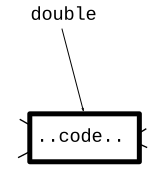
Answer: takes in one parameter value. Returns one value.
>>> # Normally don't def a function in the interpreter.
>>> # But it works for little demos like this.
>>>
>>> def double(n):
...   return n * 2
...
>>> double
<function double at 0x7fe2caad0430>
>>>
>>> double(10)
20
>>> double(144)
288
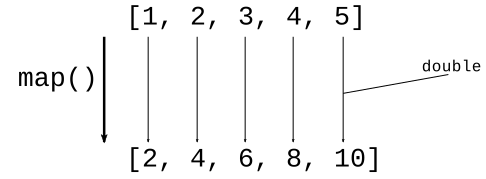
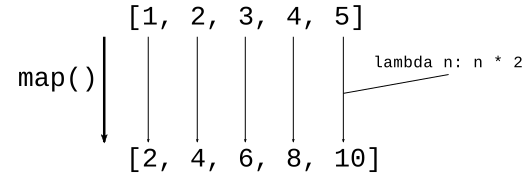
A visual of what map() does
map(double, [1, 2, 3, 4, 5]) -> [2, 4, 6, 8, 10]
>>> # We have a "double" def
>>> def double(n):
...   return n * 2
...
>>>
>>> map(double, [1, 2, 3, 4, 5])
<map object at 0x7f9a25969910>     # why we need list()
>>>
>>> list(map(double, [1, 2, 3, 4, 5]))
[2, 4, 6, 8, 10]
>>>
>>> list(map(double, [3, -1, 10]))
[6, -2, 20]
>>>
>>> list(map(double, range(20)))
[0, 2, 4, 6, 8, 10, 12, 14, 16, 18, 20, 22, 24, 26, 28, 30, 32, 34, 36, 38]
>>>
Say we have an exclaim(s) function that takes in a string and returns it uppercase with an exclamation mark at the end. Use map to run exclaim() over a list of strings.
>>> def exclaim(s):
...   return s.upper() + '!'
...
>>>
>>> list(map(exclaim, ['hi', 'woot', 'donut']))
['HI!', 'WOOT!', 'DONUT!']
>>>
>>> list(map(exclaim, ['meh']))
['MEH!']
The map() function saves us some boilerplate - if we have a function, it takes care of the not too difficult job or running it over a list of inputs, giving us a list of outputs. This is a first example of passing a function in to another function as a parameter, which turns out to be an important advanced technique.
Enter the Lambda
Here is a lambda that takes in a number, returns double that number
lambda n: n * 2
It's like the lambda just defines the black box code, not bothering with giving it name.
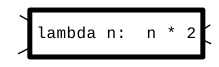
Want to double a bunch of numbers? Instead of a separate def, write the lambda inside the map() like this:
>>> list(map(lambda n: n * 2, [1, 2, 3, 4, 5]))
[2, 4, 6, 8, 10]
Write the word "lambda"
Do these in interpreter >>>. Just hit the up-arrow to change the body of the lambda.
>>> nums = [1, 2, 3, 4]
>>>
>>> # n * 10
>>> list(map(lambda n: n * 10, nums))
[10, 20, 30, 40]
>>>
>>> # n * -1
>>> list(map(lambda n: n * -1, nums))
[-1, -2, -3, -4]
>>>
>>> # 100 - n
>>> list(map(lambda n: 100 - n, nums))
[99, 98, 97, 96]
>>>
>>>
Have a list of strings. Map a lambda over this list. What is the parameter to the lambda? One string. Whatever the lambda returns, that's what makes up the list of results.
>>> strs = ['Banana', 'apple', 'Zebra', 'coffee', 'Donut']
>>>
>>> list(map(lambda s: s.lower(), strs))
['banana', 'apple', 'zebra', 'coffee', 'donut']
>>>
>>> list(map(lambda s: s[0], strs))
['B', 'a', 'Z', 'c', 'D']
>>>
>>> # Works with strings - change param name to "s"
>>> list(map(lambda s: s.upper() + '!', ['hi', 'ho', 'meh']))
['HI!', 'HO!', 'MEH!']
>>>
These are true one-liner exercises. We'll do a few of them in class, and you can look at the others in the lambda1 section.
Solve these with a 1-line call to map() for each. Do not call list(), that was needed in the interpreter, but here just map() works.
> lambda1 exercises
For reference, here is the syntax for our "double" example:
map(lambda n: n * 2, [1, 2, 3, 4, 5])
Do these: squared(), diff21() (int)
> squared exercises
> diff21 exercises
Then strings: first2x(), first_up() (str)
> first2x exercises
> first_up exercises
We'll try these food examples in the interpreter.
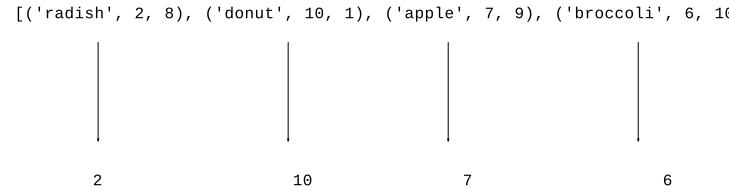
By default sorted() works on list of tuples, compares [0] first, then [1], and so on
>>> foods = [('radish', 2, 8), ('donut', 10, 1), ('apple', 7, 9), ('broccoli', 6, 10)]
>>>
>>> # By default, sorts food tuples by [0]
>>> sorted(foods)
[('apple', 7, 9), ('broccoli', 6, 10), ('donut', 10, 1), ('radish', 2, 8)]
>>>

![alt: lambda food: food[1]](python-sort3.svg)
Q: What is the parameter to the lambda?
A: One elem from the list (similar to map() function)
>>> foods = [('radish', 2, 8), ('donut', 10, 1), ('apple', 7, 9), ('broccoli', 6, 10)]
>>>
>>> sorted(foods, key=lambda food: food[1])
[('radish', 2, 8), ('broccoli', 6, 10), ('apple', 7, 9), ('donut', 10, 1)]
>>> sorted(foods, key=lambda food: food[1], reverse=True)  # most tasty
[('donut', 10, 1), ('apple', 7, 9), ('broccoli', 6, 10), ('radish', 2, 8)]
>>> sorted(foods, key=lambda food: food[2], reverse=True)  # most healthy
[('broccoli', 6, 10), ('apple', 7, 9), ('radish', 2, 8), ('donut', 10, 1)]
We not limited to just projecting out existing values. We can project out a computed value. Here we compute tasty * healthy and sort on that. So apple is first, 7 * 9 = 63, broccoli is second with 6 * 10 = 60. Donut is last :(
>>> sorted(foods, key=lambda food: food[1] * food[2], reverse=True)
[('apple', 7, 9), ('broccoli', 6, 10), ('radish', 2, 8), ('donut', 10, 1)]
>>>
>>> foods = [('radish', 2, 8), ('donut', 10, 1), ('apple', 7, 9), ('broccoli', 6, 10)]
>>> max(foods)     # uses [0] by default - tragic!
('radish', 2, 8)
>>>
>>> sorted(foods, key=lambda food: food[1])
[('radish', 2, 8), ('broccoli', 6, 10), ('apple', 7, 9), ('donut', 10, 1)]
>>>
>>> max(foods, key=lambda food: food[1])  # most tasty
('donut', 10, 1)
>>> min(foods, key=lambda food: food[1])  # least tasty
('radish', 2, 8)
Key performance point: computing one max/min element is much faster than sorting all n elements.
>>> # The default sorting is not good with upper/lower case
>>> strs = ['coffee', 'Donut', 'Zebra', 'apple', 'Banana']
>>> sorted(strs)
['Banana', 'Donut', 'Zebra', 'apple', 'coffee']
>>> strs = ['coffee', 'Donut', 'Zebra', 'apple', 'Banana']
>>>
>>> sorted(strs, key=lambda s: s.lower())    # not case sensitive
['apple', 'Banana', 'coffee', 'Donut', 'Zebra']
>>>
>>> sorted(strs, key=lambda s: s[len(s)-1])  # by last char
['Zebra', 'Banana', 'coffee', 'apple', 'Donut']
>>>
Given a list of movie tuples, (name, score, date-score), e.g.
[('alien', 8, 1), ('titanic', 6, 9), ('parasite', 10, 6), ('caddyshack', 4, 5)]
Given a list of movie tuples, (name, score, date-score), where score is a rating 1-10, and date 1-10 is a rating as a "date" movie. Return a list sorted in increasing order by score.
Given a list of movie tuples, (name, score, date-score), where score is a rating 1-10, and date-score 1-10 is a rating as a "date" movie. Return the list sorted in decreasing by date score.
Just to show how Python works, you can actually make your own def using lambda and an equal sign. A def has code and a name. Here we use = to make the name fn point to the lambda code. Then we can call it like any other function.
>>> fn = lambda n: 2 * n
>>>
>>> fn       # fn points to code
<function <lambda> at 0x7fb944ad0700>
>>>
>>>
>>>
>>> fn(10)   # function call works
20
>>> fn(12)
24
>>>
That is not something you need to do to get work done. That's a peak behind the curtain, showing what def is doing under the hood. Python is in a way very simple. A variable means that name has a pointer to that value. We see here that functions work the same way - a name pointing to a value which happens to be code.
> lambda1 section
The output list does not need to have the same element type as the input list. The lambda can output any type it likes, and that will make the output list. See examples: super_tuple() and lens()
> lens()
lens(strs): Given a list of strings. return a list of their int lengths.
Solution
def lens(strs):
    return map(lambda s: len(s), strs)
Countless times, you have called a function and passed in some data for it to use. The function name is the verb, and the parameters are extra nouns to guide the computation:
e.g. "draw_line" is the verb, with these int coords
canvas.draw_line(0, 0, 100, 50, color='red')
With lambda, we open up a new category, passing in code as the parameter for the function to use, e.g. with map():
map(lambda s: s.upper() + '!',
    ['pass', 'code']) ->
 ['PASS!', 'CODE!']
Having an easy way to pass code between functions can be very handy.
Lambda and def are similar:
def double(n):
    return 2 * n
Equivalent lambda
lambda n: 2 * n
Should you just use lambda for everything? Not at all! Lambda is good for cases where the code is really short. Your program will have situations like that sometimes, and lambda is great for that. But def can do many things lambda cannot.
In lambda1, see the map_parens() problem.
['xx(hi)xx', 'abc(there)xyz', 'fish'] ->
  ['hi', 'there', 'fish']
Solution Code. map() works fine with "parens" by name
def parens(s):
    left = s.find('(')
    right = s.find(')', left)

    if left == -1 or right == -1:
        return s
    return s[left + 1:right]


def map_parens(strs):
    return map(parens, strs)