
Today: Bit, code, functions, and the while-loop
A computer program (or "app") is a collection of code for the computer to run. The code in a program is divided into smaller, logical units of code called functions, much as all the words that make up an essay are divided into logical paragraphs.
Python programs are written as text in files named like "example.py". The program text will be divided into many functions, each marked by the word def:
We have this "Bit" robot, lives in a rectangular world divided into squares, like a chessboard. Bit is my research project - open it up to the world soon. We'll use bit at the start of CS106A to introduce and play with key parts of Python. The code driving Bit around is 100% Python code. The nice thing about Bit code is that the actions have immediate, visual results, so you can see what the code is doing.
Here is bit in two sentences: bit moves from square to square, can paint the square it is on red, green, or blue. Black squares and the sides of the world are blocked - bit cannot move there.
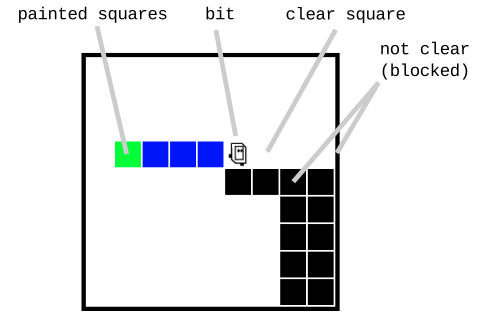
For reference, here is a more detailed guide to Bit's features: Bit Reference
Bit can do 5 actions in the world: move, left, right, paint, erase
For now we'll just jump in with an example.
Below is a code in a Python function named "do_bit1" that creates bit in a little world and commands bit to do a few things. There is syntax here - not pretty. Don't worry about all the syntax in there just yet. First let's see what it does.
def do_bit1(filename):
    bit = Bit(filename)  # Creates "before" picture
    bit.move()
    bit.paint('blue')
    bit.right()
    bit.move()
    bit.paint('green')
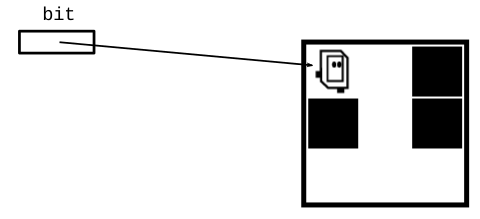
1. The function starts bit off facing the right side of the world with a couple empty squares in front (before-run picture):
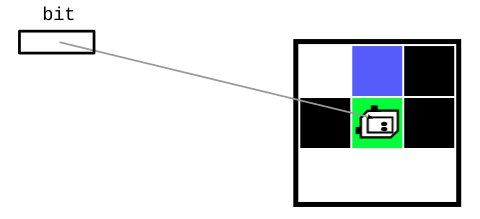
2. The code in the function moves bit over a couple squares, painting some of them. So running the function does those actions, and afterwards the world looks like this (after-run picture):
Here is the bit1 problem on the experimental server (you can run it too, or just watch):
We'll use Nick's experimental server for code practice. See the "Bit1" section at the very top; the "bit1" problem is there. Often the code in a lecture example like this will be incomplete, and we'll work it out in lecture. There is a Show Solution button on each problem, so you can always play with it again later and check your answer.
Click the Run button and see what it does. See how bit takes actions in the world first, and then we'll fill in what's going on with the lines of code. You can use the "steps" slider to run the code forwards and backwards, seeing the details of the run.
Now let's look at all of that syntax to see how this works.
def do_bit1(filename):
    bit = Bit(filename)
    bit.move()
    bit.paint('blue')
    bit.right()
    bit.move()
    bit.paint('green')
Click the Run button a few times to run this function, then we'll discuss what each line of code does.
The Run button in the web page runs this do_bit1 function, running its lines of code from top to bottom. Running a function is also known as "calling" that function. In this case, each line in the function commands bit to do this or that, so we see bit move around as the function runs from top to bottom.
bit = Bit(filename) - Set Up WorldThis line creates the world with bit in it, and sets the variable bit to point to the robot. We needs this line once at the top to set things up, then the later lines use the robot. We'll explain this with less hand-waving later. This drawing shows the setup - the bit robot is created along with its world, and the variable bit is set to point to the robot.
bit.move() = Call the "move" Functionbit.paint('blue') = Call the "paint" functionbit.left() and bit.right()def = Define a FunctionNow we'll go back and talk about the first line. This defines a function named do_bit1 that holds the lines of code we are running.
def do_bit1(filename):
    bit = Bit(filename)
    bit.move()
    bit.paint('blue')
    ...
"Syntax" is not a word that regular people use very often, but it is central in computer code. The syntax of code takes some getting used to, but is not actually difficult.
Here is an exercise like bit1 with the code left for you to do. We probably won't have time for this today, but you can do it on your own.
Bit begins at the upper left square facing right. Paint the square below the start square green, and the square below that green as well, ending like this:
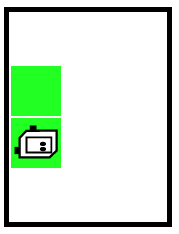
The word pass is a placeholder for your code, remove it. Conceptually this does not look hard, but expect to make some mistakes as you get the little syntax and naming details right as required by the (lame, needy) computer
Bit starts at the upper left square as usual. Move bit forward until blocked by a wall, painting every moved-to square green. The resulting world looks like:
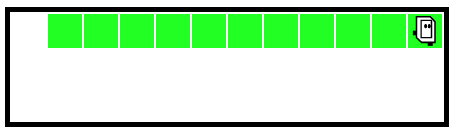
First run the code a few times. This code is complete. Watch it run a few times to see what the loop does, and we'll look at the details below.
> go-green
The loop is a big increase in power, running lines many times. There are a few different types of loop. Here we will look at the while loop.
The while loop syntax is made of four parts: the word while, a test expression, a colon (:), and on the next line indented body lines to run.
while test-expression:
    body lines
This diagram shows the sequence between the while loop test and the body:
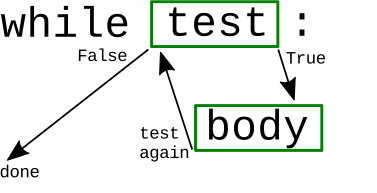
There is not much to say about the body; it is just a series of lines to run. The test expression is more interesting, controlling the run of the loop.
For today, it's maybe sufficient to run go-green a few times, get a feel for how it runs the body lines many times. We'll study it in more detail in lecture-2.
We'll continue with while loops next lecture. If you'd like to play around with some code which is similar to go green try writing the code for go-left first. The word "pass" is a placeholder in Python that does nothing. For exercises, replace the word "pass" with your code.
> go-left
The go-right exercise requires two loops - write one loop to go to the right corner. Write a second loop to go down. The first loop and the second loop should be at the same indentation, not one inside the other. Note that all these problems have a Show Solution button, so you can play with them without writing the code.
> go-right