Today: better/shorter code invariant, more string functions, unicode
See course page for timing, logistics, lots of practice problems. Finish Crypto program, first, take a day off, then worry about the exam. You might plan on spending, say, Sun evening practicing.
Topics on the exam: simple Bit (hw1), images/pixels/nested-loops (hw2), 2-d grids (hw3), strings, loops, simple lists (hw4)
Topics not on exam: bit decomposition problems, bluescreen algorithm, writing main(), file reading, int div //
The bad news / good news of it
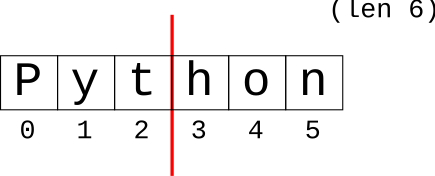
// - For IndexingSuppose I want to extract the right half of a string.
>>> s = 'Python'
The right half begins at index 3. The length is 6, so an obvious approach is to divide the length by 2. This actually does not work, and leads to a whole story.
Question: At what index does the right half begin?
Answer-maybe: mid = len(s) / 2
>>> s = 'Python'
>>> mid = len(s) / 3
>>> mid
3.0
>>> s[mid:]
TypeError: slice indices must be integers ...
>>>
What is going on here?
Recall: int and float, two separate types. Indexing, such as into a string or list, always uses ints. There is no char at i = 3.2. It's at 3 or it's at 4.
1. Division / always produces float, even with int inputs
>>> 7 / 2
3.5
>>> 8 / 2
4.0
2. Cannot use float for indexing or range()
>>> s = 'Python'
>>> s[6 / 2]
TypeError: string indices must be integers
>>> range(6 / 2)
TypeError: 'float' object cannot be interpreted as an integer
//Python has a separate "int division" operator //. It does division and discards any remainder, rounding the result down to the next integer.
>>> 7 // 2
3
>>> 8 // 2
4
>>> 59 // 10
5
>>> 60 // 10
6
>>> 100 // 25
4
>>> 102 // 25
4
>>> s = 'Python'
>>> mid = len(s) // 2
>>> mid
3
>>>
>>> s[mid:]    # int + indexing
'hon'
>>>
Suppose the width of an image is in a variable width, with a value like 100 or 125. What is the for-loop to generate the x values for the left half of the image?
# NO .. int/float issue
for x in range(width / 2):
    # use x in here


# YES
for x in range(width // 2):
    # use x in here

# e.g. width = 100: range is 0..49, since: width // 2 -> 50
'aabb' -> 'bbbbaaaa'
right_left(s): We'll say the midpoint of a string is the len divided by 2, dividing the string into a left half before the midpoint and a right half starting at the midpoint. Given string s, return a new string made of 2 copies of right followed by 2 copies of left. So 'aabb' returns 'bbbbaaaa'.
See guide for details: Strings
Thus far we have done String 1.0: len, index numbers, upper, lower, isalpha, isdigit, slices, .find().
There are more functions. You should at least have an idea that these exist, so you can look them up if needed. The important strategy is: don't write code manually to do something a built-in function in Python will do for you. The most important functions you should have memorized, and the more rare ones you can look up.
These are very convenient True/False tests for the specific case of checking if a substring appears at the start or end of a string. Also a pretty nice example of function naming.
>>> 'Python'.startswith('Py')
True
>>> 'Python'.startswith('Px')
False
>>> 'resume.html'.endswith('.html')
True
>>> s ='this is it'
>>> s.replace('is', 'xxx')  # returns changed version
'thxxx xxx it'
>>>
>>> s.replace('is', '')
'th  it'
>>>
>>> s        # s not changed
'this is it'
Recall how calling a string function does not change it. Need to use the return value...
# NO: Call without using result:
s.replace('is', 'xxx')
# s is the same as it was


# YES: this works
s = s.replace('is', 'xxx')
>>> s = '   this and that\n'
>>> s.strip()
'this and that'
>>> s = '11,45,19.2,N'
>>> s.split(',')
['11', '45', '19.2', 'N']
>>> 'apple:banana:donut'.split(':')
['apple', 'banana', 'donut']
>>>
>>> 'this    is     it\n'.split()  # special whitespace form
['this', 'is', 'it']
>>> foods = ['apple', 'banana', 'donut']
>>> ':'.join(foods)
'apple:banana:donut'
>>> name = 'Alice'
>>> score = 12
>>> 'Alice' + ' got score:' + str(score)
'Alice got score:12'
>>>
Put a lowercase 'f' to the left of the string literal. For each { } in the string, pastes values into string there - super handy!
>>> name = 'Alice'
>>>
>>> f'this is {name}'
'this is Alice'
>>>
>>> score = 12
>>> f'{name} got {score}'
Alice got 12
>>>
{x:.4}Add ":.4" within the curly braces to limit decimal digits. There are many other format options.
>>> x = 2/3
>>> f'value: {x}'
'value: 0.6666666666666666'
>>> f'value: {x:.4}'
'value: 0.6667'
In the early days of computers, the ASCII character encoding was very common, encoding the roman a-z alphabet. ASCII is simple, and requires just 1 byte to store 1 character, but it has no ability to represent characters of other languages.
Each character in a Python string is a unicode character, so characters for all languages are supported. Also, many emoji have been added to unicode as a sort of character.
Every unicode character is defined by a unicode "code point" which is basically a big int value that uniquely identifies that character. Unicode characters can be written using the "hex" version of their code point, e.g. "03A3" is the "Sigma" char Σ, and "2665" is the heart emoji char ♥.
Hexadecimal aside: hexadecimal is a way of writing an int in base-16 using the digits 0-9 plus the letters A-F, like this: 7F9A or 7f9a. Two hex digits together like 9A or FF represent the value stored in one byte, so hex is a traditional easy way to write out the value of a byte. When you look up an emoji on the web, typically you will see the code point written out in hex, like 1F644, the eye-roll emoji 🙄.
You can write a unicode char out in a Python string with a \u followed by the 4 hex digits of its code point. Notice how each unicode char is just one more character in the string:
>>> s = 'hi \u03A3'
>>> s
'hi Σ'
>>> len(s)
4
>>> s[0]
'h'
>>> s[3]
'Σ'
>>>
>>> s = '\u03A9'  # upper case omega
>>> s
'Ω'
>>> s.lower()     # compute lowercase
'ω'
>>> s.isalpha()   # isalpha() knows about unicode
True
>>>
>>> 'I \u2665'
'I ♥'
For a code point with more than 4-hex-digits, use \U (uppercase U) followed by 8 digits with leading 0's as needed, like the fire emoji 1F525, and the inevitable 1F4A9.
>>> 'the place is on \U0001F525'
'the place is on 🔥'
>>> s = 'oh \U0001F4A9'
>>> len(s)
4
The history of ASCII and Unicode is an example of ethics.
In the early days of computing in the US, computers were designed with the ASCII character set, supporting only the roman a-z alphabet. This hurt the rest of the planet, which mostly doesn't write in English. There is a well known pattern where technology comes first in the developed world, is scaled up and becomes inexpensive, and then proliferates to the developing world. Computers in the US using ASCII hurt that technology pipeline. Choosing a US-only solution was the cheapest choice for the US in the moment, but made the technology hard to access for most of the world. This choice is somewhere between ungenerous and unethical.
Unicode takes 2-4 bytes per char, so it is more costly than ASCII. Cost per byte aside, Unicode is a good solution - a freely available standard. If a system uses Unicode, it and its data can interoperate with the other Unicode compliant systems.
The cost of supporting non-ASCII data can be related to the cost of the RAM to store the unicode characters. In the 1950's every byte was literally expensive. An IBM model 360 could be leased for $5,000 per month, non inflation adjusted, and had about 32 kilobytes of RAM (not megabytes or gigabytes .. kilobytes!). So doing very approximate math, figuring RAM is half the cost of the computer, we get a cost of about $1 per byte per year.
>>> 5000 * 12 / (2 * 32000)
0.9375
So in 1950, Unicode is a non-starter. RAM is expensive.
What does the RAM in your phone cost today? Say your phone costs $500 and has 8GB of RAM (conservative). Say the RAM is all the cost and the rest of the phone is free. What is the cost per byte?
The figure 8 GB is 8 billion bytes. In Python, you can write that as 8e9 - like on your scientific calculator.
>>> 500 / 8e9   # 8 GB
6.25e-08
>>>
>>> 500 / 8e9 * 100  # in pennies
6.2499999999999995e-06
RAM costs nothing today - 6 millionths of a cent per byte. This is the result of Moore's law. Exponential growth is incredible.
Sometime in the 1990s, RAM was cheap enough that spending 2-4 bytes per char was not so bad, and around then is when Unicode was created. Unicode is a standard way of encoding chars in bytes, so that all the Unicode systems can transparently exchange data with each other.
With Unicode, the tech leaders were showing a little generosity to all the non-ASCII computer users out there in the world.
With Unicode, there is just one Python that works in every country. A world of programmers contribute to Python as free, open source software. We all benefit from that community, vs. each country maintaining their own in-country programming language, which would be a crazy waste of duplicated effort.
So being generous is the right thing to do. But the story also shows, that when you are generous to the world, that generosity may well come around and help you as well.