Today: parsing, while loop vs. for loop, parse words out of string patterns
Here's some fun looking data...
$GPGGA,005328.000,3726.1389,N,12210.2515,W,2,07,1.3,22.5,M,-25.7,M,2.0,0000*70
$GPGSA,M,3,09,23,07,16,30,03,27,,,,,,2.3,1.3,1.9*38
$GPRMC,005328.000,A,3726.1389,N,12210.2515,W,0.00,256.18,221217,,,D*78
$GPGGA,005329.000,3726.1389,N,12210.2515,W,2,07,1.3,22.5,M,-25.7,M,2.0,0000*71
$GPGSA,M,3,09,23,07,16,30,03,27,,,,,,2.3,1.3,1.9*38
$GPRMC,005329.000,A,3726.1389,N,12210.2515,W,0.00,256.18,221217,,,D*79
$GPGGA,005330.000,3726.1389,N,12210.2515,W,2,07,1.3,22.5,M,-25.7,M,3.0,0000*78
$GPGSA,M,3,09,23,07,16,30,03,27,,,,,,2.3,1.3,1.9*38
...
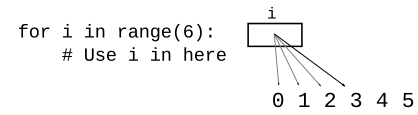
for i/rangeThe for/i/range form is great for going through numbers which you know ahead of time - a common pattern in real programs. If you need to go through 0..n-1 - use for/i/range, that's exactly what it's for. For example, if we want to loop over 0..5, say to index into 'Python'
whileBut we also have the while loop. The "for" is suited for the case where you know the numbers ahead of time. The while is more flexible. The while can test on each iteration, stop at the right spot. Ultimately you need both forms, but here we will switch to using while.
It's possible to write the equivalent of for/i/range as a while loop instead. This is not a good way to go through 0..n-1, but it does show a way to structure a while loop.
Here is the while-equivalent to for i in range(n)
i = 0         # 1. init
while i < n:  # 2. test
    # use i
    i += 1    # 3. update, loop-bottom
              # (easy to forget this line)
> while_double() (in parse1 section)
double_char() written as a while. The for-loop is the better appraoch approach for this problem, but using while here to show for/while equivalence.
def while_double(s):
    result = ''
    i = 0
    while i < len(s):
        result += s[i] + s[i]
        i += 1
    return result
i Valid:i < length and i >= 0With zero based indexing, if we are increasing an index variable i, then i < length is the easy test that i is a valid index; that it is not too big.
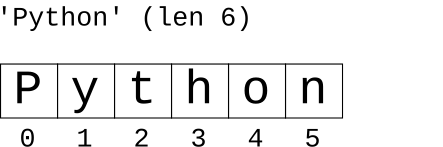
If we are increasing an index number, 5 is the last valid index. When we increase it to 6 it's past the end of the string. The length here is 6, so in effect i < 6 checks that i is valid if we are increasing i.
If we are decreasing i, then i >= 0 is the valid check, since 0 is the first index. Could equivalently write this as i > -1, but usually it's written as i >= 0.
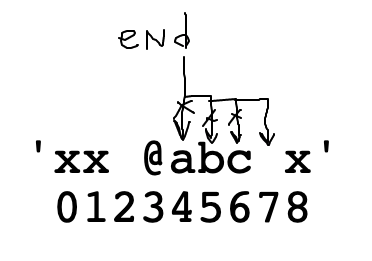
var += 1Start with end = 4. Advance to space char with end += 1 in loop
> at_word() (in parse1 section)
'xx @abcd xyz' -> 'abcd'
'x@ab^xyz' -> 'ab'
at_word(s): We'll say an at-word is an '@' followed by zero or more alphabetic chars. Find and return the alphabetic part of the first at-word in s, or the empty string if there is none. So 'xx @abc xyz' returns 'abc'.
First use s.find() to locate the '@'. Then start end pointing to the right of the '@'.
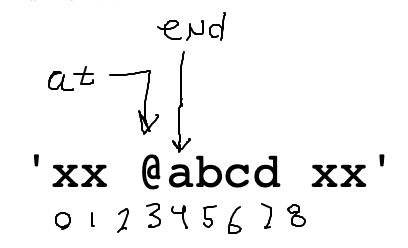
Code to set this up:
    at = s.find('@')
    if at == -1:
        return ''

    end = at + 1
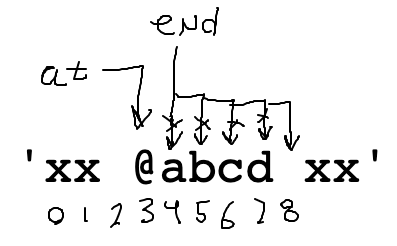
Use a while loop to advance end over the alphabetic chars. What is the test for this loop? Work it out on the drawing.
    while ????
        end += 1
This loop is 90% correct to advance end:
    # Advance end over alpha chars
    while s[end].isalpha():
        end += 1
Once we have at/end computed, pulling out the result word is just a slice.
    word = s[at + 1:end]
    return word
Put those phrases together and it's an excellent first try, and it 90% works. Run it.
def at_word(s):
    at = s.find('@')
    if at == -1:
        return ''

    end = at + 1
    # Advance end over alpha chars
    while s[end].isalpha():
        end += 1

    word = s[at + 1:end]
    return word
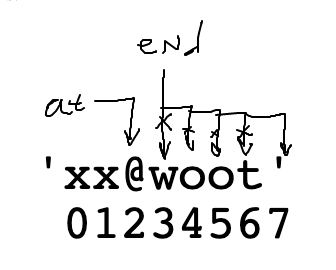
That code is pretty good, but there is actually a bug in the while-loop. It has to do with particular form of input case below, where the alphabetic chars go right up to the end of the string. Think about how the loop works when advancing "end" for the case below.
    at = s.find('@')
    end = at + 1
    while s[end].isalpha():
        end += 1
'xx@woot'
 01234567
Problem: keep advancing "end" .. past the end of the string, eventually end is 7. Then the while-test s[end].isalpha() throws an error since index 7 is past the end of the string.
The loop above translates to: "advance end so long as s[end] is alphabetic"
To fix the bug, we modify the test to: "advance end so long as end is valid and s[end] alphabetic".
In other words, stop advancing if end reaches the end of the string.
Loop end bug:
end < len(s) Guard TestThis "guard" pattern will be a standard part of looping over something.
We cannot access s[end] when end is too big. Add a "guard" test end < len(s) before the s[end]. This stops the loop when end gets to 7. The slice then works as before. This code is correct.
def at_word(s):
    at = s.find('@')
    if at == -1:
        return ''

    # Advance end over alpha chars
    end = at + 1
    while end < len(s) and s[end].isalpha():
        end += 1

    word = s[at + 1:end]
    return word
The "and" evaluates left to right. As soon as it sees a False it stops. In this way the < len(s) guard checks that "end" is a valid number, before s[end] tries to use it. This a standard pattern: the index-is-valid guard is first, then "and", then s[end] that uses the index. We'll see more examples of this guard pattern.
s[end] vs. s[at + 1:end]>>> s = 'Python' >>> len(s) 6 >>> s[2:5] 'tho' >>> s[2:6] 'thon' >>> s[2:46789] 'thon'
exclamation(s): We'll say an exclamation is zero or more alphabetic chars ending with a '!'. Find and return the first exclamation in s, or the empty string if there is none. So 'xx hi! xx' returns 'hi!'. (Like at_word, but right-to-left).
Set a variable start to the left of the exclamation mark. Move it left over the alphabetic chars.
Will need a guard here, as the loop goes right-to-left. The leftmost valid index is 0, so that will figure in the guard test.
def exclamation(s):
    exclaim = s.find('!')
    if exclaim == -1:
        return ''

    # Your code here
    # Move start left over alpha chars
    # guard: start >= 0
    start = exclaim - 1
    while start >= 0 and s[start].isalpha():
        start -= 1

    # start is on the first *non* alpha
    word = s[start + 1:exclaim + 1]
    return word
'xx @ab12 xyz' -> 'ab12'
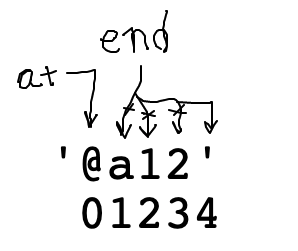
at_word99(): Like at-word, but with digits added. We'll say an at-word is an '@' followed by zero or more alphabetic or digit chars. Find and return the alpha-digit part of the first at-word in s, or the empty string if there is none. So 'xx @ab12 xyz' returns 'ab12'.
We've reached a very realistic level of complexity for solving real problems.
Like before, but now a word is made of alpha or digit - many real problems will need this sort of code. This may be our most complicated line of code thus far in the quarter! Fortunately, it's a re-usable pattern for any of these "find end of xxx chars" problems.
The most difficult part is the "end" loop to locate where the word ends. What is the while test here? (Bring up at_word99() in other window to work it out). We want to use "or" to allow alpha or digit.
at = s.find('@')
end = at + 1
while ??????????:
    end += 1
# 1. Still have the < guard
# 2. Use "or" to allow isalpha() or isdigit()
# 3. Need to add parens, since this has and+or
#    combination
while end < len(s) and (s[end].isalpha() or s[end].isdigit()):
    end += 1
def at_word99(s):
    at = s.find('@')
    if at == -1:
        return ''

    # Advance end over alpha or digit chars
    # use "or" + parens
    end = at + 1
    while end < len(s) and (s[end].isalpha() or s[end].isdigit()):
        end += 1

    word = s[at + 1:end]
    return word
If we have time, we'll look at these.
'xx www.foo.com xx' -> 'www.foo.com'
dotcomt2(s): We are looking for the name of an internet host within a string. Find the '.com' in s. Find the series of alphabetic chars or periods before the '.com' with a while loop and return the whole hostname, so 'xx www.foo.com xx' returns 'www.foo.com'. Return the empty string if there is no '.com'. This version has the added complexity of the periods.
Ideas: find the '.com', loop left-right to find the chars before it. Loop over both alphabetic and '.'
def dotcom2(s):
    com = s.find('.com')
    if com == -1:
        return ''

    # "or" logic - move leftwards over
    # alphabetic or '.'
    start = com - 1
    while start >= 0 and (s[start].isalpha() or s[start] == '.'):
        start -= 1

    return s[start + 1:com + 4]
Normally each Python line of code is un-broken. BUT if you add parenthesis, Python allows the code to span multiple lines until the closing parenthesis. Indent the later lines an extra 4 spaces - in this way, they have a different indentation than the body of the while. There's also a preference to end each line with an operator like or .. to suggest that there's more on the later lines.
    while (end < len(s) and
            (s[end].isalpha() or
            s[end].isdigit())):
        end += 1