![alt: outer points to list, nums points to nested [5] list](lecture-outer1.svg)
Today: nesting, new data type dict and the dict-count algorithm, something extra at end
With a nested structure we have, say, a list with another list inside it.
We've used square brackets many times to pull a thing out of a string or list, but here let's look at how brackets and nesting work together.
Say we have a list, and its elements are little "nested" lists.
>>> outer = [[1, 2], [3, 4], [5, 6]]
>>>
>>>
b = outerQ: What is we assign a variable b = outer — what does this do?
>>> outer = [[1, 2], [3, 4], [5, 6]]
>>> b = outer
A: In general, assigning a variable like x = y - sets x to point to the same thing that the expression y points to (a list, a number, a string, whatever). Both now point to the same thing.
![alt: outer points to list, nums points to nested [5] list](lecture-outer2.svg)
[5, 6]?Q: How to refer to the nested [5, 6] list?
>>> outer = [[1, 2], [3, 4], [5, 6]]
>>>
>>> outer[2]
[5, 6]
>>>
A: The outer list contains 3 elements. Their index numbers are 0, 1, 2. So the referring to the last one is: outer[2]
![alt: outer points to list, nums points to nested [5] list](lecture-outer3.svg)
Square brackets access elements inside a list. So each expression, outer[0] outer[1] and outer[2] is a pointer to each nested value.
[5, 6, 7]We'll look at two ways to do it.
[5, 6, 7] - The Long WayThe expression outer[2] refers to the nested list, and we can call .append() on it in the standard way:
>>> outer = [[1, 2], [3, 4], [5, 6]]
>>> outer[2]
[5, 6]
>>>
>>> outer[2].append(7)
>>> outer[2]
[5, 6, 7]
>>>
>>> outer
[[1, 2], [3, 4], [5, 6, 7]]
>>>
The line outer[2].append(7) has a lot going on for one line. Here is a better way we will typically use.
[5, 6, 7] - The Better WayHere is a 2-step technique we will use to clean up that line with a variable.
1. Set a variable to point to the nested structure. What does the line below do?
>>> outer = [[1, 2], [3, 4], [5, 6]]
>>> nums = outer[2]
This sets nums to point to the nested list.
![alt: outer points to list, nums points to nested [5] list](lecture-outer4.svg)
Now we can do operations on the the nested structure through the variable, and the code is simpler. Just remember that nums points to the nested list.
>>> nums
[5, 6]
>>>
>>> nums.append(7)
>>> nums
[5, 6, 7]
>>>
>>> outer
[[1, 2], [3, 4], [5, 6, 7]]
>>>
Later on, when we get to complex nested structure problems. At that time, we'll use this technique, introducing a variable to point to the nested structure.
>>> outer = [[1, 2], [3, 4], [5, 6]]
>>> nums = outer[2]   # key line
Then we can use the variable to work on the nested structure with normal looking code. This is basically our Add Var technique, introducing a named variable to point to some intermediate value to use on later lines.
The code in this problem builds on the basic outer/nums example above.
> add_99()
add_99(outer): Given a list "outer" which contains lists of numbers. Add 99 to the end of each list of numbers. Return the outer list.
The nest1 section on the server has introductory problems with nested structures.
dict - Hash Table - FastFor more details sees the chapter in the Guide: Dict
The dict lets us choose a key to organize the incoming data.
Suppose you are out ordering dinner at a restaurant, and the order is proceeding in a chaotic way, with the people throwing out their orders out in random order:
Alice: I'd like to start with a cup of gazpacho
Bob:   I like beignets for dessert
Alice: Then a ceaser salad
Zoe:   I'll have lasagna
Bob:   Actually two orders of beignets
Alice: Then I'll have tacos
Bob:   And a hot dog
...
People mention the parts of their order piece by piece in no organized order - fine. However, what is needed for the kitchen is to organize each order by person. In a dict, we choose the person as the key for their order, and organize the data that way.
Using each name as the key, we get the data organized like this:
Alice: gazpacho, ceasar, tacos
Bob: hot dog, two orders of beignets
...
This is what the dictionary gives us - data comes in randomly and the dict can organize it by a chosen "key" part of the data.
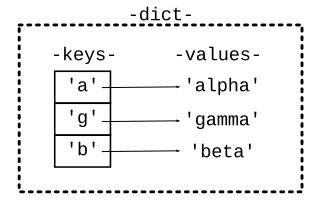
>>> d = {}             # Start with empty dict {}
>>> d['a'] = 'alpha'   # Set key/value
>>> d['g'] = 'gamma'
>>> d['b'] = 'beta'
>>> # Now we have built the picture above
>>> # Python can input/output a dict using
>>> # the literal { .. } syntax.
>>> d
{'a': 'alpha', 'g': 'gamma', 'b': 'beta'}
>>>
>>> s = d['g']         # Get by key
>>> s
'gamma'
>>> d['b']
'beta'
>>> d['a'] = 'apple'   # Overwrite 'a' key
>>> d['a']
'apple'
>>>
>>> # += modify str value
>>> d['a'] += '!!!'
>>> d['a']
'apple!!!'
>>>
>>> d
{'a': 'apple!!!', 'g': 'gamma', 'b': 'beta'}
>>>
>>> # Can initialize dict with literal
>>> d = {'a': 'alpha', 'g': 'gamma', 'b': 'beta'}
>>>
>>> val = d['x']         # Key not in -> Error
Error:KeyError('x',)
>>>
>>> 'a' in d             # "in" key tests
True
>>> 'x' in d
False
>>>
>>> # Guard pattern (else ..)
>>> if 'x' in d:
      val = d['x']
>>>
The get/set/in logic of the dict is always by key. The key for each key/value pair is how it is set and found. The value is actually just stored without being looked at, just so it can be retrieved later. In particular get/set/in logic does not use the value. See the last line below.
>>> d = {'a': 'alpha', 'g': 'gamma', 'b': 'beta'}
>>>
>>> d['a']          # key works
'alpha'
>>> 'g' in d
True
>>>
>>> 'gamma' in d    # value doesn't work
False
>>>
The dictionary is like memory - put something in, later can retrieve it.
Problems below use a "meals" dict to remember what food was eaten under the keys 'breakfast', 'lunch', 'dinner'.
>>> meals = {}
>>> meals['breakfast'] = 'apple'
>>> meals['lunch'] = 'donut'
>>>
>>> # time passes, other lines run
>>>
>>> # what was lunch again?
>>> meals['lunch']
'donut'
>>>
>>> # did I have breakfast and dinner yet?
>>> 'breakfast' in meals
True
>>> 'dinner' in meals
False
>>>
Look at the dict1 "meals" exercises on the experimental server
> dict1 meals exercises
With the "meals" examples, the keys are 'breakfast', 'lunch', 'dinner' and the values are like 'hot dot' and 'bagel'. A key like 'breakfast' may or may not be in the dict, so need to "in" check first. No loops in these.
dict[key]Often pulling up a value by its key
val = d[key]
Think first - do we know that key is always in there? If the key is not in the dict, get a KeyError crash when accessing it. Therefore, have "in" logic to check if key is present before accessing with square brackets
if key in d:
    val = d[key]
bad_start(meals): Return True if there is no 'breakfast' key in meals, or the value for 'breakfast' is 'candy'. Otherwise return False.
Try running code without the "in" check - see the KeyError.
Question: is the meals['breakfast'] == 'candy' line safe? Yes. The earlier if-statement guards the [ ].
def bad_start(meals):
    if 'breakfast' not in meals:
        return True
    if meals['breakfast'] == 'candy':
        return True
    return False
    # Can be written with "or" / short-circuiting
    # if 'breakfast' not in meals or meals['breakfast'] == 'candy':
> enkale()
enkale(meals): If the key 'dinner' is in the dict with the value 'candy', change the value to 'kale'. Otherwise leave the dict unchanged. Return the dict in all cases.
Demo: work out the code, see key error
Cannot access meals['dinner'] in the case that dinner is not in the dict, so need logic to avoid that case.
def enkale(meals):
    if 'dinner' in meals and meals['dinner'] == 'candy':
        meals['dinner'] = 'kale'
    return meals
Typical pattern: "in" check guards the meals['dinner'] access, since the short-circuit and only proceeds when the first test is True.
Could write it out in this longer form with two if-statements which is ok — works exactly the same as the above and/short-circuit form:
def enkale(meals):
    if 'dinner' in meals:
        if meals['dinner'] == 'candy':
            meals['dinner'] = 'kale'
    return meals
is_boring(meals): Given a "meals" dict. We'll say the meals dict is boring if lunch and dinner are both present and are the same food. Return True if the meals dict is boring, False otherwise.
Idea: could solve without worrying about the KeyError first. Then put in the needed "in" guard checks.
> dict2 Count exercises
Go through these strs strs = ['a', 'b', 'a', 'c', 'b']Sketch out counts dict here:
Counts dict ends up as {'a': 2, 'b': 2, 'c': 1}:
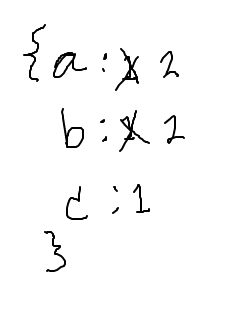
str_count1 demo, canonical dict-count algorithm
def str_count1(strs):
    counts = {}
    for s in strs:
        # s not seen before?
        if s not in counts:
            counts[s] = 1   # first time
        else:
            counts[s] +=1   # every later time
    return counts
def str_count2(strs):
    counts = {}
    for s in strs:
        # fix counts/s if not seen before
        if s not in counts:
            counts[s] = 0
        # Unified: now s is in counts one way or
        # another, so this works for all cases:
        counts[s] += 1
    return counts
Apply the dict-count algorithm to a list of int values, return a counts dict, counting how many times each int value appears in the list.
Try to get this one working before next lecture.
Apply the dict-count algorithm to chars in a string. Build a counts dict of how many times each char, converted to lowercase, appears in a string so 'Coffee' returns {'c': 1, 'o': 1, 'f': 2, 'e': 2}.
Today's puzzle: