Today: loose ends - comprehension-if, truthy logic, modules, float flaws
>>> nums = [1, 2, 3, 4, 5, 6]
>>> [n * n for n in nums]
[1, 4, 9, 16, 25, 36]
>>> nums = [1, 2, 3, 4, 5, 6]
>>> [n for n in nums if n > 3]
[4, 5, 6]
>>> [n * n for n in nums if n > 3]
[16, 25, 36]
These are all 1-liner solutions with comprehensions.
Syntax reminder - e.g. make a list of nums doubled where n > 3
[2 * n for n in nums if n > 3]
Section on server: Comprehensions
> up_only (has if)
> even_ten (has if)
Comprehensions are easier to write than map(), so you can use them instead. Why did we learn map() then? Because map() is the ideal way to see how lambda works. At this point, you can use comprehensions instead of map, (and exam problems will give full credit to either form, your choice).
Programmers can get into Comprehension Fever - trying to write your whole program as nested comprehensions. Probably 1-line is the sweet spot.
Using regular functions, loops, variables etc. for longer phrases is fine.
Say we want to print a string if it is non-empty, this code works fine and you can write it this way, but there is a shorter way to do it shown below.
if s != '':
    print(s)
The if and while are a little more flexible than we have shown thus far. They use the "truthy" system to distinguish True/False.
You never need to use this in CS106A, just mentioning it in case you see it in the future.
For more detail see "truthy" section in the if-chapter Python If - Truthy
FalseTruthy logic says that "empty" values count as False. The following values, such the empty-string and the number 0 all count as False in an if-test:
# Count as False:
''
0
0.0
None
[]
{}
TrueAny other value counts as True. Anything that is not one of the above False values:
# Count as True:
6
3.14
'Hello'
[1, 2]
{1: 'b'}
With truthy-logic, you can use a string or list or whatever as an if-test directly. This makes it easy to test, for example, for an empty string like the following. Testing for "empty" data is such a common case, truthy logic is a shorthand for it. For CS106A, you don't ever need to use this shorthand, but it's there if you want to use it. Also, many other computer languages also use this truthy system, so we don't want you to be too surprised when you see it.
# pre-truthy way:
if s != '':
    print(s)


# truthy equivalent:
if s:
    print(s)
We have a nums list of numbers, print all the non-zero numbers, one per line..
nums = [1, 17, 0, 13, 0]

# pre-truthy
for n in nums:
    if n != 0:
        print(n)


# truthy equivalent:
for n in nums:
    if n:
        print(n)
Easily skipping over empty-string or 0 or None .. common use of truthy-logic.
Just an optional shortcut, not something you need to use. You will see it in other computer languages as well.
> no_zero
There are lines of Python code we have glossed over. Piece by piece, we will fill these in.
e.g. in file pylibs.py
1. #! thing at the top
2. import sys near the top - a whole topic
3. 'if __name__.. at the bottom
#!/usr/bin/env python3

"""
Stanford CS106A Pylibs Example
Nick Parlante
"""

import sys
import random

def read_terms(filename):
...
... lots of Python code ...
...

if __name__ == '__main__':
    main()
#!/usr/bin/env python3There are not huge differences between Python version-2 and version-3. You could easily write Python-2 code if you needed to, but Python-3 is strongly preferred for all new work. That said, many orgs may have old python-2 programs laying around, and it's easiest if they just use them and don't update or edit them. The first line #!/usr/bin/env python3 is a de-facto way of marking which version the file is for.
You do not need to remember all those details. Just remember this: have that if-statement at the bottom of your file as a couple boilerplate lines. It calls the main() function when this file is run on the command line.
#!/usr/bin/env python3

...

if __name__ == '__main__':
    main()
So if we run like this..
$ python3 pylibs.py
Python will load the pylibs.py file, and then call its main() function. That's what the if-statement does. It's a historical quirk that Python does not simply call main() automatically, but it doesn't, so we have this if-statement at the bottom of the file.
import sysWhat about the import lines..
#!/usr/bin/env python3


import sys
import random
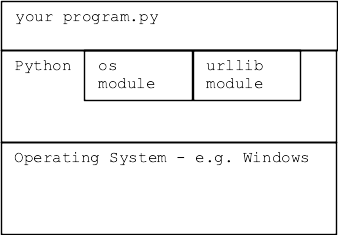
Modules hold code for common problems, ready for your code to use. Also commonly known as "libraries" of code. We say that you build your code "on top of" the module. It is very common with modern coding that part of your coding is custom, and part is building on top of module code.
import mathmath.sqrt(2)>>> import math >>> math.sqrt(2) # call sqrt() fn 1.4142135623730951 >>> math.sqrt>>> >>> math.log(10) 2.302585092994046 >>> math.pi # constants in module too 3.141592653589793
Quit and restart the interpreter without the import, see common error:
>>> # quit and restart interpreter
>>> math.sqrt(2)  # OOPS forgot the import
Traceback (most recent call last):
NameError: name 'math' is not defined
>>>
>>> import math
>>> math.sqrt(2)  # now it works
1.4142135623730951
Other modules are valuable but they are not a standard part of Python. For code using non-standard module to work, the module must be installed on that computer via the "pip" Python tool. e.g. for homeworks we had you pip-install the "Pillow" module with this command:
$ python3 -m pip install Pillow
..prints stuff...
Successfully installed Pillow-5.4.1
A non-standard module can be great, although the risk is harder to measure. The history thus far is that popular modules continue to be maintained. Sometimes the maintenance is picked up by a different group than the original module author. A little used module is more risky.
When you install a module on your machine from somewhere - you are trusting that code to run on your machine. In very rare cases, bad guys have tampered with modules to include malware in the module, which then runs on your machine, steal data, install malware, etc. A so called "supply chain attack"
Installing code from python.org is very safe, and also very well known modules like Pillow and matplotlib are safe, benefiting from large, active base of users.
Several supply chain attacks have been made on lesser known modules, from lesser known code sources, in particular the code source pypi.org
Be more careful if installing a little used module.
>>> import math
>>> dir(math)
['__doc__', '__file__', '__loader__', '__name__', '__package__', '__spec__', 'acos', 'acosh', 'asin', 'asinh', 'atan', 'atan2', 'atanh', 'ceil', 'copysign', 'cos', 'cosh', 'degrees', 'e', 'erf', 'erfc', 'exp', 'expm1', 'fabs', 'factorial', 'floor', 'fmod', 'frexp', 'fsum', 'gamma', 'gcd', 'hypot', 'inf', 'isclose', 'isfinite', 'isinf', 'isnan', 'ldexp', 'lgamma', 'log', 'log10', 'log1p', 'log2', 'modf', 'nan', 'pi', 'pow', 'radians', 'remainder', 'sin', 'sinh', 'sqrt', 'tan', 'tanh', 'tau', 'trunc']
>>>
>>> help(math.sqrt)
Help on built-in function sqrt in module math:

sqrt(x, /)
    Return the square root of x.
>>>
>>> help(math.cos)
Help on built-in function cos in module math:

cos(x, /)
    Return the cosine of x (measured in radians).
You already have! A regular old foo.py file is a module.
How hard is it to write a module? Not hard at all. A regular Python file we have written works as a module too with whatever defs the foo.py file has.
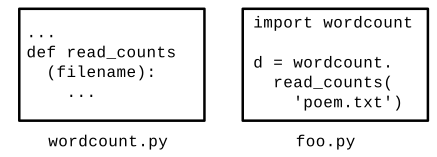
Consider the file wordcount.py in wordcount.zip
Forms a module named wordcount
Try this demo in the wordcount directory. The file wordcount.py has the module name wordcount
>>> # Run interpreter in wordcount directory
>>> import wordcount
>>>
>>> wordcount.read_counts('test1.txt')
{'a': 2, 'b': 2}
>>> dir(wordcount)
['__builtins__', '__cached__', '__doc__', '__file__', '__loader__', '__name__', '__package__', '__spec__', 'clean', 'main', 'print_counts', 'print_top', 'read_counts', 'sys']
>>>
>>> help(wordcount.read_counts)

read_counts(filename)
    Given filename, reads its text, splits it into words.
    Returns a "counts" dict where each word
    ...
# 1. In the babygraphics.py file
# import the babynames.py file in same directory
import babynames

...

    # 2. Call the read_files() function
    names = babynames.read_files(FILENAMES)
Do a quick demo here - just show the power of modules
Here is the HTML code for is plain text with a bolded word in it, tags like <b> mark up the text.
This <b>bolded</b> textHTML Experiment - View Source
Go to python.org. Try view-source command on this page (right click on page). Search for a word in the page text, such as "whether" .. to find that text in the HTML code.
Thing of how many web pages you have looked at - this is the code behind those pages. It's a text format! Lines of unicode chars!
Every web page you've ever seen is defined by this HTML text behind the scenes. Hmm. Python is good at working with text.
(See copy of these lines below suitable for copy/paste yourself.)
>>> import urllib.request
>>> f = urllib.request.urlopen('http://www.python.org/')
>>> text = f.read().decode('utf-8')
>>> text.find('Whether')
26997
>>> text[26997:27100]
"Whether you're new to programming or an experienced developer, it's easy to learn and use Python"
Here is the above Python lines, suitable for copy paste:
import urllib.request
f = urllib.request.urlopen('http://www.python.org/')
text = f.read().decode('utf-8')
# int
3  100  -2

# float, has a "."
3.14  -26.2  6.022e23
>>> 0.1
0.1
>>> 0.1 + 0.1
0.2
>>> 0.1 + 0.1 + 0.1    # this is why we can't have nice things
0.30000000000000004
>>>
>>> 0.1 + 0.1 + 0.1 + 0.1
0.4
>>> 0.1 + 0.1 + 0.1 + 0.1 + 0.1
0.5
>>> 0.1 + 0.1 + 0.1 + 0.1 + 0.1 + 0.1
0.6
>>> 0.1 + 0.1 + 0.1 + 0.1 + 0.1 + 0.1 + 0.1
0.7
>>> 0.1 + 0.1 + 0.1 + 0.1 + 0.1 + 0.1 + 0.1 + 0.1
0.7999999999999999     # here the garbage is negative
Another example with 3.14
>>> 3.14 * 3
9.42
>>> 3.14 * 4
12.56
>>> 3.14 * 5
15.700000000000001   # d'oh
Conclusion: float math is slightly wrong
The short answer, is that with a fixed number of bytes to store a floating point number in memory, there are some unavoidable problems where numbers have these garbage digits on the far right. It is similar to the impossibility of writing number 1/3 precisely as a decimal number — 0.3333 is close, but falls a little short.
>>> a = 3.14 * 5
>>> b = 3.14 * 6 - 3.14
>>> a == b   # Observe == not working right
False
>>> b
15.7
>>> a
15.700000000000001
>>> abs(a - b) < 0.00001
True
>>>
>>> import math
>>> math.isclose(a, b)
True
>>> # Int arithmetic is exact
>>> a = 6
>>> b = 24
>>>
>>> a * 5
30
>>> a * 5 - 6
24
>>> a * 5 - 6 == b
True
Bitcoin wallets use this int strategy - the amount of bitcoin in a wallet is measured in "satoshis". One satoshi is one 100-millionth of 1 bitcoin. Each balance is tracked as an int number of satoshis, e.g. an account with 0.25 Bitcoins actually has 25,000,000 satoshis. Using ints in this way, the addition and subtraction to move bitcoin (satoshis) from one account to another comes out exactly correct. int is precise!