Today: modules, how the internet works
There are a few lines in your Python files that still need to be explained. Today we'll explain the "import" lines, e.g in pylibs.py.
...

import sys
import random

def read_terms(filename):
...
Your Python code runs "on" the Python system installed on your computer, which we can think of as a sort of stack like this:
Python code is "portable", meaning that you can move your Python code, without any editing, to a different type of computer or operating system, and it should run there too. This is a nice feature, allowing your Python code work reliably over time.
import math - Module - LibraryPython itself has the basic loop/string etc functionality. And there are modules that contain ready to use code for common problems. e.g. the "math" module contains common math functions, the "urllib" module contains code to interact with urls and the web.
We say that you build your code "on top of" the module code. Modern coding is part custom code, and part building on top of module code.

import mathmath.sqrt(2)>>> import math >>> math.sqrt(2) # call sqrt() fn 1.4142135623730951 >>> math.sqrt <built-in function sqrt> >>> >>> math.log(10) 2.302585092994046 >>> math.pi # constants in module too 3.141592653589793
Quit and restart the interpreter without the import, see common error:
>>> math.sqrt(2)  # OOPS forgot the import
Traceback (most recent call last):
NameError: name 'math' is not defined
>>>
>>> import math
>>> math.sqrt(2)  # now it works
1.4142135623730951
Other modules are valuable but they are not a standard part of Python. For code using non-standard module to work, the module must be installed on that computer via the "pip" Python tool. e.g. for homeworks we had you pip-install the "Pillow" module with this command:
$ python3 -m pip install Pillow
..prints stuff...
Successfully installed Pillow-5.4.1
A non-standard module can be great, although the risk is harder to measure. The history thus far is that popular modules continue to be maintained. Sometimes the maintenance is picked up by a different group than the original module author. A little used module is more risky.
When you upgrade Python, from 3.11 to to 3.12, you will lose the pip installed modules which are back in your previous Python 3.11 directories. You need to re-install your pop modules - not hard actually.
When you install a module on your machine from somewhere - you are trusting that code to run on your machine. In very rare cases, bad guys have tampered with modules to include malware in the module, which then runs on your machine, steal data, install malware, etc. A so called "supply chain attack"
Installing code from python.org is very safe, and also very well known modules like Pillow and matplotlib are very safe, benefiting from large, active base of users.
Several supply chain attacks have been made on lesser known modules, from lesser known code sources, in particular the code source pypi.org. They are aware of this problem and are working on it. There are also "typosquatting" attacks, where bad guys put up a malware module with a name easily confused with the real module, something like a "matplotplib", expecting that some unwary people will install the bad one by accident.
Be more careful if installing a little used module. Prefer code that was released a month ago vs. code that was released yesterday, allowing time for the community to notice if something is not right.
>>> import math
>>> dir(math)
['__doc__', '__file__', '__loader__', '__name__', '__package__', '__spec__', 'acos', 'acosh', 'asin', 'asinh', 'atan', 'atan2', 'atanh', 'ceil', 'copysign', 'cos', 'cosh', 'degrees', 'e', 'erf', 'erfc', 'exp', 'expm1', 'fabs', 'factorial', 'floor', 'fmod', 'frexp', 'fsum', 'gamma', 'gcd', 'hypot', 'inf', 'isclose', 'isfinite', 'isinf', 'isnan', 'ldexp', 'lgamma', 'log', 'log10', 'log1p', 'log2', 'modf', 'nan', 'pi', 'pow', 'radians', 'remainder', 'sin', 'sinh', 'sqrt', 'tan', 'tanh', 'tau', 'trunc']
>>>
>>> help(math.sqrt)
Help on built-in function sqrt in module math:

sqrt(x, /)
    Return the square root of x.
>>>
>>> help(math.cos)
Help on built-in function cos in module math:

cos(x, /)
    Return the cosine of x (measured in radians).
How hard is it to write a module? Not hard at all. A regular file like wordcount.py is also a module.
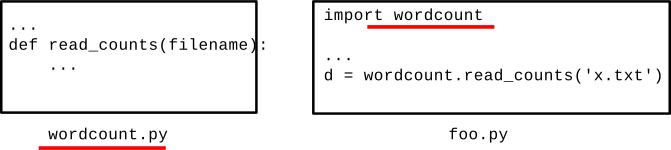
Consider the file wordcount.py in wordcount.zip
Forms a module named wordcount
Try this demo in the wordcount directory
>>> # Run interpreter in wordcount directory
>>> import wordcount
>>>
>>> wordcount.read_counts('poem.txt')
{'roses': 1, 'are': 2, 'red': 1, 'violets': 1, 'blue': 1, 'this': 1, 'does': 1, 'not': 1, 'rhyme': 1}
>>>
# 1. In the babygraphics.py file
# import the babynames.py file in same directory
import babynames

...

    # 2. Call the read_files() function
    names = babynames.read_files(FILENAMES)
>>> dir(wordcount)
['__builtins__', '__cached__', '__doc__', '__file__', '__loader__', '__name__', '__package__', '__spec__', 'clean', 'main', 'print_counts', 'print_top', 'read_counts', 'sys']
>>>
>>> help(wordcount.read_counts)

read_counts(filename)
    Given filename, reads its text, splits it into words.
    Returns a "counts" dict where each word
    ...
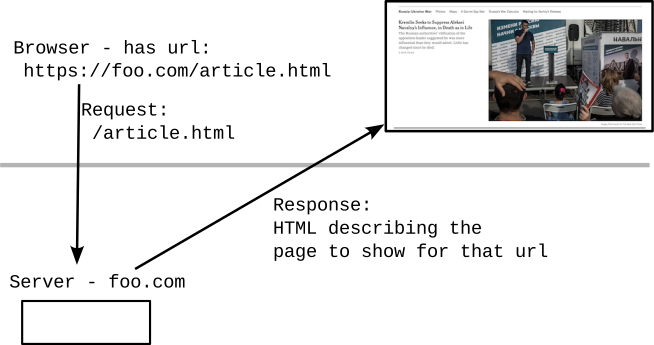
Suppose we have this text on screen
This important text
Here is the HTML code to produce the above, with tags like <b> inserted in the text to indicate bold, paragraphs, urls etc. etc. sprinkled in the text..
This <b>important</b> textHTML Experiment - View Source
Go to python.org. Try view-source command on this page (right click on page). Search for a word in the page text, such as "whether" .. to find that text in the HTML code.
Think of how many web pages you have looked at - this is the code behind those pages. It's a text format! Lines of unicode chars!
Every web page you've ever seen is defined by this HTML text behind the scenes. Hmm. Python is good at working with text.
(See copy of these lines below suitable for copy/paste yourself.)
>>> import urllib.request
>>> f = urllib.request.urlopen('http://www.python.org/')
>>> text = f.read().decode('utf-8')
>>> text.find('Whether')
26997
>>> text[26997:27100]
"Whether you're new to programming or an experienced developer, it's easy to learn and use Python"
Here is the above Python lines, suitable for copy paste:
import urllib.request
f = urllib.request.urlopen('http://www.python.org/')
text = f.read().decode('utf-8')
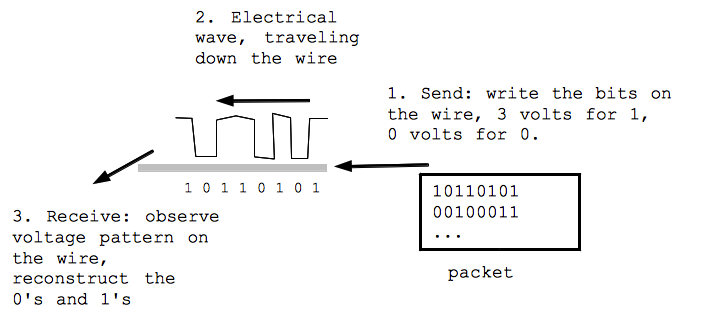
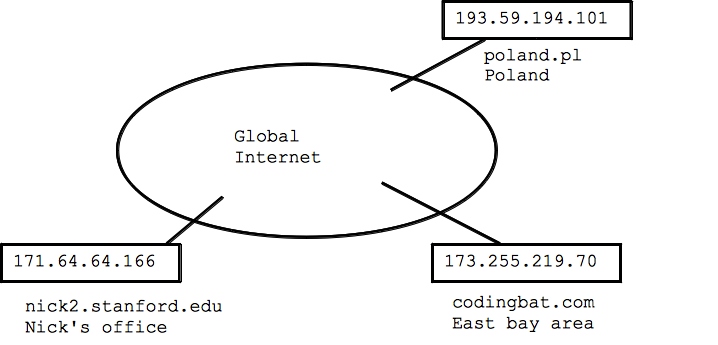
Just for fun, how does the Internet work? I pulled these slides together I had laying around from another class. Neat to see how something you use every day works.
TCP/IP blooper in this video of "The Net"...
Blooper: in the video the IP address is shown as 75.748.86.91 - not a valid IP address! Each number should be 1 byte, 0..255
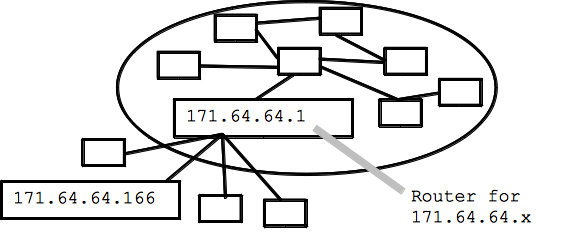
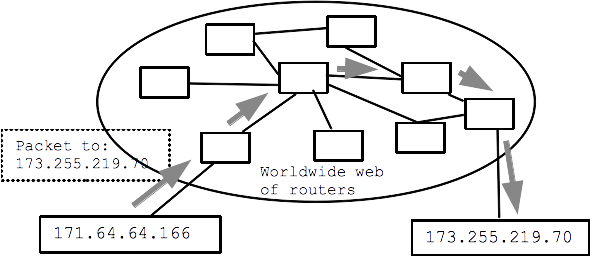
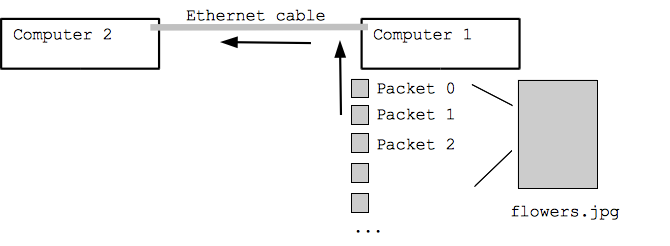
The most common way for a computer to be "on the internet" is to establish a connection with a "router" which is already on the internet. The computer establishes a connection via, say, wifi to communicate packets with the router. The router is "upstream" of the computer, connecting the computer to the whole internet.
The packet is passed from router to router - called a "hop". There might be 10 or 20 hops in a typical internet connection.
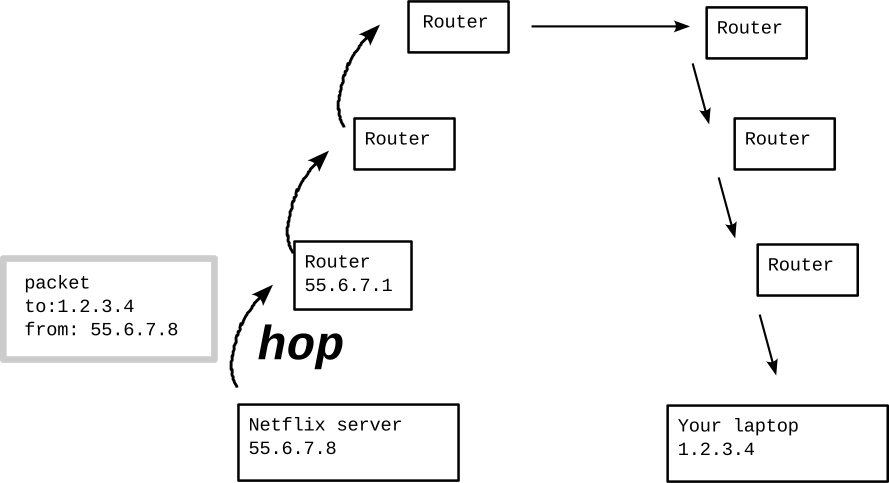
The routing of a packet from your computer is like a capillary/artery system .. your computer is down at the capillary level, your packet gets forwarded up to larger and larger arteries, makes its way over to the right area, and then down to smaller and smaller capillaries again, finally arriving at its destination.
So what does it mean for a computer to be on the internet? Typically it means the computer has established a connection with a router. The commonly used DHCP standard (Dynamic Host Configuration Protocol), facilitates connecting to a router; establishing a temporary connection, and the router gives your computer an IP address to use temporarily. Typically DHCP is used when you connect to a Wi-Fi access point.
Bring up the networking control panel of your computer. It should show what IP address you are currently using and the IP address of your router. You will probably see some text mentioning that DHCP is being used. Your computer will likely have a local IP address, just used while you're in this room.
"Ping" is an old and very simple internet utility. Your computer sends a "ping" packet to any computer on the internet, and the computer responds with a "ping" reply (not all computers respond to ping). In this way, you can check if the other computer is functioning and if the network path between you and it works. As a verb, "ping" is also used in regular English this way .. not sure if that's from the internet or the other way around.
Experiment: Most computers have a ping utility, or you can try "ping" on the command line (works on the Mac, Windows, and Linux). Try pinging www.google.com or pippy.stanford.edu. Not all computers respond to ping. Type ctrl-c to terminate ping.
Milliseconds fraction of a second used for the packet to go and come back. 1 ms = 1/1000 of a second. Different from bandwidth, this "round trip delay".
Here I run the "ping" program for a few addresses, see what it reports. Every second, a ping packet is sent and the result is printed.
$ ping www.google.com  # I type in a command here
PING www.l.google.com (74.125.224.144): 56 data bytes
64 bytes from 74.125.224.144: icmp_seq=0 ttl=53 time=8.219 ms
64 bytes from 74.125.224.144: icmp_seq=1 ttl=53 time=5.657 ms
64 bytes from 74.125.224.144: icmp_seq=2 ttl=53 time=5.825 ms
^C                            # Type ctrl-C to exit
--- www.l.google.com ping statistics ---
3 packets transmitted, 3 packets received, 0.0% packet loss
round-trip min/avg/max/stddev = 5.657/6.567/8.219/1.170 ms
$ ping pippy.stanford.edu
PING pippy.stanford.edu (171.64.64.28): 56 data bytes
64 bytes from 171.64.64.28: icmp_seq=0 ttl=64 time=0.686 ms
64 bytes from 171.64.64.28: icmp_seq=1 ttl=64 time=0.640 ms
64 bytes from 171.64.64.28: icmp_seq=2 ttl=64 time=0.445 ms
64 bytes from 171.64.64.28: icmp_seq=3 ttl=64 time=0.498 ms
^C
--- pippy.stanford.edu ping statistics ---
4 packets transmitted, 4 packets received, 0.0% packet loss
round-trip min/avg/max/stddev = 0.445/0.567/0.686/0.099 ms
Traceroute is a program that will attempt to identify all the routers in between you and some other computer out on the internet - demonstrating the hop-hop-hop quality of the internet. Most computers have some sort of "traceroute" utility available if you want to try it yourself (not required). On Windows it's called "tracert" in Windows Power Shell, and it does not suppor the "-q 1" option below, but otherwise works fine.
Some routers are visible to traceroute and some not, so it does not provide completely reliable output. However, it is a neat reflection of the hop-hop-hop quality of the internet.s
codingbat.com is housed in the east bay - 13 hops we see here. The milliseconds listed is the round-trip delay.
$ traceroute -q 1 codingbat.com
traceroute to codingbat.com (173.255.219.70), 64 hops max, 52 byte packets
 1  rt-ac68u-b3f0 (192.168.1.1)  7.152 ms
 2  96.120.89.177 (96.120.89.177)  9.316 ms
 3  24.124.159.189 (24.124.159.189)  9.638 ms
 4  be-232-rar01.santaclara.ca.sfba.comcast.net (162.151.78.253)  9.775 ms
 5  be-39931-cs03.sunnyvale.ca.ibone.comcast.net (96.110.41.121)  31.753 ms
 6  be-3202-pe02.529bryant.ca.ibone.comcast.net (96.110.41.214)  10.273 ms
 7  ix-xe-0-1-1-0.tcore1.pdi-paloalto.as6453.net (66.198.127.33)  10.570 ms
 8  if-ae-2-2.tcore2.pdi-paloalto.as6453.net (66.198.127.2)  11.344 ms
 9  if-ae-5-2.tcore2.sqn-sanjose.as6453.net (64.86.21.1)  13.555 ms
10  if-ae-1-2.tcore1.sqn-sanjose.as6453.net (63.243.205.1)  11.583 ms
11  216.6.33.114 (216.6.33.114)  11.938 ms
12  if-2-4.csw6-fnc1.linode.com (173.230.159.87)  14.833 ms
13  li229-70.members.linode.com (173.255.219.70)  11.549 ms
A random Serbian address - 31 hops - the farthest thing I could fine. See the extra delay where the packets go across the Atlantic - I'm guessing hop 16. The names there may refer to Amsterdam and France. Note that the packets are going at a fraction of the speed of light here - a fundamental limit of how quickly you can get a packet across the earth.
Or try: www.fu-berlin.de or www.parlament.hu be1.rtr1.vh.hbone.hu
May hang at the end, but we can at least see the early hops.
$ traceroute -q 1 yujor.fon.bg.ac.rs
traceroute to hostweb.fon.bg.ac.rs (147.91.128.13), 64 hops max, 52 byte packets
 1  rt-ac68u-b3f0 (192.168.1.1)  9.136 ms
 2  96.120.89.177 (96.120.89.177)  9.608 ms
 3  24.124.159.189 (24.124.159.189)  20.184 ms
 4  be-232-rar01.santaclara.ca.sfba.comcast.net (162.151.78.253)  15.058 ms
 5  be-39911-cs01.sunnyvale.ca.ibone.comcast.net (96.110.41.113)  11.050 ms
 6  be-3411-pe11.529bryant.ca.ibone.comcast.net (96.110.33.94)  11.294 ms
 7  be3111.ccr31.sjc04.atlas.cogentco.com (154.54.11.5)  10.420 ms
 8  be2379.ccr21.sfo01.atlas.cogentco.com (154.54.42.157)  20.021 ms
 9  be3110.ccr32.slc01.atlas.cogentco.com (154.54.44.142)  37.200 ms
10  be3037.ccr21.den01.atlas.cogentco.com (154.54.41.146)  36.318 ms
11  be3035.ccr21.mci01.atlas.cogentco.com (154.54.5.90)  49.991 ms
12  be2831.ccr41.ord01.atlas.cogentco.com (154.54.42.166)  66.591 ms
13  be2718.ccr22.cle04.atlas.cogentco.com (154.54.7.130)  67.178 ms
14  be2993.ccr31.yyz02.atlas.cogentco.com (154.54.31.226)  77.369 ms
15  be3260.ccr22.ymq01.atlas.cogentco.com (154.54.42.90)  86.026 ms
16  be3042.ccr21.lpl01.atlas.cogentco.com (154.54.44.161)  152.559 ms
17  be2183.ccr42.ams03.atlas.cogentco.com (154.54.58.70)  161.324 ms
18  be2813.ccr41.fra03.atlas.cogentco.com (130.117.0.122)  164.945 ms
19  be2960.ccr22.muc03.atlas.cogentco.com (154.54.36.254)  172.507 ms
20  be2974.ccr51.vie01.atlas.cogentco.com (154.54.58.6)  197.670 ms
21  be3463.ccr22.bts01.atlas.cogentco.com (154.54.59.186)  181.075 ms
22  be3261.ccr31.bud01.atlas.cogentco.com (130.117.3.138)  184.336 ms
23  be2246.rcr51.b020664-1.bud01.atlas.cogentco.com (130.117.1.14)  189.231 ms
24  149.6.182.114 (149.6.182.114)  182.364 ms
25  amres-ias-amres-gw.bud.hu.geant.net (83.97.88.6)  191.607 ms
26  amres-mpls-core----amres-ip-core-amres-ip.amres.ac.rs (147.91.5.144)  187.181 ms
27  *
28  stanica-134-241.fon.bg.ac.rs (147.91.134.241)  204.945 ms
29  stanica-134-250.fon.bg.ac.rs (147.91.134.250)  192.673 ms
30  stanica-134-250.fon.bg.ac.rs (147.91.134.250)  193.978 ms
31  stanica-134-250.fon.bg.ac.rs (147.91.134.250)  193.032 ms !Z