Today: loose ends: is, truthy logic, better/shorter code, flex-arrow example
This is something that every programmer should know, but it's a little odd.
The function of Python does not depend on the words chosen for variables. Like it's standard practice to use the variable i for a 0..n-1 loop, like this:
>>> for i in range(5):
...     print('in loop', i)
...
in loop 0
in loop 1
in loop 2
in loop 3
in loop 4
We do this so consistently with variables like i and pixel, that it's easy to get the impression that those words are required. However, Python does not care what word you use, only that the word is used consistently.
>>> for python_rules in range(5):
...     print('in loop', python_rules)
...
in loop 0
in loop 1
in loop 2
in loop 3
in loop 4
is, Not Same as ==is None1. Say we have a word variable. The following if-statement will work perfectly for CS106A, and you probably wrote it that way before, and it's fine and we will never mark off for it.
if word == None:       # Works fine, not PEP8
    print('Nada')
2. However, there is a very old rule in PEP8 that comparisons to the value None should be written with the is operator. This is an awkward rule, but we are stuck with it. You may have noticed PyCharm complaining about the above form, so you can write it as follows and it works correctly and is PEP8:
if word is None:       # Works fine, PEP8
    print('Nada')


if word is not None:   # "is not" variant
    print('Not Nada')
Very important limitation:
3. The is operator is similar to ==, but actually does something different for most data types, like strings and ints and lists. For the value None, the is operator is reliable. Therefore, the rule is:
Never use the is operator for values other than None.
Never, never, never, never.
Only use is with None as above. If you use it with other values, it will lead to horrific, weekend-ruining bugs.
There's a longer explanation about this awkward "is" rule in the guide page above.
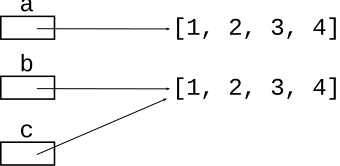
The "no copy" rule — = does not copy a data structure such as a list, just makes another pointer to that list (example below).
The is comparison computes if two values occupy the same bytes in memory. It is extremely rare for an algorithm to need to compute that, so as a practical matter, the is operator not very interesting IMHO. Unfortunately, this PEP8 forces the is operator into normal looking code.
>>> a = [1, 2, 3, 4]
>>> b = [1, 2, 3, 4]
>>> # b looks like a, but is separate
>>> a
[1, 2, 3, 4]
>>> b
[1, 2, 3, 4]
>>>
>>> a == b          # == returns True
True
>>>
>>> a is b          # "is" False - not same mem
False
>>>
>>> c = b           # c - same memory as b ("nocopy")
>>> a is c          # "is" True case
True
>>>
See Python copy/is chapter for the details.
The if and while are actually a little more flexible than we have shown thus far. They use the "truthy" system to distinguish True/False.
You never need to use this in CS106A, just mentioning it in case you see it in the future.
For more detail see "truthy" section in the if-chapter Python If - Truthy
FalseTruthy logic says that "empty" values count as False. The following values, such the empty-string and the number 0 all count as False in an if-test:
# All count as False:
None
''
0
0.0
[]
{}
TrueAny other value counts as True. Anything that is not one of the above False values:
# Count as True:
6
3.14
'Hello'
[1, 2]
{1: 'b'}
The bool() function takes
any value and returns a formal bool False/True value, so for any value, it reveals how Truthy logic will treat that value. You don't typically use bool() in production code. Here we're using it to see Python's internal logic.
>>> # "Empty" values count as False
>>> bool(None)
False
>>> bool('')
False
>>> bool(0)
False
>>> bool(0.0)
False
>>> bool([])
False
>>> # Anything else counts as True
>>> bool(6)
True
>>> bool('yo')
True
>>> bool([1, 2])
True
These are tricky / misleading. Can always try it in the interpreter.
>>> bool(7)
True
>>> bool('')
False
>>>
>>> bool(0)
False
>>>
>>> bool('hi')
True
>>>
>>> bool('False')   # SAT Vibes
True
>>>
>>> bool(False)
False
>>>
>>>
With truthy-logic, you can use a string or list or whatever as an if-test directly. This makes it easy to test, for example, for an empty string like the following. Testing for "empty" data is such a common case, truthy logic is a shorthand for it. For CS106A, you don't ever need to use this shorthand, but it's there if you want to use it. Also, many other computer languages also use this truthy system, so we don't want you to be too surprised when you see it.
# Pre-truthy code:
if word != '':
    print(word)


# Truthy equivalent:
if word:
    print(word)
Truthy logic is just a shortcut test for the empty string or 0 or None. Those are pretty common things to test for, so the shortcut is handy. You do not need to use this shortcut in your writing, but you may see it in when reading code. Most computer languages use Truthy logic like this, not just Python.
> no_zero
Not showing any new python, but showing moves and patterns you may not have thought of to shorten and clean up your code.
Many of these techniques involve leveraging variables to clean up the code.
Say we want to set alarm differently for weekends, something like this:
if is_weekened:
    alarm = 'off'
else:
    alarm = '9:00 am'
The above code is fine. Here I will propose a slightly shorter way, and this is used below. (1) Initialize (set) the variable to its common, default value first. (2) Then an if-statement detects the case where the var should e set to a different value.
alarm = '9:00 am'
if is_weekend:
    alarm = 'off'
if case-1:
    lines-a
    ...
    ...

if case-2:
    lines-b
    ...
    ...
grounded(minutes, is_birthday): Given you came home minutes late, how many days of grounded are you. If minutes is an hour or less, grounding is 5, otherwise 10. Unless it is your birthday, then 30 extra minutes are allowed. Challenge: change this code to be shorter, not have so much duplicated code.
The code below works correctly. You can see there is one set of lines for the birthday case, and another set of similar lines for the not-birthday case. What exactly is the difference between these two sets of lines?
def grounded(minutes, is_birthday):
    if not is_birthday:
        if minutes <= 60:
            return 5
        return 10

    # is birthday
    if minutes <= 90:
        return 5
    return 10
1. Set limit first. 2. Then unified lines below use limit, work for all cases.
def grounded(minutes, is_birthday):
    limit = 60
    if is_birthday:
        limit = 90

    if minutes <= limit:
        return 5
    return 10
ncopies: word='bleh' n=4 suffix='@@' ->

   'bleh@@bleh@@bleh@@bleh@@'


ncopies: word='bleh' n=4 suffix='' ->

   'bleh!bleh!bleh!bleh!'
ncopies(word, n, suffix): Given name string, int n, suffix string, return
n copies of string + suffix.
If suffix is the empty string, use '!' as the suffix.
Challenge: change this code to be shorter,
not have so many distinct paths.
The problem starts with eversion below as a starting point. Look at lines that are similar - make a unified version of those lines using a variable, as above.
Before:
def ncopies(word, n, suffix):
    result = ''

    if suffix == '':
        for i in range(n):
            result += word + '!'
    else:
        for i in range(n):
            result += word + suffix
    return result
Solution: use logic to set an ending variable to hold what goes on the end for all cases. Later, unified code uses that variable vs. separate if-stmt for each case. Alternately, could use the suffix parameter as the variable, changing it to '!' if it's the empty string.
def ncopies(word, n, suffix):
    result = ''
    ending = suffix
    if ending == '':
        ending = '!'

    for i in range(n):
        result += word + ending
    return result
> match()
match(a, b): Given two strings a and b. Compare the chars of the strings at index 0, index 1 and so on. Return a string of all the chars where the strings have the same char at the same position. So for 'abcd' and 'adddd' return 'ad'. The strings may be of any length. Use a for/i/range loop. The starter code works correctly. Re-write the code to be shorter.
match():
 'abcd'
 'adddd'  -> 'ad'
  01234
Code before unify:
def match(a, b):
    result = ''
    if len(a) < len(b):
        for i in range(len(a)):
            if a[i] == b[i]:
                result += a[i]
    else:
        for i in range(len(b)):
            if a[i] == b[i]:
                result += a[i]
    return result
def match(a, b):
    result = ''
    # Set length to whichever is shorter
    length = len(a)
    if len(b) < len(a):
        length = len(b)

    for i in range(length):
        if a[i] == b[i]:
            result += a[i]

    return result
If we have time, a fun bit of drawing code.
Download the flex-arrow.zip to work this fun little drawing example.
Recall: floating point values passed into draw_line() etc. work fine.
Ultimately we want to produce this output:
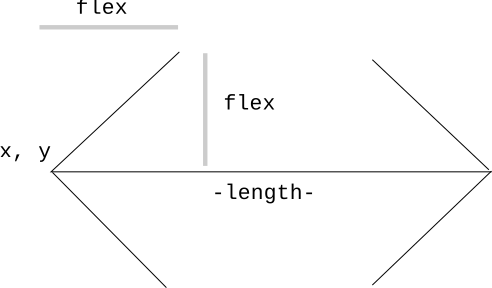
flex_factor = 0.2
flex = flex_factor * length
The flex_factor parameter is 0..1.0: the fraction of the arrow's length used for the arrow heads. The arms of the arrow will go at a 45-degree angle away from the horizontal.
Specify flex on the command line so you can see how it works, here calling the version with the code completed. Close the window to exit the program. The main() draws 2 arrows, one above the other. You can also specify larger canvas sizes.
$ python3 flex-arrow-solution.py -arrows 0.25
$ python3 flex-arrow-solution.py -arrows 0.15
$ python3 flex-arrow-solution.py -arrows 0.1 1200 600
Look at the draw_arrow() function. It is given x,y of the left endpoint of the arrow and the horizontal length of the arrow in pixels. The flex_factor is in 0..1.0, giving the percent of length to add/subtract to make the arrow heads.
This starter code has the first half of the drawing done.
def draw_arrow(canvas, x, y, length, flex_factor):
    """
    Draw a horizontal line with arrow heads at both ends.
    Its left endpoint at x,y, extending for length pixels.
    flex_factor is 0.0 .. 1.0, the fraction of length
    to add/subtract from ends to make the arrow heads.
    """
    # Compute where the line ends, draw it
    x_right = x + length - 1
    canvas.draw_line(x, y, x_right, y)

    # Draw 2 arrowhead lines, up and down from left endpoint
    flex = flex_factor * length
    # what goes here?
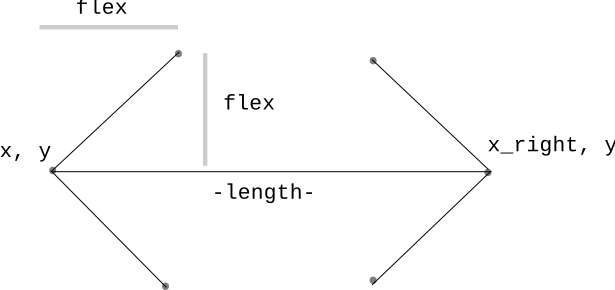
With flex computed - what the two lines to draw the left arrow head? This is a nice visual algorithmic problem.
Code to draw left arrow head. Note the arrowhead lines are not "flex" pixels long. Flex is just the number we add and subtract, derived from flex_factor.
    flex = flex_factor * length
    canvas.draw_line(x, y, x + flex, y - flex)  # up
    canvas.draw_line(x, y, x + flex, y + flex)  # down
Add code draw_arrow() in flex-arrow.py to draw the head on the right endpoint of the arrow. This is a little CS106A applied-math exercise. In the function, the variable x_right is the x coordinate of the right endpoint of the line:x_right = x + length - 1
Add "up" and "down" diagonal lines to form the right arrowhead.
When that code is working, this should draw both arrows (or use the flex-arrow-solution.py):
$ python3 flex-arrow.py -arrows 0.1 1200 600
def draw_arrow(canvas, x, y, length, flex_factor):
    """
    Draw a horizontal line with arrow heads at both ends.
    Its left endpoint at x,y, extending for length pixels.
    flex_factor is 0.0 .. 1.0, the fraction of length
    to add/subtract from ends to make the arrow heads.
    """
    # Compute right x endpoint, draw horizontal line
    x_right = x + length - 1
    canvas.draw_line(x, y, x_right, y)

    # Draw left arrowhead, add/subtract flex from x,y
    flex = flex_factor * length
    canvas.draw_line(x, y, x + flex, y - flex)  # up
    canvas.draw_line(x, y, x + flex, y + flex)  # down

    # Draw right arrowhead from the right endpoint
    # your code here
    pass
    canvas.draw_line(x_right, y, x_right - flex, y - flex)  # up
    canvas.draw_line(x_right, y, x_right - flex, y + flex)  # down
Now we're going to show you something a little beyond the regular CS106A level, and it's a teeny bit mind warping.
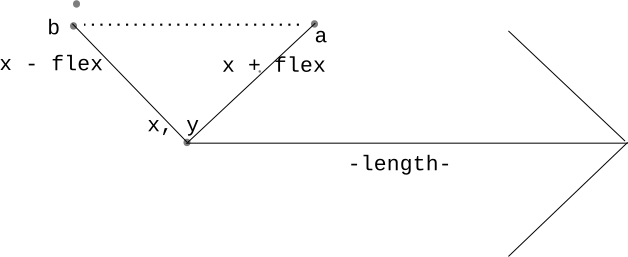
Run the code with -trick like this, see what you get.
$ python3 flex-arrow-solution.py -trick 0.1 1000 600