
Today: review dict-count, nested/inner structure, more sophisticated nested-dict examples
Start with a few preamble points.
Then we'll work a complex and powerful dict technique - dicts with nested structures. handy
names vs nameThis is a tiny habit, but it works very nicely.
Use a plural variable name for a list or dict with many items - plural name ending with "s".
A variable pointing to just one string or int is singular (i.e. not plural).
It's common to have both the plural and singular data participating in the altorithm, and getting the two mixed up is a common source of bugs. We use the variable names to help keep these two things straight. We'll see this plural pattern a few times in today's examples.
With plural/singular variable names, then we'll see certain confirming patterns in the code as we type it. I always like it when I'm typing in a line, and right there, the plural/singular line up to confirm the logic is correct.
# Looks like we're appending
# the right data
users.append(user)

...

# The right look
# for a loop.
for user in users:
    # Use user
If we have a dict where each key is a date, we might name the dict dates:
dates = {'2022-jan-1': 34, '2003-dec-7': 12, ...}
Then later to look up with a date key, the code will look like
>>> date = '2022-jan-1'
>>> num = dates[date]
The dict-count algorithm is very important, so let's review the steps.
Say we are building a counts dict, counting how many times each string appears in the strs list
strs = ['a', 'b', 'a', 'c', 'b']
Want to build this counts dict ultimately
counts == {'a': 2, 'b': 2, 'c': 1}
The core dict-count algorithm has 2 main steps. Say you have a key to put in the dict.
Question when looking at a key: is this key not seen before? aka first time seen. In that case, initialize the value for that key to 0 in the dict. We'll call this the "init" step.
if key not in d:
    d[key] = 0   # "init"
+= 1Increase the value for this key by 1. We'll call this the "increment" step.
d[key] += 1 # "increment"
This is the unified version that runs the increment line every time (vs. putting it in an "else" section).
Here's the standard dict-count code, and with the two steps (1) not seen before? init, (2) increment.
counts = {}
for s in strs:
    # 1. Not seen before - init
    if s not in counts:
        counts[s] = 0

    # 2. Increment
    counts[s] += 1
Here's a working example to review the dict-count steps.
%Recall that modulo % is the remainder after int division. Computing % n always yields an int in the range 0 .. n-1
Note that % 10 of a non-negative int simply yields the last digit of the number.
 57 % 10 -> 7
 19 % 10 -> 9
 20 % 10 -> 0
123 % 10 -> 3
 98 % 10 -> 8
 99 % 10 -> 9
100 % 10 -> 0
Mathematics angle: The numbers represented by the digits to the left of the rightmost digit all include 10 as a factor. Computing % 10 is just what's left after all the multiples of 10 are taken away.
Apply the dict-count algorithm to count how many numbers end with each digit.
What do we choose a the key? Use the last digit of each number as the key in the dict, building up a count of how often each last digit appears.
digit_count(nums): Give a list of non-negative ints. The last digit of each num can be found by computing num % 10. For example 57 % 10 is 7, and 7 is the last digit of 57. Build and return a counts dictionary where each key is an int digit, and its value is the count of one or more numbers in the list ending with that digit.
def digit_count(nums):
    counts = {}
    for num in nums:
        # Use last digit as key
        digit = num % 10
        if digit not in counts:
            counts[digit] = 0
        counts[digit] += 1
    return counts
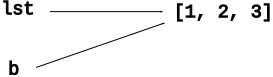
=>>> lst = [1, 2, 3] >>> b = lst
Assigning one variable to another, b = lst, sets them to point to the same thing. It does not copy the underlying structure. Instead, there are now two variables pointing to the one structure.
>>> lst
[1, 2, 3]
>>> b
[1, 2, 3]
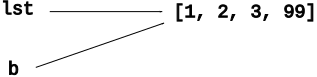
There is one list, two vars pointing to it. We can call .append() using either variable, and works the same either way, changing the one underlying list.
>>> b.append(99)  # b.append()
>>> b
[1, 2, 3, 99]     # b's list is changed
>>> lst
[1, 2, 3, 99]     # so is lst - it's the same list
Now we'll look at nesting one data structure inside of another. We'll refer to the inside data structure as the "inner" or "nested" structure.
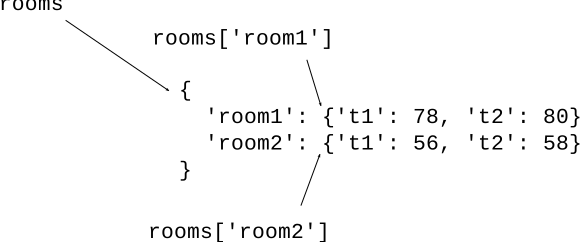
Say for our building we have a dict rooms with a key for each room - 'room1', 'room2', etc. The value for each room is a nested dict with 2 temperature sensors per room, 't1', 't2', with the value being the temperature.
>>> rooms = {'room1': {'t1': 78, 't2': 80},
             'room2': {'t1': 56, 't2': 58}}
The expression rooms['room1']' is a reference to the nested 'room1' dictionary, a pointer to it, and likewise for 'room2'. Paste in the rooms definition above and try it in the interpreter.
>>> rooms['room1']
{'t1': 78, 't2': 80}
>>>
>>> rooms['room2']
{'t1': 56, 't2': 58}
'room2' Average TemperatureSuppose we want to compute the average temperature in room2. What is the code for this?
The expression rooms['room2'] is a reference to the nested dict. It's possible to access the temperatures inside the nested dict by adding more square brackets, like this.
>>> rooms['room2']
{'t1': 56, 't2': 58}
>>>
>>> rooms['room2']['t2']
58
>>>
You can solve things by adding brackets like this, and below we'll look at using a variable to divide up the steps a bit.
tempsAdd a variable pointing to the inner dict. The inner dict contains temperatures, so we name the variable temps.
>>> temps = rooms['room2'] # Var point to inner
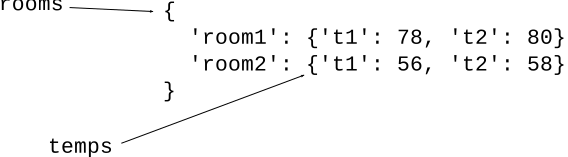
Now we can access the temperatures through the variable — computing the average temperature for room2:
>>> temps = rooms['room2']  # Var points to inner
>>> temps['t1']             # Then use var
56
>>> temps['t2']
58
>>>
>>> (temps['t1'] + temps['t2']) / 2  # Compute average
57.0
Working with outer/inner structures like this, we'll often set up a variable pointing to the inner structure as a first step like this.
Now we'll work more sophisticated problems, where we nest a list or dict inside of a dict.
# Have email strings
'abby@foo.com'
'bob@bar.com'

# One @
"user" is left of @ -> 'abby'
"host" is right of @ -> 'foo.com'
This is a tricky problem. We'll go step by step in lecture, you can follow along. Then we'll work a similar problem in section.
High level: we have a big list of email addresses. We want to organize the data by host (i.e. we'll use the host strings in the data as the keys). For each host, build up a list of all the users for that host.
Given a list of email address strings.
Each email address has one '@' in it,
e.g. 'abby@foo.com', where 'abby' is the user,
and 'foo.com' is the host.
Create a nested dict with a key for each host, and the value for that key is a list of all the users for that host, in the order they appear in the original list (repetition allowed).
Here is the input and output. Essentially going through the data, organizing it by host.
input emails:
  ['abby@foo.com', 'bob@bar.com', 'abe@foo.com']

output hosts dict:
  {
   'foo.com': ['abby', 'abe'],
   'bar.com': ['bob']
  }
When working a nested problem, it's good to keep in mind the type of the key and value, as this information is helpful to complete certain lines. We'll write down the key and value type now and refer to these later in the coding.
Here are the two types we have for the hosts dict. Write these on the board, for reference later when we get to the code. A commitment.
'foo.com'Each key in the hosts dict is a host string, e.g. 'foo.com'
A good name for a dict is based on its keys - so here hosts is the dict using host strings as the key.
The value for each key is an nested list of users for that host, e.g. ['abby', 'abe']
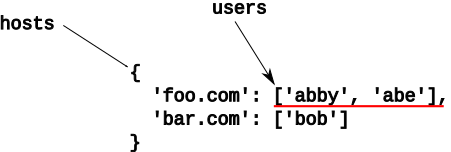
'abe@foo.com' - Four VariablesWe are building hosts for ['abby@foo.com', 'bob@bar.com', 'abe@foo.com']
Think about the steps to add the last string, 'abe@foo.com', to get a feel for the four variables: host, user, hosts, users
host = 'foo.com'
user = 'abe'
1. host is string e.g. 'foo.com' - use as key into dict
2. hosts[host] is hosts['foo'com'] - an inner list, red underline in picture.
3. Set var to point to inner list: users = hosts['foo.com']
4. Then append is: users.append(user)
> email_hosts() - nested dict problem
Here is the code to start with. We need code to add each 'abby@foo.com' into the hosts structure.
def email_hosts(emails):
    hosts = {}
    for email in emails:
        at = email.find('@')
        user = email[:at]
        host = email[at + 1:]
        # your code here
        pass
    return hosts
We have host and user. Here are the three steps of the algorithm.
Say we are starting to load up the hosts dict, and the first name is 'abby@foo.com'
host = 'foo.com'  # key
user = 'abby'     # add to list

hosts = {}   # to start
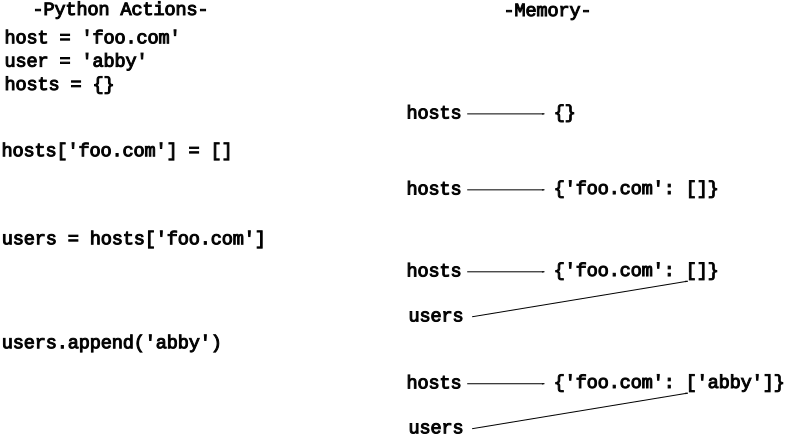
Look at the series of actions to add 'abby@foo.com' to the dict:
What is the key for the dict? It's the host, which in this case is 'foo.com'
Question for dict algorithms: is this key not seen seen before? `'foo.com' is not seen before. Create an initial value in the dict for that key - aka "init".
What is the type of each value? A list. So the init value will be a list. For dict-count the init value was 0. Here the init value will be empty list [], which is analogous. We'll see how the empty list works properly in the later steps.
        # init ([])
        if host not in hosts:
            hosts[host] = []
hosts[host]The outer hosts dict looks like this after the init:
  hosts = {
   'foo.com': []
  }
Now we want to edit the list for this host. The Python expression that refers to that inner list is: hosts[host]
Set a variable to point to the inner list. In this case, it's the list of users, so use the variable name users
users = hosts[host] # var -> inner
We want to append this user to the inner list of users. The variable users points to that list, and user is the current user, so we just do an append with it.
        # increment (.append)
        users.append(user)
Here we see the confirming pattern, where the variable names line up nicely, providing a sense that this line is just right.
It's complicated, although it is just 4 lines of code in the loop.
def email_hosts(emails):
    hosts = {}
    for email in emails:
        at = email.find('@')
        user = email[:at]
        host = email[at + 1:]

        if host not in hosts:
            hosts[host] = []
        users = hosts[host]  # var -> inner
        users.append(user)
    return hosts
Below is another nested structure example, but first we need to see this new string function.
s. split(',')The s.split(',') function works on a string, splits it into parts separated by commas, and returns a list of those parts. This is a quick way to divide a line up into parts, and easily access each part.
>>> # Say we have a line from a file with commas
>>> line = 'aaa,11/2024,zzzz'
>>> parts = line.split(',')
>>> parts
['aaa', '11/2024', 'zzzz']
>>>
>>> len(parts)
3
>>> parts[0]
'aaa'
>>> parts[1]
'11/2024'
The above example splits on commas, but we can specify any substring for the split. Say we have a string like 'donut:10', and we want to separate out the '10'. This code splits on the ':' char to access the substrings on either side:
>>> rating = 'donut:10'
>>> parts = rating.split(':')
>>> parts
['donut', '10']
>>> parts[0]
'donut'
>>> parts[1]
'10'
Say we have a bunch of ratings about foods, and we want to organize them per food. Each input rating is a string combining the food name and its numeric rating like this 'donut:10'. so the list or ratings looks like this:
['donut:10', 'apple:8', 'donut:9', 'apple:6', 'donut:7']
We process all the ratings to load up a dict with a key for each distinct food, and its value is a list of all that food's ratings, like this:
{
   'donut': [10, 9, 7],
   'apple': [8, 6]
}
> food_ratings() - nested dict problem
food_ratings(ratings): Given a list of food survey rating strings like this 'donut:10'. Create and return a "foods" dict that has a key for each food, and its value is a list of all its rating numbers in int form. Use split() to divide each food rating into its parts. There's a lot of Python packed into this question!
Build dict with structure:
Key = one food string
Value = list of rating ints
split('-')The birthdays problem below has dates like 'dec-31-2002'
We'll use split('-') to extract the parts from this string, like this:
>>> date = 'dec-31-2002'
>>>
>>> parts = date.split('-')
>>> parts
['dec', '31', '2002']
>>>
>>> parts[0]
'dec'
>>> parts[2]
'2002
Here is a more complex nested-dict example to work in class.
Say we have birthdays of Stanford students. Want to know - has the distribution of months changed over the years? Like maybe Jan used to be most common, but now it's Feb? (Malcolm Gladwell examined the effect of birth-date on student performance in his book Outliers, and recently did a podcast episode on it if you are curious.) (Aside: are you tired of clickbait - a headline leading to something splashy but shallow? Maybe podcasts are the opposite? Long, into the details. IMHO Gladwell's work is great for this, e.g. effects of prescription pad structure)
Say as input we have a list of birthday dates. Output will be a years dict with a key for each year. The value for each year will be a count dict of that year's months.
dates = ['jan-31-2002', 'jan-20-2002', 'dec-10-2001']

years = {

    '2002': {'jan': 2},

    '2001': {'dec': 1}
}
To help later, we'll note down the key/value types for this nested structure.
1. Key of years dict: string year, e.g. '2002'
2. Value of years dict: a nested count dict. Its key is a month string, e.g. 'dec', and its value is the standard int count of how many times that month appears in that year's data.
month and yearIn the loop to add each item we have these two.
month = 'jan'
year = '2002'
What is the key? The year.
What is the value for each year? A count dict. So the init if not seen before is the empty dict.
        # Year not seen before - init
        if year not in years:
            years[year] = {}
Set a "counts" var pointing to the nested counts dict. We'll use the variable name "counts" here, since it's just a counts dict, using the standard counts-dict steps.
        # Set var -> nested
        counts = years[year]
Do increment step on the counts dict. This amounts to the standard 3 lines to add a data point to a counts dict:
1. Month not seen before: init = 0
2. This month += 1
        # Standard init/+= counts steps
        if month not in counts:
            counts[month] = 0
        counts[month] += 1
def birthdays(dates):
    years = {}
    for date in dates:
        parts = date.split('-')
        month = parts[0]
        year = parts[2]

        # Year not seen before - init
        if year not in years:
            years[year] = {}

        # Set var -> inner
        counts = years[year]

        # Standard init/+= counts steps
        if month not in counts:
            counts[month] = 0
        counts[month] += 1
    return years
Social Security Administration's (SSA) baby names data set of babies born in the US going back more than 100 years. This part of the project will load and organize the data. Part-b of the project will build out interactive code that displays the data.
New York Times: Where Have All The Lisas Gone. This is the article that gave Nick the idea to create this assignment way back when.
This is an endlessly interesting data set to look through: john and mary, jennifer, ethel and emily, trinity and bella and dawson, blanche and stella and stanley, michael and miguel.
We'll demo HW6 Baby Names with this data next time.