Today: whole program example - pylibs
We'll do something fun for the second half, but let's start off with a more difficult sorted/lambda exercise to setup the homework.
Given a non-empty list of numbers. We'll say the midpoint is the float average of the min and max numbers in the list. Return the list sorted into order with the number with the smallest difference from the midpoint first, with differences increasing from there.
[1, 2, 7, 3]
midpoint: (1 + 7) / 2 -> 4.0

Sort increasing different from midpoint:
[3, 2, 1, 7]
Compute the midpoint using the list min() and max() builtin functions.
mid = (min(nums) + max(nums)) / 2
Sort the numbers into increasing order by their distance from the midpoint. Compute the distance for each n as abs(mid - n) — the absolute value of the difference between two numbers is the "distance" between them.
As we have discussed, every function has its own variables, kept separate from the variables in other functions. Python follows the common "lexical scoping" system, where code can see the variables based on where the text of the code is located. Here the lambda is inside near_point(), so it can access near_point() variables such as mid.
This is some dense/powerful code. Also shifting much of the work to builtin functions.
def near_point(nums):
    mid = (min(nums) + max(nums)) / 2
    return sorted(nums, key=lambda n: abs(mid - n))
Suppose I want to extract the right half of a string.
>>> s = 'Python'
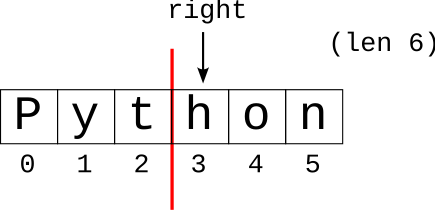
We'll say the right half begins at the index equal to half the string's length, rounding down if needed. So if the length is 6, the right begins at index 3. The obvious approach is something like this, but this exposes a detail of how Python does math:
>>> s = 'Python'
>>>
>>> right = len(s) / 2
>>> right
3.0
>>>
In the code above, "right" comes out as a float, 3.0, since the division operator / always returns a float value. We mentioned this earlier, but today we'll follow the story through.
Unfortunately, every attempt to index or use range() with the float fails. These only work with int values:
>>> s[right]
TypeError: string indices must be integers
>>> s[right:]
TypeError: slice indices must be integers or None or have an __index__ method
>>> range(right)
TypeError: 'float' object cannot be interpreted as an integer
//Sometimes, you algorithm where you want to keep everything as an int. Python has a separate "int division" operator // which does division and discards any remainder, rounding the result down to the next integer.
>>> 7 // 2
3
>>> 8 // 2
4
>>> 99 // 25
3
>>> 100 // 25
4
>>> 102 // 25
4
Use int div // to compute the right index of the string, and we are all set since it produces an int.
>>> s = 'Python'
>>> right = len(s) // 2
>>> right
3                # Note: int
>>>
>>> s[right:]    # int works!
'hon'
>>>
The int div rounds down, so length 6 and 7 will both treat 3 as the start of the right half, essentially putting the extra char for length 7 in the right half. If the string is odd length, we need to accept that one or the other "half" will have an extra character. Because int-div rounds down, problem specifications will commonly choose round-down to deal with the extra char to keep things simple.
One theme is problem solving — looking at some problem IRL, then making a drawing of a plan, and then working on the Python code to make it happen. The other theme running through everything is decomposition — dividing the program into smaller functions, testing them separately, and finally knitting them together to solve the whole thing. Today's example is realistic story of decomposition done from scratch, and when it all comes together at the end, it's kind of beautiful.
The big-picture strategy for CS is dividing the big program up into separate, testable functions, and we've gotten a lot of mileage out of that strategy.
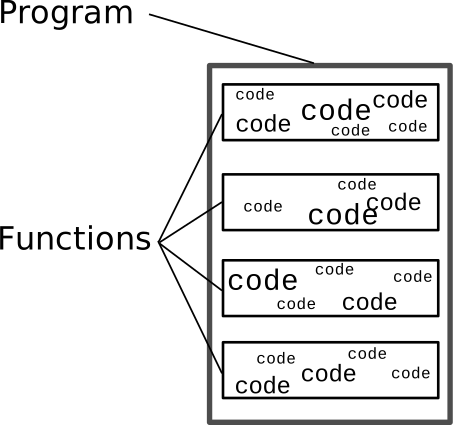
This may not sound a like a system which follows logic and produces functional code, and yet it does. The best way to see the pieces of this strategy fitting together is to work a whole example from scratch.
With the Pylibs example today, we'll do the whole top-down process starting with nothing, and ending with a working program.
Download pylibs.zip to get started. We'll work through this together.
First, look at what problem we want to solve - like Madlibs.
Say we have two files, a "terms" file and a "template" file. (It's handy to have terminology for the parts of your abstract problem to then use in yours docs, var names, etc.):
The "terms" file defines categories like 'noun' and 'verb' and words for that category. The syntax for each line has the category word first, followed by the words for that category, all separated by commas, like this:
noun,cat,donut,velociraptor
verb,nap,run
The "template" file has lines of text, and within it are markers like '[noun]' where
a random substitution should be done.
I had a [noun]
and it liked to [verb] all day
We want to run this program giving it the terms and templates files, and get the output like this (here I'm using pylibs-solution.py so we can see output).
$ python3 pylibs-solution.py test-terms.txt test-template.txt
I had a velociraptor
and it liked to nap all day
Let's do it. We'll write the code in pylibs.py
Here we will follow a top-down strategy to solve the whole thing. At each step - think up what would be a useful helper to have, and then go write that helper. We still end up with our traditional structure — the whole program divided into functions, with helper functions solving smaller sub-problems.
Thought process: I have X and want Y. Write a function that takes X as input and returns Y, or perhaps the function returns something halfway to Y.
Add code in main(), add code calling the imaginary function read_terms(filename). It takes in the filename of the terms file and returns a terms dictionary, with a key for each term. We're just writing a call to the function, although it does not exist. Perhaps the word here is audacious or perhaps optimistic. As a funny detail, PyCharm puts red squiggles under our call, since of course it does not currently work.
def main():
    args = sys.argv[1:]

    # command line:
    # args[0] == terms-file
    # args[1] == template-file
    terms = read_terms(args[0])  # Call non-existent helper
Looking at the input and desired output data is a nice way to get started on the code. Input line from terms file like the following. Sometimes I will paste an example line into the source code, where I'm writing the parse code for that sort of data.
noun,cat,donut,velociraptor
For each line, create an entry in terms dict like:
'noun': ['cat', 'donut', 'velociraptor']
Here's our standard file-read code:
    with open(filename) as f:
        for line in f:
            line = line.strip()
Have the standard line = line.strip() to remove newline. Use parts = line.split(',') to separate on the words between the commas.
File 'test-terms.txt' - write a Doctest
noun,cat,donut,velociraptor
verb,nap,run
Write a Doctest so we know this code is working before proceeding: read_terms('test-terms.txt')
Doctest trick: could just run the Doctest, look at what it returns, paste that into the Doctest as the desired output if it looks right. We are not the first programmers to have thought of this little shortcut. Even done this way, it's a pretty good test. The code is run with real input, and we have glanced at the produced output.
Here is our solution complete with docs and doctest - in lecture, anything that works is doing pretty well.
def read_terms(filename):
    """
    Given the filename of the terms file, read
    it into a dict with each 'noun' word as a key
    and its value is its list of substitutions
    like ['cat', 'donut', 'velociraptor'].
    Return the terms dict.
    >>> read_terms('test-terms.txt')
    {'noun': ['cat', 'donut', 'velociraptor'], 'verb': ['nap', 'run']}
    """
    terms = {}
    with open(filename) as f:
        for line in f:
            line = line.strip()
            # line like: noun,cat,donut,velociraptor
            parts = line.split(',')
            term = parts[0]    # 'noun'
            words = parts[1:]  # ['cat', 'donut' ..]
            terms[term] = words
    return terms
main() - calls two helpers, just need to write them
    # args[0] == terms-file
    # args[1] == template-file
    if len(args) == 2:
        terms = read_terms(args[0])
        process_template(terms, args[1])
Here is the beginning code for process_template() which starts with the standard file for/line/f loop.
You can paste this in to get started.
def process_template(terms, filename):
    with open(filename) as f:
        for line in f:
            line = line.strip()
            words = line.split()  # ['I', 'had', 'a', '[noun]']
            # Print each word with substitution done
Use line.split() (no parameters) which splits on all whitespace chars. This makes an easy way to split up the words on each line.
line.split() -> ['I', 'had', 'a', '[noun]']
Want: go through the words from the line. Print out each word, except if the word has square brackets [noun], then substitute a randomly selected word for that term.
Q: What would be a useful helper to have here?
A: A function that did the substitution for one word, e.g. a helper function where we pass in '[noun]' and it returns 'donut', and returns other words unchanged.
Substitute helper, like
'[noun]'  ->  'donut'
'kitten'  ->  'kitten'
Let's go write that helper, sort of piling deficit spending on top of our deficit spending.
If the word is of the form '[noun]' return a random substitute for it from the terms dict. Otherwise return the word unchanged.
Note 1: s.startswith() / s.endswith() very handy here to look for square brackets
Note 2: random.choice(lst) returns a random element from a list.
Here our solution has all the Doctests added, but for in-class anything that works is fine.
def substitute(terms, word):
    """
    Given terms dict and a word from the template.
    Return the substituted form of that word.
    If it is of the form '[noun]' return a random
    word from the terms dict. Otherwise
    return the word unchanged.
    >>> substitute({'noun': ['apple']}, '[noun]')
    'apple'
    >>> substitute({'noun': ['apple']}, 'pie')
    'pie'
    """
    if word.startswith('[') and word.endswith(']'):
        word = word[1:len(word) - 1]  # trim off [ ]
        if word in terms:
            words = terms[word]  # list of ['apple', 'donut', ..]
            return random.choice(words)
    return word
Note: ultimately, the inner loop prints each word with the substitution done, followed by one space and no newline::
print(word + ' ', end='')
The need to print this way is not obvious at first. The details are explained below if we have time.
            ...
            words = line.split()
            # Print each word with substitution done
            for word in words:
                sub = substitute(terms, word)
                print(sub + ' ', end='')
            print()
Decomposing out substitute() is a nice example of a helper function: separate out a sub-problem, and solve that sub-problem with its own helper function. Decomposing the helper function keeps both functions relatively simple and coherent — each function concentrates on its one area. The two areas look different: one is about a file and lines, and one is about . In this case, the existence of substitute() makes the caller code in process_template() more clear, focussing on its file/text problem.
The most obvious first attempt of the inner loop would use a simple print() for each word as below. This does not quite work right:
                sub = substitute(terms, word)
                print(sub)
It's perhaps easiest to understand the problem with the above version by running it to see what it prints. The above version prints each word on a line by itself, since that's what print() does by default. Then add the end='' option, which turns off the ending '\n' in print(), and see what that prints. Then add the space following each word. Finally add one print() outside the loop to print a single newline to end each line of output words.
Run the finished code from the command line, with the files 'terms.txt' and 'template.txt'
$ cat terms.txt
noun,velociraptor,donut,ray of sunshine
verb,run,nap,eat the bad guy
adjective,blue,happy,flat,shiny
$
$ cat template.txt
I had a [noun] and
it was very [adjective]
when it would [verb]
$
$ python3 pylibs.py terms.txt template.txt
I had a ray of sunshine and
it was very shiny
when it would nap
$
$ python3 pylibs.py terms.txt template.txt
I had a velociraptor and
it was very shiny
when it would eat the bad guy
$
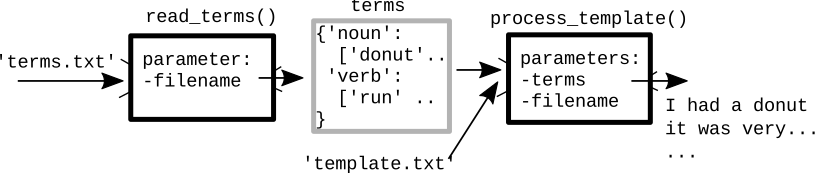
The functions read_terms() and process_template() are two separate and independent functions. We want each function to be independent, so we can test each separately. Given this, how does that data get from one function to the other to solve this whole thing?
Saying each function is independent is true, however each function does take in input as parameters and produces output as its return result. This is how the data moves between read_terms() and process_template(). We can look at the text of the code, thinking about the sequence:
    # args[0] == terms-file
    # args[1] == template-file
    terms = read_terms(args[0])
    process_template(terms, args[1])
The call to read_terms() passes in the terms-file filename, and gets back the whole terms dict, which is stored in a variable: terms. The next line then calls process_template() passing the newly created terms dict in as its first parameter. Its output, in turn, is printing out the processed lines of the template.
Alternately, here is a diagram, showing data flow through the two functions.
In the end we have a well-decomposed program — we have helper functions to solve sub problems, and each helper can be written and tested independently. Then the helpers are knitted together to solve the whole program.