Trees
CS 106B: Programming Abstractions
Spring 2021, Stanford University Computer Science Department
Lecturer: Chris Gregg, Head CA: Chase Davis
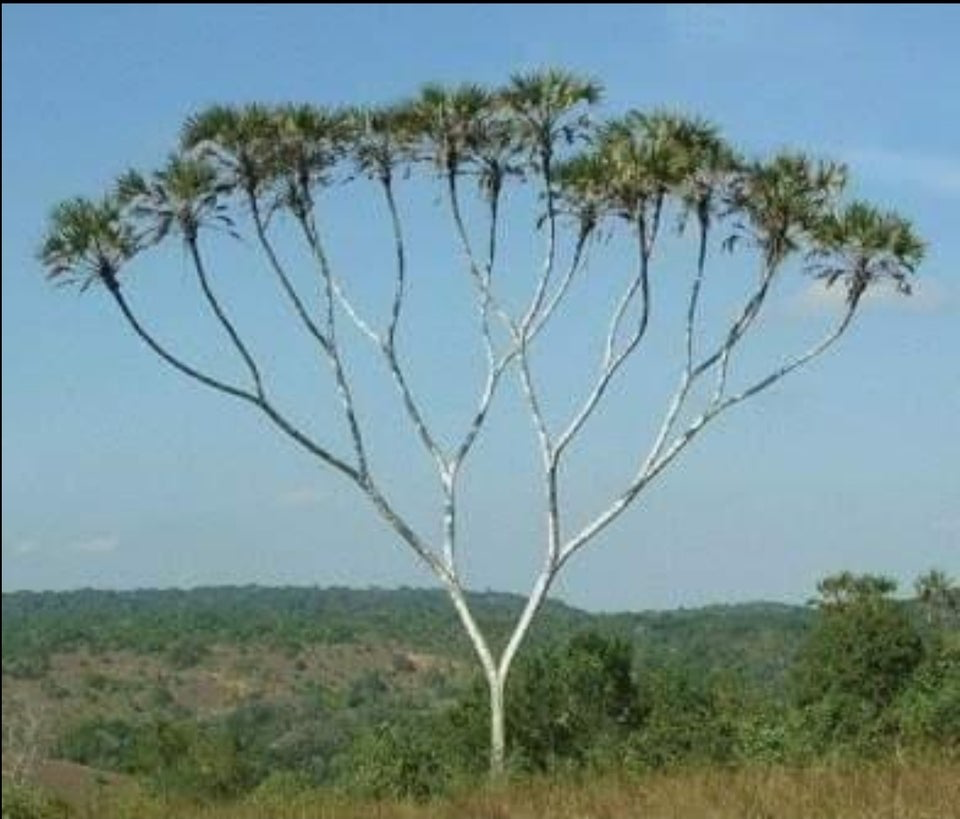
Slide 2
Announcements
- Assignment 5 is due tomorrow (late extension until Sunday), and Assignment 6 is due next Wednesday
- We will post Assignment 6 today. It is a scaled-back assignment, so should be doable by Wednesday
- You should start working on your personal project
- The personal project is your final assessment!
Slide 3
Today's Topics
- Refresh on what pointer diagrams represent
- Quick comment on doubly-linked lists
- Introduction to the tree data structure
- You've already seen lots of tree structures
- Tree terminology
- How do we build trees programatically?
- Writing code to traverse a tree
Slide 4
Pointer Diagram Refresh
- The following diagram was put together by a student last Spring:
- Pointers have values that are memory addresses.
- All variables and objects have their own memory address where they are located
- The
nextpointer is a memory address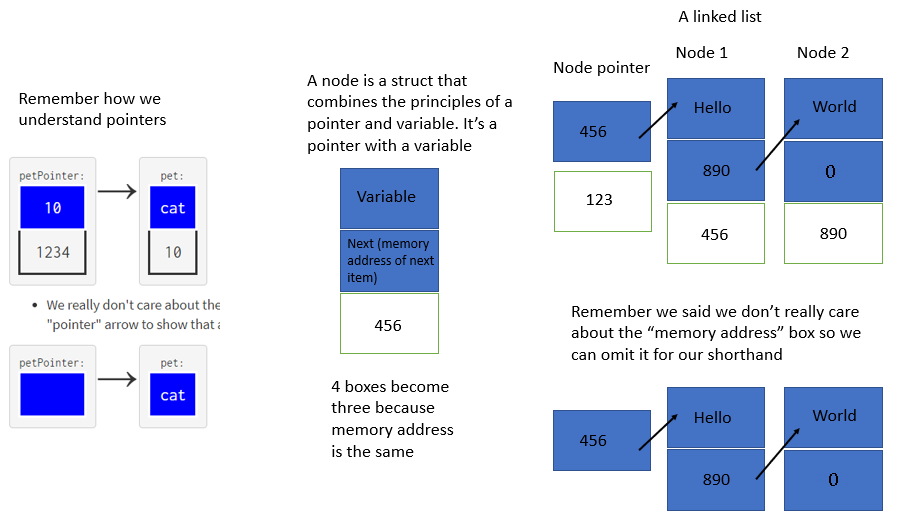
Slide 5
Doubly-linked lists
- Last time, we discussed linked lists. Specifically, we discussed singly linked lists, which have a single
nextpointer in each node, and are strictly one-way. - We also can create a doubly linked list, which has pointers in both directions:
struct ListNode { int data; ListNode* prev; ListNode* next; }; - We will keep a
_frontand a_backpointer in the class, too:class DoublyLinkedList { ... private: ListNode* _front; ListNode* _back; }; -
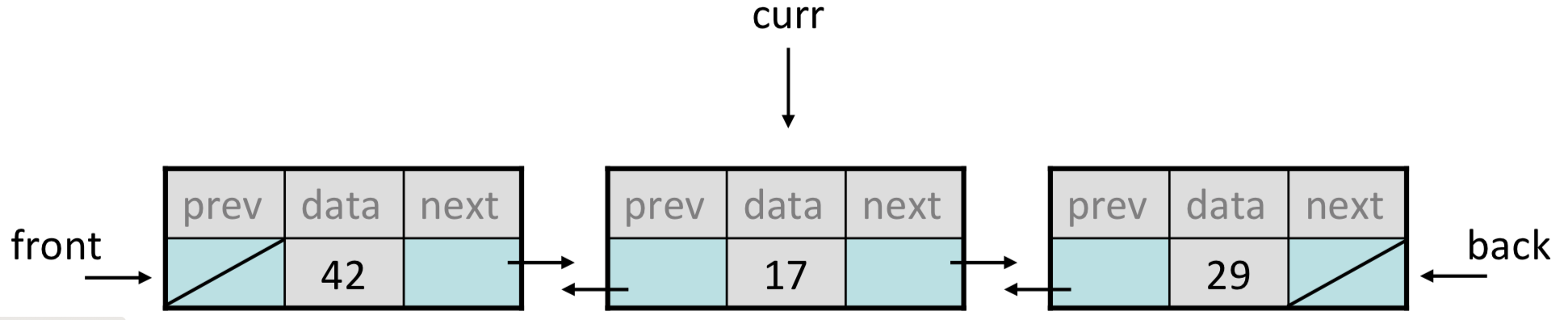
We can draw the nodes sideways for a bit more intuitive pictures: ```

- We can traverse in either direction with a doubly linked list:
ListNode* curr = _front; // print in forward order
while (curr != nullptr) {
    cout << curr->data;
    curr = curr->next;
}

ListNode* curr = _back;
while (curr != nullptr) {
    // print in reverse order
    cout << curr->data;
    curr = curr->prev;
}
Slide 6
Adding nodes to a doubly linked list
- If we want to add a new node to a doubly-linked list, we don't have to stop on the previous node, and we could find the node in either direction.
- However, we have to change four pointers, which can make coding up a doubly lnked list tricky.
- Let's say we want to add the following
newNodebefore the 17, and we havecurron the 17: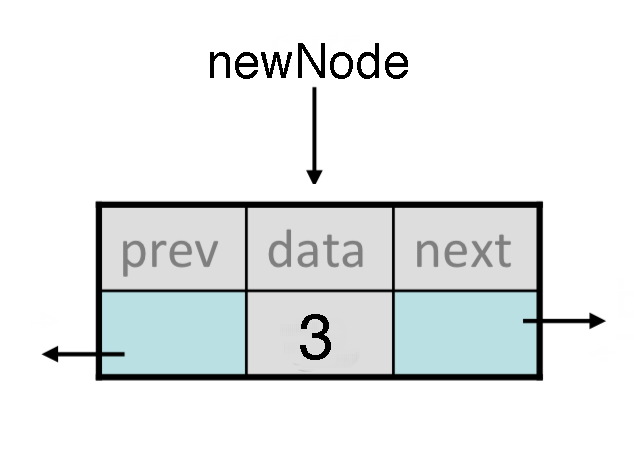
- We would have to change four different pointers. Here's how we would make those changes (and order is important!):
curr->prev->next = newNode;
newNode->prev = curr->prev;
curr->prev = newNode;
newNode->next = curr;
Removing nodes from a doubly linked list
- If we want to remove a new node to a doubly-linked list, we don't have to stop on the previous node, and we could find the node in either direction.
- In this case, we only have to make changes to two pointers, the previous node's
next, and the next node'sprev. - Let's say we want to remove the 17 from the list below, and we've stopped
curron that node: - Here are the changes we have to make:
curr->prev->next = curr->next;
curr->next->prev = curr->prev;
delete curr;
Slide 7
Trees
- We have seen trees in this class before, in the form of decision trees:
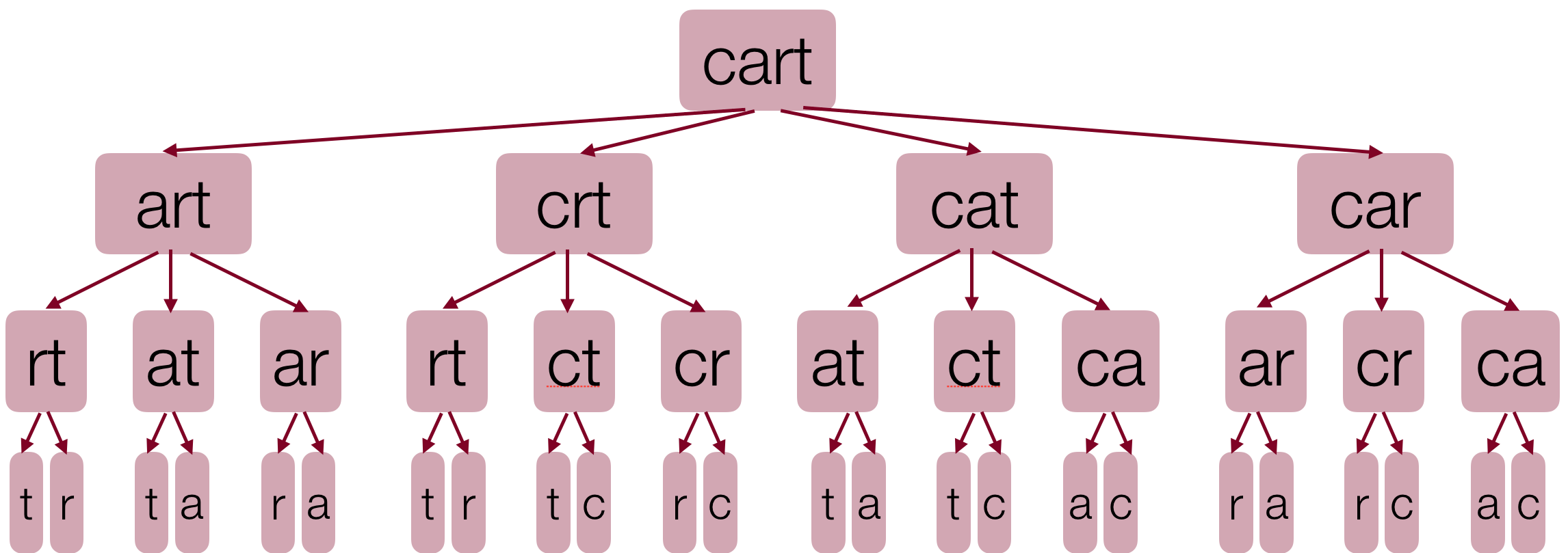
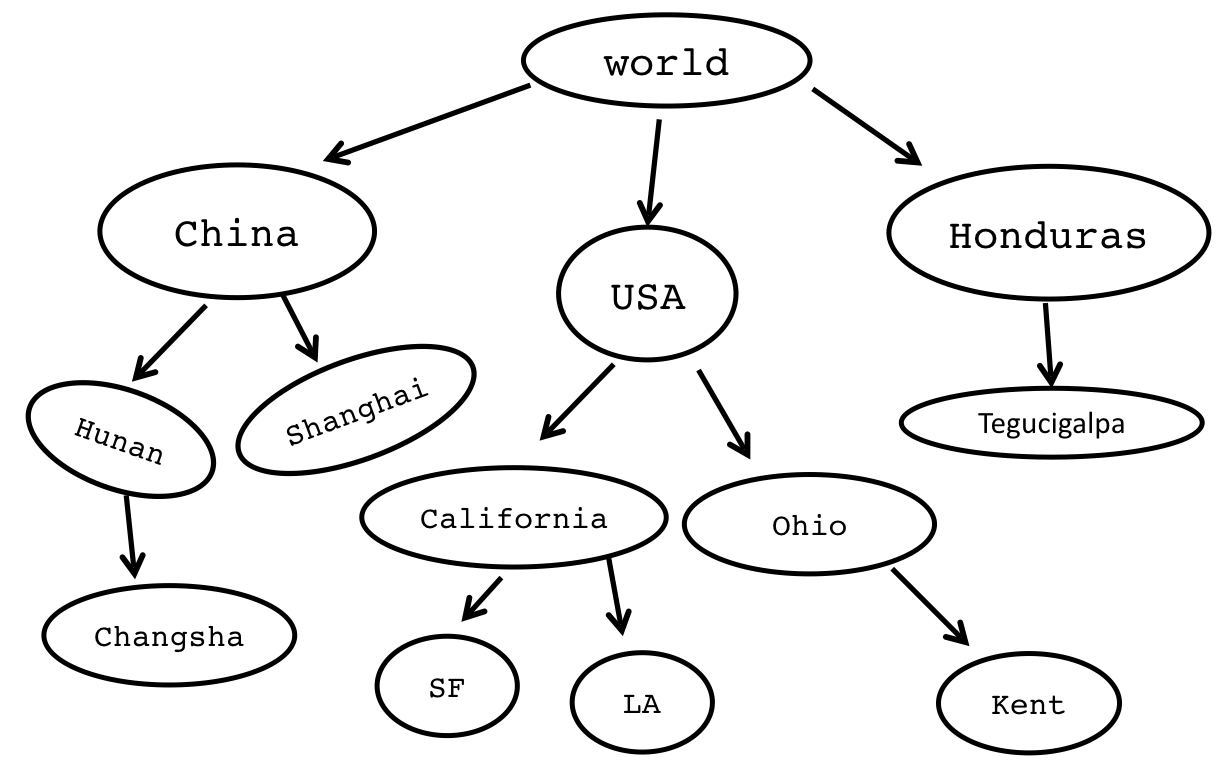
- Trees can describe hirearchies:
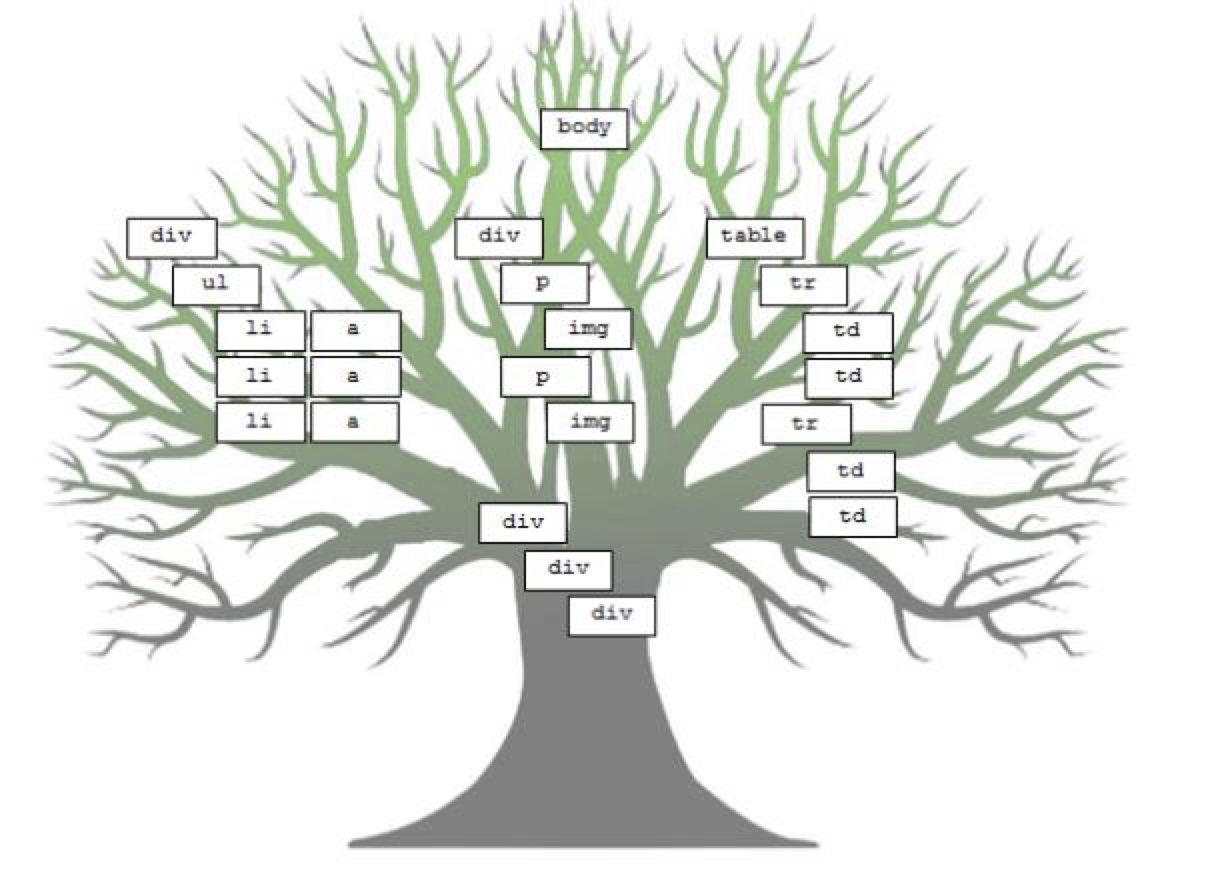
- Trees can describe websites:
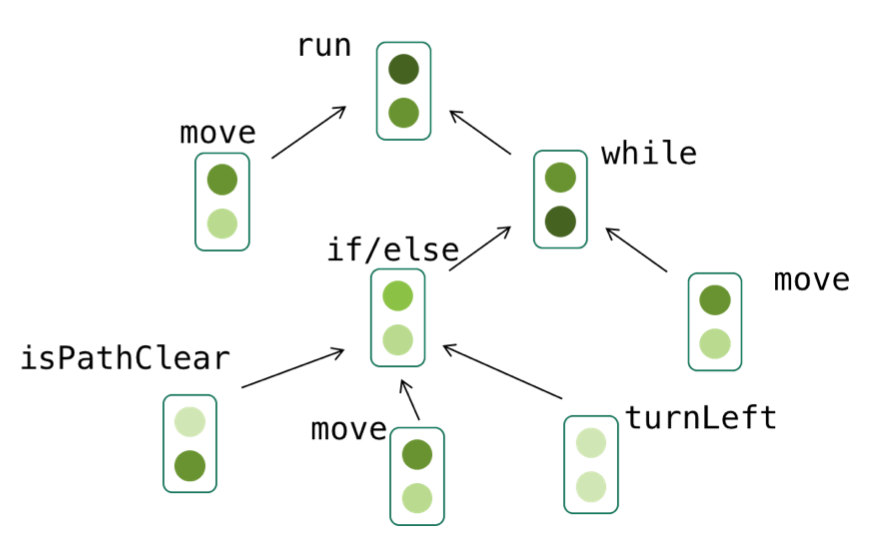
- Trees can desceribe programs (we often call them abstract syntax trees (the following is a figure in an academic paper written by a recent CS 106 student!)
// Example student solution
function run() {
  // move then loop
  move();
  // the condition is fixed
  while (notFinished()) {
    if (isPathClear()) {
      move();
    } else {
      turnLeft();
    }
    // redundant
    move();
  }
}
Slide 8
Trees are inherently recursive
- What is a tree in computer science?
- A tree is a collection of nodes, which can be empty. If it is not empty, there is a root node,
r, and zero or more non-empty subtrees,T1,T2, …,Tk, whose roots are connected by a directed edge fromr.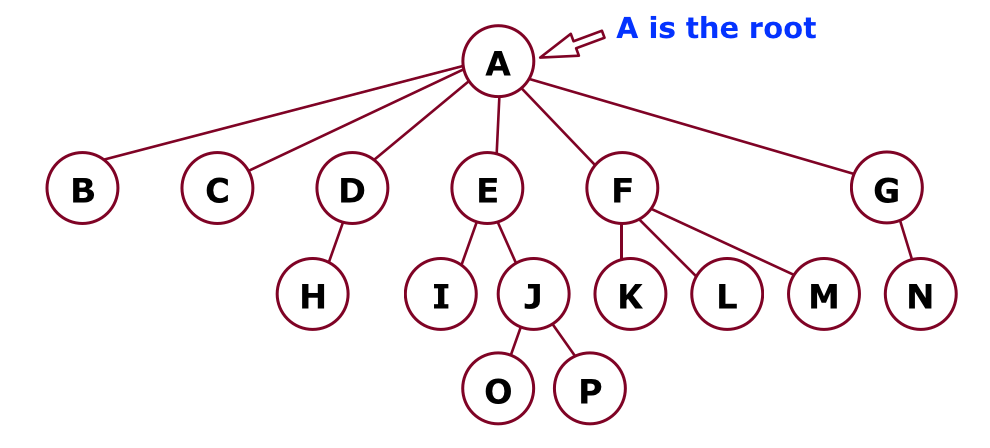
- A tree is a collection of nodes, which can be empty. If it is not empty, there is a root node,
                       (root)
              -----------A--------------
              ↙︎   ↙︎  ↙︎   ↓    ↘︎       ↘︎
             B   C   D   E     F--      G
                    ↙︎   ↙︎ ↘︎   ↙︎ ↘︎ ↘︎      ↘︎
                   H   I   J K   L M       N
                          ↙︎ ↘︎
                         O   P
- There are N nodes and N-1 edges in a tree.
- Tree terminology. In the diagram above:
- B is a child of A, and F is a child of A and a parent of K, L, M.
- Nodes with no children are leaves. Nodes B, C, H, I, K, L, M, N, O, and P are all leaves.
- Nodes with the same parent are siblings. I and J are siblings. K, L, and M are siblings. Nodes O and P are siblings. Nodes H and N do not have any siblings (only children).
Slide 9
More Tree Terminology
                       (root)
                         A--------------
                         ↓    ↘︎        ↘︎
                         E     F         G
                        ↙︎ ↘︎   ↙︎ ↘︎ ↘︎       ↘︎
                       I   J K   L M       N
                          ↙︎ ↘︎
                         O   P
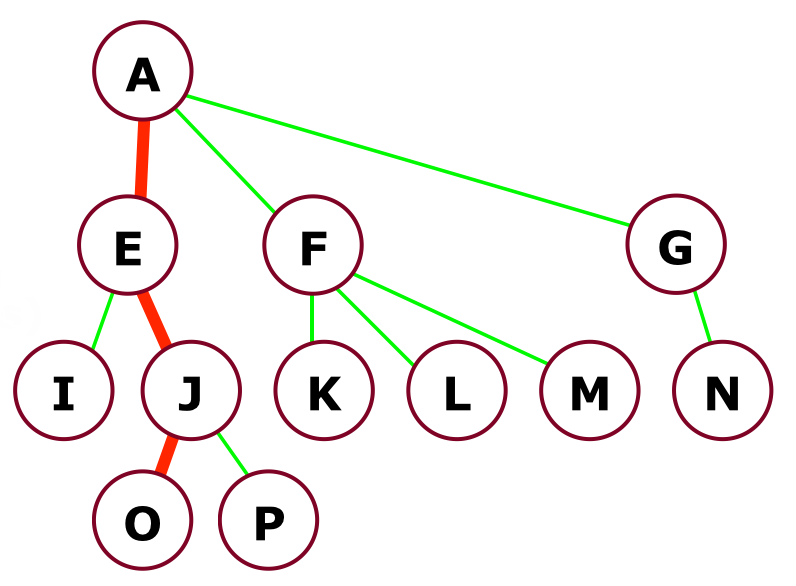
- We can define a path from a parent to its children. The path from A to O is: A-E-J-O.
- The path A-E-J-O has a length of three (the number of edges).
- The depth of a node is the length from the root. The depth of node J is 2. The depth of the root is 0.
- The height of a node is the longest path from the node to a leaf. The height of node F is 1. The height of all leaves is 0.
- The height of a tree is the height of the root. The height of the above tree is 3.
Slide 10
One Parent, No Cycles

- Tree nodes can only have one parent, and they cannot have cycles
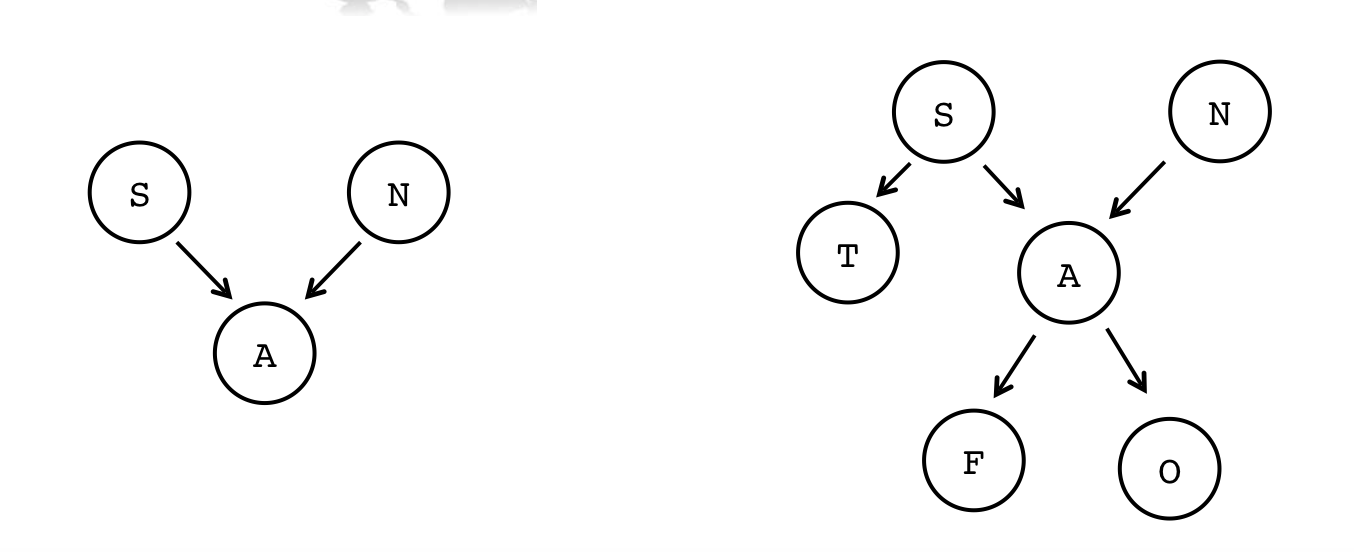
- Not a tree (A has two parents):
S N ↘︎ ↙︎ A - Again: not a tree (A has two parents):
S N ↙︎ ↘︎ ↙︎ T A ↙︎↘︎ F O - The following are not trees, either, because you can cycle through the tree. Nodes cannot have children that are on the same level or above on the tree:
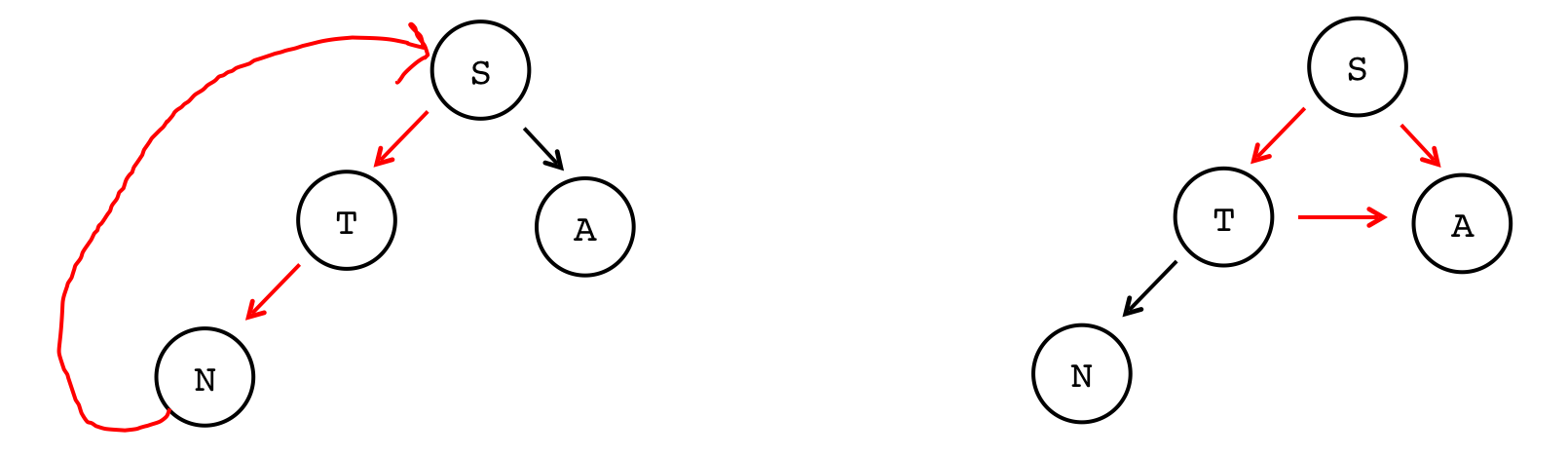
- Not a tree (cycle from N back to S):
→→→→S ↑ ↙︎ ↘︎ ↑ T A ↑↙︎ N - Again: not a tree (the arrow from T to A causes a cycle):
    S
   ↙︎ ↘︎
  T→→→A
↙︎
N
Slide 11
Building trees programatically
- To build a tree, we need a new version of our
Node. In this case, we want eachNodeto have a data value (like a linked list), but now we want to pointers, one to the left child, and one to the right child:struct TreeNode { string data; TreeNode* left; TreeNode* right; };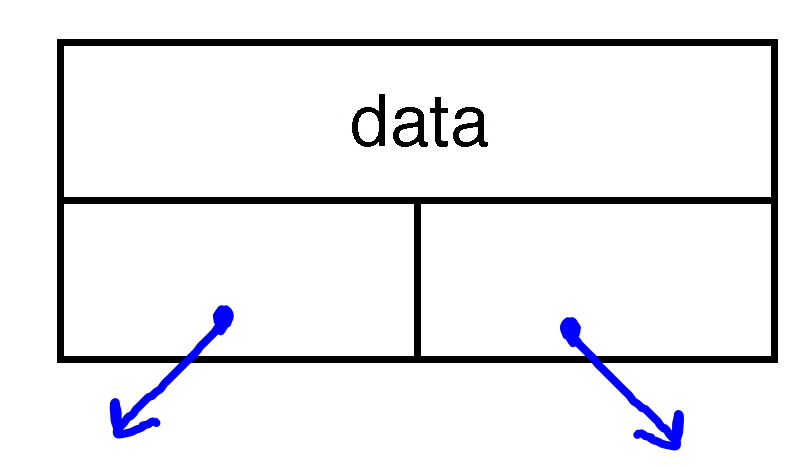
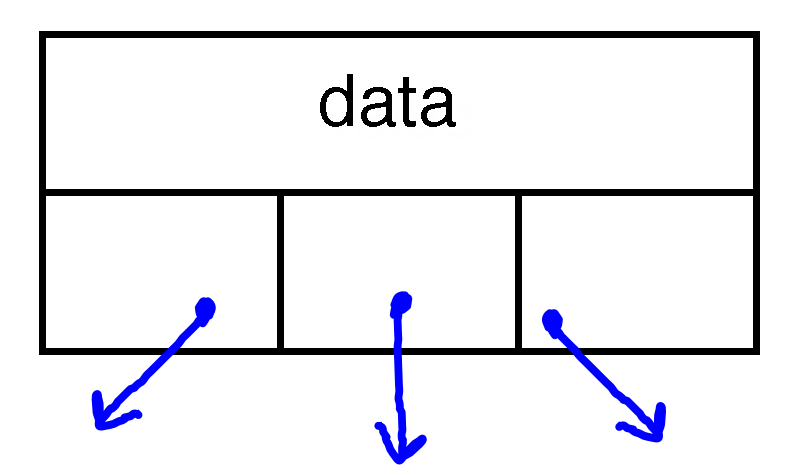
- We don't have to limit ourselves to binary trees, by the way: we could have a ternary tree:
struct TernaryTreeNode {
    string data;
    TernaryTreeNode* left;
    TernaryTreeNode* middle;
    TernaryTreeNode* right;
};
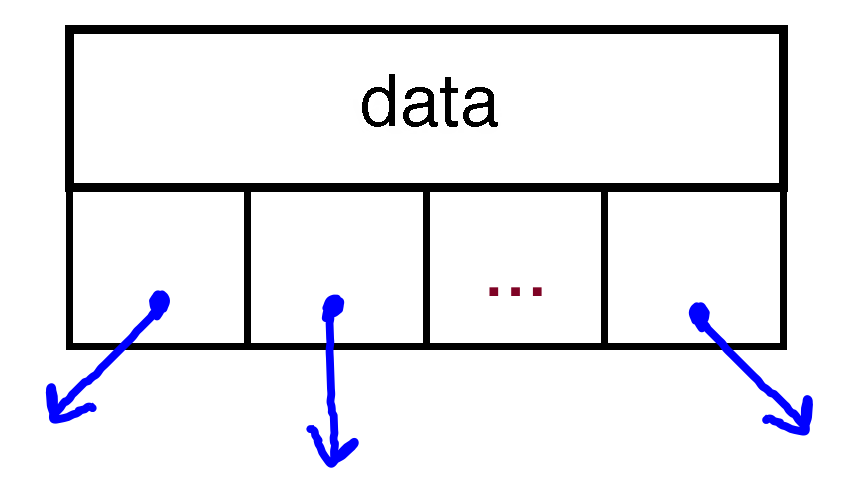
- In fact, we could have any number of children (we may look at the Trie data structure, which can be built this way). This is an N-ary Tree:
struct NAryTreeNode {
    string data;
    Vector<NAryTreeNode*> children;
};
Slide 12
Traversing a Tree
- Often, we will want to do something with each node in a tree. Like linked lists, we can traverse the tree, but it is more involved because of all the branching.
- There are four different ways to traverse a binary tree:
- Pre-order
- In-order
- Post-order
- Level-order
- Let's write some code for each traversal to see the differences. We'll look at two trees:
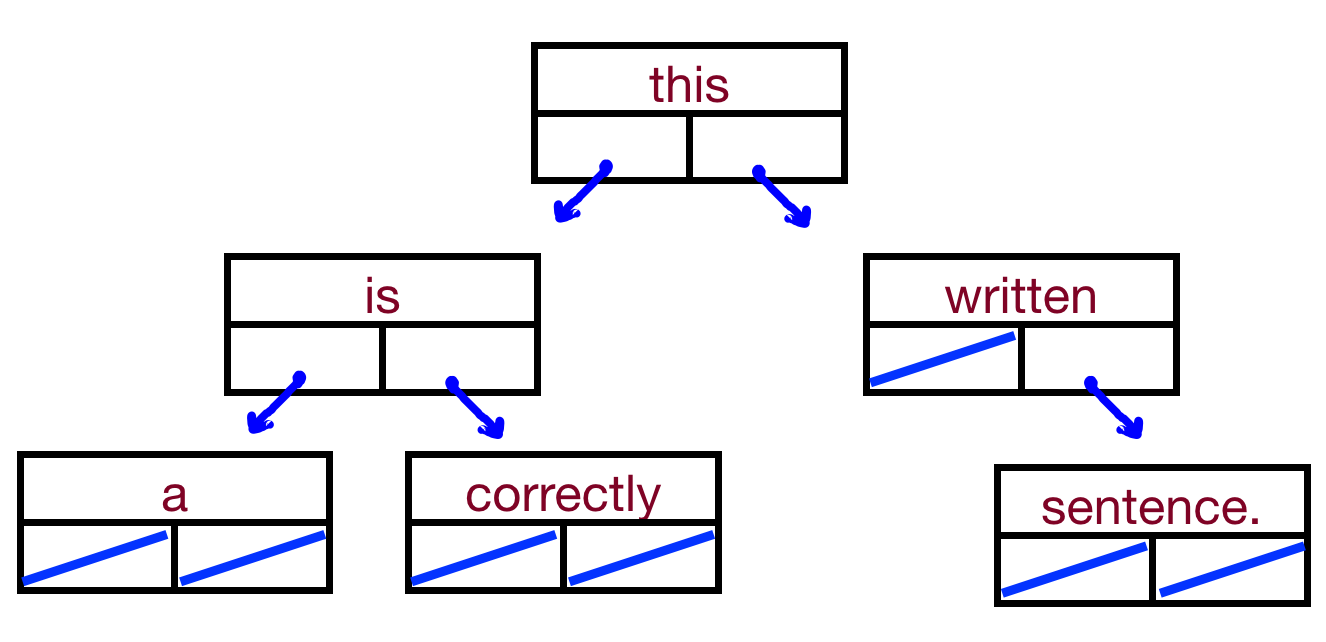
this ↙︎ ↘︎ is written ↙︎ ↘︎ ↘︎ a correctly sentence - We'll also look at:
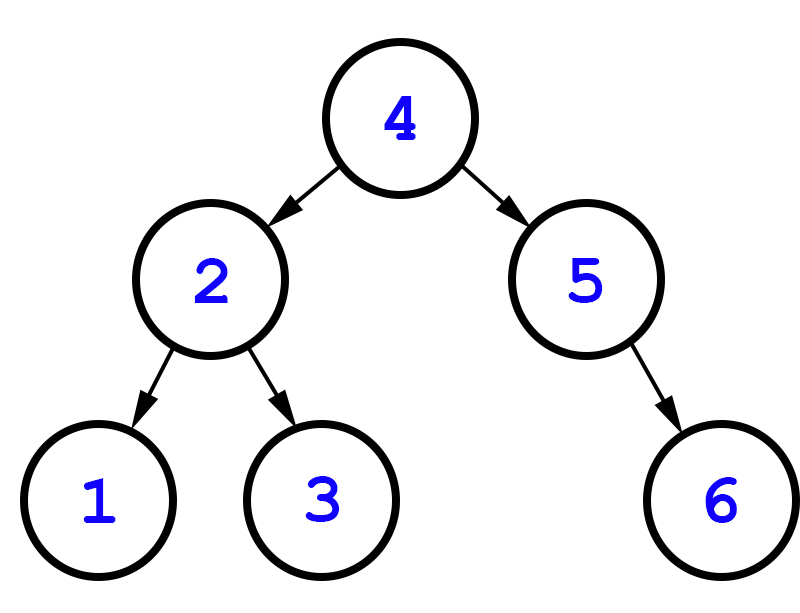
4 ↙︎ ↘︎ 2 5 ↙︎ ↘︎ ↘︎ 1 3 6 - By the way: trees do not have to be complete, like heaps. Any node can have 0, 1, or 2 children.
Slide 13
Pre-order traversal
- The algorithm for a pre-order traversal is as follows:
- Do something
- Go left
- Go right
- This is an inherently recursive algorithm
- For our tests, let's make the "Do something" part print the data at a particular node.
- Code:
void preOrder(TreeNode* tree) {
    if(tree == nullptr) return;
    cout<< tree->data <<" ";
    preOrder(tree->left);
    preOrder(tree->right);
}
Slide 14
In-order traversal
- The algorithm for a in-order traversal is as follows:
- Go left
- Do something
- Go right
- This is also an inherently recursive algorithm
- Code:
void inOrder(TreeNode* tree) {
    if(tree == nullptr) return;
    inOrder(tree->left);
    cout<< tree->data <<" ";
    inOrder(tree->right);
}
Slide 15
Post-order traversal
- The algorithm for a post-order traversal is as follows:
- Go left
- Go right
- Do something
- This is also an inherently recursive algorithm
- Code:
void postOrder(TreeNode* tree) {
    if(tree == nullptr) return;
    postOrder(tree->left);
    postOrder(tree->right);
    cout<< tree->data <<" ";
}
Slide 16
Level-order traversal
- A level order traversal is different than all the others – we want to go one level at a time and print out each node, then go to the next level.
- For this tree, it would be:
this is written a correctly sentence
- Can we do this recursively!
- But, we can use an algorithm you've seen before: breadth first search!
- This is going to use a queue, just like the BFS you did for your maze solving assignment.
- Enqueue the root node
- While the queue is not empty
- dequeue a node
- do something with the node
- enqueue the left child if it exists
- enqueue the right child if it exists
- This is going to use a queue, just like the BFS you did for your maze solving assignment.
- Code:
void levelOrder(TreeNode *tree) {
    Queue<TreeNode *>treeQueue;
    treeQueue.enqueue(tree);
    while (!treeQueue.isEmpty()) {
        TreeNode *node = treeQueue.dequeue();
        cout << node->value << " ";

       if (node->left != nullptr) {
            treeQueue.enqueue(node->left);
        }
        if (node->right != nullptr) {
            treeQueue.enqueue(node->right);
        }
    }
}