Page 1
 Monday, January 24, 2022
Computer Systems
Winter 2022
Stanford University
Computer Science Department
Reading: Reader: Ch 4,
C Primer,
K&R Ch 1.6, 5.1-
5.5
Lecturers: Chris Gregg
CS 107
Lecture 6: Stack
and Heap
Page 2
Today's Topics
•
Logistics
•
Assign2 — Due Wednesday Jan 26th at 11:59pm, with a late deadline of
Friday Jan 28th.
•
Reading: Reader: C Primer
•
Pointers to Arrays (finish from last time)
•
Stack allocation
•
Stack frames
•
Parameter passing
•
Dynamic allocation (malloc/realloc/free).
•
More Pointers to pointers
Page 3
Double pointers
— why are they needed?
Here is an example I posted on Ed. Let's take an in-depth look at it:
#include<stdio.h>
#include<stdlib.h>
// print the next character in p
// and update the local pointer, p (which does nothing)
char nextCharA(char *p) {
char next = p[0];
p++; // this does not do anything except inside this function
// and, we are returning here, so it really doesn't
// do anything productive
return next;
}
// print the next character in the string pointed to by p
// and update the string pointer by one to go to the next character
char nextCharB(char **p) {
char next = (*p)[0];
(*p)++; // now the original pointer gets updated!
// we return here, but the calling function has the
// details it needs for the next call
return next;
}
int main() {
char *myString = "hello";
char *pA = myString;
char *pB = myString;
for (int i = 0; i < 5; i++) {
printf("nextCharA(pA): %c ", nextCharA(pA));
printf("nextCharB(&pB): %c\n", nextCharB(&pB));
}
return 0;
}
Page 4
Pointers to Arrays
— char *envp[]
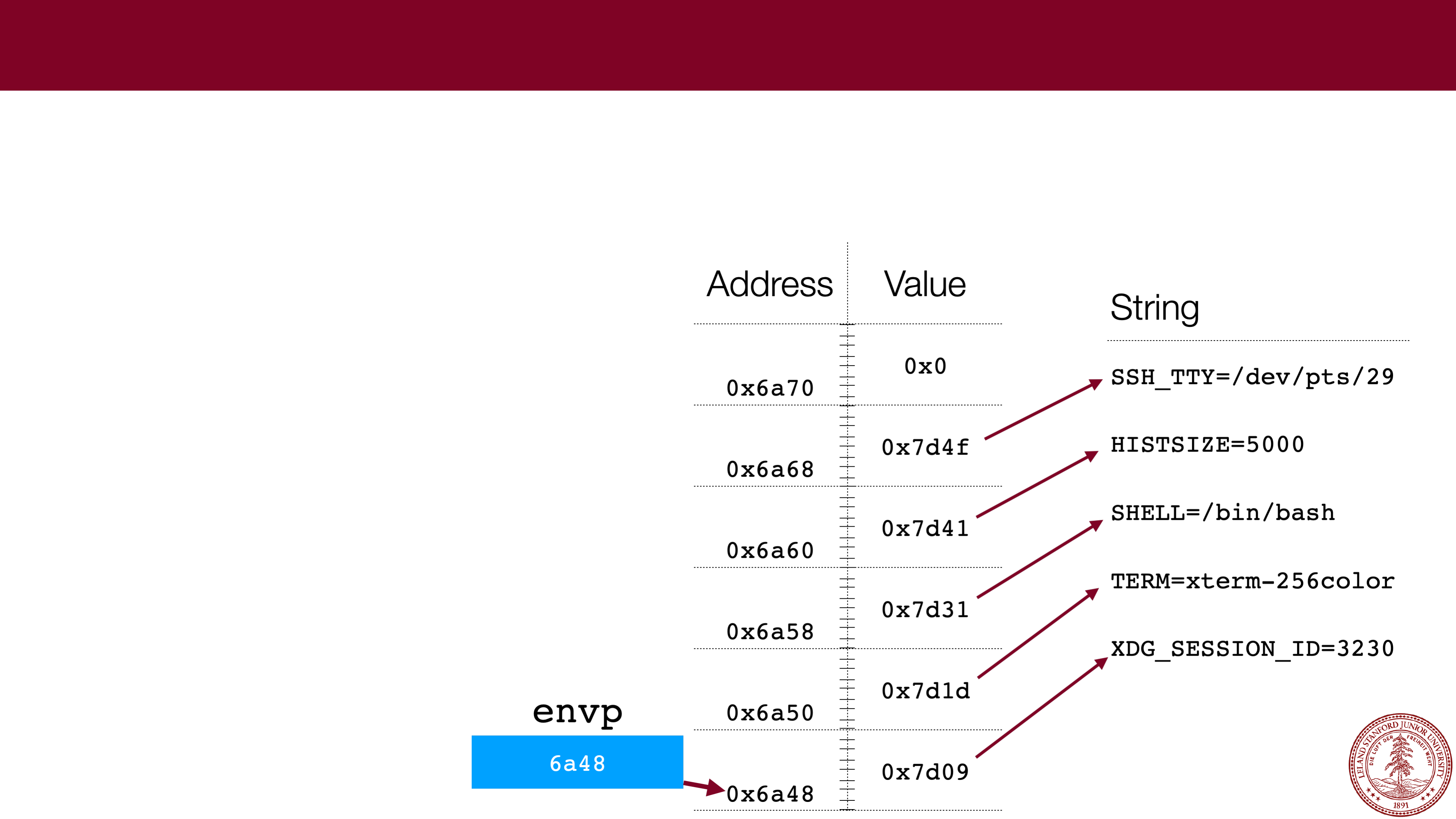
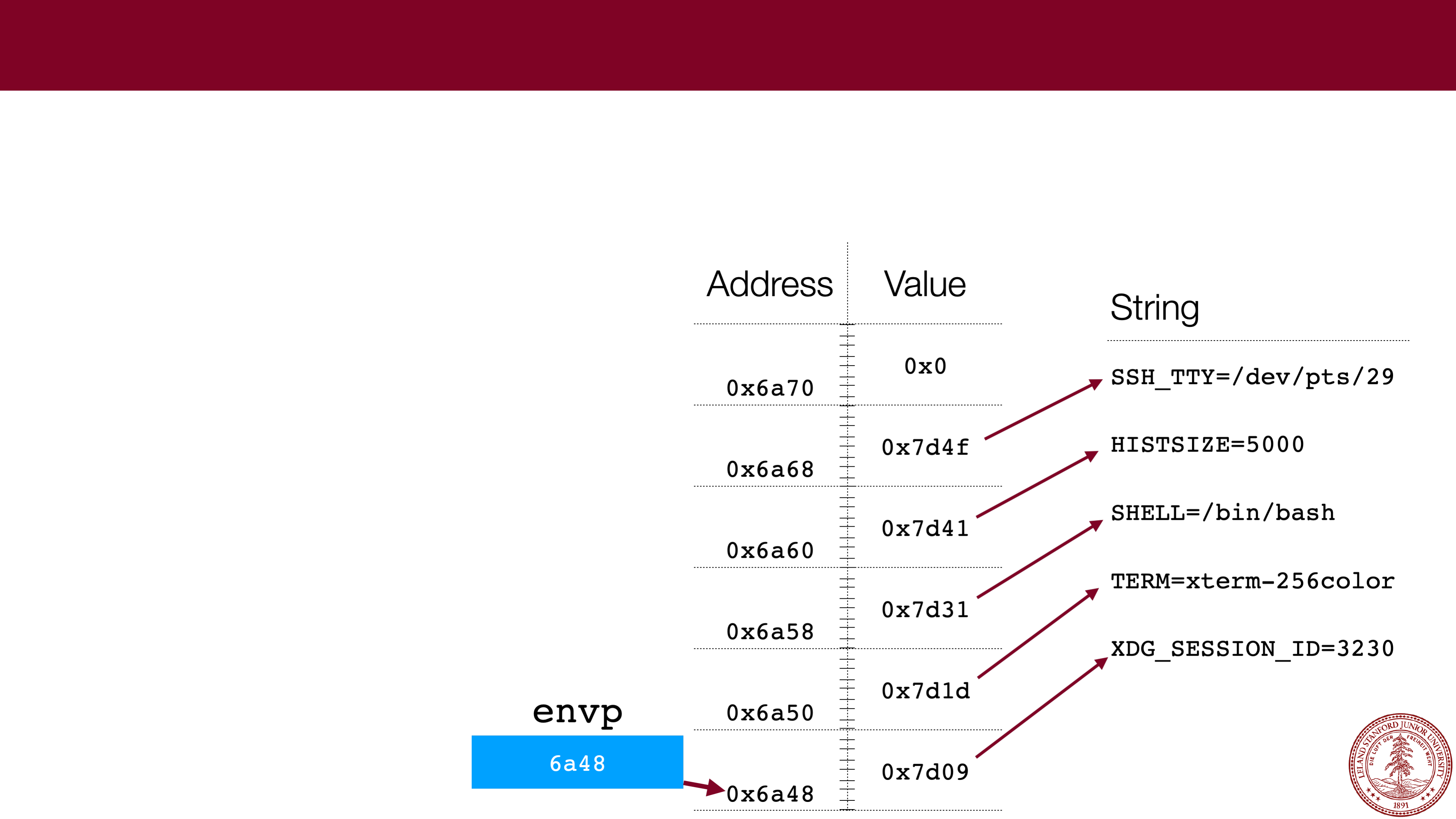
One tricky part of CS 107 for many students is getting comfortable with what the
memory looks like for pointers to arrays, particularly when the arrays themselves are
filled with pointers. This week's assignment has a good example:
envp
.
With arrays:
1.
Always draw a picture!!!1! Make up the
addresses
-- the actual numbers aren't
particularly important for understanding.
Page 5
Pointers to Arrays
— char *envp[]
One tricky part of CS 107 for many students is getting comfortable with what the
memory looks like for pointers to arrays, particularly when the arrays themselves are
filled with pointers. The lab had a good example:
envp
.
envp
With arrays:
1.
Always draw a picture!!!1! Make up the
addresses
-- the actual numbers aren't
particularly important for understanding.
6a48
Page 6
Pointers to Arrays
— char *envp[]
One tricky part of CS 107 for many students is getting comfortable with what the
memory looks like for pointers to arrays, particularly when the arrays themselves are
filled with pointers. The lab had a good example:
envp
.
Address
Value
0x6a70
0x6a68
0x6a60
0x6a58
0x6a50
0x6a48
envp
With arrays:
1.
Always draw a picture!!!1! Make up the
addresses
-- the actual numbers aren't
particularly important for understanding.
6a48
Page 7
Pointers to Arrays
— char *envp[]
One tricky part of CS 107 for many students is getting comfortable with what the
memory looks like for pointers to arrays, particularly when the arrays themselves are
filled with pointers. The lab had a good example:
envp
.
Address
Value
0x6a70
0x0
0x6a68
0x7d4f
0x6a60
0x7d41
0x6a58
0x7d31
0x6a50
0x7d1d
0x6a48
0x7d09
envp
With arrays:
1.
Always draw a picture!!!1! Make up the
addresses
-- the actual numbers aren't
particularly important for understanding.
6a48
Page 8
Pointers to Arrays
— char *envp[]
One tricky part of CS 107 for many students is getting comfortable with what the
memory looks like for pointers to arrays, particularly when the arrays themselves are
filled with pointers. The lab had a good example:
envp
.
Address
Value
0x6a70
0x0
0x6a68
0x7d4f
0x6a60
0x7d41
0x6a58
0x7d31
0x6a50
0x7d1d
0x6a48
0x7d09
envp
String
SSH_TTY=/dev/pts/29
HISTSIZE=5000
SHELL=/bin/bash
TERM=xterm
-
256color
XDG_SESSION_ID=3230
With arrays:
1.
Always draw a picture!!!1! Make up the
addresses
-- the actual numbers aren't
particularly important for understanding.
6a48
Page 9
 Pointers to Arrays
— char *envp[]
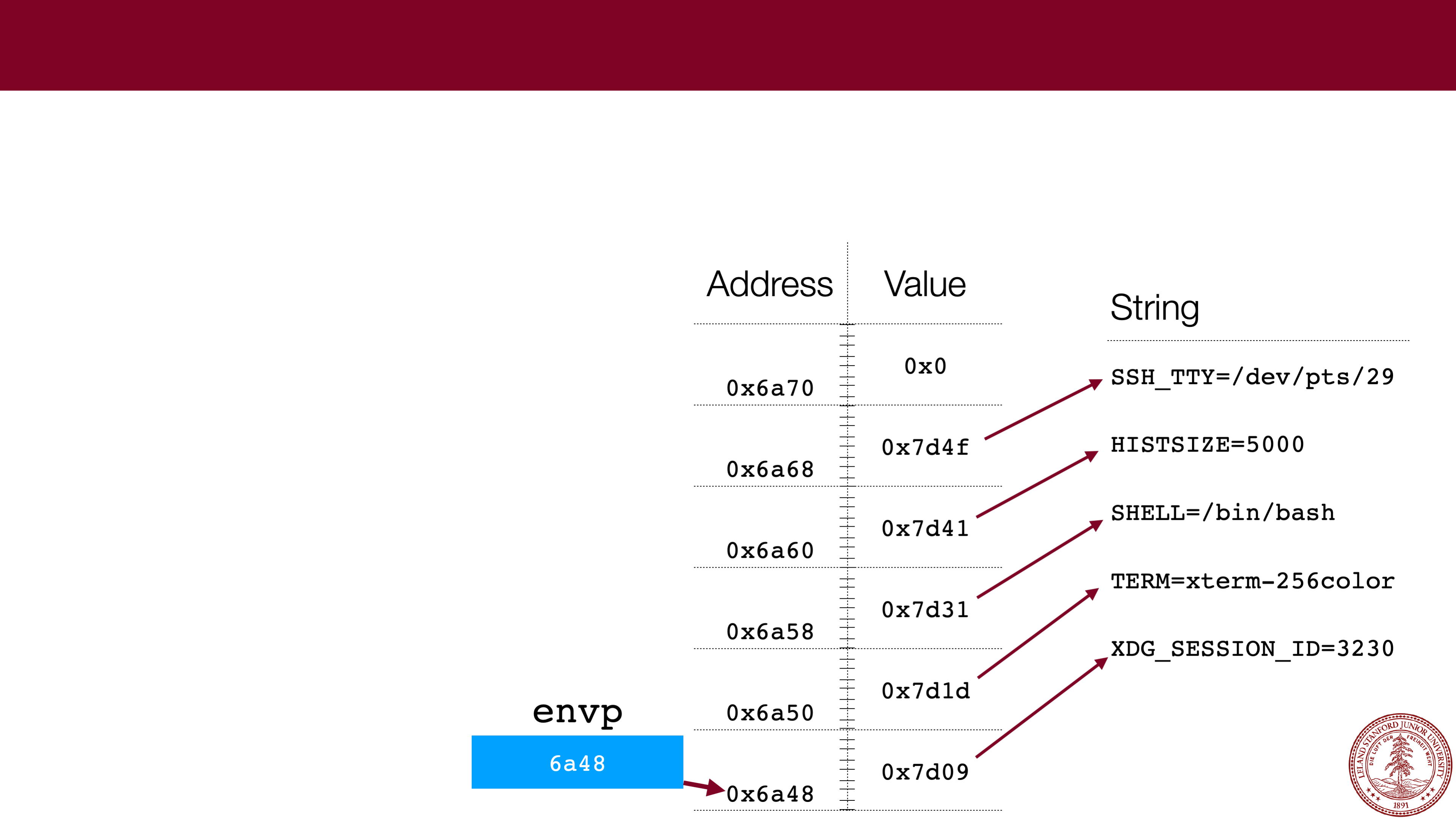
One tricky part of CS 107 for many students is getting comfortable with what the
memory looks like for pointers to arrays, particularly when the arrays themselves are
filled with pointers. The lab had a good example:
envp
.
With arrays:
1.
Always draw a picture!!!1! Make up the
addresses
-- the actual numbers aren't
particularly important for understanding.
2.
If you know the type that is held in the
array, you can always dereference to get a
single pointer to the type. E.g.,
envp[0]
is a pointer to the string
"
XDG_SESSION_ID=3230
"
What is
the value of
envp[2]
for the
diagram?
Page 10
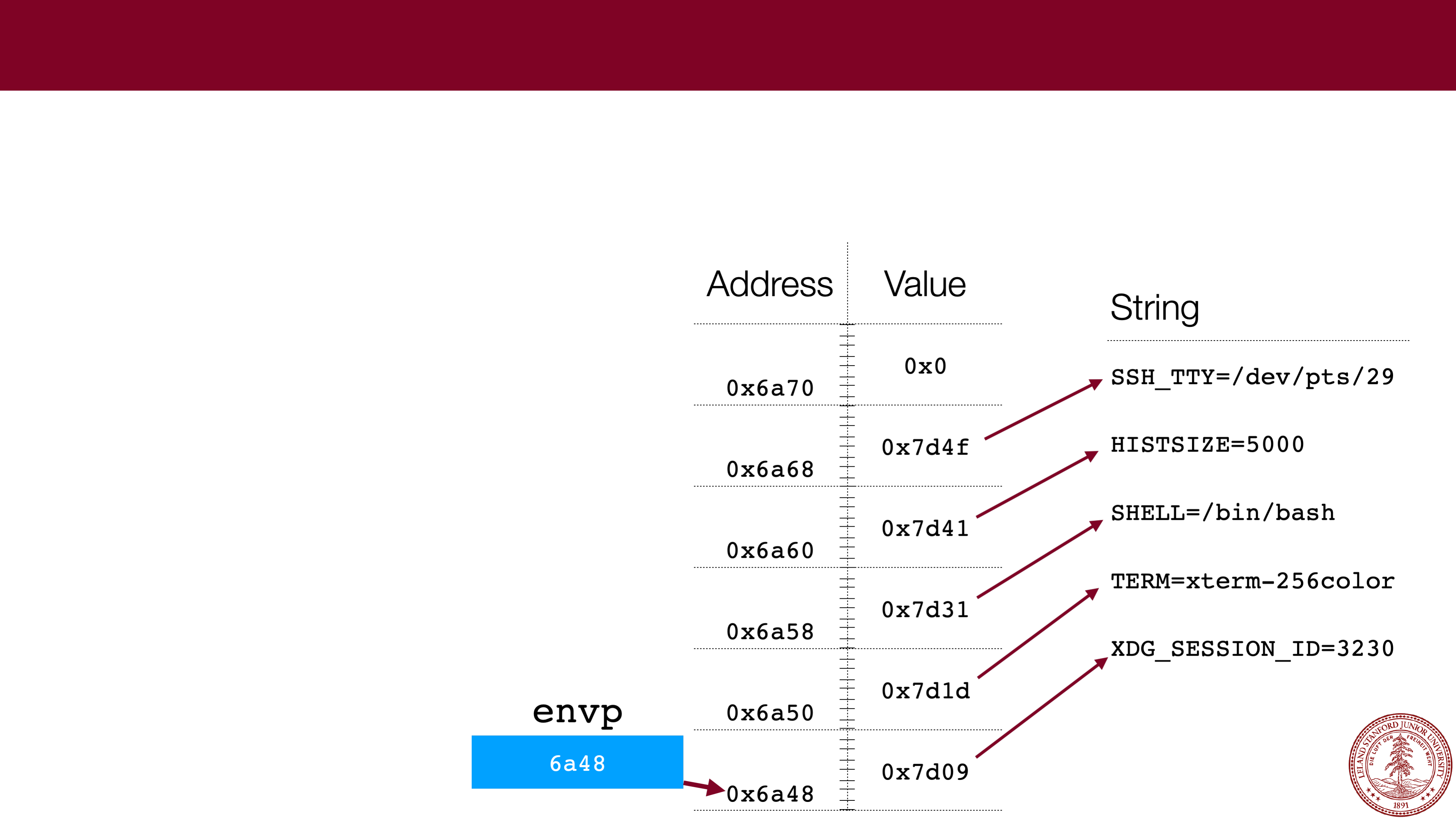 What is
the value of
envp[2]
for the
diagram?
Pointers to Arrays
— char *envp[]
One tricky part of CS 107 for many students is getting comfortable with what the
memory looks like for pointers to arrays, particularly when the arrays themselves are
filled with pointers. The lab had a good example:
envp
.
0x7d31
With arrays:
1.
Always draw a picture!!!1! Make up the
addresses
-- the actual numbers aren't
particularly important for understanding.
2.
If you know the type that is held in the
array, you can always dereference to get a
single pointer to the type. E.g.,
envp[0]
is a pointer to the string
"
XDG_SESSION_ID=3230
"
Page 11
 Pointers to Arrays
— char *envp[]
One tricky part of CS 107 for many students is getting comfortable with what the
memory looks like for pointers to arrays, particularly when the arrays themselves are
filled with pointers. The lab had a good example:
envp
.
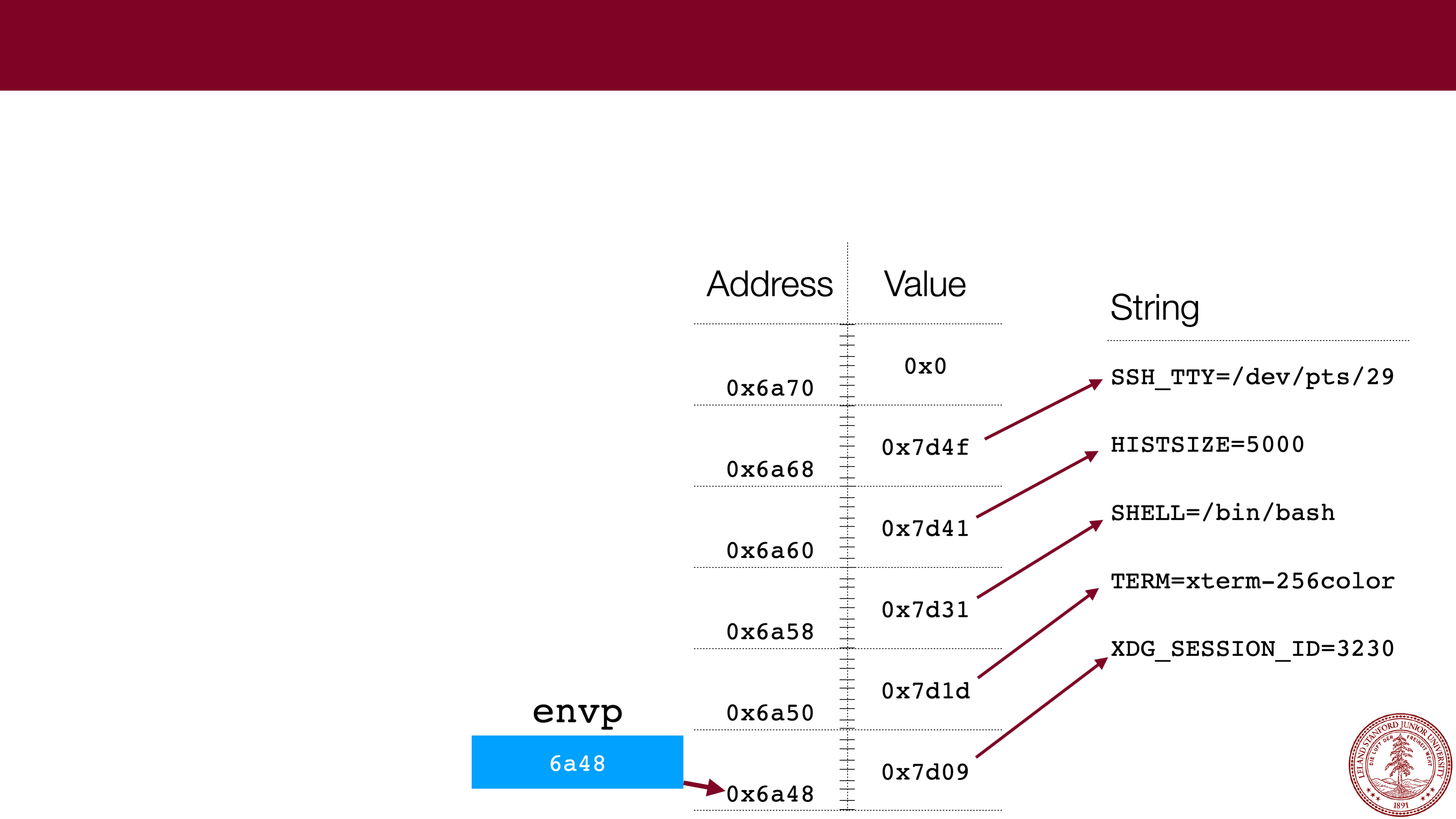
What type is
envp[2]
?
With arrays:
1.
Always draw a picture!!!1! Make up the
addresses
-- the actual numbers aren't
particularly important for understanding.
2.
If you know the type that is held in the
array, you can always dereference to get a
single pointer to the type. E.g.,
envp[0]
is a pointer to the string
"
XDG_SESSION_ID=3230
"
Page 12
 Pointers to Arrays
— char *envp[]
One tricky part of CS 107 for many students is getting comfortable with what the
memory looks like for pointers to arrays, particularly when the arrays themselves are
filled with pointers. The lab had a good example:
envp
.
char *
With arrays:
1.
Always draw a picture!!!1! Make up the
addresses
-- the actual numbers aren't
particularly important for understanding.
2.
If you know the type that is held in the
array, you can always dereference to get a
single pointer to the type. E.g.,
envp[0]
is a pointer to the string
"
XDG_SESSION_ID=3230
"
What type is
envp[2]
?
Page 13
 Pointers to Arrays
— char *envp[]
Note:
envp
is a weird array in that
it is null
-terminated! Very, very few
arrays have this property in C.
Most arrays are passed with
another variable that gives their
length. For example, we have
argv
and
argc
.*
*Note:
argv[argc] is
defined to be
NULL
, but that still an anomaly for C
arrays in general.
Page 14
 x86
x86
-
64 Memory Layout
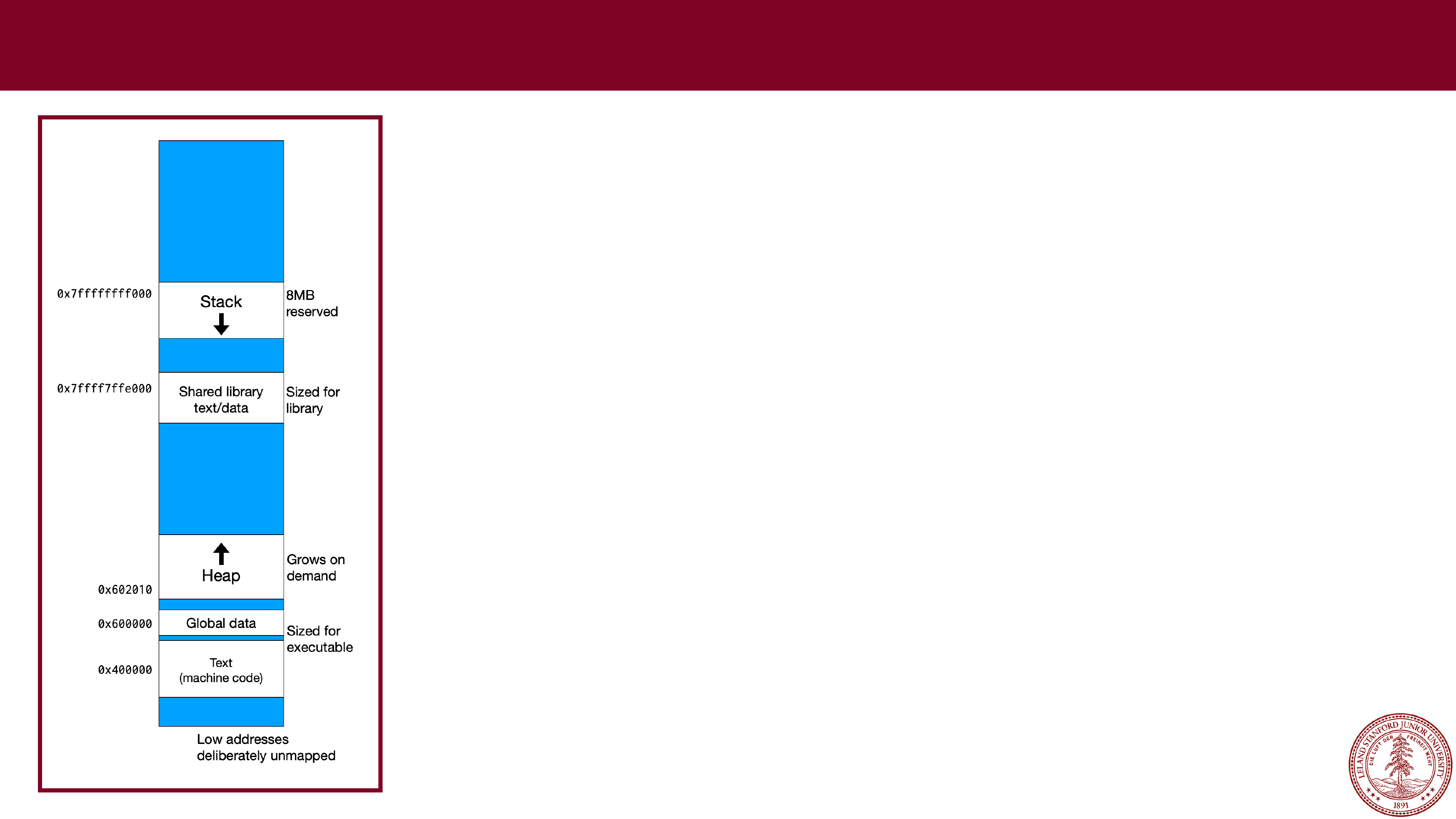
In CS 107, we are going to talk about two different areas
of memory that your program will access, called the
stack
and the
heap
.
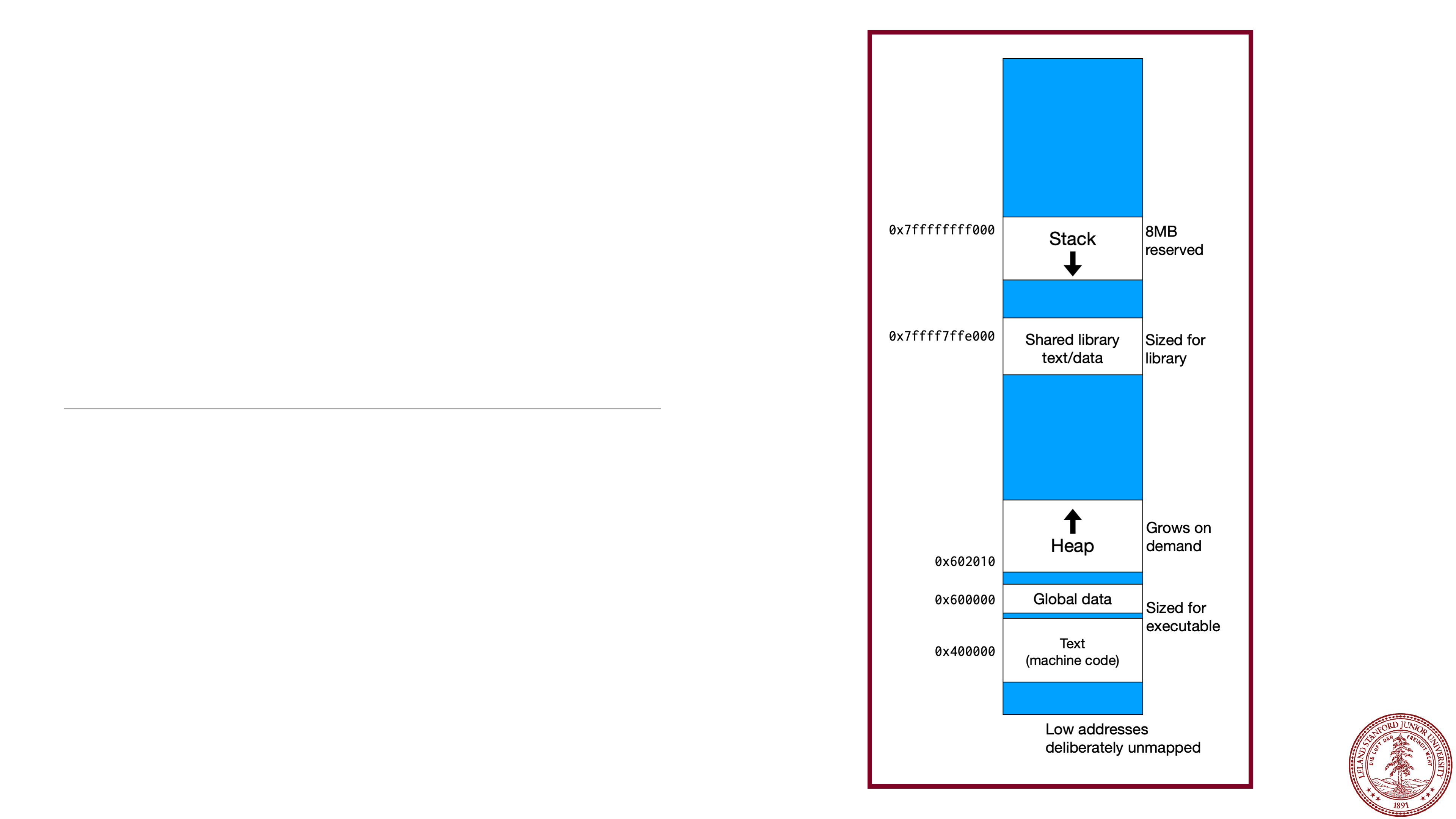
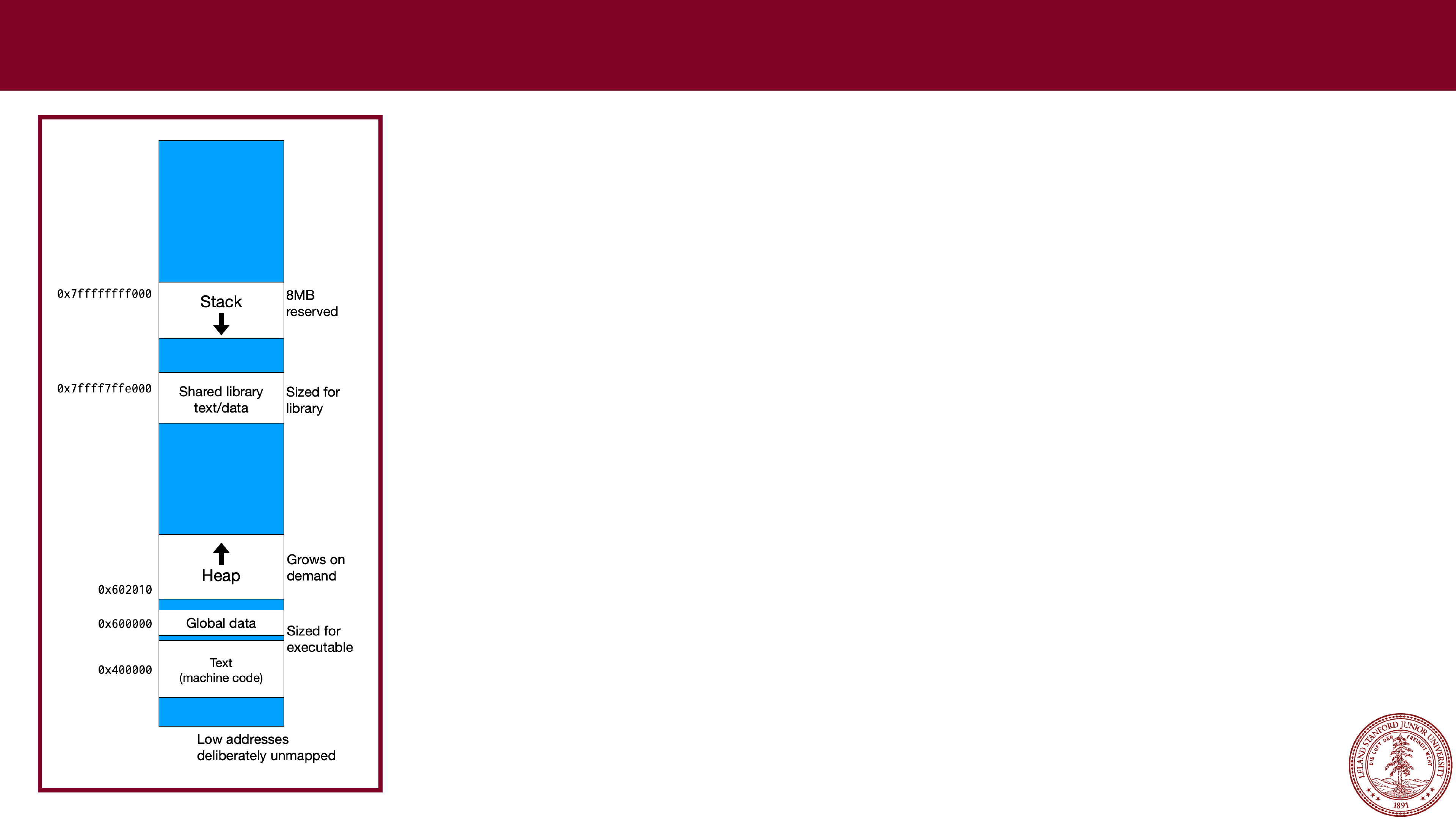
This diagram shows the overall memory layout in Linux
on an x86
-64 computer (e.g., the Myth computers).
Every program, by default, has access to an 8MB stack
segment in memory. Your program can do anything it
wants with that memory, but it is limited. The stack
grows
downward
in memory, so your program starts
with a location on the stack, and you get the next 8MB
lower
in memory.
Page 15
 x86
x86
-
64 Memory Layout
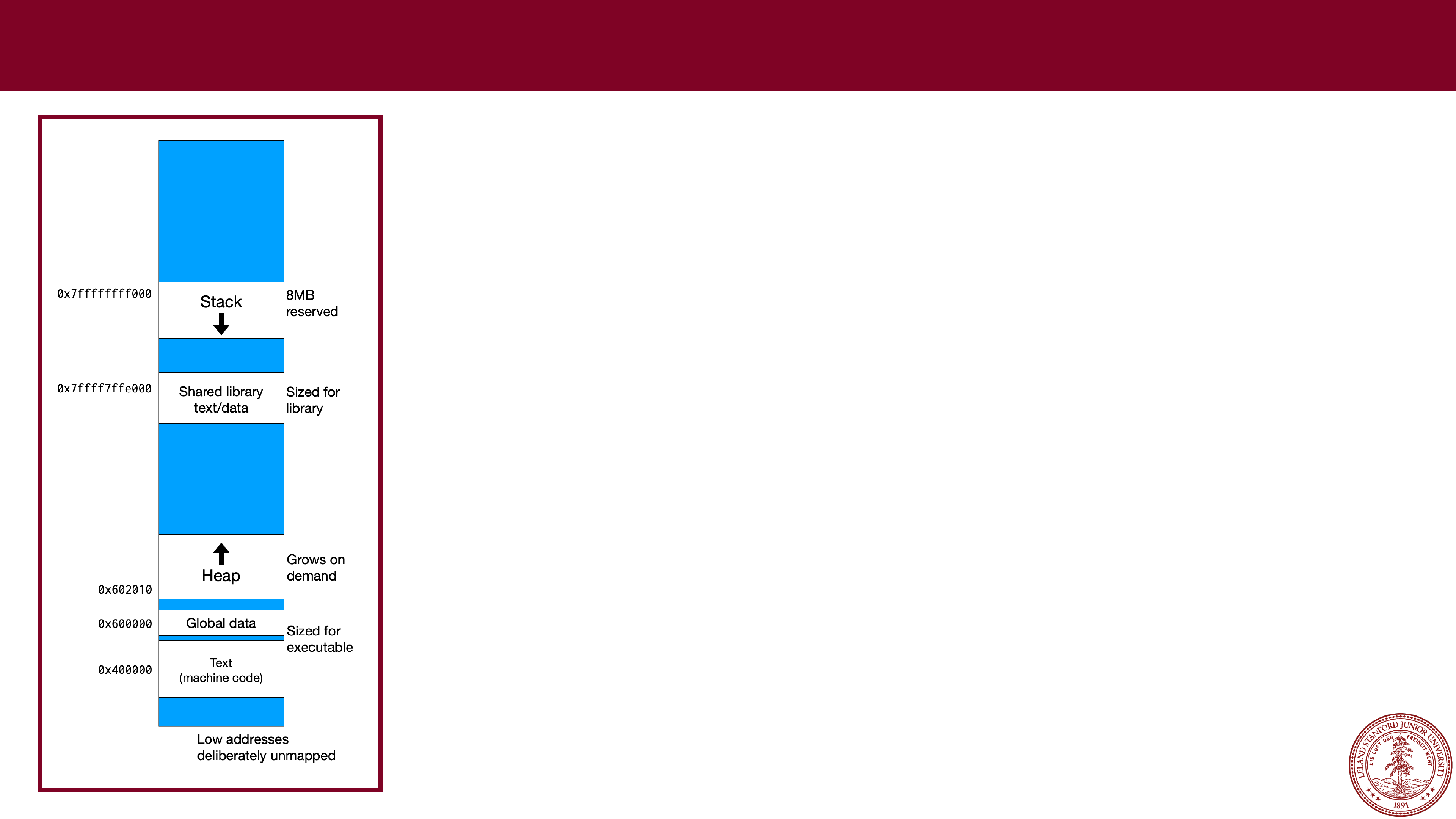
Below the stack is the shared library. This is all of the
standard libraries that are used by programs (e.g.,
stdlib.h, stdio.h, string.h, etc.) Your programs do not
have access to these directly, except to call functions
that are there.
Below the shared library data is the
heap
, which is
managed by the operating system, and comprises the
vast majority of the memory in your computer. When a
program wants to use heap memory, it requests it from
the operating system (using
malloc
,
calloc
, or
realloc
in C).
The heap starts at a low memory address and grows
upwards.
Page 16
 x86
x86
-
64 Memory Layout
Below the heap is global data for your program (i.e.,
global variables and string literals -- remember that string
literals are not modifiable).
Below the global data is your program code.
Note
: When you program references memory, it
references
virtual
memory. Virtual memory is a way for
every program to
think
it has access to the entire
memory system, while hiding the details. The operating
system and PC hardware handle all of the details of the
translation between virtual memory and physical
memory, and for this course you only need to consider
the diagram to the left.
Page 17
 Stack Allocation
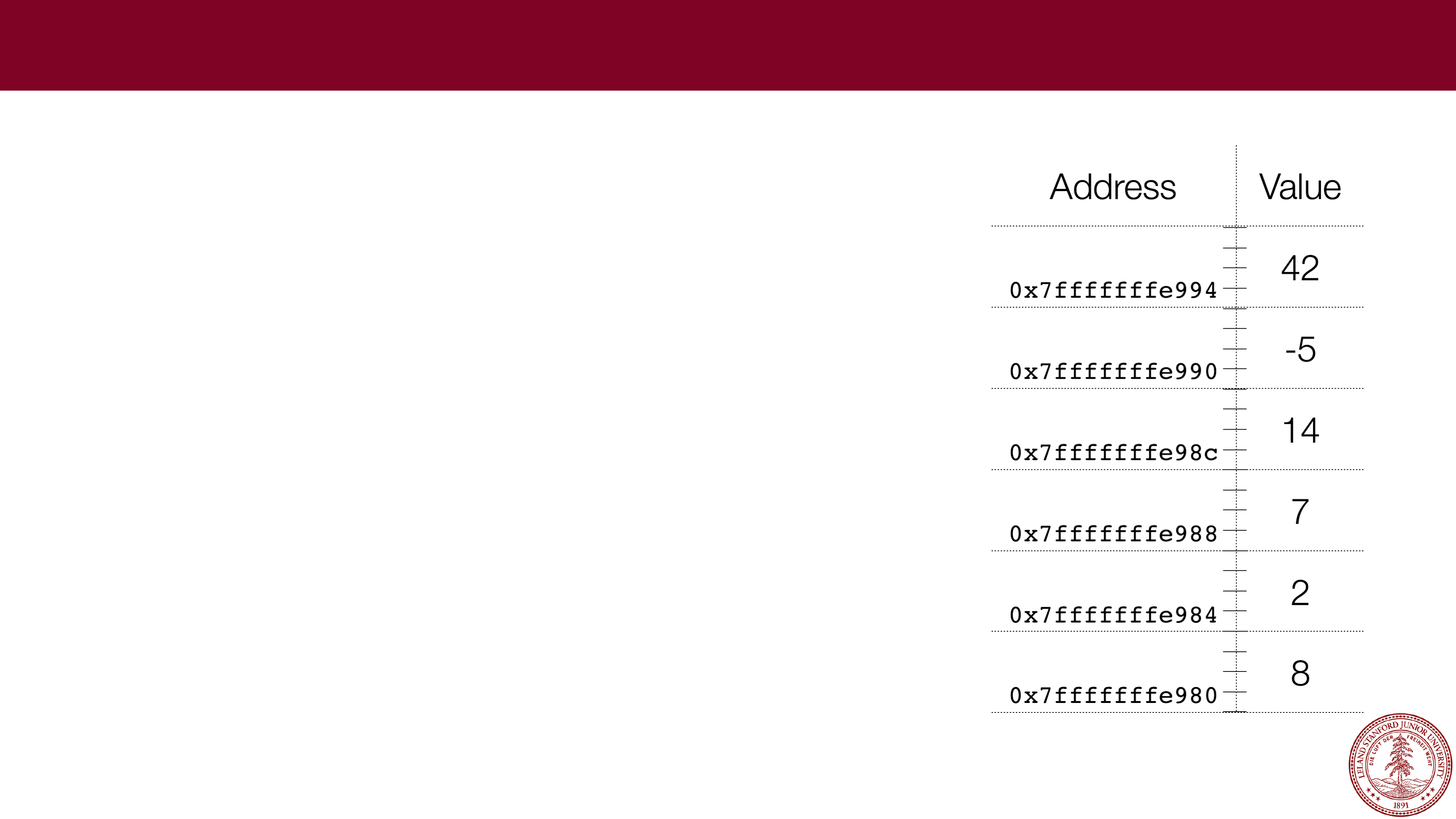
When a function creates a local variable, or
when a function receives parameters, the data
is either kept in
registers
or kept on the stack.
We will cover registers when we get to
assembly language, but for now we will assume
that all of our local variables go on the stack
(and we will compile with "
-O0
" which forces
everything onto the stack.
Arrays are also kept on the stack.
Page 18
Stack Allocation
Let's look at an example:
// file: stack_ex1.c
#include<stdio.h>
#include<stdlib.h>
int main(int argc, char **argv)
{
int a = 0x12345;
int b = 0x98765432;
char str[] = "hello";
short array[] = {0x2,0x4,0x6,0x8,0xa};
printf("0x%x
\
n",a);
printf("0x%x
\
n",b);
printf("%s
\
n",str);
for (int i=0; i < sizeof(array) / sizeof(array[0]); i++) {
printf("0x%x,",array[i]);
}
printf("
\
n");
return 0;
}
Address
Value
0x7fffffffe984
0x7fffffffe980
0x7fffffffe97c
0x7fffffffe978
0x7fffffffe974
0x7fffffffe970
0x7fffffffe96c
0x7fffffffe968
Page 19
Stack Allocation
Let's look at an example:
// file: stack_ex1.c
#include<stdio.h>
#include<stdlib.h>
int main(int argc, char **argv)
{
int a = 0x12345;
int b = 0x98765432;
char str[] = "hello";
short array[] = {0x2,0x4,0x6,0x8,0xa};
printf("0x%x
\
n",a);
printf("0x%x
\
n",b);
printf("%s
\
n",str);
for (int i=0; i < sizeof(array) / sizeof(array[0]); i++) {
printf("0x%x,",array[i]);
}
printf("
\
n");
return 0;
}
Address
Value
0x7fffffffe984
0x7fffffffe980
0x7fffffffe97c
0x7fffffffe978
0x7fffffffe974
0x7fffffffe970
0x7fffffffe96c
0x7fffffffe968
(gdb)
p &a
$16 = (int *) 0x7fffffffe968
$ gcc -g -O0 -std=gnu99 -Wall
stack_ex1.c -o stack_ex1
$ ./stack_ex1
0x12345
0x98765432
hello
0x2,0x4,0x6,0x8,0xa,
$ gdb stack_ex1
(gdb) break 12
Breakpoint 1 at 0x40067d: file
stack_ex1.c, line 12.
(gdb) run
Starting program: stack_ex1
Breakpoint 1, main (argc=1,
argv=0x7fffffffea78) at stack_ex1.c:12
12
printf("0x%x\n",a);
(gdb)
Page 20
Stack Allocation
Let's look at an example:
Address
Value
0x7fffffffe984
0x7fffffffe980
0x7fffffffe97c
0x7fffffffe978
0x7fffffffe974
0x7fffffffe970
0x7fffffffe96c
0x7fffffffe968
0x12345
(gdb)
p &a
$16 = (int *) 0x7fffffffe968
// file: stack_ex1.c
#include<stdio.h>
#include<stdlib.h>
int main(int argc, char **argv)
{
int a = 0x12345;
int b = 0x98765432;
char str[] = "hello";
short array[] = {0x2,0x4,0x6,0x8,0xa};
printf("0x%x
\
n",a);
printf("0x%x
\
n",b);
printf("%s
\
n",str);
for (int i=0; i < sizeof(array) / sizeof(array[0]); i++) {
printf("0x%x,",array[i]);
}
printf("
\
n");
return 0;
}
$ gcc -g -O0 -std=gnu99 -Wall
stack_ex1.c -o stack_ex1
$ ./stack_ex1
0x12345
0x98765432
hello
0x2,0x4,0x6,0x8,0xa,
$ gdb stack_ex1
(gdb) break 12
Breakpoint 1 at 0x40067d: file
stack_ex1.c, line 12.
(gdb) run
Starting program: stack_ex1
Breakpoint 1, main (argc=1,
argv=0x7fffffffea78) at stack_ex1.c:12
12
printf("0x%x\n",a);
(gdb)
Page 21
Stack Allocation
Let's look at an example:
Address
Value
0x7fffffffe984
0x7fffffffe980
0x7fffffffe97c
0x7fffffffe978
0x7fffffffe974
0x7fffffffe970
0x7fffffffe96c
0x7fffffffe968
0x12345
(gdb)
p &a
$16 = (int *) 0x7fffffffe968
(gdb)
p &b
$17 = (int *) 0x7fffffffe96c
// file: stack_ex1.c
#include<stdio.h>
#include<stdlib.h>
int main(int argc, char **argv)
{
int a = 0x12345;
int b = 0x98765432;
char str[] = "hello";
short array[] = {0x2,0x4,0x6,0x8,0xa};
printf("0x%x
\
n",a);
printf("0x%x
\
n",b);
printf("%s
\
n",str);
for (int i=0; i < sizeof(array) / sizeof(array[0]); i++) {
printf("0x%x,",array[i]);
}
printf("
\
n");
return 0;
}
$ gcc -g -O0 -std=gnu99 -Wall
stack_ex1.c -o stack_ex1
$ ./stack_ex1
0x12345
0x98765432
hello
0x2,0x4,0x6,0x8,0xa,
$ gdb stack_ex1
(gdb) break 12
Breakpoint 1 at 0x40067d: file
stack_ex1.c, line 12.
(gdb) run
Starting program: stack_ex1
Breakpoint 1, main (argc=1,
argv=0x7fffffffea78) at stack_ex1.c:12
12
printf("0x%x\n",a);
(gdb)
Page 22
Stack Allocation
Let's look at an example:
Address
Value
0x7fffffffe984
0x7fffffffe980
0x7fffffffe97c
0x7fffffffe978
0x7fffffffe974
0x7fffffffe970
0x7fffffffe96c
0x98765432
0x7fffffffe968
0x12345
(gdb)
p &a
$16 = (int *) 0x7fffffffe968
(gdb)
p &b
$17 = (int *) 0x7fffffffe96c
// file: stack_ex1.c
#include<stdio.h>
#include<stdlib.h>
int main(int argc, char **argv)
{
int a = 0x12345;
int b = 0x98765432;
char str[] = "hello";
short array[] = {0x2,0x4,0x6,0x8,0xa};
printf("0x%x
\
n",a);
printf("0x%x
\
n",b);
printf("%s
\
n",str);
for (int i=0; i < sizeof(array) / sizeof(array[0]); i++) {
printf("0x%x,",array[i]);
}
printf("
\
n");
return 0;
}
$ gcc -g -O0 -std=gnu99 -Wall
stack_ex1.c -o stack_ex1
$ ./stack_ex1
0x12345
0x98765432
hello
0x2,0x4,0x6,0x8,0xa,
$ gdb stack_ex1
(gdb) break 12
Breakpoint 1 at 0x40067d: file
stack_ex1.c, line 12.
(gdb) run
Starting program: stack_ex1
Breakpoint 1, main (argc=1,
argv=0x7fffffffea78) at stack_ex1.c:12
12
printf("0x%x\n",a);
(gdb)
Page 23
Stack Allocation
Let's look at an example:
Address
Value
0x7fffffffe984
0x7fffffffe980
0x7fffffffe97c
0x7fffffffe978
0x7fffffffe974
0x7fffffffe970
0x7fffffffe96c
0x98765432
0x7fffffffe968
0x12345
(gdb)
p &a
$16 = (int *) 0x7fffffffe968
(gdb)
p &b
$17 = (int *) 0x7fffffffe96c
(gdb)
p &array[0]
$18 = (short *) 0x7fffffffe970
// file: stack_ex1.c
#include<stdio.h>
#include<stdlib.h>
int main(int argc, char **argv)
{
int a = 0x12345;
int b = 0x98765432;
char str[] = "hello";
short array[] = {0x2,0x4,0x6,0x8,0xa};
printf("0x%x
\
n",a);
printf("0x%x
\
n",b);
printf("%s
\
n",str);
for (int i=0; i < sizeof(array) / sizeof(array[0]); i++) {
printf("0x%x,",array[i]);
}
printf("
\
n");
return 0;
}
$ gcc -g -O0 -std=gnu99 -Wall
stack_ex1.c -o stack_ex1
$ ./stack_ex1
0x12345
0x98765432
hello
0x2,0x4,0x6,0x8,0xa,
$ gdb stack_ex1
(gdb) break 12
Breakpoint 1 at 0x40067d: file
stack_ex1.c, line 12.
(gdb) run
Starting program: stack_ex1
Breakpoint 1, main (argc=1,
argv=0x7fffffffea78) at stack_ex1.c:12
12
printf("0x%x\n",a);
(gdb)
Page 24
Stack Allocation
Let's look at an example:
Address
Value
0x7fffffffe984
0x7fffffffe980
0x7fffffffe97c
0x7fffffffe978
0xa
0x7fffffffe974
0x8
0x6
0x7fffffffe970
0x4
0x2
0x7fffffffe96c
0x98765432
0x7fffffffe968
0x12345
(gdb)
p &a
$16 = (int *) 0x7fffffffe968
(gdb)
p &b
$17 = (int *) 0x7fffffffe96c
(gdb)
p &array[0]
$18 = (short *) 0x7fffffffe970
// file: stack_ex1.c
#include<stdio.h>
#include<stdlib.h>
int main(int argc, char **argv)
{
int a = 0x12345;
int b = 0x98765432;
char str[] = "hello";
short array[] = {0x2,0x4,0x6,0x8,0xa};
printf("0x%x
\
n",a);
printf("0x%x
\
n",b);
printf("%s
\
n",str);
for (int i=0; i < sizeof(array) / sizeof(array[0]); i++) {
printf("0x%x,",array[i]);
}
printf("
\
n");
return 0;
}
$ gcc -g -O0 -std=gnu99 -Wall
stack_ex1.c -o stack_ex1
$ ./stack_ex1
0x12345
0x98765432
hello
0x2,0x4,0x6,0x8,0xa,
$ gdb stack_ex1
(gdb) break 12
Breakpoint 1 at 0x40067d: file
stack_ex1.c, line 12.
(gdb) run
Starting program: stack_ex1
Breakpoint 1, main (argc=1,
argv=0x7fffffffea78) at stack_ex1.c:12
12
printf("0x%x\n",a);
(gdb)
Page 25
Stack Allocation
Let's look at an example:
Address
Value
0x7fffffffe984
0x7fffffffe980
0x7fffffffe97c
0x7fffffffe978
0xa
0x7fffffffe974
0x8
0x6
0x7fffffffe970
0x4
0x2
0x7fffffffe96c
0x98765432
0x7fffffffe968
0x12345
(gdb)
p &a
$16 = (int *) 0x7fffffffe968
(gdb)
p &b
$17 = (int *) 0x7fffffffe96c
(gdb)
p &array[0]
$18 = (short *) 0x7fffffffe970
(gdb)
p &str[0]
$19 = 0x7fffffffe980 "hello"
// file: stack_ex1.c
#include<stdio.h>
#include<stdlib.h>
int main(int argc, char **argv)
{
int a = 0x12345;
int b = 0x98765432;
char str[] = "hello";
short array[] = {0x2,0x4,0x6,0x8,0xa};
printf("0x%x
\
n",a);
printf("0x%x
\
n",b);
printf("%s
\
n",str);
for (int i=0; i < sizeof(array) / sizeof(array[0]); i++) {
printf("0x%x,",array[i]);
}
printf("
\
n");
return 0;
}
$ gcc -g -O0 -std=gnu99 -Wall
stack_ex1.c -o stack_ex1
$ ./stack_ex1
0x12345
0x98765432
hello
0x2,0x4,0x6,0x8,0xa,
$ gdb stack_ex1
(gdb) break 12
Breakpoint 1 at 0x40067d: file
stack_ex1.c, line 12.
(gdb) run
Starting program: stack_ex1
Breakpoint 1, main (argc=1,
argv=0x7fffffffea78) at stack_ex1.c:12
12
printf("0x%x\n",a);
(gdb)
Page 26
Stack Allocation
Let's look at an example:
Address
Value
0x7fffffffe984
\0
o
0x7fffffffe980
l
l
e
h
0x7fffffffe97c
0x7fffffffe978
0xa
0x7fffffffe974
0x8
0x6
0x7fffffffe970
0x4
0x2
0x7fffffffe96c
0x98765432
0x7fffffffe968
0x12345
(gdb)
p &a
$16 = (int *) 0x7fffffffe968
(gdb)
p &b
$17 = (int *) 0x7fffffffe96c
(gdb)
p &array[0]
$18 = (short *) 0x7fffffffe970
(gdb)
p &str[0]
$19 = 0x7fffffffe980 "hello"
// file: stack_ex1.c
#include<stdio.h>
#include<stdlib.h>
int main(int argc, char **argv)
{
int a = 0x12345;
int b = 0x98765432;
char str[] = "hello";
short array[] = {0x2,0x4,0x6,0x8,0xa};
printf("0x%x
\
n",a);
printf("0x%x
\
n",b);
printf("%s
\
n",str);
for (int i=0; i < sizeof(array) / sizeof(array[0]); i++) {
printf("0x%x,",array[i]);
}
printf("
\
n");
return 0;
}
$ gcc -g -O0 -std=gnu99 -Wall
stack_ex1.c -o stack_ex1
$ ./stack_ex1
0x12345
0x98765432
hello
0x2,0x4,0x6,0x8,0xa,
$ gdb stack_ex1
(gdb) break 12
Breakpoint 1 at 0x40067d: file
stack_ex1.c, line 12.
(gdb) run
Starting program: stack_ex1
Breakpoint 1, main (argc=1,
argv=0x7fffffffea78) at stack_ex1.c:12
12
printf("0x%x\n",a);
(gdb)
Page 27
 Stack Allocation
Let's look at an example:
(gdb)
p &a
$16 = (int *) 0x7fffffffe968
(gdb)
p &b
$17 = (int *) 0x7fffffffe96c
(gdb)
p &array[0]
$18 = (short *) 0x7fffffffe970
(gdb)
p &str[0]
$19 = 0x7fffffffe980 "hello"
(gdb)
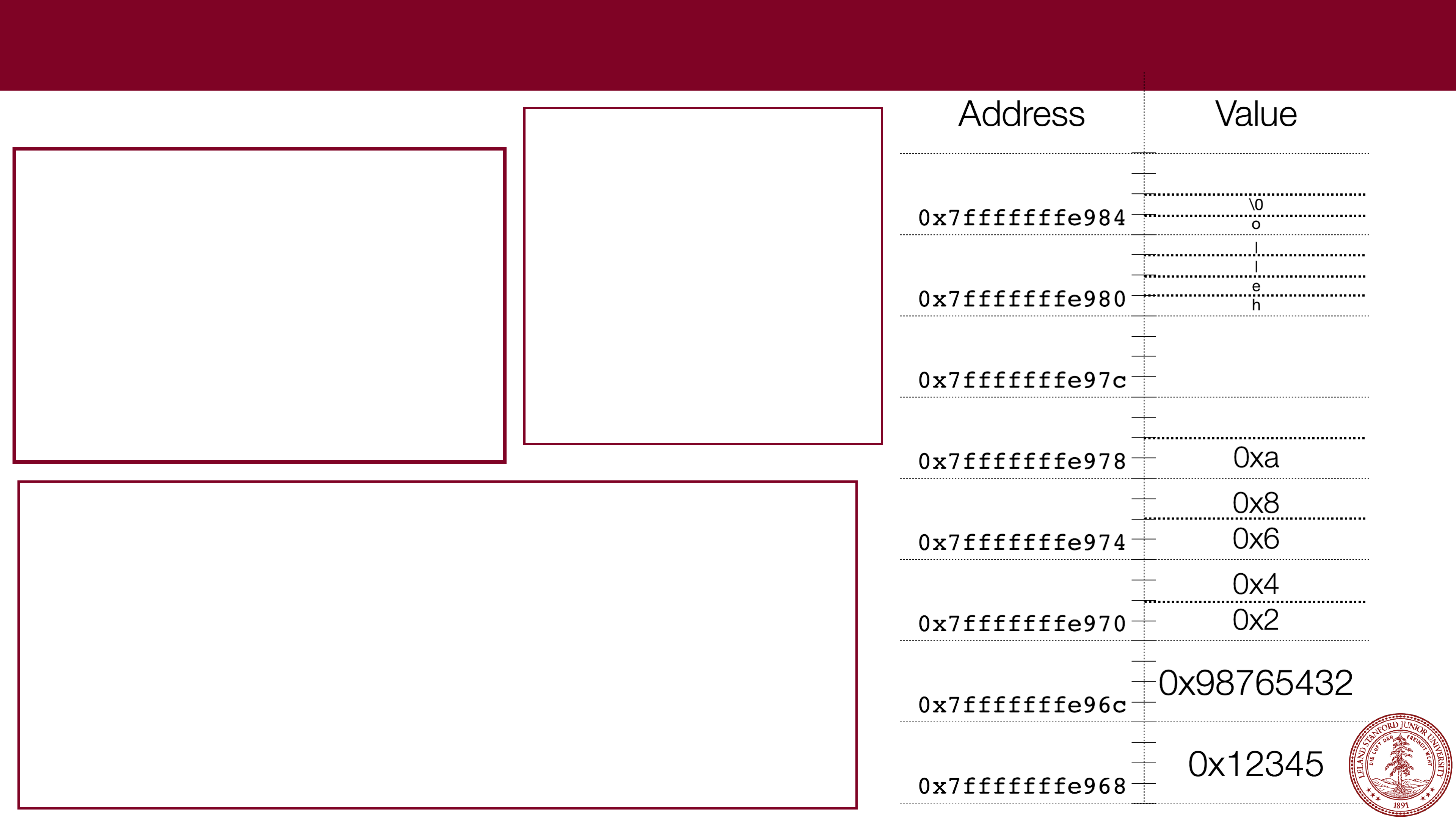
x/30bx &a
0x7fffffffe968: 0x45 0x23 0x01 0x00 0x32 0x54 0x76 0x98
0x7fffffffe970: 0x02 0x00 0x04 0x00 0x06 0x00 0x08 0x00
0x7fffffffe978: 0x0a 0x00 0x40 0x00 0x00 0x00 0x00 0x00
0x7fffffffe980: 0x68 0x65 0x6c 0x6c 0x6f 0x00
(gdb)
// file: stack_ex1.c
#include<stdio.h>
#include<stdlib.h>
int main(int argc, char **argv)
{
int a = 0x12345;
int b = 0x98765432;
char str[] = "hello";
short array[] = {0x2,0x4,0x6,0x8,0xa};
printf("0x%x
\
n",a);
printf("0x%x
\
n",b);
printf("%s
\
n",str);
for (int i=0; i < sizeof(array) / sizeof(array[0]); i++) {
printf("0x%x,",array[i]);
}
printf("
\
n");
return 0;
}
$ gcc -g -O0 -std=gnu99 -Wall
stack_ex1.c -o stack_ex1
$ ./stack_ex1
0x12345
0x98765432
hello
0x2,0x4,0x6,0x8,0xa,
$ gdb stack_ex1
(gdb) break 12
Breakpoint 1 at 0x40067d: file
stack_ex1.c, line 12.
(gdb) run
Starting program: stack_ex1
Breakpoint 1, main (argc=1,
argv=0x7fffffffea78) at stack_ex1.c:12
12
printf("0x%x\n",a);
(gdb)
Page 28
3 minute break
Page 29
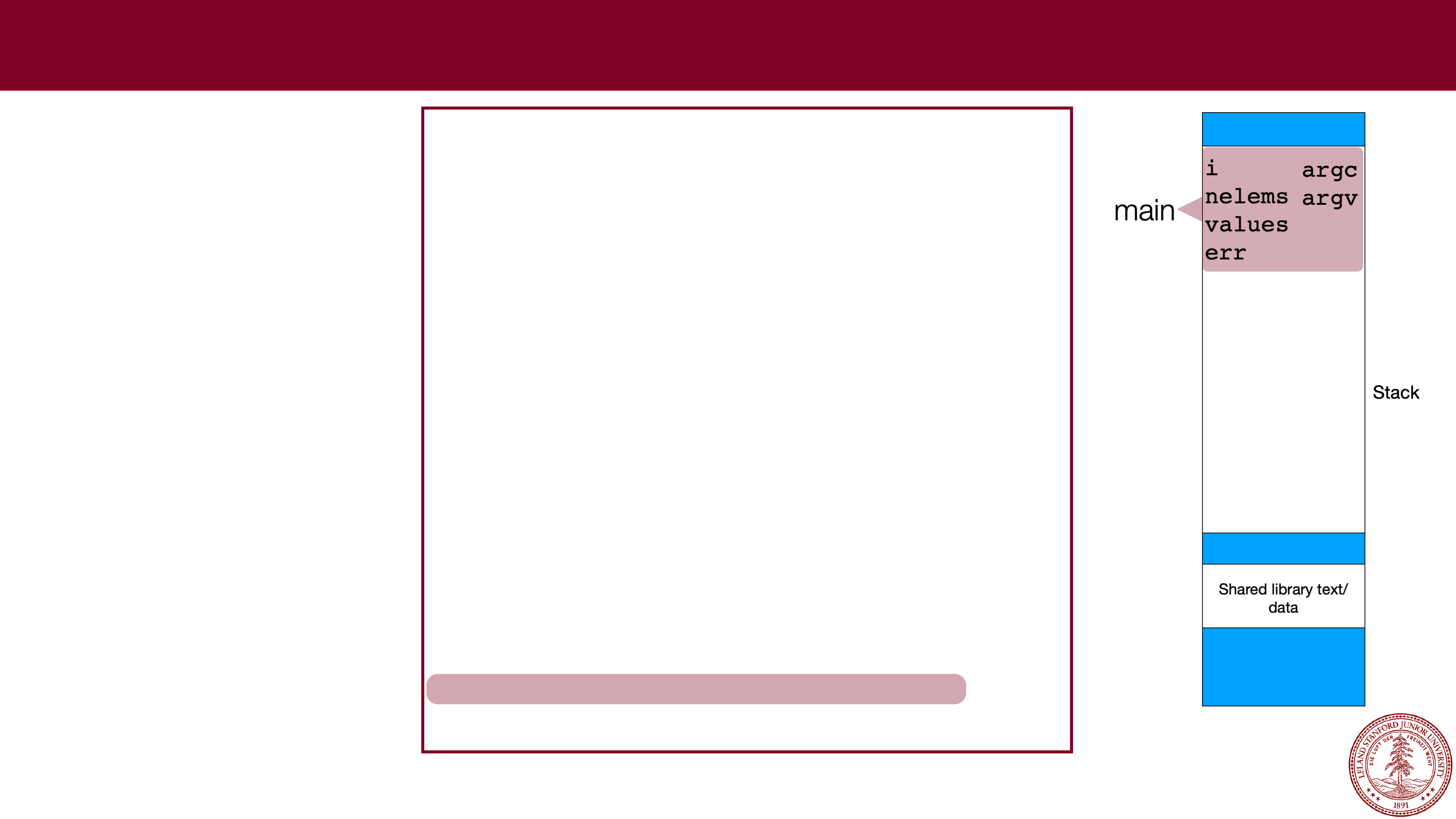
 Stack Frames
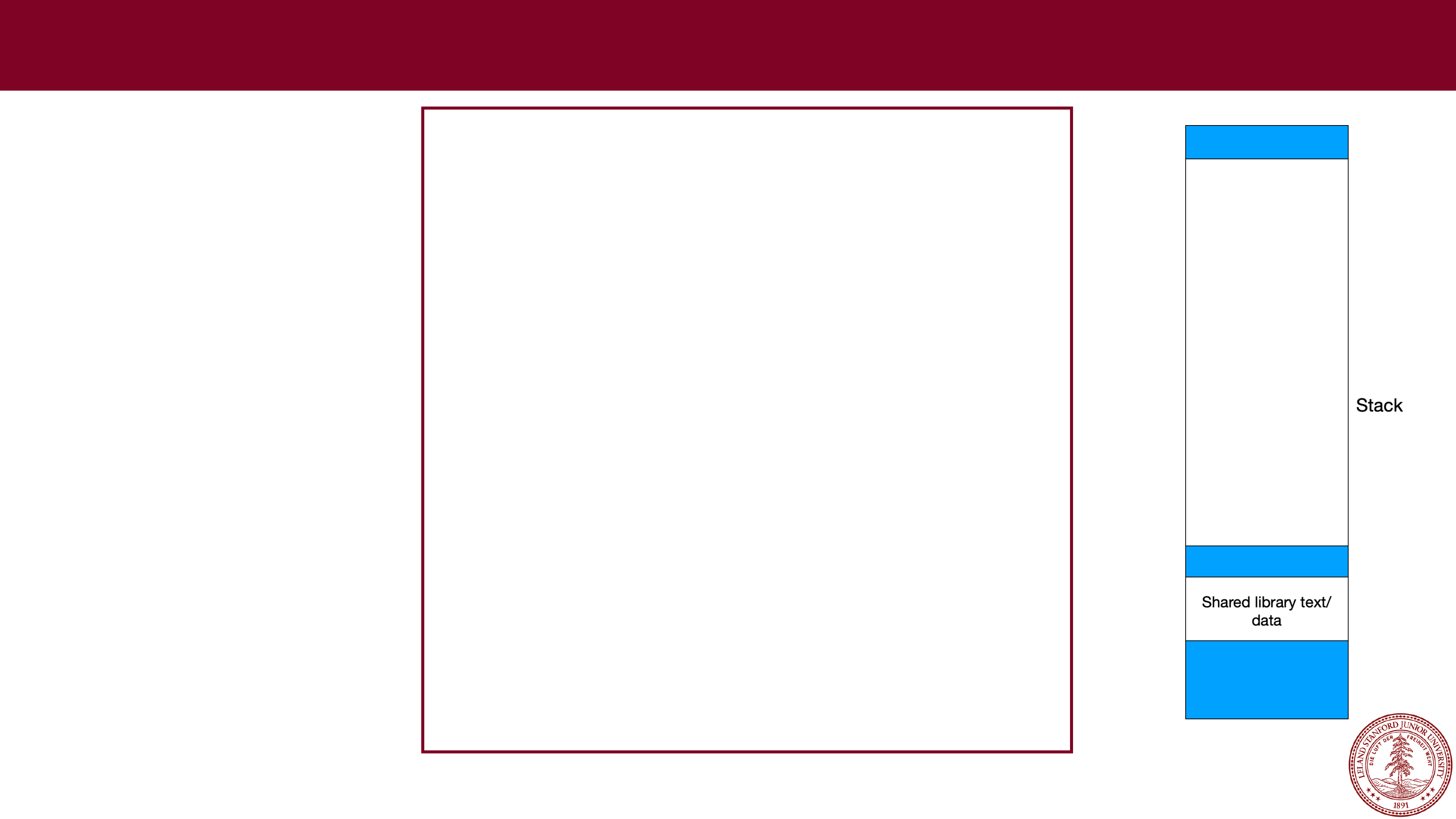
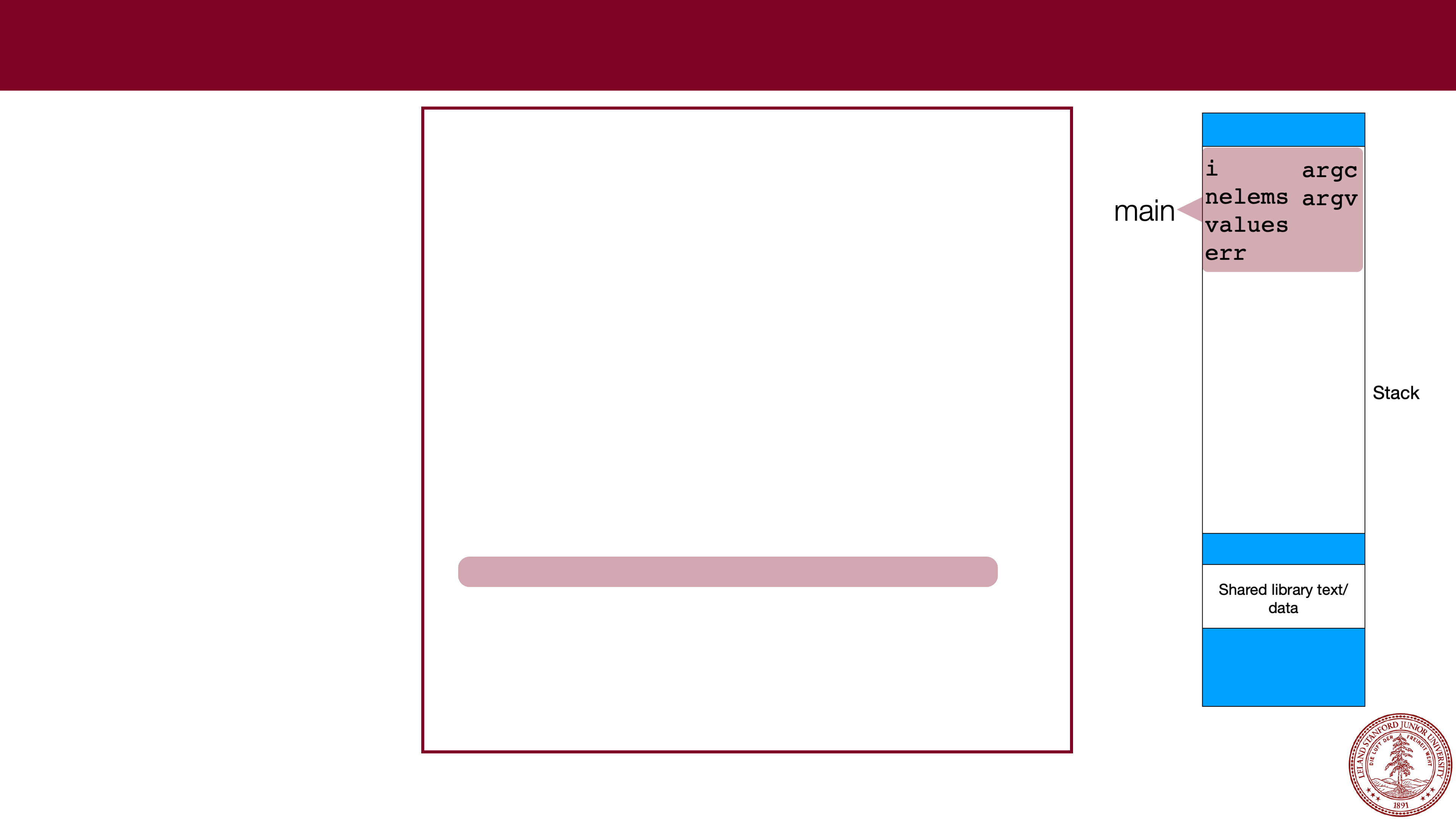
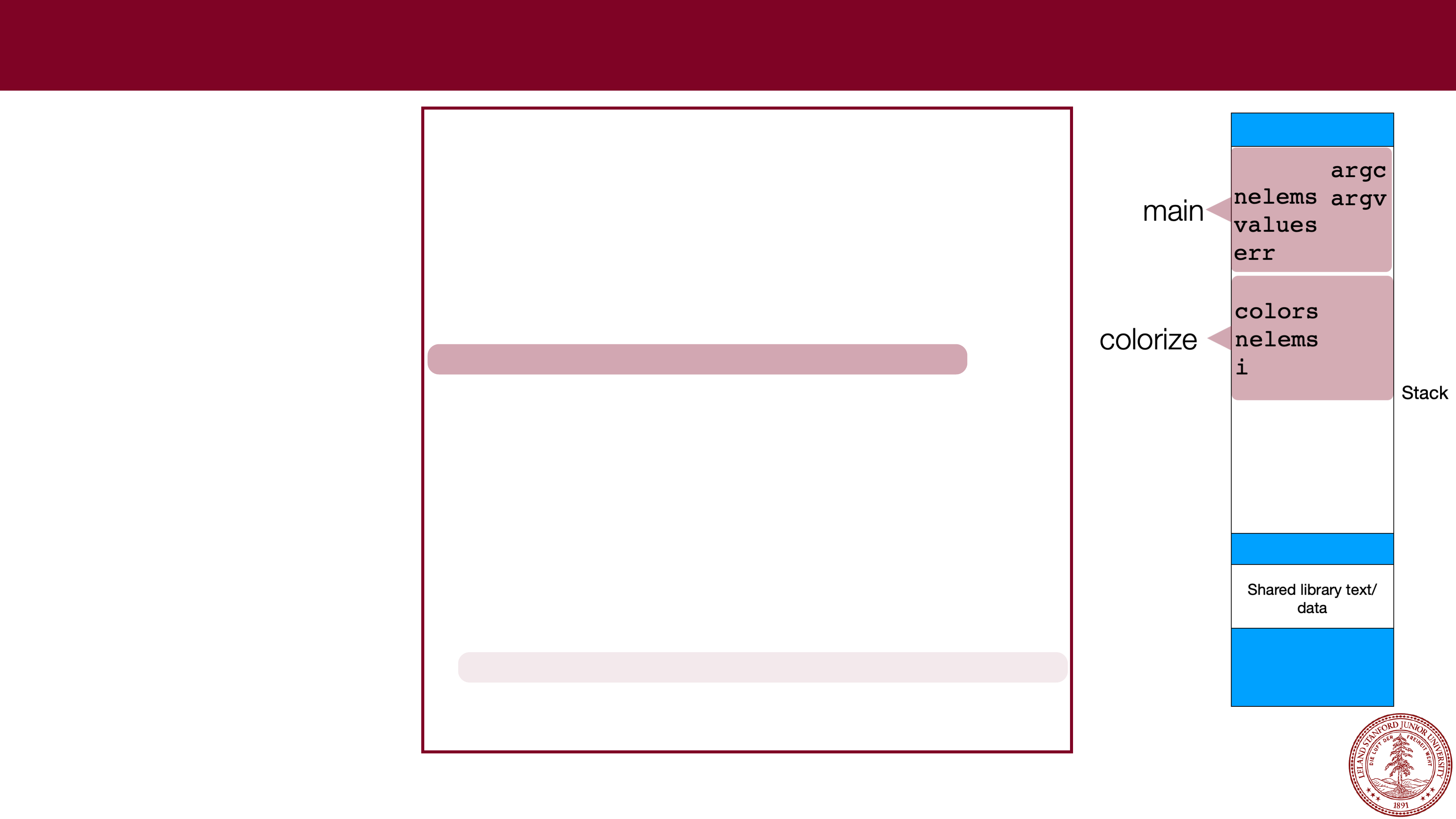
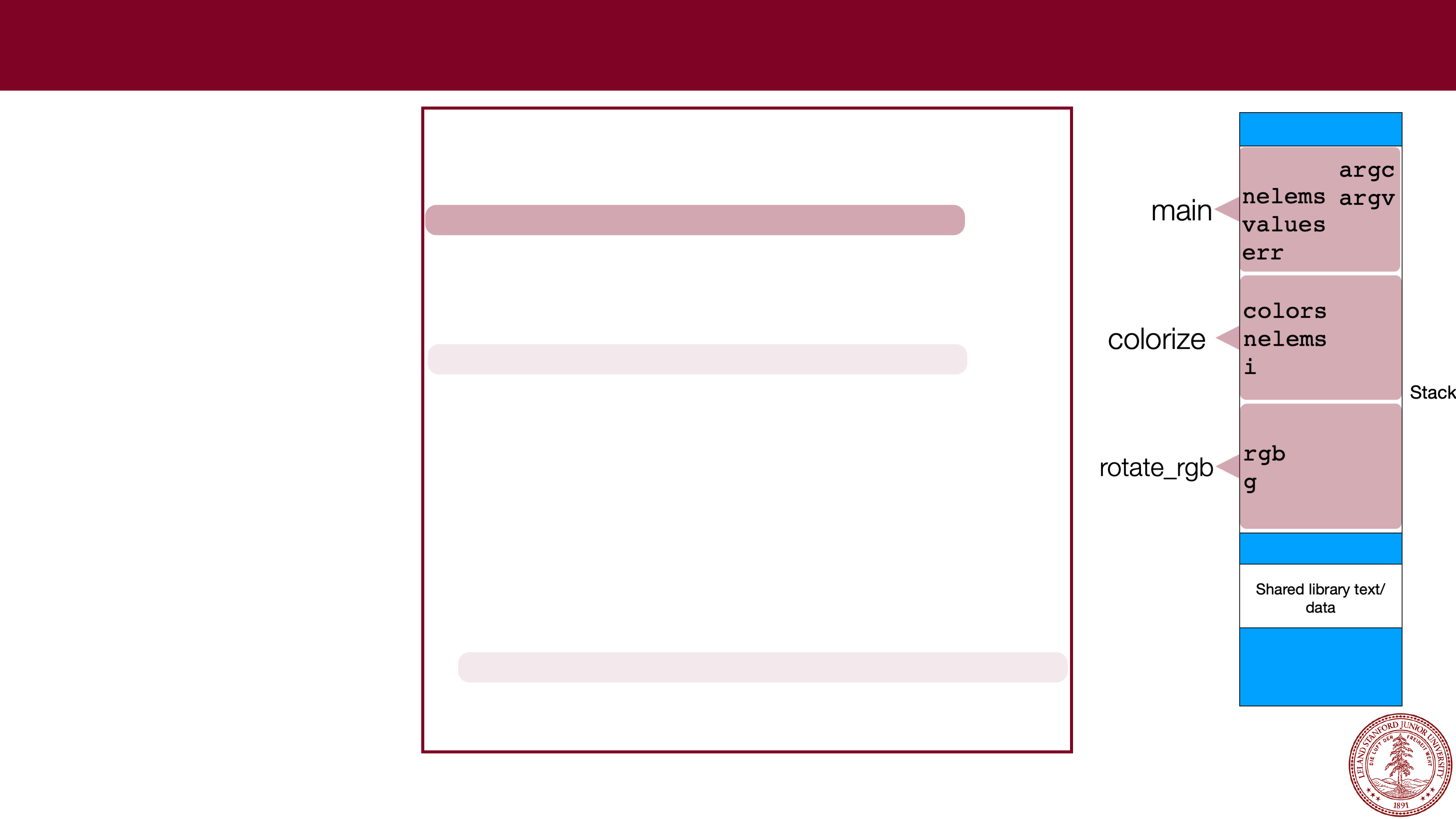
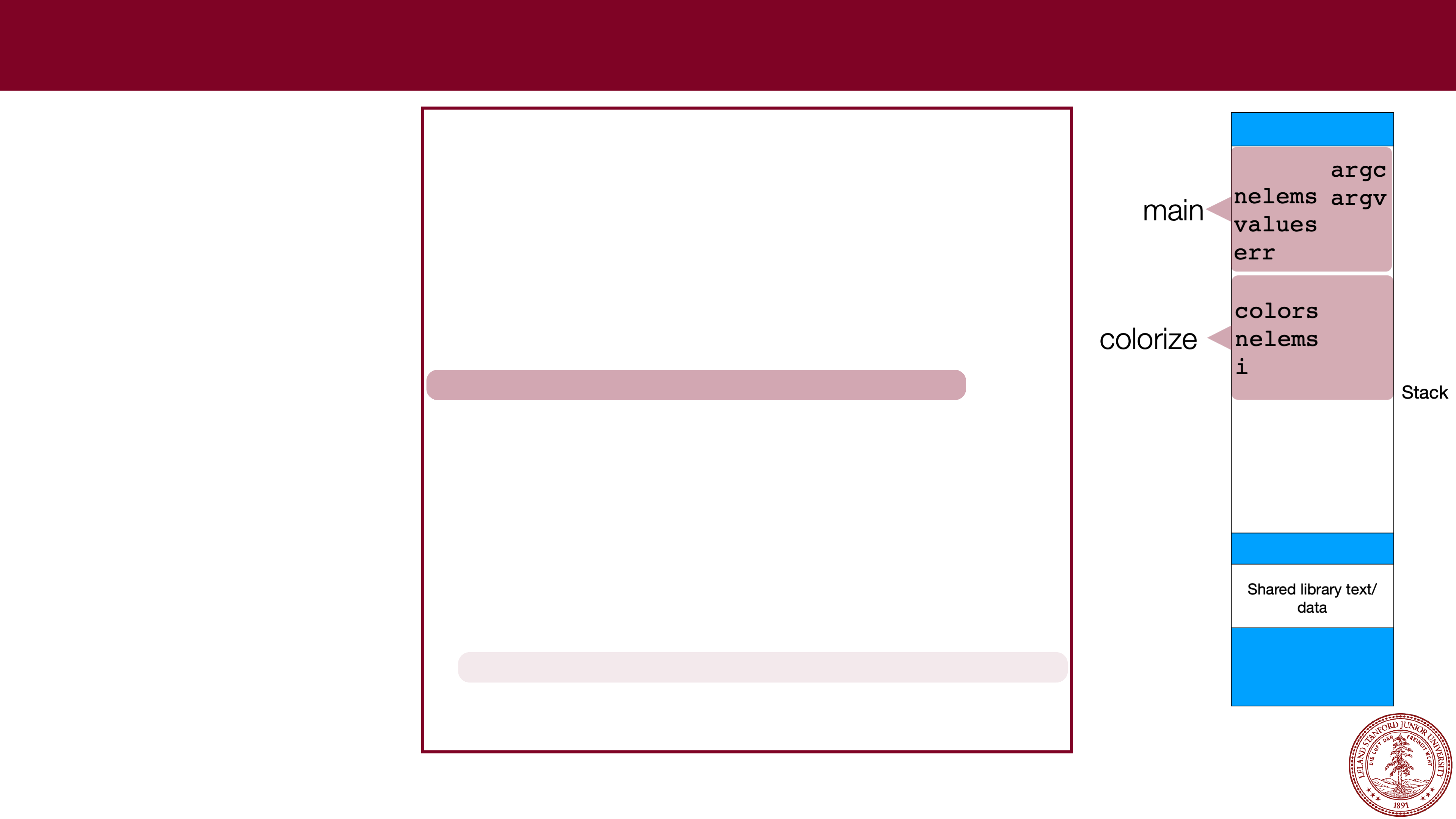
Every time you call a
function, the data for
the current function
needs to be saved.
The x86 operating
system handles this in
an elegant manner: a
function just uses
memory farther down
in the stack, and
leaves the part of the
stack that the calling
function was using
unchanged. Example:
int rotate_rgb(int rgb)
{
// rgb
-
> brg
int g = ((rgb & 0xff) << 16);
return (rgb >> 8) | g;
}
void colorize(int *colors, size_t nelems)
{
for (int i=0; i < nelems; i++) {
colors[i] = rotate_rgb(colors[i]);
}
}
int main(int argc, char **argv)
{
size_t nelems = argc
-
1;
int values[nelems];
char *err;
for (int i=0; i < argc
-
1; i++) {
values[i] = strtol(argv[i+1],&err,0);
}
print_colors(values, nelems);
colorize(values,sizeof(values)/sizeof(values[0]));
print_colors(values, nelems);
return 0;
}
Page 30
 Stack Frames
Every time you call a
function, the data for
the current function
needs to be saved.
The x86 operating
system handles this in
an elegant manner: a
function just uses
memory farther down
in the stack, and
leaves the part of the
stack that the calling
function was using
unchanged. Example:
int rotate_rgb(int rgb)
{
// rgb
-
> brg
int g = ((rgb & 0xff) << 16);
return (rgb >> 8) | g;
}
void colorize(int *colors, size_t nelems)
{
for (int i=0; i < nelems; i++) {
colors[i] = rotate_rgb(colors[i]);
}
}
int main(int argc, char **argv)
{
size_t nelems = argc
-
1;
int values[nelems];
char *err;
for (int i=0; i < argc
-
1; i++) {
values[i] = strtol(argv[i+1],&err,0);
}
print_colors(values, nelems);
colorize(values,sizeof(values)/sizeof(values[0]));
print_colors(values, nelems);
return 0;
}
Page 31
 Stack Frames
Every time you call a
function, the data for
the current function
needs to be saved.
The x86 operating
system handles this in
an elegant manner: a
function just uses
memory farther down
in the stack, and
leaves the part of the
stack that the calling
function was using
unchanged. Example:
int rotate_rgb(int rgb)
{
// rgb
-
> brg
int g = ((rgb & 0xff) << 16);
return (rgb >> 8) | g;
}
void colorize(int *colors, size_t nelems)
{
for (int i=0; i < nelems; i++) {
colors[i] = rotate_rgb(colors[i]);
}
}
int main(int argc, char **argv)
{
size_t nelems = argc
-
1;
int values[nelems];
char *err;
for (int i=0; i < argc
-
1; i++) {
values[i] = strtol(argv[i+1],&err,0);
}
print_colors(values, nelems);
colorize(values,sizeof(values)/sizeof(values[0]));
print_colors(values, nelems);
return 0;
}
Page 32
 Stack Frames
Every time you call a
function, the data for
the current function
needs to be saved.
The x86 operating
system handles this in
an elegant manner: a
function just uses
memory farther down
in the stack, and
leaves the part of the
stack that the calling
function was using
unchanged. Example:
int rotate_rgb(int rgb)
{
// rgb
-
> brg
int g = ((rgb & 0xff) << 16);
return (rgb >> 8) | g;
}
void colorize(int *colors, size_t nelems)
{
for (int i=0; i < nelems; i++) {
colors[i] = rotate_rgb(colors[i]);
}
}
int main(int argc, char **argv)
{
size_t nelems = argc
-
1;
int values[nelems];
char *err;
for (int i=0; i < argc
-
1; i++) {
values[i] = strtol(argv[i+1],&err,0);
}
print_colors(values, nelems);
colorize(values,sizeof(values)/sizeof(values[0]));
print_colors(values, nelems);
return 0;
}
Page 33
 Stack Frames
Every time you call a
function, the data for
the current function
needs to be saved.
The x86 operating
system handles this in
an elegant manner: a
function just uses
memory farther down
in the stack, and
leaves the part of the
stack that the calling
function was using
unchanged. Example:
int rotate_rgb(int rgb)
{
// rgb
-
> brg
int g = ((rgb & 0xff) << 16);
return (rgb >> 8) | g;
}
void colorize(int *colors, size_t nelems)
{
for (int i=0; i < nelems; i++) {
colors[i] = rotate_rgb(colors[i]);
}
}
int main(int argc, char **argv)
{
size_t nelems = argc
-
1;
int values[nelems];
char *err;
for (int i=0; i < argc
-
1; i++) {
values[i] = strtol(argv[i+1],&err,0);
}
print_colors(values, nelems);
colorize(values,sizeof(values)/sizeof(values[0]));
print_colors(values, nelems);
return 0;
}
Page 34
 Stack Frames
Every time you call a
function, the data for
the current function
needs to be saved.
The x86 operating
system handles this in
an elegant manner: a
function just uses
memory farther down
in the stack, and
leaves the part of the
stack that the calling
function was using
unchanged. Example:
int rotate_rgb(int rgb)
{
// rgb
-
> brg
int g = ((rgb & 0xff) << 16);
return (rgb >> 8) | g;
}
void colorize(int *colors, size_t nelems)
{
for (int i=0; i < nelems; i++) {
colors[i] = rotate_rgb(colors[i]);
}
}
int main(int argc, char **argv)
{
size_t nelems = argc
-
1;
int values[nelems];
char *err;
for (int i=0; i < argc
-
1; i++) {
values[i] = strtol(argv[i+1],&err,0);
}
print_colors(values, nelems);
colorize(values,sizeof(values)/sizeof(values[0]));
print_colors(values, nelems);
return 0;
}
Page 35
 Parameter Passing
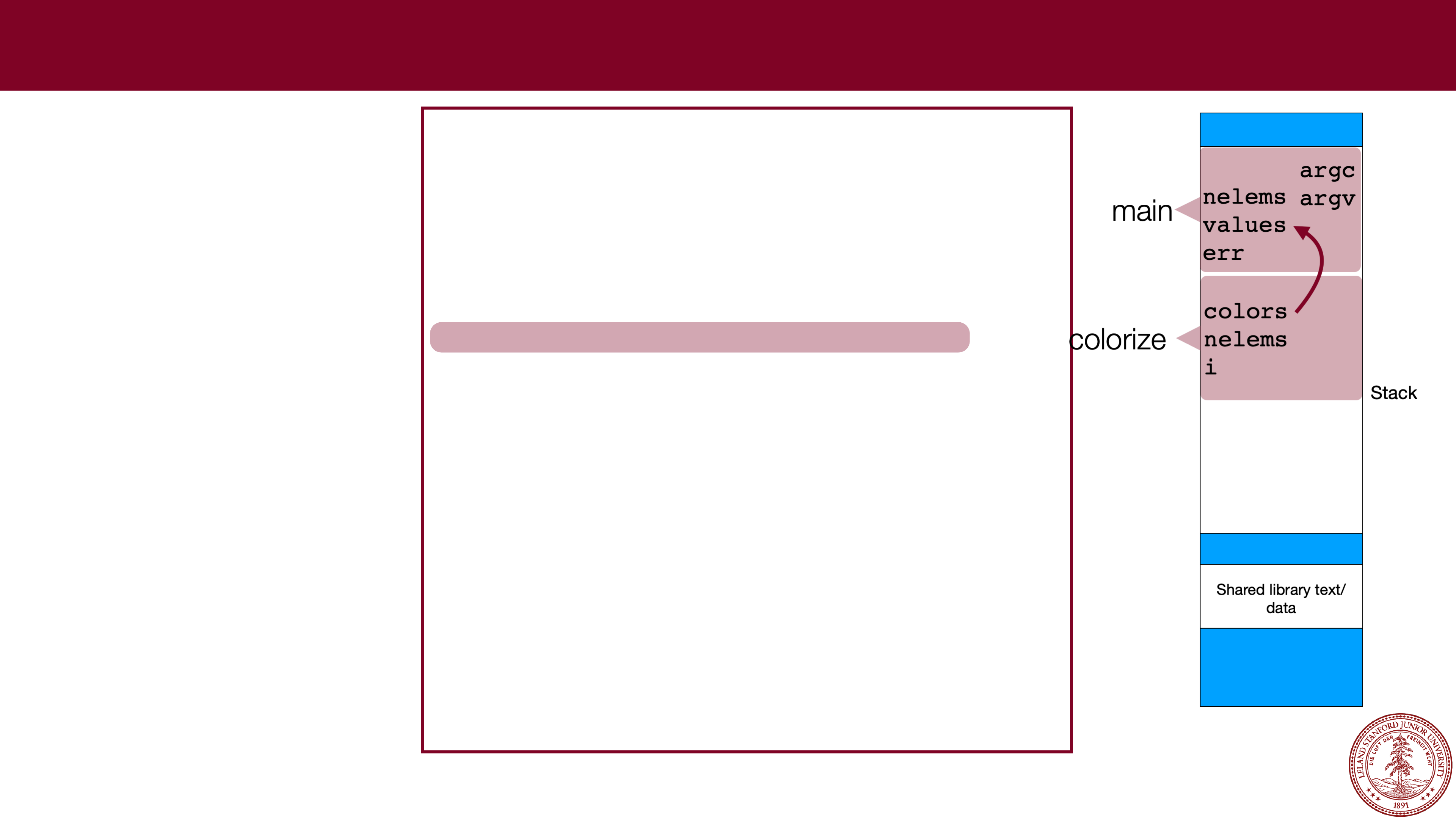
Parameters can also
be put onto the stack,
and they just behave
like local variables.
They might actually
point to other
elements on the
stack.
In our example, colors
points to the values
array. Non-pointers
are just copied (e.g.,
nelems
).
int rotate_rgb(int rgb)
{
// rgb
-
> brg
int g = ((rgb & 0xff) << 16);
return (rgb >> 8) | g;
}
void colorize(int *colors, size_t nelems)
{
for (int i=0; i < nelems; i++) {
colors[i] = rotate_rgb(colors[i]);
}
}
int main(int argc, char **argv)
{
size_t nelems = argc
-
1;
int values[nelems];
char *err;
for (int i=0; i < argc
-
1; i++) {
values[i] = strtol(argv[i+1],&err,0);
}
print_colors(values, nelems);
colorize(values,sizeof(values)/sizeof(values[0]));
print_colors(values, nelems);
return 0;
}
Page 36
Why we like stack allocation
It is fast
. Allocating space on the stack is efficient because your program
already has access to the memory.
It is convenient
. When you leave a function, all your stack-allocated data is
left in place, and there isn't anything to clean up. Think of the stack as
"scratch space" where your program can jot things down when it needs
them inside a function. The scope (lifetime) of the data is inside the function,
so it keeps things tidy.
Type safety
. You are controlling the type of the variables, and therefore the
compiler can do lots of checks on the data. We will see that this isn't always
the case with heap memory.
Page 37
Why we dislike stack allocation
It isn't that plentiful
. You're limited to 8MB of data for your program, by
default (you can change this before you run the program if you want). This
might seem like a good deal of space, but if your program needs more
space, you can't get it from the stack!
Size fixed at declaration, with no option to resize
. You can't resize an
array, and once you allocate it, it is there for the lifetime of your function or
block.
Limited scope
. Once the function or block is finished, your stack-based
memory is gone! You can't return a pointer to a stack array, for instance
(well, you can, but your program will be corrupted).
Page 38
Dynamic Allocation (malloc / realloc / free)
"Dynamic allocation" should be familiar to you if you took CS 106B, where you
used the
new
and delete operators to request memory for arrays and objects.
In C, we don't have objects, but we can request memory from the heap, using
three functions:
malloc
calloc
realloc
and we return the memory to the operating system using
free
.
Page 39
malloc
The most common method for requesting memory from the heap is by using
malloc
. The function is used to allocate a specified number of bytes:
void *malloc(size_t size);
Size is always in
bytes
, so often you need to calculate the number of bytes with
sizeof
and a multiplication.
malloc returns a "
void *
" pointer, which basically means that you can assign
the return value to any pointer. Example:
int *scores = malloc(20 * sizeof(int)); // allocate an array of 20 ints.
(In reality, this is just an allocation of 80 bytes, which the compiler will treat as an
int
array)
If malloc returns
NULL
, then there wasn't enough memory for the request. :(
Page 40
calloc
calloc
is like malloc, except that it takes two parameters which are multiplied to
calculate the number of bytes, and it
zeros
the memory for you (
malloc
does
not
zero the memory!*)
void *calloc(size_t nmemb, size_t size);
nmemb * size
will be bytes, so the following would be functionally equivalent:
int *scores = calloc(20, sizeof(int)); // allocate and zero 20 ints
// alternate (but slower)
int *scores = malloc(20 * sizeof(int)); // allocate an array of 20 ints.
for (int i=0; i < 20; i++) scores[i] = 0;
* it's a bit more subtle than that
-- new memory that your process hasn't used before will be zeroed for security reasons by
malloc
, but if the OS re-issues you memory, it won't be zeroed.
Page 41
realloc
realloc
can be used to (potentially) change the size of the memory block
pointed to by its pointer:
void *realloc(void *ptr, size_t size);
The
realloc function returns a pointer to the memory block, which will often be
the same pointer you pass in as
ptr
. If it needs to move the data, it moves it for
you,
frees the old memory, and then passes back a different pointer. If the
request fails, it returns
NULL
, but the original memory is not affected (e.g., your
original pointer is still valid). Example:
int *values = malloc(10 * sizeof(int)); // allocate space for 10 ints
... // fill up values, etc.
int *new_values = realloc(20 * sizeof(int)); // increase the memory to 20 ints
if (new_values != NULL) values = new_values;
else { ...request failed, deal with gracefully }
Page 42
free
When a function uses
malloc
,
calloc
, and
realloc
, the function is
responsible for returning the memory to the operating system when it no longer
needs it. Un-returned memory is called a
memory leak
, and wastes memory.
To return memory, the
free
function is used:
void free(void *ptr);
ptr
must point to a previously allocated block (or it can be
NULL
). Once a
program frees memory,
it cannot be used again
. The pointer can, of course, be
re-used to point elsewhere.
Page 43
dynamic memory allocation example
// file: allocation.c
#include<stdio.h>
#include<stdlib.h>
#include<error.h>
int main(int argc, char **argv)
{
int nelems = argc
-
1;
int *scores = malloc(nelems * sizeof(int)); // allocate an array for args.
if (scores == NULL) {
error(1,0,"Could not allocate memory!");
}
for (int i=0; i < nelems; i++) {
scores[i] = atoi(argv[i+1]);
}
// let's add some more scores
nelems += 2;
int *new_scores = realloc(scores,nelems * sizeof(int));
if (new_scores == NULL) {
error(1,0,"Could not reallocate memory!");
}
scores = new_scores;
scores[nelems
-
2] = 90;
scores[nelems
-
1] = 95;
for (int i=0; i < nelems; i++) {
printf("%d",scores[i]);
i == nelems
-
1 ? printf("
\
n") : printf(",");
}
free(scores);
return 0;
}
$ ./allocation 90 85 92
90,85,92,90,95
$ valgrind ./allocation 90 85 92
==6038== Memcheck, a memory error detector
==6038== Copyright (C) 2002-2015, and GNU GPL'd, by Julian Seward et al.
==6038== Using Valgrind-3.11.0 and LibVEX; rerun with -h for copyright info
==6038== Command: ./allocation 90 85 92
==6038==
90,85,92,90,95
==6038==
==6038== HEAP SUMMARY:
==6038== in use at exit: 0 bytes in 0 blocks
==6038== total heap usage: 3 allocs, 3 frees, 1,056 bytes allocated
==6038==
==6038== All heap blocks were freed -- no leaks are possible
==6038==
==6038== For counts of detected and suppressed errors, rerun with: -v
==6038== ERROR SUMMARY: 0 errors from 0 contexts (suppressed: 0 from 0)
We can use valgrind to determine if there
are memory leaks:
You want to see the "All heap blocks were
freed" message.
Page 44
References and Advanced Reading
•
References:
•
K&R C Programming (from our course)
•
Course Reader, C Primer
•Awesome C book:
http://books.goalkicker.com/CBook
•
Advanced Reading:
•
virtual memory:
https://en.wikipedia.org/wiki/Virtual_memory
Page 45
Extra Slides
Page 46
Values of variables
char arr1[8]; // assume arr1 is at address 0x7ffdf94d7830
char *ptr1; // assume ptr1 is at address 0x7ffdf94d77e0
char *arr2[8]; // assume arr2 is at address 0x7ffdf94d77f0
char **ptr2; // assume ptr2 is at address 0x7ffdf94d77e8
What values print out?
printf("%p\n",arr1);
printf("%lu\n",sizeof(arr1));
printf("%p\n",ptr1);
printf("%lu\n",sizeof(ptr1));
printf("%p\n",arr2);
printf("%lu\n",sizeof(arr2));
printf("%p\n",ptr2);
printf("%lu\n",sizeof(ptr1));
Page 47
Values of variables
char arr1[8]; // assume arr1 is at address 0x7ffdf94d7830
char *ptr1 = 0; // assume ptr1 is at address 0x7ffdf94d77e0
char *arr2[8]; // assume arr2 is at address 0x7ffdf94d77f0
char **ptr2 = 0; // assume ptr2 is at address 0x7ffdf94d77e8
What values print out?
printf("%p\n",arr1); // 0x7ffdf84d7830
printf("%lu\n",sizeof(arr1)); // 8
printf("%p\n",ptr1); // 0 (or (nil))
printf("%lu\n",sizeof(ptr1)); // 8
printf("%p\n",arr2); // 0x7ffdf94d77f0
printf("%lu\n",sizeof(arr2)); // 64
printf("%p\n",ptr2); // 0 (or (nil))
printf("%lu\n",sizeof(ptr1)); // 8
Page 48
Values of variables
char *str = "a string"; // assume str has the value of 0x40073d
// assume str's address is 0x7ffecdcbcc38
What bytes get moved, and where do they move to?
memmove(arr1,&str,8);
memmove(&ptr1,&str,8);
memmove(arr1,str,8);
memmove(ptr1,&str,8);
char arr1[8]; // assume arr1 is at address 0x7ffdf94d7830
char *ptr1 = 0; // assume ptr1 is at address 0x7ffdf94d77e0
Page 49
Values of variables
char *str = "a string"; // assume str has the value of 0x40073d
// assume str's address is 0x7ffecdcbcc38
What bytes get moved, and where do they move to?
memmove(arr1,&str,8); // "0x40073d" is moved from 0x7ffecdcbcc38 to 0x7ffdf94d7830
memmove(&ptr1,&str,8); // "0x40073d" is moved from 0x7ffecdcbcc38 to 0x7ffdf94d77e0
memmove(arr1,str,8); // "a string" (without
\
0) is moved from 0x40073d to
// 0x7ffdf94d7830
memmove(ptr1,&str,8); // seg fault!
char arr1[8]; // assume arr1 is at address 0x7ffdf94d7830
char *ptr1 = 0; // assume ptr1 is at address 0x7ffdf94d77e0