Page 1

Monday, February 7th, 2022
Computer Systems
Winter 2022
Stanford University
Computer Science Department
Reading: Course Reader: x86-64 Assembly
Language, Textbook: Chapter 3.1
-
3.4
Lecturer: Chris Gregg
CS 107
Lecture 10:
Assembly Part I
(gdb)

──looper.c────────────────────────────────────────────────

3


4 void count_from_offset(int offset)


5 {

B+>

6 for (int i=0; i < 10; i++) {


7 printf("Count: %d\n",i+offset);


8 }


9 }


10


──────────────────────────────────────────────────────────

0x400531 <count_from_offset+4> sub $0x20,%rsp


0x400535 <count_from_offset+8> mov %edi,-0x14(%rbp)

B+>

0x400538 <count_from_offset+11> movl $0x0,
-
0x4(%rbp)


0x40053f <count_from_offset+18> jmp 0x40055e <count_fro


0x400541 <count_from_offset+20> mov -0x14(%rbp),%eax


0x400544 <count_from_offset+23> mov -0x4(%rbp),%edx


0x400547 <count_from_offset+26> add %edx,%eax


0x400549 <count_from_offset+28> mov %eax,%esi


──────────────────────────────────────────────────────────
child process 8824 In: count_from_off* Line: 6 PC: 0x400538
(gdb)
6 for (int i=0; i < 10; i++) {
0x400538 <count_from_offset+11> movl $0x0,
-
0x4(%rbp)

Page 2

Today's Topics


Logistics


Reading: Course Reader: x86-64 Assembly Language;Textbook, Chapter
3.1
-
3.4


Programs from class: /afs/ir/class/cs107/samples/lect10


Introduction to x86 Assembly Language


Overview of assembly code and the weirdness of x86 (primarily historical)


First example: HelloWorld, gcc -S, gdbtui


Second Example: Looper


Registers


Data formats


Addressing Modes


The mov instruction


Access to variables of various types

Page 3

What is Assembly Code?


Computers execute "machine code," which is a sequence
of bytes that encode low
-
level operations for manipulating
data, managing memory, read and write from storage,
and communicate with networks.


The "assembly code" for a computer is a textual
representation of the machine code giving the individual
instructions to the underlying machine.

Page 4

What is Assembly Code?


gcc generates assembly code from C code


Assembly is raw — there is no type checking, and the
instructions are simple. It is unique to the type of
processor (e.g., the assembly for your computer cannot
run on your phone)


Humans can write assembly (and, in fact, in the early days
of computing they had to write assembly), but it is more
productive to be able to read and understand what the
compiler produces, than to write it by hand.


gcc is almost always going to produce better optimized
code than a human could, and understanding what the
compiler produces is important.

Page 5

Intel 8086 chip, circa 1978/1984 x86 Assembly


The Intel-based computers we use are direct descendants
of Intel's 16
-bit, 1978 processor with the name 8086.


Intel has taken a strict backwards-compatibility approach
to new processors, and their 32
- and 64-bit processors
have built upon the original 8086 Assembly code.


These days, when we learn x86 assembly code, we have
to keep this history in mind. Naming of "registers," for
example, has historical roots, so bear with it.

Page 6

Machine
-Level Code


Before we look at some assembly code, let's talk about
some things that have been hidden from us when writing
C code.


Machine code is based on the "instruction set
architecture" (ISA), which defines the behavior and layout
of the system. Behavior is defined as if instructions are
run one after the other, and memory appears as a very
large byte array.

Page 7

three ghosts (RIP) Machine
-Level Code


New things that have been hidden:


The program counter (PC), called "%rip" indicates the address of the next
instruction ("r"egister "i"nstruction "p"ointer". We cannot modify this directly.


The "register file" contains 16 named locations that store 64-bit values.
Registers are the fastest memory on your computer.


Registers can hold addresses, or integer data. Some registers are used to
keep track of your program's state, and others hold temporary data.


Registers are used for arithmetic, local variables, and return values for
functions.


The condition code registers hold status information about the most recently
executed arithmetic or logical instruction. These are used to control program
flow
— e.g., if the result of an addition is negative, exit a loop.


There are vector registers, which hold integer or floating point values.

Page 8

Machine
-Level Code


Unlike C, there is no model of different data types, and memory is simply a large,
byte-addressable array.


There is no distinction between signed and unsigned integers, between different
types of pointers, or even between pointers and integers.


A single machine instruction performs only a very elementary operation. For
example:


there is an instruction to add two numbers in registers. That's all the instruction
does.


there is an instruction that transfers data between a register and memory.


there is an instruction that conditionally branches to a new instruction address.


Often, one C statement generates multiple assembly code instructions.

Page 9

x86 Assembly: a first look


Let's look at some assembly code!
#include<stdlib.h>
#include<stdio.h>
int main()
{
int i = 1;
printf("Hello, World %d!
\
n", i);
return 0;
}
.LC0:
.string "Hello, World %d!
\
n"
main:
subq $8, %rsp
movl $1, %esi
movl $.LC0, %edi
movl $0, %eax
call printf
movl $0, %eax
addq $8, %rsp
ret
$ gcc
-
S
-
Og
-
std=gnu99
-
Wall hello.c
$ vim hello.s
Lots of extra stuff
taken away

Page 10

x86 Assembly: a first look


Let's look at some assembly code!
#include<stdlib.h>
#include<stdio.h>
int main()
{
int i = 1;
printf("Hello, World %d!
\
n", i);
return 0;
}
(gdb) disas main
Dump of assembler code for function main:
=> 0x0000555555555149 <+0>: endbr64
0x000055555555514d <+4>: sub $0x8,%rsp
0x0000555555555151 <+8>: mov $0x1,%edx
0x0000555555555156 <+13>:

lea 0xea7(%rip),%rsi # 0x555555556004
0x000055555555515d <+20>:

mov $0x1,%edi
0x0000555555555162 <+25>:

mov $0x0,%eax
0x0000555555555167 <+30>:

callq 0x555555555050 <__printf_chk@plt>
0x000055555555516c <+35>:

mov $0x0,%eax
0x0000555555555171 <+40>:

add $0x8,%rsp
0x0000555555555175 <+44>:

retq
$ make
gcc
-
g
-
Og
-
std=gnu99
-
Wall $warnflags
hello.c
-
o hello
$ hello
gdb hello

Page 11

First Look Takeaways
#include<stdlib.h>
#include<stdio.h>
int main()
{
int i = 1;
printf("Hello, World %d!
\
n", i);
return 0;
}
=> 0x0000555555555149 <+0>:

endbr64
0x000055555555514d <+4>:

sub $0x8,%rsp
0x0000555555555151 <+8>:

mov $0x1,%edx
0x0000555555555156 <+13>:

lea 0xea7(%rip),%rsi # 0x555555556004
0x000055555555515d <+20>:

mov $0x1,%edi
0x0000555555555162 <+25>:

mov $0x0,%eax
0x0000555555555167 <+30>:

callq 0x555555555050 <__printf_chk@plt>
0x000055555555516c <+35>:

mov $0x0,%eax
0x0000555555555171 <+40>:

add $0x8,%rsp
0x0000555555555175 <+44>:

retq


One C statement can lead to multiple
assembly instructions


"mov" is a pretty common instruction


It also has different forms


Setting up function calls takes some work.


Something is going on with the stack


Return values go into a register (%rax, as it
turns out)

Page 12

Data Formats


Because of its 16-bit origins, Intel uses "word" to mean 16-bits (two bytes)


32-bit words are referred to as "double words" ("l" suffix)


64-bit quantities are referred to as "quad words" ("q" suffix)


This table shows the x86 primitive data types of C (Figure 3.1 in the textbook)
C declaration

Intel data type Assembly-code suffix Size (bytes)
char
Byte
b
1
short
Word
w
2
int
Double word
l
4
long
Quad word
q
8
char *
Quad word
q
8
float
Single precision
s
4
double
Double precision
l
8


Notice:


Pointers are 8-byte quad words


The suffixes will become important very soon

Page 13

Accessing Information


x86 CPUs have 16 general purpose registers, which store 64-bit values.


Registers store integer data, and pointers


The names begin with "r", but the naming is historical:


The original 16-bit registers were %ax, %bx, %cx, %dx, %si, %di, %bp, and %sp.


Each had a purpose, and were named as such.


When 32-bit x86 arrived, the register names expanded to 32-bits each, and
changed to
%eax
, %ebx, etc.


When x86-64 arrived, the registers were again renamed to %rax, %rbx, etc., and
expanded to 64
-bits. Additionally, eight more registers were added, %r8 - %r15.


The following page shows the registers, which have nested naming behavior.


The least flexible register is %rsp, the "stack pointer", but the others are relatively
flexible, and have multiple uses.

Page 14

The Integer Registers (part I)
%rax

%eax

%ax

%al
return value
63

31

15

7
%rbx

%ebx

%bx

%bl
caller owned
%rcx

%ecx

%cx

%cl
4th argument
%rdx

%edx

%dx

%dl
3rd argument
%rsi

%esi

%si

%sil
2nd argument
%rdi

%edi

%di

%dil
1st argument

Page 15

The Integer Registers (part II)
%rbp

%ebp

%bp

%bpl
caller owned
63

31

15

7
%rsp

%esp

%sp

%spl
stack pointer
%r8

%r8d

%r8w

%r8b
5th argument
%r9

%r9d

%r9w

%r9b
6th argument
%r10

%r10d

%r10w

%r10b
callee owned
%r11

%r11d

%r11w

%r11b
callee owned

Page 16

The Integer Registers (part III)
63

31

15

7
%r14

%r14d

%r14w

%r14b
caller owned
%r15

%r15d

%r15w

%r15b
caller owned
%r12

%r12d

%r12w

%r12b
caller owned
%r13

%r13d

%r13w

%r13b
caller owned
The last column designates the standard programming conventions — we will get
to that later, but it denotes how registers manage the stack, passing function
arguments, returning from function calls, and storing local and temporary data.

Page 17

The Integer Registers are nested!
%rax

%eax

%ax

%al
return value
63

31

15

7
$ gdb hello
(gdb) b main
(gdb) run
(gdb) p/x $rax=0x445566778899aabb
$1 = 0x445566778899aabb
(gdb) p/x $eax
$2 = 0x8899aabb
(gdb) p/x $ax
$3 = 0xaabb
(gdb) p/x $al
$4 = 0xbb
(gdb) p/x $ah
$5 = 0xaa

Page 18

Type Form Operand value Name
Immediate $Imm Imm Immediate
Register ra R[ra] Register
Memory Imm M[Imm] Absolute
Memory (ra) M[R[ra] Indirect
Memory Imm(rb) M[Imm + R[rb]] Base + displacement
Memory (rb,ri) M[R[rb] + R[ri]] Indexed
Memory Imm(rb,ri) M[Imm + R[rb] + R[ri]] Indexed
Memory ( ,ri ,s) M[R[ri] · s] Scaled indexed
Memory Imm( ,ri ,s) M[Imm + R[ri] · s] Scaled indexed
Memory (rb, r; ,s) M[R[rb] + R[ri] · s] Scaled indexed
Memory Imm(rb,ri,s) M[Imm + R[rb] + R[ri] · s] Scaled indexed

Page 19

Type Form Operand value Name
Immediate $Imm Imm Immediate
Register ra R[ra] Register
Memory Imm M[Imm] Absolute
Memory (ra) M[R[ra] Indirect
Memory Imm(rb) M[Imm + R[rb]] Base + displacement
Memory (rb,ri) M[R[rb] + R[ri]] Indexed
Memory Imm(rb,ri) M[Imm + R[rb] + R[ri]] Indexed
Memory ( ,ri ,s) M[R[ri] · s] Scaled indexed
Memory Imm( ,ri ,s) M[Imm + R[ri] · s] Scaled indexed
Memory (rb, r; ,s) M[R[rb] + R[ri] · s] Scaled indexed
Memory Imm(rb,ri,s) M[Imm + R[rb] + R[ri] · s] Scaled indexed
Immediate
: for constant values. Examples: $1, $0x1A, $-42

Page 20

Type Form Operand value Name
Immediate $Imm Imm Immediate
Register ra R[ra] Register
Memory Imm M[Imm] Absolute
Memory (ra) M[R[ra] Indirect
Memory Imm(rb) M[Imm + R[rb]] Base + displacement
Memory (rb,ri) M[R[rb] + R[ri]] Indexed
Memory Imm(rb,ri) M[Imm + R[rb] + R[ri]] Indexed
Memory ( ,ri ,s) M[R[ri] · s] Scaled indexed
Memory Imm( ,ri ,s) M[Imm + R[ri] · s] Scaled indexed
Memory (rb, r; ,s) M[R[rb] + R[ri] · s] Scaled indexed
Memory Imm(rb,ri,s) M[Imm + R[rb] + R[ri] · s] Scaled indexed
Register
: for constant values. Represents the value of the register. Examples:
%rax
,
%edx
,
%r8d

Page 21

Type Form Operand value Name
Immediate $Imm Imm Immediate
Register ra R[ra] Register
Memory Imm M[Imm] Absolute
Memory (ra) M[R[ra] Indirect
Memory Imm(rb) M[Imm + R[rb]] Base + displacement
Memory (rb,ri) M[R[rb] + R[ri]] Indexed
Memory Imm(rb,ri) M[Imm + R[rb] + R[ri]] Indexed
Memory ( ,ri ,s) M[R[ri] · s] Scaled indexed
Memory Imm( ,ri ,s) M[Imm + R[ri] · s] Scaled indexed
Memory (rb, r; ,s) M[R[rb] + R[ri] · s] Scaled indexed
Memory Imm(rb,ri,s) M[Imm + R[rb] + R[ri] · s] Scaled indexed
Memory
: for accessing some memory location according to a computed
address, often called the
effective address
. As seen above, there are many
different
addressing modes
to allow different forms of memory references.

Page 22

The most generic operand form: Imm(rb, ri, rs) = M[Imm + R[rb]+R[ri]*s], Scaled Indexed Operand Forms
Most general form
: Imm(r
b
,
r
i
,
s
)
This has four parts: an immediate offset,
Imm
, a base register,
r
b
, an index
register,
r
i
, and a scale factor,
s
, which must be 1, 2, 4, or 8. The effective
address is computed as:
Imm
+ R[r
b
] + R[
r
i
] *
s
Often, we see this when referencing elements in arrays.

Page 23

Practice with Operand Forms
Assume the following values are stored at the indicated memory addresses and registers:
Address

Value
Register

Value
0x100

0xFF

%rax

0x100
0x104

0xAB

%rcx

0x1
0x108

0x13

%rdx

0x3
0x10C

0x11
Operand

Value
%rax

______
0x104

______
$0x108
(%rax)
______
(%rax)

______
4(%rax)
______
9(%rax,%rdx)

______
260(%rcx,%rdx)

______
0xFC(,%rcx,4)

______
(%rax,%rdx,4)

______
Fill in the table to the right showing
the values for the indicated operands.
Reminder:
Most general form
: Imm(r
b
,
r
i
,
s
)
Imm

+ R[r
b
] + R[
r
i
] *
s
Also: 260d = 0x104

Page 24

Practice with Operand Forms
Fill in the table to the right showing
the values for the indicated operands.
Reminder:
Most general form
: Imm(r
b
,
r
i
,
s
)
Imm

+ R[r
b
] + R[
r
i
] *
s
Also: 260d = 0x104
Assume the following values are stored at the indicated memory addresses and registers:
Address

Value
Register

Value
0x100

0xFF

%rax

0x100
0x104

0xAB

%rcx

0x1
0x108

0x13

%rdx

0x3
0x10C

0x11
Operand

Value Comment
%rax

0x100
Register
0x104

0xAB
Absolute address
$0x108
(%rax)
0x108
Immediate
(%rax)

0xFF
Address
0x100
4(%rax)
0xAB
Address
0x104
9(%rax,%rdx)

0x11
Address
0x10C
260(%rcx,%rdx) 0x13
Address
0x108
0xFC(,%rcx,4)

0xFF
Address
0x100
(%rax,%rdx,4)

0x11
Address
0x10C

Page 25

Data Movement Instructions


Copying data from location to another is one of the most common instructions in
assembly code.


The x86 processors have a "Complex Instruction Set Architecture" (CISC), as opposed
to some other processors
—like the ARM that is most likely in your phone—called
"Reduced Instruction Set Architecture" (RISC). The many ways to copy data is a hallmark
of a CISC processor.


We will discuss many different types of data movement instructions, starting with the
mov

instruction. The simple data movement instructions are as follows:
Instruction

Effect
Description
MOV
S
,
D
D


S
Move
movb
Move byte
movw
Move word
movl
Move double word
movq
Move quad word
movabsq
I
,
R
R


I
Move absolute quad word

Page 26

mov


The mov instruction has a source and a destination, but only one can potentially be a
memory location (you need two instructions to copy from memory to memory: first copy
to a register from memory, then copy to memory from the register)


For most cases, the mov instruction only updates the specific register bytes or memory
locations indicated by the destination operand.


The exception is for the movl instruction: if it has a register as a destination, it will also
set the high order 4 bytes of the register to 0.


Examples:
1
movl $0x4050,%eax
Immediate

Register, 4 bytes
2
movw %bp,%sp
Register

Register,

2 bytes
3
movb (%rdi,%rcx),%al
Memory

Register,

1 byte
4
movb $
-
17,(%rsp)
Immediate

Memory,

1 byte
5
movq %rax,
-
12(%rbp)
Register

Memory,

8 bytes

Page 27

movabsq


The movabsq instruction is used when a 64-bit immediate (constant) value is needed in
a register. The regular
movq
instruction can only take a 32-bit immediate value (because
of the way the instruction is represented in memory).


The movabsq instruction can have a 64-bit immediate as a source, and only a register
as a destination.


Example:
movabsq $0x0011223344556677, %rax

Page 28

movz
and
movs


There are two mov instructions that can be used to copy a smaller source to a larger
destination:
movz
and movs.


movz fills the remaining bytes with zeros


movs fills the remaining bytes by sign-extending the most significant bit in the source.


The source must be from memory or a register, and the destination is a register.


There are six ways to move a 1- or 2-byte size to a 2-, 4- or 8-byte size, for each case:
Instruction

Effect
Description
MOVZ
S
,
R
R


ZeroExtend(S)
Move with zero extension
movzbw
Move zero-extended byte to word
movzbl
Move zero-extended byte to double word
movzwl
Move zero-
extended word to double word
movzbq
Move zero-extended byte to quad word
movzwq
Move zero-
extended word to quad word


There isn't a 4-byte source to 8-byte destination, as it is already covered by the
movl

instruction with a register destination, which always populates the upper 4
bytes with 0s.

Page 29

Time for a Break 3 minute break

Page 30

movz
and
movs


movs fills the remaining bytes by sign-extending the most significant bit in the source.


There is also a cltq instruction, which is a more compact encoding of
movslq %eax,%rax
Instruction

Effect
Description
MOVZ
S
,
R
R


SignExtend(S)
Move with sign extension
movsbw
Move sign-extended byte to word
movsbl
Move sign-extended byte to double word
movswl
Move sign-
extended word to double word
movsbq
Move sign-extended byte to quad word
movswq
Move sign-
extended word to quad word
movslq
Move sign-
extended double word to quad word
cltq
%rax

⟵ SignExtend(
%eax
) Sign-extend
%eax to %rax

Page 31

Practice with

mov


For each of the following lines of assembly language, determine the appropriate
instruction suffix based on the operands (e.g.,
mov
can be movb, movw, movl, movq)
mov____ %eax, (%rsp)
mov____ (%rax), %dx
mov____ $0xFF, %bl
mov____ (%rsp,%rdx,4), %dl
mov____ (%rdx), %rax
mov____ %dx, (%rax)

Page 32

Practice with

mov


For each of the following lines of assembly language, determine the appropriate
instruction suffix based on the operands (e.g.,
mov
can be movb, movw, movl, movq)
Instruction

Description
movl

%eax, (%rsp)

copy 4 bytes from %eax into memory at (%rsp)
movw

(%rax), %dx

copy 2 bytes from memory at (%rax) to %dx
movb

$0xFF, %bl

set %bl to hold the 1
-
byte value $0xFF
movb

(%rsp,%rdx,4), %dl

copy 1 byte from memory at (%rsp + 4*%rdx) to %dl
movq

(%rdx), %rax

copy 8 bytes from memory at (%rdx) to %rax
movw

%dx, (%rax)

copy 2 bytes from %dx to memory at (%rax)

Page 33

Practice with

mov


Each of the following lines of code generate an error message if we use the assembler.
movl %rax, (%rsp)
movw (%rax),4(%rsp)
movb %al, %sl
movq %rax,$0x123
movl %eax,%dx
movb %si, 8(%rbp)

Page 34

Practice with

mov


Each of the following lines of code generate an error message if we use the assembler.
movl %rax, (%rsp)
Mismatch between instruction suffix and register ID
movw (%rax), 4(%rsp)
Cannot have both source and destination be memory registers
movb %al, %sl
No register named
%sl
movq %rax, $0x123
Cannot have immediate destination
movl %eax, %dx
Destination operand incorrect size
movb %si, 8(%rbp)
Mismatch between instruction suffix and register ID (
%si
is a word)


The good news: you won't be writing any assembly

Page 35

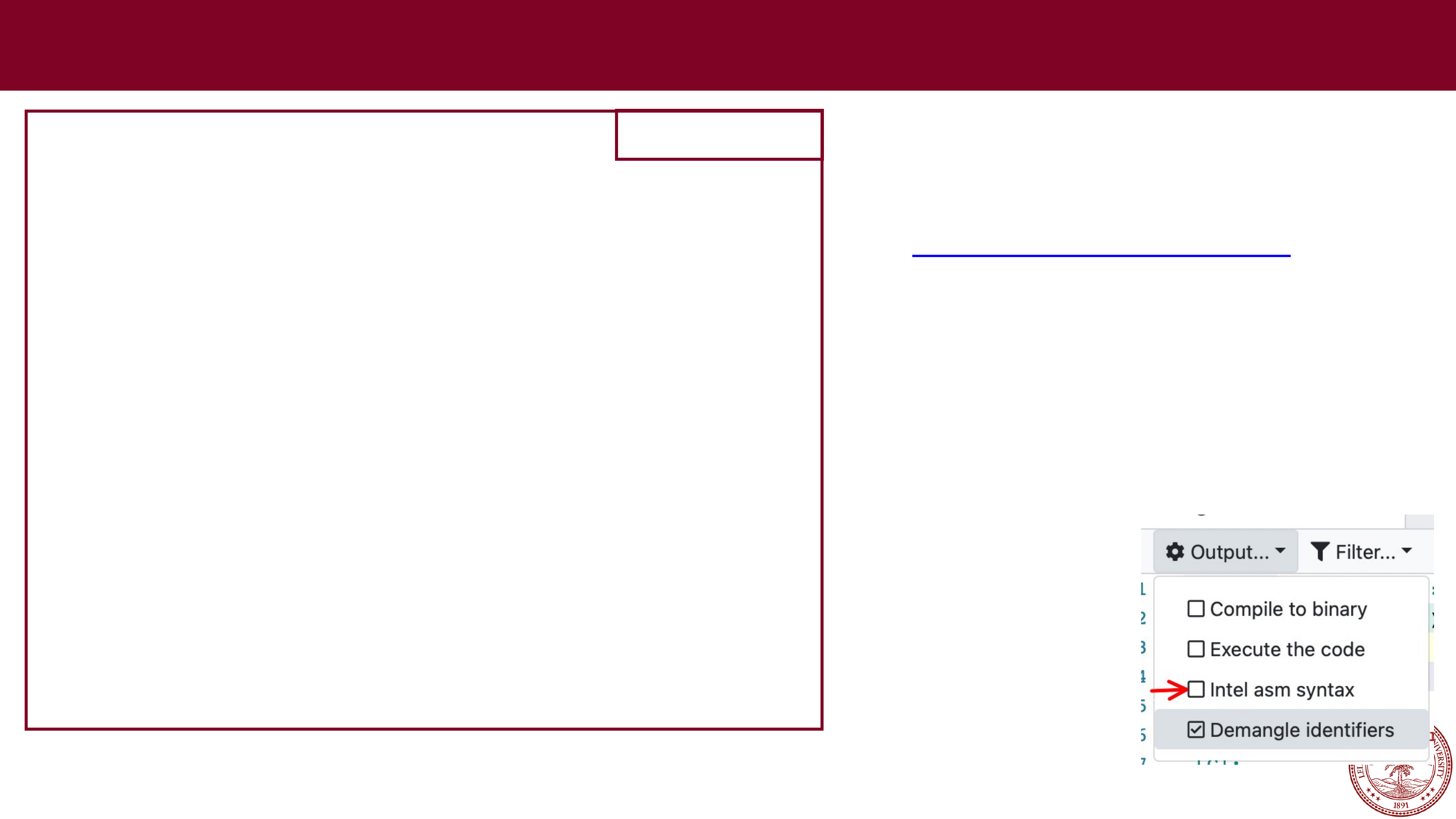
In compiler explorer, make sure to uncheck 'Intel asm syntax' in the settings More C to Assembly
Compile line:
gcc
-
g
-
Og
-
std=gnu99
-
Wall $warnflags exchange.c
-
o exchange
https://gcc.godbolt.org
Compiler Explorer:
Flags:
-
g
-
Og
-std=gnu99
Use compiler:
x86
-64 gcc 9.3
#include<stdio.h>
#include<stdlib.h>
long exchange(long *xp, long y)
{
long x = *xp;
*xp = y;
return x;
}
int main()
{
long x = 1000;
long y = 42;
printf("Before exchange: x:%lu, y:%lu
\
n", x, y);
y = exchange(&x, y);
printf("After exchange: x:%lu, y:%lu
\
n", x, y);
return 0;
}
exchange.c
uncheck
Intel asm
syntax in settings

Page 36

More C to Assembly
Slightly different compile line:
gcc
-
g
-
Og
-
std=gnu99
-
Wall $warnflags looper.c
-
o looper
#include<stdio.h>
#include<stdlib.h>
void count_from_offset(int offset)
{
for (int i=0; i < 10; i++) {
printf("Count: %d
\
n",i+offset);
}
}
int main()
{
count_from_offset(5);
return 0;
}
looper.c
https://gcc.godbolt.org
Compiler Explorer:
Flags:
-
g
-
Og
-std=gnu99
Use compiler:
x86
-64 gcc 9.3
uncheck
Intel asm
syntax in settings

Page 37

The
lea
instruction


The lea instruction is related to the mov instruction. It has the form of an instruction
that reads from memory to a register, but it
does not reference memory at all
.


Its first operand appears to be a memory reference, but instead of reading from the
designated location, the instruction copies the effective address to the destination.


You can think of it as the "&" operator in C — it retrieves the address of a memory
location:
Instruction

Effect
Description
leaq S,D
D

⟵ &
S
Load effective address
Examples: if
%rax
holds value
x
and
%rcx
holds value
y
:
leaq 6(%rax), %rdx
:
%rdx

now holds x + 6
leaq (%rax,%rcx), %rdx
:
%rdx

now holds x + y
leaq (%rax,%rcx,4), %rdx
:
%rdx

now holds x + 4*y
leaq 7(%rax,%rax,8), %rdx
:
%rdx

now holds 7 + 9x
leaq 0xA(,%rcx,4), %rdx
:
%rdx

now holds 10 + 4y
leaq 9(%rax,%rcx,2), %rdx
:
%rdx

now holds 9 + x + 2y

Page 38

Pushing and Popping from the Stack


As we have seen from stack-based memory allocation in C, the stack is an
important part of our program, and assembly language has two built-in
operations to use the stack.


Just like the stack ADT, they have a first-in, first-out discipline.


By convention, we draw stacks upside down, and the stack "grows" downward.
Stack "bottom"
Stack "top"
Increasing
address
.
.
.
0x108

Page 39

Pushing and Popping from the Stack


The push and pop operations write and read from the stack, and they also
modify the stack pointer,
%rsp
:
Instruction

Effect
Description
pushq
S
R[
%rsp
] ⟵
R[
%rsp
]-8;
Push quad word
M[R[%rsp]]
⟵ S
popq
D
D

M[R[%rsp]];
Push quad word
R[
%rsp
] ⟵
R[
%rsp
]+8
Stack "bottom"
Stack "top"
Increasing
address
.
.
.
0x108

Page 40

Pushing and Popping from the Stack


Example:
Initially
%rax

0x123
%rdx

0
%rsp

0x108
Stack "bottom"
Stack "top"
Increasing
address
.
.
.
0x108

Page 41

Pushing and Popping from the Stack


Example:
Initially
%rax

0x123
%rdx

0
%rsp

0x108
pushq %rax
%rax

0x123
%rdx

0
%rsp

0x100
Stack "bottom"
Stack "top"
Increasing
address
.
.
.
0x108
Stack "bottom"
Stack "top"
Increasing
address
.
.
.
0x108
0x123
0x100

Page 42

Pushing and Popping from the Stack


Example:
Initially
%rax

0x123
%rdx

0
%rsp

0x108
pushq %rax
%rax

0x123
%rdx

0
%rsp

0x100
Stack "bottom"
Stack "top"
Increasing
address
.
.
.
0x108
Stack "bottom"
Stack "top"
Increasing
address
.
.
.
0x108
0x123
0x100
popq %rdx
%rax

0x123
%rdx

0x123
%rsp

0x108
Stack "bottom"
Stack "top"
Increasing
address
.
.
.
0x108
0x123
0x100

Page 43

Pushing and Popping from the Stack


As you can tell, pushing a quad word onto the stack involves first decrementing
the stack pointer by 8, and then writing the value at the new top-
of
-stack
address.


Therefore, the behavior of the instruction pushq %rbp is equivalent to the pair of
instructions:
subq $8, %rsp

(subq is a subtraction, and this decrements the stack point er)
movq $rbp,(%rsp)

(Store %rbp on the stack)


The behavior of the instruction popq %rax is equivalent to the pair of
instructions:
movq (%rsp), %rax

(Read %rax from the stack)
addq $8,%rsp

(Increment the stack pointer)

Page 44

References and Advanced Reading


References:


Stanford guide to x86-64: https://web.stanford.edu/class/cs107/guide/x86-
64.html


CS107 one-page of x86-64:
https://web.stanford.edu/class/cs107/resources/onepage_x86-
64.pdf


gdbtui: https://beej.us/guide/bggdb/


More gdbtui: https://sourceware.org/gdb/onlinedocs/gdb/TUI.html


Compiler explorer: https://gcc.godbolt.org


Advanced Reading:


x86-64 Intel Software Developer manual:
https://software.intel.com/sites/default/files/managed/39/c5/325462-
sdm
-
vol
-
1-
2abcd
-
3abcd.pdf


history of x86 instructions:
https://en.wikipedia.org/wiki/X86_instruction_listings


x86-64 Wikipedia: https://en.wikipedia.org/wiki/X86-64


Page 45

Extra Slides
Extra Slides

Page 46

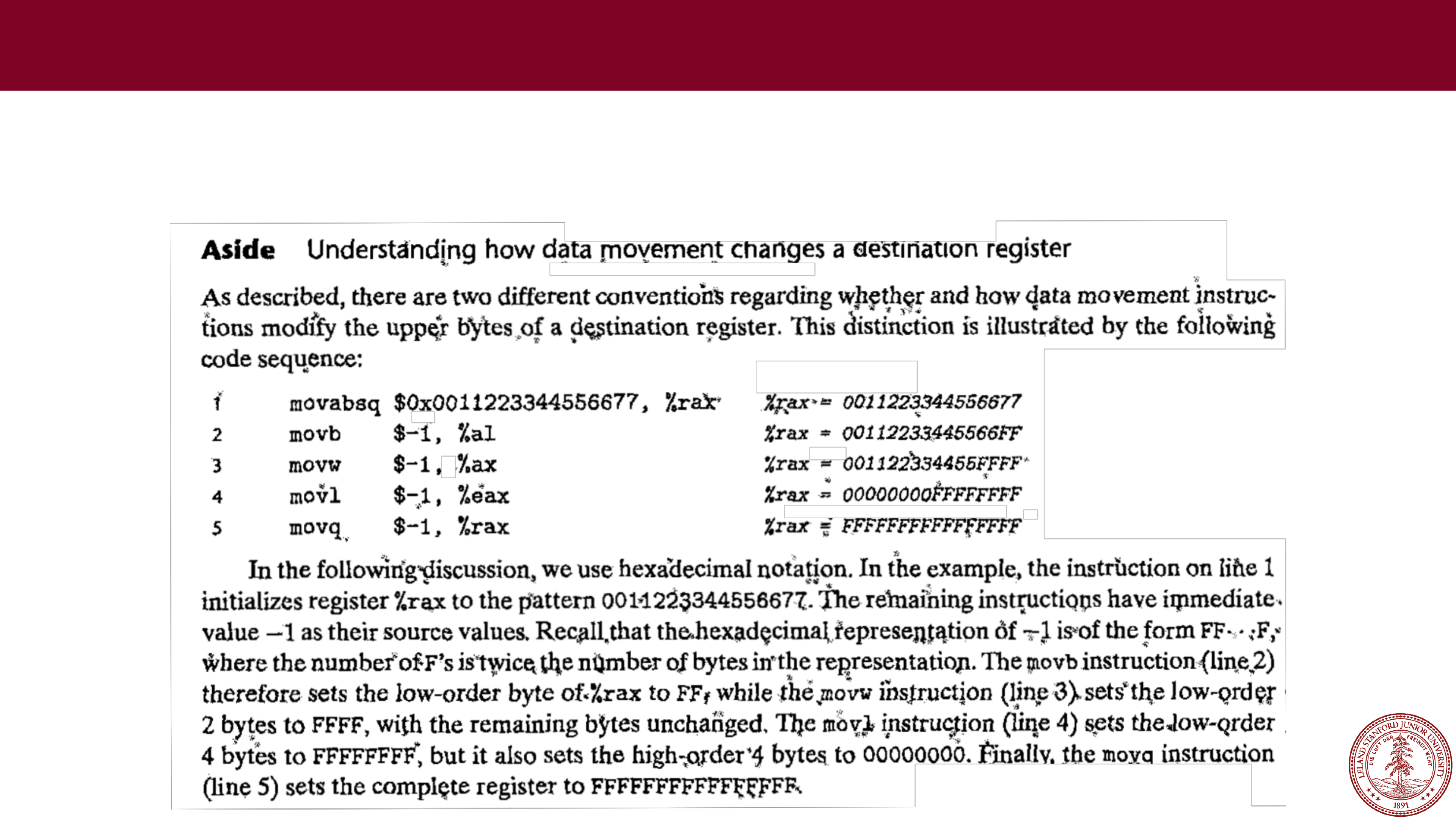
Aside: Understanding how data movement changes a destination register Extra Slides
The aside on page 184 of the textbook is interesting: you should understand
how data movement changes the destination register: