NOTE: this website is out of date. This is the course web site from a past quarter. If you are a current student taking the course, you should visit the current class web site instead. If the current website is not yet visible by going to cs107.stanford.edu, it may be accessible by visiting this link until the new page is mounted at this address. Please be advised that courses' policies change with each new quarter and instructor, and any information on this out-of-date page may not apply to you.
1. Cellular Automata
A cellular automaton models the life cycle of a cell colony, which you can think of as a 1D array of cells, each of which can be either live or empty. Starting with an initial pattern, the automaton simulates the birth and death of future generations of cells using a set of simple rules. In this part of the assignment, you will implement a cellular automaton using a bitvector so that it uses memory as efficiently as possible.
We represent a 1D cell colony as a 64-bit unsigned long, with one bit for each cell. A 1 indicates the cell is live, and 0 indicates the cell is empty. Your program will advance the cells forward 1 generation, print out what the colony looks like, and then repeat, thereby printing out the cells' lifecycle.
For a given cell, the way we know whether it is live or empty in the next generation is by looking at its neighbors, the cells to its immediate left and right. The ruleset, which is a number specified by the user when they run the program, tells us, based on the state (live or empty) of a cell and its neighbors in the current generation, whether that cell is live or empty in the next generation. Using this bit vector representation, reading and updating a single cell is implemented with bitwise operations.
The automata program prints a number of iterations of the cell colony, but stops early if the cell colony does not change further. In the output, each line represents one generation, going from the first generation at the top to the last generation at the bottom. Below shows a sample run of the program for ruleset 77 - take a moment to run the sample solution (in the samples folder) and try out the automata program for yourself!
$ samples/automata_soln 77
                               +
++++++++++++++++++++++++++++++ + +++++++++++++++++++++++++++++++
+                            + + +                             +
+ ++++++++++++++++++++++++++ + + + +++++++++++++++++++++++++++ +
+ +                        + + + + +                         + +
+ + ++++++++++++++++++++++ + + + + + +++++++++++++++++++++++ + +
+ + +                    + + + + + + +                     + + +
+ + + ++++++++++++++++++ + + + + + + + +++++++++++++++++++ + + +
+ + + +                + + + + + + + + +                 + + + +
+ + + + ++++++++++++++ + + + + + + + + + +++++++++++++++ + + + +
+ + + + +            + + + + + + + + + + +             + + + + +
+ + + + + ++++++++++ + + + + + + + + + + + +++++++++++ + + + + +
+ + + + + +        + + + + + + + + + + + + +         + + + + + +
+ + + + + + ++++++ + + + + + + + + + + + + + +++++++ + + + + + +
+ + + + + + +    + + + + + + + + + + + + + + +     + + + + + + +
+ + + + + + + ++ + + + + + + + + + + + + + + + +++ + + + + + + +
+ + + + + + + ++ + + + + + + + + + + + + + + + + + + + + + + + +
Pretty cool, huh? Since a ruleset is an 8-bit number, this means there are 256 different possible rulesets to dictate how cell generations evolve. There are some really cool outcomes you get depending on the ruleset. We'll let you explore these!
You are to implement these 2 functions for the automata program, both of which are called by the starter code.
void draw_generation(unsigned long gen);
unsigned long advance(unsigned long gen, unsigned char ruleset);
Testing recommendations: look carefully at where you have special cases in advancing the generation, and set up test cases that explicitly poke at those issues.
Step 1: draw_generation
The draw_generation function takes a cell colony gen and outputs it as text. Specifically, it should output a row of 64 characters, one for each cell. A live cell is shown as an inverted box (a provided constant), and an empty cell is shown as a blank space. The generation is ordered such that the cell corresponding to the most significant bit is in the leftmost column and the least significant bit is in the rightmost column. You will need to iterate through the binary representation of gen and print out each cell individually. The key idea is that gen is an unsigned long, but we can use bit operators to access and manipulate its underlying binary representation. Remember to print a new line character once you have fully printed the generation! Once you complete this task, if you then run the program with any ruleset, it should print out one line for the first generation, another blank line for a generation of 0 (since that is what the advance function below initially returns), and then it will stop because the generation does not change:
$ ./automata 76
                               +
$
Step 2: advance
The advance function takes a cell colony gen and returns a new cell colony bitvector which is gen advanced forward one generation. For each cell, it examines its neighborhood and uses the specified ruleset to determine the cell's state in the next generation. Here's how the process works and what you need to implement. Diagrams are taken from Daniel Shiffman's neat book The Nature of Code, Sections 7.1 and 7.2.
A cell and its two neighbors form a "neighborhood":

A neighborhood is effectively a 3-bit number, a value from 0 to 7. For instance, the highlighted neighborhood here is 110, which is the 3-bit number 6. The ruleset is an 8-bit number that dictates, for each of the 8 possible neighborhood values, whether that cell will be live or empty in the next generation. Specifically, bit 0 in the ruleset (the least significant bit) specifies whether cells with neighborhood 0 will be live or empty. Bit 1 in the ruleset (the second-least significant bit) specifies whether cells with neighborhood 1 will be live and empty. And so on. Here are the steps to determine whether a cell is alive or empty in the next generation:
- for a given cell, get its 3-bit neighborhood N
- look at bit N in the ruleset (note: bit 0 here is the least significant bit, and bit 7 the most significant)
- if that bit is 1, the cell is alive in the next generation. If that bit is 0, it is empty in the next generation.
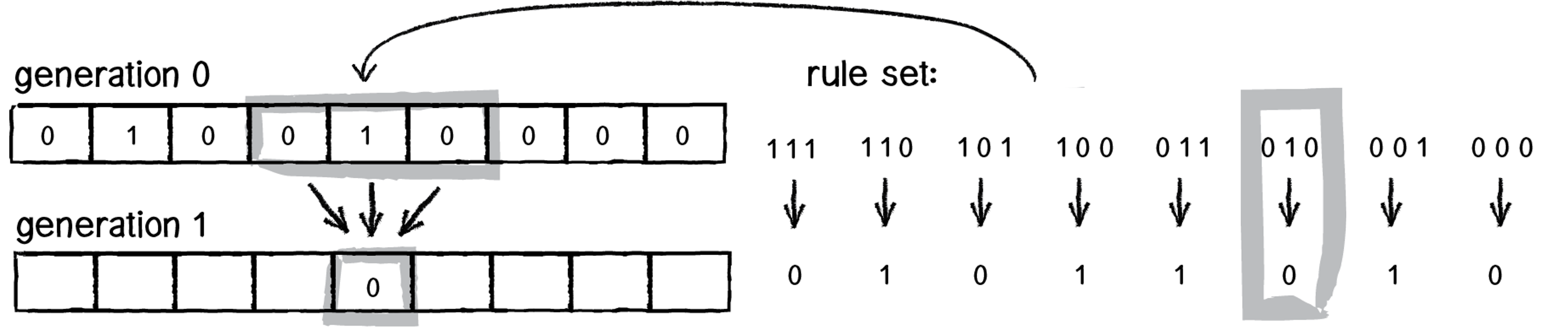
A cool observation here is that a ruleset is ultimately an 8 bit number - in this diagram, it is the01011010 which is 90. This diagram shows the possible neighborhood values along the top, and along the bottom it shows the bit in the ruleset at that index. The user specifies a ruleset number when they run the program, and this is passed in to advance, and you will use its underlying binary representation. Remember that even though ruleset is an unsigned char, it is really represented in binary, and you can access that binary representation using bitwise operators.
Another key idea is that we can alternate between treating a value as a binary representation and as a regular integer number. For example, we get a 3-bit neighborhood for a cell, but then treat it as a number to know which bit in the ruleset to look at.
Here are some final notes and tips:
- The leftmost and rightmost cells in a generation are special cases since they don't have 2 neighbors. You should pretend their non-existent neighbor is an empty cell. In other words, in the first diagram above, the rightmost cell would have neighborhood
010. - You will need to iterate through the passed-in generation and calculate each cell's updated state, adding those to a new generation you build up.
- Consider how you can use bit operations to do things like: isolating a given cell's 3-bit neighborhood as a number from 0 to 7, and looking at a specific bit in the ruleset.
- Keep in mind that cell generations are 64 bit
unsigned longs, and number literals are by default 32 bit signed integers! - Use sanity check and custom tests to compare your output to the sample solution
- If a generation doesn't match the solution, run GDB and put a breakpoint on
advance(usingcontinueto skip calls if necessary) and step through the call that returns the incorrect generation.