Minimax, Expectimax.
Pac-Man, now with ghosts.
Minimax, Expectimax.
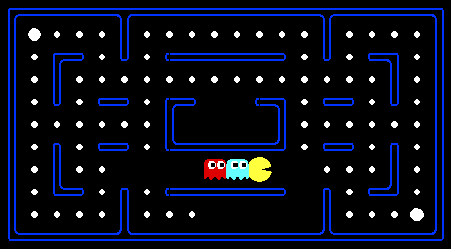
For those of you not familiar with Pac-Man, it's a game where Pac-Man (the yellow circle with a mouth in the above figure) moves around in a maze and tries to eat as many food pellets (the small white dots) as possible, while avoiding the ghosts (the other two agents with eyes in the above figure). If Pac-Man eats all the food in a maze, it wins. The big white dots at the top-left and bottom-right corner are capsules, which give Pac-Man power to eat ghosts in a limited time window (but you won't be worrying about them for the required part of the assignment). You can get familiar with the setting by playing a few games of classic Pac-Man, which we come to just after this introduction.
In this project, you will design agents for the classic version of Pac-Man, including ghosts. Along the way, you will implement both minimax and expectimax searches.
The base code for this project contains a lot of files (which
are listed towards the end of this page); you, however, do not need to
go through these files to complete the assignment. These are there only to
guide the more adventurous amongst you to the heart of Pac-Man. As in previous
assignments, you will be modifying only submission.py.
A basic grader.py has been included in the .zip file, but it only checks for timing issues, not functionality.
New: a .tex template is available here for this homework. Feel free to use it, and in any case do not forget to tag your answers on Gradescope!
You can check that Pac-Man behaves as described in the problems, and rungrader.py
without timeout in order to test your implementation.
First, play a game of classic Pac-Man to get a feel for the assignment:
python pacman.pyYou can always add
--frameTime 1 to the command line
to run in "demo mode" where the game pauses after
every frame.
Now, run the provided ReflexAgent in submission.py:
python pacman.py -p ReflexAgentNote that it plays quite poorly even on simple layouts:
python pacman.py -p ReflexAgent -l testClassicYou can also try out the reflex agent on the default
mediumClassic layout with one ghost or two.
python pacman.py -p ReflexAgent -k 1
python pacman.py -p ReflexAgent -k 2
Note: you can never have more ghosts than the layout permits.
Options: Default ghosts are random; you can also play for fun with slightly smarter directional ghosts using -g DirectionalGhost. You can also play multiple games in a row with -n. Turn off graphics with -q to run lots of games quickly.
ReflexAgent code carefully (in submission.py) and make sure you understand what it's doing. The reflex agent code provides some helpful examples of methods that query the GameState (a GameState specifies the full game state, including the food, capsules, agent configurations and score changes: see submission.py for further information and helper methods) for information, which you will be using in the actual coding part. We are giving an exhaustive and very detailed description below, for the sake of completeness and to save you from digging deeper into the starter code. The actual coding part is very small - so please be patient if you think there is too much writing.
Note: if you wish to run Pac-Man in the terminal using a text-based interface,
check out the terminal directory.Specifically, consider the limited depth tree minimax search with evaluation functions taught in class. Suppose there are $n+1$ agents on the board, $a_0,\ldots , a_n$, where $a_0$ is Pac-Man and the rest are ghosts. Pac-Man acts as a max agent, and the ghosts act as min agents. A single depth consists of all $n+1$ agents making a move, so depth 2 search will involve Pac-Man and each ghost moving two times. In other words, a depth of 2 corresponds to a height of $2(n+1)$ in the minimax game tree.
Write the recurrence for $V_{\text{minmax}}(s,d)$ in math. You should express your answer in terms of the following functions: $\text{IsEnd}(s)$, which tells you if $s$ is an end state; $\text{Utility}(s)$, the utility of a state; $\text{Eval}(s)$, an evaluation function for the state $s$; $\text{Player}(s)$, which returns the player whose turn it is; $\text{Actions}(s)$, which returns the possible actions; and $\text{Succ}(s,a)$, which returns the successor state resulting from taking an action at a certain state. You may use any relevant notation introduced in lecture.
MinimaxAgent class in
submission.py using the above recurrence.
Remember that your minimax
agent should work with any number of ghosts, and your minimax tree should have
multiple min layers (one for each ghost) for every max layer.
Your code should also expand the game tree to an arbitrary depth. Score the
leaves of your minimax tree with the supplied
self.evaluationFunction, which defaults to
scoreEvaluationFunction. The class
MinimaxAgent extends MultiAgentSearchAgent, which
gives access to self.depth and
self.evaluationFunction. Make sure your minimax code makes
reference to these two variables where appropriate as these variables are
populated from the command line options.
Other functions that you might use in the code:
GameState.getLegalActions() which returns all the possible legal
moves, where each move is Directions.X for some X in the set
{NORTH, SOUTH, WEST, EAST, STOP}. Go through
ReflexAgent code as suggested before to see how the above are used
and also for other important methods like GameState.getPacmanState(),
GameState.getGhostStates(), GameState.getScore() etc. These are further documented inside
the MinimaxAgent class.
MinimaxAgent.
GameStates, either passed in
to getAction or generated via
GameState.generateSuccessor. In this project, you will not be
abstracting to simplified states.
self.evaluationFunction), and you should call this function without changing it. Use self.evaluationFunction in your definition of $V_\text{minmax}$ wherever you used $\text{Eval}(s)$ in part $1a$. Recognize that now we're evaluating states rather than actions. Look-ahead agents evaluate future states whereas reflex agents evaluate actions from the current state. getLegalActions function.
minimaxClassic layout are 9, 8, 7, -492 for depths 1, 2, 3 and 4 respectively. You can use these numbers to verify whether your implementation is correct. Note that your minimax agent will often win (60-70% of the time for us--be sure to test on a large number of games using the -n and -q flags) despite the dire prediction of depth 4 minimax.
python pacman.py -p MinimaxAgent -l minimaxClassic -a depth=4
openClassic and
mediumClassic (the default), you'll find Pac-Man to be good at not
dying, but quite bad at winning. He'll often thrash around without making
progress. He might even thrash around right next to a dot without eating it.
Don't worry if you see this behavior. Why does Pac-Man thrash around right next to a dot?
(These questions are here for you to ponder upon; no need to
include in the write-up.)
python pacman.py -p MinimaxAgent -l trappedClassic -a depth=3Why do you think Pac-Man rushes the closest ghost in minimax search on
trappedClassic?
AlphaBetaAgent. Again, your algorithm will be slightly more
general than the pseudo-code in the slides, so part of the challenge is to
extend the alpha-beta pruning logic appropriately to multiple minimizer agents.
You should see a speed-up (perhaps depth 3 alpha-beta will run as fast as
depth 2 minimax). Ideally, depth 3 on mediumClassic should run in
just a few seconds per move or faster.
python pacman.py -p AlphaBetaAgent -a depth=3
The AlphaBetaAgent minimax values should be identical to the
MinimaxAgent minimax values, although the actions it selects can
vary because of different tie-breaking behavior. Again, the minimax values of
the initial state in the minimaxClassic layout are 9, 8, 7, and
-492 for depths 1, 2, 3, and 4, respectively. Running the command given above this
paragraph, the minimax values of the initial state should be 9, 18, 27, and 36
for depths 1, 2, 3, and 4, respectively.
ExpectimaxAgent, where your agent
will no longer take the min over all ghost actions, but the expectation according to your agent's model of how the ghosts
act. Assume Pac-Man is playing against multiple RandomGhost, which each chooses
getLegalActions uniformly at random.
You should now observe a more cavalier approach to close quarters with ghosts. In particular, if Pac-Man perceives that he could be trapped but might escape to grab a few more pieces of food, he'll at least try:
python pacman.py -p ExpectimaxAgent -l trappedClassic -a depth=3You may have to run this scenario a few times to see Pac-Man's gamble pay off. Pac-Man would win half the time on an average and for this particular command, the final score would be -502 if Pac-Man loses and 532 or 531 (depending on your tiebreaking method and the particular trial) if it wins (you can use these numbers to validate your implementation).
Why does Pac-Man's behavior in expectimax differ from the minimax case (i.e., why doesn't he head directly for the ghosts)? Again, just think about it; no need to write it up.
betterEvaluationFunction.
The evaluation function should evaluate states (rather than actions).
You may use any tools at your disposal for evaluation, including any util.py code
from the previous assignments. With depth 2 search, your evaluation function
should clear the smallClassic layout with two random ghosts more
than half the time for full credit and still run at a reasonable rate.
python pacman.py -l smallClassic -p ExpectimaxAgent -a evalFn=better -q -n 10We will run your Pac-Man agent 20 times, and calculate the average score you obtained in the winning games. Starting from 1300, you obtain 1 point per 100 point increase in your average winning score. In
grader.py, you can see the how extra credit is awarded.
In addition, the top 3 people in the class will get additional points.Hints and Observations
pacman.pdf (not in code comments).
Go Pac-Man Go!
Files:submission.py |
Where all of your multi-agent search agents will reside and the only file you need to concern yourself with for this assignment. |
pacman.py
| The main file that runs Pac-Man games. This file also describes a Pac-Man GameState type, which you will use extensively in this project |
game.py |
The logic behind how the Pac-Man world works. This file describes several supporting types like AgentState, Agent, Direction, and Grid. |
util.py |
Useful data structures for implementing search algorithms. |
graphicsDisplay.py |
Graphics for Pac-Man |
graphicsUtils.py |
Support for Pac-Man graphics |
textDisplay.py |
ASCII graphics for Pac-Man |
ghostAgents.py |
Agents to control ghosts |
keyboardAgents.py |
Keyboard interfaces to control Pac-Man |
layout.py |
Code for reading layout files and storing their contents |