Computer Security 3 - Cryptography
Cryptography - History
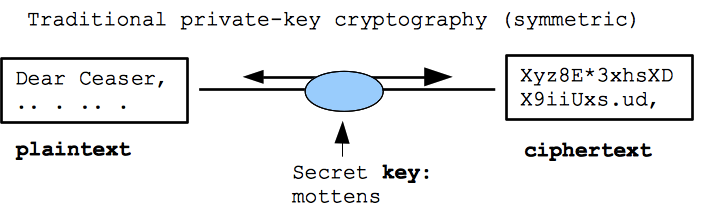
- "Encryption" deals with scrambling information so it is readable by someone with the key
- Plaintext -- the original bytes (text, image, ...)
- Ciphertext -- the encrypted, unreadable form
- Key -- the short secret needed to encyprt/decrypt (a password basically)
- Aside: cryptography shows up throughout history, especially World War 2. See "The Code Book" by Signh for some great summer reading on the history.
- Notably, the German Engima machine was cracked by Polish and British cryptographers, probably shortening the war by a couple years and saving many millions of lives.
Aside: Public/Open Machinery Design
- The modern practice is that the cryptography scheme/machinery is public
- The security derives from keeping the per-message key secret
- The machinery is wide open ... you need to really trust your per-key encryption!
- World War 2: The German Enigma machine internal wiring was secret, but the Poles and British figured that out eventually (amazingly building workalike machines just from intercepting encrypted messages but never seeing a machine). The Enigma still had a key for each message which provided excellent, although ultimately breakable encryption.
Classical: Private Key Cryptography ("symmetric")
- Traditional -- encrypt and decrypt with a single key which is kept secret
- aka "symmetric" encryption, since the key is used both for encryption and decryption
- Current tech: the "AES" standard, mature and reliable technology
- Two results one obvious, one subtle:
- Provides: secrecy attacker intercepts the ciphertext, but cannot recover the plaintext from it
- ProvidesL authenticity attacker cannot "spoof" data, sent to be decrypted. If the ciphertext decrypts cleanly, it must have come from a party with the secret key
- The only "attack" known is "brute force" .. try to guess the key (if the original key is long, it's safe)
- Note; any encryption can be attacked brute force, so if that's the best attack known, the encryption is regarded as un-broken
- Problem: key distribution. How do you get a copy of the key safely to the recipient?
Application: File Encryption
- One day, your laptop is going to get stolen
- Suppose you have a spreadsheet on their with people's SSNs?
- Suppose your browser is set to auto-login to important sites? (The browser probably has an option to require a password to "unlock" your site passwords, which could take care of this case)
- Most likely, the thief just wants to sell your laptop, but naturally you're a little worried about your information
- Approach 1: Encrypt a sensitive file, deleting the original
- Approach 2: set up home-directory encryption on the laptop (or whole-disk encryption)
- Whenever you wake the machine, it prompts for private-key to see your own files
- The files in your home directory are all stored in encrypted form .. docs, browser prefs, everything
- Problem: annoying to type in your password
- Problem: if you forget the password, your data is not accessible
Modern: Public Key Cryptography
- Public-key cryptography ("asymmetric")
- Amazing technology, surprising that it is even possible
- Used on the internet all the time
- Some of the early work was out of Stanford: Diffie/Hellman
1. pub/priv key pair
- Instead of a simple key, the key is created with two parts: public and private
- Your computer can just make up a pub/priv key pair out of thin air based on random numbers
- Key features:
- 1. The pub/priv keys work as encryption opposites of each other: encrypt with pub, decrypt with priv, Or encrypt with priv and decrypt with pub.
- 2. If someone knows pub, they cannot easily compute priv from it. This is an impressive feature, given how closely pub/priv must be related to work as opposites.

Public key Application -- Packet Secrecy
- 1. Suppose www.example.com wants to accept packets from anyone, but so they are secret from eavesdropping
- 2. www.example.com makes up a pub/priv pair
- 3. www.example.com publishes the pub part of the pair so everyone can see and downlaod it. Priv is kept inside www.example.com.
- This is a typical structure -- the pub key is published in what is called a "certificate", and priv is kept secret.
- 4. Someone who wants to send a packet to www.example.com first encrypts it with pub
- 5. At www.example.com the encrypted packet is decrypted with priv
- 6. Provides: no key exchange problem!
- 7. Does not provide authenticity. Anybody can compose an encrypted packet, but only www.example.com can decrypt them (asymmetric)
Public key Application -- Digital Signatures
- How do you write something online and prove it's from you?
- These are called "digital signatures"
- Public key cryptography can do this
- 1. Suppose you have a document you want to sign
- 2. Generate a pub/priv key pair, publish the pub part publicly, declaring that it goes with, say, your email addr (this is essentially what a "certificate" is)
- 3. Encrypt the document with your priv key, attach the encrypted form to the end of the document
- Provides: anyone with the doc can do the decryption with your pub key, see that the result matches.
- They conclude: only the holder of the priv key could have made this
- Provides: an attacker cannot forge the sig (they do not have the priv key. Indeed, the priv key never needs to leave your machine)
Public key Application -- Digital Money
- The Credit Card number system is rather stupid
- I give my number to the merchant
- Now they, or anyone who intercepts the data, can pretend to be me
- Pub-key scheme:
- 1. My e-wallet makes a pub-priv pair, publishes the pub part to my bank
- Say I want to do a transaction at The Prolific Oven, paying them $5
- My e-wallet makes up a "Pay $5 to Prolific Oven 2013-5-28 11:08am" messages, encrypts it with priv, sends it to the Prolific Oven which sends it into the banking system
- Provides: Prolific Oven can see that I'm paying them (decrypt with pub)
- Provides: My bank can see it's really from me (who holds priv)
- Need the name/date on the transaction, so a bad guy cannot copy the bytes (but not decrypt them) and play them back later to do the transaction again.
- Notice I pay the Prolific Oven, but without giving them the priv key ... shows up how stupid are current system really is.
- Why don't we have something like this?
- The banks are dragging their feet, as the fraud costs are mostly not borne by them and they make tons of money with the current scheme, so why change?
- The government should require secure (pub/priv) e-money tech for credit/debit cards, then all sorts of fraud would just disappear. A technical fix!
- This pub/priv scheme is how Bitcoin works .. I'll go through that later if we have time
Future: Mozilla Persona Logins
- Mozilla Persona is a technology that saves you from having a separate login id and password for every site
- It uses pub/priv key pairs under the hood
- Makes accounts/logins convenient and more secure
- I think it's going to be a huge hit. You heard about it here first!
- Disclosure; my wife Katie works at Mozilla on this
- Persona is a free and open standard, and not tied to any particular organization (i.e. not tied to a single corp like Facebook connect)
- As a non-profit, Mozilla is well positioned to create cross-vendor infrastructure like this
How It Works
For this example, say you want to log in to www.123done.org using a Persona identity provided by www.persona.org.

1. Create Persona Account
- Persona account is associated with an email address
- Any site can issue Persona accounts (an "identity provider")
- Ultimately gmail.com etc. will act as identity providers directly
- That said, for now create a Persona account at www.persona.org
- Supply an email address and password to create the account. It works with any email address. You need to click a "confirm" link in your email to confirm the account.
- Your Persona email/password just needs to be done once, then it works to log in to all sites that support Persona.
- Amazingly: the way Persona works, your Persona password is not shared with the sites, so using in effect this one password across all these sites is fine.
- You can go to www.persona.org to create your Persona account first, or the login button from www.123done.org will prompt you to create a Persona account. I think it's less confusing to do the one-time setup at www.persona.org first.
2. Log In Using Persona
- Visit www.123done.org or any other relying site
- There's a "Log in with Persona" button
- If you do not have an account on the site, type in your Persona linked email address to create an account (but no password or maiden names or anything)
- a. The most common case is that you have already logged into some other Persona site, so your browser knows you are logged in to Persona. Therefore, there's no password required. Just click the "Sign In" button to confirm and you're done.
- b. If your browser is not logged in (say you just rebooted), you will be prompted for your Persona password once (look at the URL bar to see that it's login.persona.org so as not to be phished). Type in the password once then all the other sites will just work as above.
3. Persona Advantages and Disadvantages
- 1. You don't have to remember different logins/passwords for every site. You can have your one Persona email/password and all the sites just use it. Your browser knows you are logged in to Persona and sites just work.
- 2. Persona technology does not share your password with each site, so if a site is hacked, you are no longer subject to the bad guys cracking the password table from that site. The whole arms race of password cracking that lead to longer and longer passwords goes away. There is no password on the relying site for them to crack! We can revert to merely medium complicated passwords (assuming that www.persona.org itself is not hacked)
- Non-monopoly detail: the Persona protocol does not depend on the existence of www.persona.org or Mozilla. Any organization (say, gmail) can act as an identity provider, and it all works the same as far as the sites care. When Microsoft or Facebook proposes to be the monopoly login provider ... everyone is a little hesitant, but Persona avoids this problem.
- Privacy detail: Persona supports any number of email addresses, so you can control by what "identity" you interact with various sites, and the sites cannot discern that the various emails are from one person.
- Disadvantage: all the eggs in one basket! If the bad guys get your Persona password, that's a lot of sites they can break in to (you can still reset it via your email of course).
- You can imagine the bad guys will be energetic in trying to phish your Persona password once it becomes popular.
- Mozilla knows this, and should add extra-robust security options to Persona, e.g. a two-factor option to use your phone in addition to a password when using a new computer. Then all the sites benefit from the highly-secure authentication.
- It is easier to imagine Mozilla making this one thing hyper-secure than it is that all the sites you use are going to be hyper-secure.
- Prediction: I expect Persona will take over all the non-critical passwords of your life (blogs, kittens, ...). Remembering all those username/passwords was not a good system.
- Your email provider and banks will likely continue to have their own password schemes
- Your email provider will eventually serve as Persona identity provider directly, so www.persona.org will not need its own password. You will just use your email password itself as your Persona password.
Future: Google Chrome OS / ChromeBook
- Google research to create a device optimized to have no vulnerabilities from the ground-up. (it's open source so you can make your own)
- Easier done with a clean-slate design vs. existing Windows etc.
- Boot the device up, it just has a browser with no vulnerabilities, no rootkits, no key loggers etc.
- The security record thus far is extremely good
- 1. It just provides a browser, so it can only do things that can be done on the web/cloud
- 2. Security is extremely good. Log into bank etc. with confidence.
- 3. Low tech-support ... there's very little to administer or set-up. Among techies, these are regarded as a good "give your parents one" and it just works reliably without tech-support phone calls
- I suspect devices like this will be popular, where the hassle of a more complex device is just not worth it
- Tablets are a similar strategy, but are more general purpose and have more security problems.
- The ChromeBook is the extreme vision of the strategy -- completely stripped down, completely secure